|
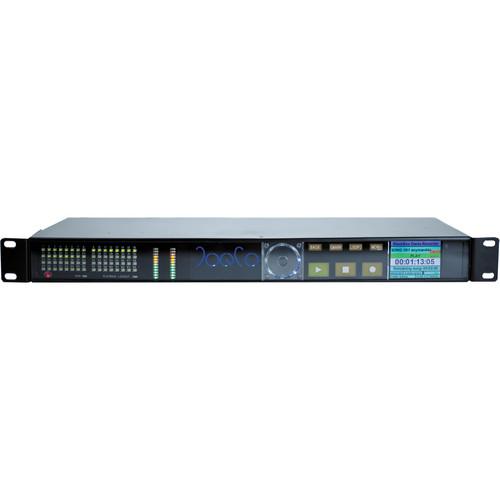
User Manual for JoeCo BBP64 64-Channel BlackBox Player with Dante Interface Click to enlarge the picture
 Contents of the user manual for the JoeCo BBP64 64-Channel BlackBox Player with
- Product category: Digital Recorders & Players JoeCo
- Brand: JoeCo
- Description and content of package
- Technical information and basic settings
- Frequently asked questions – FAQ
- Troubleshooting (does not switch on, does not respond, error message, what do I do if...)
- Authorized service for JoeCo Digital Recorders & Players
|
User manual for the JoeCo BBP64 64-Channel BlackBox Player with contain basic instructions
that need to be followed during installation and operation.
Before starting your appliance, the user manual should be read through carefully.
Follow all the safety instructions and warnings, and be guided by the given recommendations.
User manual is an integral part of any JoeCo product,
and if it is sold or transferred, they should be handed over jointly with the product.
Following the instructions for use is an essential prerequisite for protecting
health and property during use, as well as recognition of liability on the part of the manufacturer
for possible defects should you make a warranty claim. Download an official JoeCo user manual in which you will find instructions on how to install, use, maintain and service your product.
And do not forget – unsuitable use of a JoeCo product will considerably shorten its lifespan!
|
Product description The BBP64 64-Channel BlackBox Player with Dante Interface from JoeCo provides an innovative solution for live performance playback in a compact 1U rack-mounted frame. Specifically designed to replay backing tracks or multiple surround stems for live shows and themed entertainment, it can replay up to 64 channels of high-quality audio at up to 24-bit at 96 kHz. The player can be triggered using timecode, a footswitch or QWERTY keyboard, or it can be controlled via MIDI commands, giving a live engineer, installation sound designer, musical director, or artist full control of the show at all times.This player accepts playback material from almost any Digital Audio Workstation (DAW) that creates files in Broadcast WAV format. In addition to standard mono BWAV files, the player also supports the replay of polyphonic .wav files from multiple stereo files up to 64 channels. This flexible system allows mono, stereo, and multichannel files to be used together in the same song. It allows set lists to be configured into simple XML format playlist files that allow you to cue songs for instantaneous replay; multiple playlists can be stored ready for any quick changes or alternative show formats. A simple naming procedure ensures that the correct file is replayed through each output. The audio files can be stored on an external USB2 hard drive or flash drive (sold separately).Separate foldback mixes can be configured using normal facilities on the console, and an additional mix can be sent via the headphone output. For playback applications requiring timecode synchronization, the BlackBox Player can be configured to an incoming source of digital clock, or optionally word clock. The implementation of Chase mode enables the unit to commence playback in sync when it receives incoming timecode. This option can either be controlled from the front panel or via extended SONY 9-pin support. The extended 9-pin commands also allow you to rehearse shows that are normally locked to timecode via remote control and are compatible with most edit suites and show controllers. Timecode can be shown on the main time display in playback mode.The BlackBox Player features an integrated automated fail-over mechanism that enables it to automatically switch to a synchronous secondary system (sold separately) using its internal analog relays in the event of a failure. - General
-
- Synchronous multi-channel playback in up to 24-bit / 96 kHz quality without the use of a computer
- Files for playback can be loaded from any digital audio workstation capable of creating valid WAV/BWAV files, or recorded directly
- Audio can be stored on USB2 hard drive or fast flash drive
- Simple naming convention ensures that the correct file is replayed through each output
- Output via Dante interface
- Set lists configured as simple XML format playlist files
- Remote control via QWERTY keyboard, footswitch, MIDI, SONY 9-pin and JoeCoRemote for iPad (sold separately)
- Synchronous playback to SMPTE timecode (LTC and MTC)
- Multiple playlists can be stored for quick changes or alternative show formats
- Separate foldback mixes can be configured via the console and an additional mix can be sent via the headphone output (e.g., for the musical director)
- Can be configured to accept an incoming source of digital clock
- Built-in safety features including automated fail-over for balanced player pairs
- Applications
-
- Solo artists and vocal groups using pre-recorded backing tracks
- Bands requiring additional backing tracks (strings, horns, etc.)
- Themed Entertainment: Theatres, theme parks, and cruise ships
- Permanent installations that require reliable playback, such as museums, galleries, and houses of worship
- Broadcast applications for timed multi-language or multi-station play-out
- Playback applications that require timecode synchronization
In the Box JoeCo BBP64 64-Channel BlackBox Player with Dante Interface 9 to 12VDC Power Supply Limited 1-Year Warranty on Parts & Labor Table of Contents
|
Upload User Manual
Have you got an user manual for the JoeCo BBP64 64-Channel BlackBox Player with Dante Interface in electronic form? Please send it to us and help us expand our library of instruction manuals.
Thank you, too, on behalf of other users.
To upload the product manual, we first need to check and make sure you are not a robot. After that, your "Submit Link" or "Upload File" will appear.
Technical parametersJoeCo BBP64-DANTE Specs | | | I/O | Headphones: Mono or stereo solo or mixed output from internal mixer
Analogue in (switchable -10/4 dBu): 8 channel balanced
Digital Out: Dante
Digital In: Dante | | Sample Rates | 44.1 kHz: 64 channels
48 kHz: 64 channels
88.2 kHz: 32 channels
96 kHz: 32 channels | | Connections | 1 x Dante RJ24 Gigabit Ethernet
1 x 8-channel balanced analog in (TASCAM analog format) Reduced track counts at higher sample rates | | Storage Media | External USB2 storage device: USB2 drive, flash RAM drive (thumb drive) 32 GB minimum, high performance, SDHC card via USB2 converter (Class 10 minimum) Storage devices sold separately | | Synchronization | Audio Clock: 2 x RCA sockets
AES3/SPDIF format, also used for communications to slave units | | Audio Formats | Broadcast WAV Files: Accepts mono, stereo, and polywav files | | Name | Audio File Naming Convention: sss-tt.songname-trackname.wav where: sss is the song number (001-999) [determines which tracks play together as a Song], -tt. is the track number (01-24) [determines which output each track is replayed through], songname is the (optional) song name [free text up to 32 characters], -trackname is the (optional) track name [free text up to 24 characters], .wav is the file extension [mandatory] | | Playlists Supported | Simple XML file structure for easy playlist editing | | Time | Pre-Load Time: Typically < 3 sec | | Control | Instant Replay Controlled By: Time code (LTC or MTC), Footswitch (GPI), QWERTY keyboard, MIDI control, Real-time clock, JoeCoRemote for iPad
Automatic pre-load of next song in playlist
Timecode / GPI: 1/4" TRS jack - tip = unbalanced TC, Ring = GPI, sleeve = GND. All standard frame rates supported | | MIDI | MIDI open loop connection, start, stop commands, song select for preloading specific songs, program change, & show control | | Clock | Selectable Audio Clocks: Internal, Dante in | | Fail-Safe | Analog fail-over automatically switches to synchronous secondary system in case of replay problem (balanced player pairs). Uses 1 channel of playback | | Power | < 25 W | | DC Input | 9 to 12 VDC (PSU supplied) | | Dimensions (WxDxH) | 19.0" (48.2 cm) rack mounting x 1 U
17.1 x 1.7 x 6.7" (43.5 x 4.4 x 17.0 cm) | | Weight | 5.5 lb (2.5 kg) |
Rating70% users recommend this product to others. And what about you?

This product has already been rated by 31 owners. Add your rating and experience with the product.
Discussion
 Ask our technicians if you have a problem with your settings,
or if anything is unclear in the user manual you have downloaded.
You can make use of our moderated discussion.
The discussion is public and helps other users of our website who may be encountering similar problems.
Ask our technicians if you have a problem with your settings,
or if anything is unclear in the user manual you have downloaded.
You can make use of our moderated discussion.
The discussion is public and helps other users of our website who may be encountering similar problems.
The discussion is empty - enter the first post
Post a new topic / query / comment:
|
|
|
| Request for user manual |
You can’t find the operation manual you are looking for? Let us know and we will try to add the missing manual:
I’m looking for a manual / Request for manual
Current requests for instruction manuals:
Call Of Duty World War Two For Xbox...
controller stratus XL...
stratus XL...
smart whatch serie S11 42mm...
Allen & Heath SQ-6 manual...
|
| Discussion |
Latest contributions to the discussion:
AEW R 4100
Name: MAURICIO ANGARITA
Audio-Technica AEW-R4100 UHF Diversity Receiver for
AEW R 4100 has the mute function blocked and does not allow audio to pass. I tried several times to turn off the mute from the transmitter but it does nothing, the mute stays on. Solution?
Thank you...
Instructions for assembling the 2015 Forecast Image Master Consoles GC3-A
Name: mike elam
Forecast Consoles GC3-A ImageMaster Editing Console
Looking for instructions for assembling this console. ...
EMPTY TONER ERROR MESSAGE AFTER REPLACING TONER
Name: LINDA BAD YELLOW EYES
Brother TN223BK Standard-Yield Toner
I HAD TO CHANGE OUT ALL THREE TONERS DUE TO LEAKS IN THE YELLOW AND CYAN. AFTER I REPLACED THEM, THE MACHINE KEEPS GIVING ME AN EMPTY TONER ERROR MESSAGE. HELP!!...
PS480D 20/24 pin Switching 480W Power Supply
Name: swkargo
Logisys 480W Power Supply
This item states in can run -5vdc .It is NOT listed on the board or I beleive is r4 is missing the resitior. Any body have thid issue. Shawn
...
Help needed
Name: Ann Carter
SanDisk 1TB Extreme Portable USB 3.1
When I click the link to download the user manual for my Sandisk Extreme external hard drive, it gives me the manual for the LG Cricket. Can you please change the link so I can download the Sandisk manual and begin using this drive? Thank you....
|
|


