User Manual for Korg KingKORG 61-Key Analog Modeling Synthesizer Click to enlarge the picture
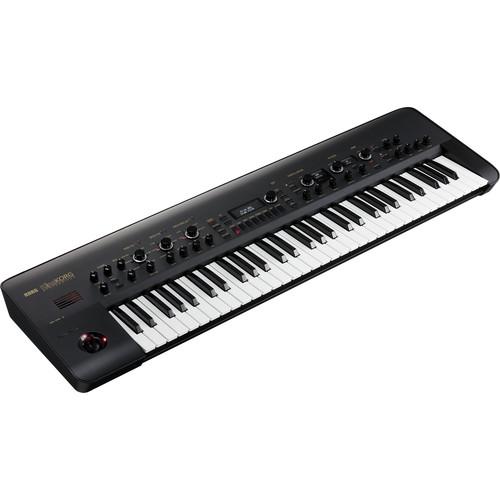 Contents of the user manual for the Korg KingKORG 61-Key Analog Modeling Synthesizer
- Product category: Synthesizer Keyboards Korg
- Brand: Korg
- Description and content of package
- Technical information and basic settings
- Frequently asked questions – FAQ
- Troubleshooting (does not switch on, does not respond, error message, what do I do if...)
- Authorized service for Korg Synthesizer Keyboards
|
User manual for the Korg KingKORG 61-Key Analog Modeling Synthesizer contain basic instructions
that need to be followed during installation and operation.
Before starting your appliance, the user manual should be read through carefully.
Follow all the safety instructions and warnings, and be guided by the given recommendations.
User manual is an integral part of any Korg product,
and if it is sold or transferred, they should be handed over jointly with the product.
Following the instructions for use is an essential prerequisite for protecting
health and property during use, as well as recognition of liability on the part of the manufacturer
for possible defects should you make a warranty claim. Download an official Korg user manual in which you will find instructions on how to install, use, maintain and service your product.
And do not forget – unsuitable use of a Korg product will considerably shorten its lifespan!
|
Product description The black KingKORG 61-Key Analog Modeling Synthesizer from Korg is a synthesizer designed for live performance that covers all synth sounds with an array of parameter knobs. It can be used by musicians or sound designers to reproduce the sound of classic instruments, and more. Featuring powerful oscillators that are understandable to the beginner, yet satisfying for the expert, the KingKORG has three master effect sections (each with six effects types), and a vacuum tube driver circuit that adds rich overtones and powerful distortion. Also, the panel layout is designed for intuitive operation. A microphone input provides the audio source for the built-in vocoder. The vocoder features Formant Shift, which dramatically modifies the tonal character of the modulated sound, as well as Formant Hold, which allows for "freezing" a vowel sound and playing it back from the keyboard. Finally, a step arpeggiator provides a choice of six arpeggio types, with the ability to specify the duration, interval, and on/off status of each step. A virtual patch function continues the classic synthesizer mold, allowing for connecting various functions using the six Virtual Patch assignments per timbre. - Powerful Oscillators
- KingKORG features a 3-oscillator x 2-timbre design that allows you to generate thick and rich sounds, plus a newly developed XMT modeling sound engine. The XMT (Xpanded Modeling Technology) was created specifically to offer a wide variety of sounds, while keeping operation simple. In a conventional synthesizer, the sound-creation process requires you to adjust the oscillator settings one by one, making it difficult to see the overall picture. In contrast, KingKORG provides pre-set algorithms that contain combinations of various types and numbers of oscillators, letting you easily and quickly sculpt stage-ready sounds. The wide range of oscillator algorithms includes the choices you'd expect from an analog synthesizer—sawtooth wave, square wave, and noise—in addition to numerous PCM/DWGS algorithms, giving you plenty of choices for creating highly personal sounds.
- Modeling Filters That Reproduce the Sound of Classic Instruments
- In addition to a variety of essential analog modeling filter types, you get faithful models of filters that reproduce the analog monophonic synths used for lead and bass in the '70s, the polyphonic synths used in new wave music of the '80s, and the filters of Korg's classic MS-20 analog synth. These filters can also be made to self-oscillate by raising the resonance setting—a unique capability of analog synthesizers.
- Three Master Effects Add the Finishing Touch to Your Sound
- KingKORG provides three master effect slots, each giving you a choice of six effect types: PRE FX, with types such as distortion and amp simulator; MOD FX, with classic effects like phaser, chorus, and tremolo; and REV/DELAY, with ambience effects such as hall reverb and modulation delay. Each effect processor has a dedicated front-panel dial that selects the effect type. To choose the ideal effect type, simply turn the dial to hear the result, and use the FX control knobs located below these dials to adjust the effect as desired.
- Vacuum Tube Driver Circuit Adds Rich Overtones and Distortion
- KingKORG provides a full-analog vacuum tube driver circuit as a mastering effect. You can use it to add warm fullness, a powerful overdrive, or anything in between.
- Vocoder Function
- The built-in vocoder uses audio from the onboard mic input to modify the sound, creating an effect as though the synthesizer were talking. KingKORG's vocoder features Formant Shift to dramatically modify the tonal character, as well as Formant Hold, which allows you to "freeze" a vowel sound and play it back using the keys. The KingKORG's dual-timbre architecture, can combine the vocoder with another timbre, either as a complementing sound or a modulation source.
- Virtual Patch Function
- On many classic synthesizers (such as the MS-20), the signal flow could be reconfigured using patch cables to physically connect one element to another. KingKORG reproduces this function with an intuitive Virtual Patch system. With six Virtual Patch assignments per timbre, control signals such as EG, LFO, or joystick movement can be virtually connected to sound parameters such as pitch or cutoff, allowing you to modulate a parameter for even greater sound-shaping possibilities.
- Step Arpeggiator Function
- The step arpeggiator automatically generates an arpeggio phrase (broken chord) according to the chord you hold on the keyboard. You can choose from six arpeggio types, and specify the duration, interval, and on/off status of each step to enjoy a wide variety of performance possibilities.
In the Box Korg KingKORG 61-Key Analog Modeling Synthesizer (Black) CV/Gate Cable AC Adapter Limited 1-Year Warranty Table of Contents
|
Upload User Manual
Have you got an user manual for the Korg KingKORG 61-Key Analog Modeling Synthesizer in electronic form? Please send it to us and help us expand our library of instruction manuals.
Thank you, too, on behalf of other users.
To upload the product manual, we first need to check and make sure you are not a robot. After that, your "Submit Link" or "Upload File" will appear.
Technical parametersKorg KingKORG 61 Specs | Sound Generation | XMT (Xpanded modeling technology) | | Programs | Number of Programs: 300 (200 preset + 100 user)
Number of Categories: 8
Timbres: Max 2 timbres (layer/split)
Maximum Polyphony: 24 voices maximum | | Synth Section | Oscillator
Structure: 3 x oscillators (choose from analog, noise, DWGS, PCM, and mic in types)
Number of Types: 127 (32 analog and noise, 64 DWGS, 30 PCM, Mic In
Filter
Structure: 1 filter (choose from LPF, HPF, BPF)
Number of Types: 18 (7 LPF, 5 HPF, and 6 BPF)
Modulation
Structure: EG, 2 units, LFO, 2 units
Routing: Virtual patches, 6 sets | | Effects | Sections: Program effects x 3 (PRE FX, MOD FX, REV/DELAY) + EQ (2-Band) + TUBE (Stereo)
Types: PRE FX: 6 types (Distortion, Decimator, Ring Mod, GT Amp, EP Amp, Tone)
Mod FX: 6 types (Flanger, Chorus, U-Vibe, Tremolo, Phaser, Rotary)
Rev/Delay: 6 types (Hall, Room, Plate, Tape Echo, Mod Delay, BPM Delay) | | Vocoder | 16-band vocoder, formant shift function, formant hold function | | Arpeggiator | Up to 8 steps (number of steps can be changed), 6 types (Up/Down/Alt 1/Alt 2/Random/Trigger) | | Audio Input | Mic Jack
Connector: XLR 3-pin (balanced)
Input Impedance: 6.8 kOhms
Maximum Level: -12 dBu | | Audio Output | (L/Mono, R) Jacks
Connectors: 1/4" (6.3 mm) TS phone jack (unbalanced)
Load Impedance: 10 kOhms or higher
Maximum Level: +8.2 dBu
Headphone Jack
Connector: 1/8" (3.5 mm stereo mini-phone jack)
Maximum level: 60 mW + 60 mW @ 33 Ohms | | Displays | Main: 16 x 2-character OLED display
Oscillator, Filter: 128 x 64-pixel OLED display | | Keyboard | 61-note, semi-weighted keyboard (velocity sensitive) | | Controllers | Internal: Joystick, octave up/down buttons, category/favorites buttons
Inputs: Damper jack (half-damper not supported), switch/pedal jack
Output: CV/gate out jack | | External Connections | MIDI In, Out, USB Type-B connector | | Power Supply | AC adapter jack (12 VDC, -ring, + tip) | | Power Consumption | 10 W | | Operating Temperature Range | 32 to 104°F (0 to 40°C) | | Dimensions (W x D x H) | 40.43 x 12.32 x 3.78" (1027 x 313 x 96 mm) | | Weight | 15.43 lb (7.0 kg) | | | | Package Weight | 10.0 lb | | Box Dimensions (LxWxH) | 47.0 x 17.0 x 7.0" |
Rating60% users recommend this product to others. And what about you?

This product has already been rated by 19 owners. Add your rating and experience with the product.
Discussion
 Ask our technicians if you have a problem with your settings,
or if anything is unclear in the user manual you have downloaded.
You can make use of our moderated discussion.
The discussion is public and helps other users of our website who may be encountering similar problems.
Ask our technicians if you have a problem with your settings,
or if anything is unclear in the user manual you have downloaded.
You can make use of our moderated discussion.
The discussion is public and helps other users of our website who may be encountering similar problems.
The discussion is empty - enter the first post
Post a new topic / query / comment:
|
|


