User Manual for Kramer 7-Input 4K UHD Presentation Switcher Scaler Click to enlarge the picture
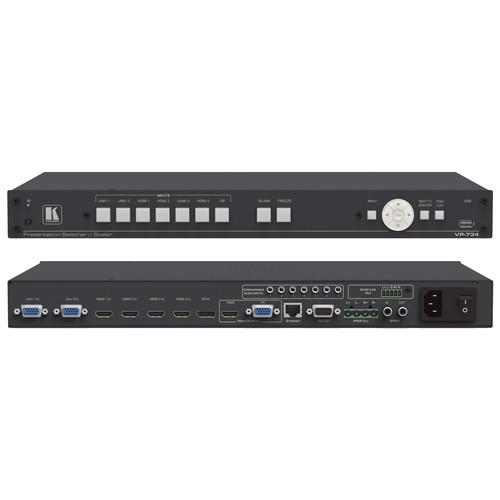 Contents of the user manual for the Kramer 7-Input 4K UHD Presentation Switcher
- Product category: Routers & Switchers Kramer
- Brand: Kramer
- Description and content of package
- Technical information and basic settings
- Frequently asked questions – FAQ
- Troubleshooting (does not switch on, does not respond, error message, what do I do if...)
- Authorized service for Kramer Routers & Switchers
|
User manual for the Kramer 7-Input 4K UHD Presentation Switcher contain basic instructions
that need to be followed during installation and operation.
Before starting your appliance, the user manual should be read through carefully.
Follow all the safety instructions and warnings, and be guided by the given recommendations.
User manual is an integral part of any Kramer product,
and if it is sold or transferred, they should be handed over jointly with the product.
Following the instructions for use is an essential prerequisite for protecting
health and property during use, as well as recognition of liability on the part of the manufacturer
for possible defects should you make a warranty claim. Download an official Kramer user manual in which you will find instructions on how to install, use, maintain and service your product.
And do not forget – unsuitable use of a Kramer product will considerably shorten its lifespan!
|
Product description The 7-Input 4K UHD Presentation Switcher/Scaler from Kramer comes with four HDMI, one DisplayPort, and two user definable (universal) analog video inputs. It features up- and downscales to selectable graphics or HDTV output resolutions (up to 4K UHD) and provides fast fade thru black switching between sources. The switcher/scaler supports analog and embedded audio inputs and outputs and includes rich audio functionality and a stereo loudspeaker output. - Pixel mapping and high quality scaling technology
- FTB (Fade-Thru-Black) switching - output signal provides constant sync so the display never glitches
- Selectable refresh rates up to 4K UHD
- HDMI and 15-pin HD computer graphics
- Multiple aspect ratio selections
- Seven stereo analog audio inputs on 3.5mm connectors
- Embed/De-embed Audio on the HDMI and DisplayPort inputs and output
- Advanced noise reduction feature improves video quality by reducing artifacts such as block, chroma, and mosquito noise
- DSP technology including audio equalization, mixing, delay, and so on
- Audio breakaway and audio follow video support, selectable audio delay
- Stereo speaker output with 10W per channel into 8 Ohms, on a 4-pin terminal block connector
- Built-in Video Proc-Amp features color, hue, sharpness, contrast, and brightness which are set individually for each input
- Firmware upgrade via Ethernet based, user-friendly software upgrade tool
- OSD (On-Screen Display) for user-friendly control and adjustments
- AP for text overlay support
- USB port for use with flash drive to download custom splash screens and video logos and for storing/downloading the machine configurations
- Non-volatile memory saves final settings and setup configurations
- Flexible control options such as front panel buttons, IR remote control, RS232, Ethernet with web browser
In the Box Kramer 7-Input 4K UHD Presentation Switcher/Scaler Rack-Mount Ears IR Remote Control Power Cord Limited 7-Year Warranty Table of Contents
|
Upload User Manual
Have you got an user manual for the Kramer 7-Input 4K UHD Presentation Switcher Scaler in electronic form? Please send it to us and help us expand our library of instruction manuals.
Thank you, too, on behalf of other users.
To upload the product manual, we first need to check and make sure you are not a robot. After that, your "Submit Link" or "Upload File" will appear.
Technical parametersKramer VP-734 Specs | Inputs | 4 x HDMI connectors, 2 x universal (composite, S-video, computer graphics and component) on 15-pin HD connectors, 1 x DisplayPort connector, 1 x S/PDIF on an RCA connector, 7 x unbalanced stereo audio on 3.5 mm mini jacks | | Outputs | 1 x HDMI connector, 1 x PC (computer graphics) on a 15-pin HD connector, 1 x balanced audio stereo output on a 5-pin terminal block (+4 dBu nominal), 1 x stereo speaker output (10 W per channel into 8 Ohms) on a 4-pin terminal block connector, 1 x digital S/PDIF output on an RCA connector | | Ports | 1 x USB connector, RS232, Ethernet | | Compliance With HDMI Standard | Supports HDMI and HDCP | | Output Resolutions | Native HDMI, Native VGA, 640 x 480 x 60 Hz, 640 x 480 x 75 Hz, 800 x 600 x 50 Hz, 800 x 600 x 60 Hz, 800 x 600 x 75 Hz, 1024 x 768 x 50 Hz, 1024 x 768 x 60 Hz, 1024 x 768 x 75 Hz, 1280 x 768 x 50 Hz, 1280 x 768 x 60 Hz, 1280 x 720 x 60 Hz, 1280 x 800 x 60 Hz, 1280 x 1024 x 50 Hz, 1280 x 1024 x 60 Hz, 1280 x 1024 x 75 Hz, 1366 x 768 x 50 Hz, 1366 x 768 x 60 Hz, 1400 x 1050 x 50 Hz, 1400 x 1050 x 60 Hz, 1600 x 900 x 60 Hz (R), 1600 x 1200 x 50 Hz, 1600 x 1200 x 60 Hz, 1680 x 1050 x 60 Hz, 1920 x 1080 x 60 Hz, 1920 x 1200 x 60 Hz (R), 2048 x 1080 x 50 Hz, 2048 x 1080 x 60 Hz, 3840 x 2160 @ 24 Hz, 3840 x 2160 @ 25 Hz, 3840 x 2160 @ 29.97 Hz, 3840 x 2160 @ 30 Hz, 4096 x 2160 @ 24 Hz, 480p x 60 Hz, 576p x 50 Hz, 720p x 50 Hz, 720p x 60 Hz, 1080i x 50 Hz (1080i/1080p x 50 Hz), 1080i x 60 Hz (1080i/1080p x 60 Hz), 1080p x 50 Hz, 1080p x 60 Hz, 1080p x 24 Hz, 480p x 59.94 Hz, 720p x 59.94 Hz, 1080i x 59.94 Hz (1080i/1080p x 59.94 Hz), 1080p x 23.98, 1080p x 29.97, 1080p x 59.94, Custom 1 to Custom 4 | | Control | Front panel buttons/OSD, IR remote control, RS232 on a 9-pin D-sub connector, Ethernet
Additional: Freeze, blank and zoom, different selectable vertical refresh rates, Video and Audio ProcAmp control, output image scaling and aspect ratio change, EDID capture | | Power Source | 100/240 VAC, 50/60 Hz, 49 VA | | Operating Temperature | 32 to 104°F (0 to 40°C) | | Storage Temperature | 40 to 158°F (40 to 70°C) | | Humidity | 10 to 90%, RHL non-condensing | | Dimensions | 19 x 9.34" x 1U (48.3 x 23.7 x 4.36 cm) | | Weight | 5.4 lb (2.5 kg) approximately | | | | Package Weight | 7.9 lb | | Box Dimensions (LxWxH) | 21.5 x 13.2 x 4.3" |
Rating100% users recommend this product to others. And what about you?

This product has already been rated by 27 owners. Add your rating and experience with the product.
Discussion
 Ask our technicians if you have a problem with your settings,
or if anything is unclear in the user manual you have downloaded.
You can make use of our moderated discussion.
The discussion is public and helps other users of our website who may be encountering similar problems.
Ask our technicians if you have a problem with your settings,
or if anything is unclear in the user manual you have downloaded.
You can make use of our moderated discussion.
The discussion is public and helps other users of our website who may be encountering similar problems.
The discussion is empty - enter the first post
Post a new topic / query / comment:
|
|


