User Manual for Kramer KDS-EN3 HD HDMI to H.264 Encoder, Recorder, Streamer with VGA & RS-232 Port Click to enlarge the picture
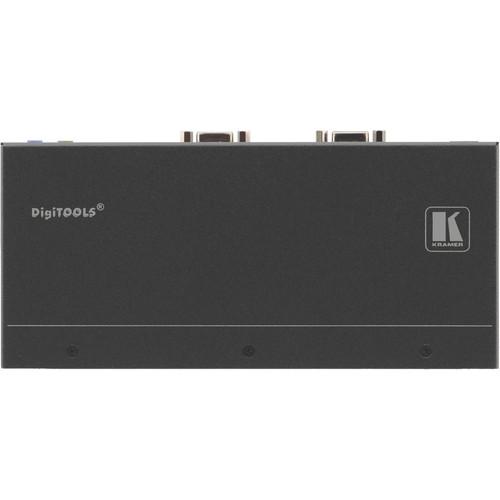 Contents of the user manual for the Kramer KDS-EN3 HD HDMI to H.264
- Product category: Video Extenders & Repeaters Kramer
- Brand: Kramer
- Description and content of package
- Technical information and basic settings
- Frequently asked questions – FAQ
- Troubleshooting (does not switch on, does not respond, error message, what do I do if...)
- Authorized service for Kramer Video Extenders & Repeaters
|
User manual for the Kramer KDS-EN3 HD HDMI to H.264 contain basic instructions
that need to be followed during installation and operation.
Before starting your appliance, the user manual should be read through carefully.
Follow all the safety instructions and warnings, and be guided by the given recommendations.
User manual is an integral part of any Kramer product,
and if it is sold or transferred, they should be handed over jointly with the product.
Following the instructions for use is an essential prerequisite for protecting
health and property during use, as well as recognition of liability on the part of the manufacturer
for possible defects should you make a warranty claim. Download an official Kramer user manual in which you will find instructions on how to install, use, maintain and service your product.
And do not forget – unsuitable use of a Kramer product will considerably shorten its lifespan!
|
Product description The KDS-EN3 HD HDMI to H.264 Encoder, Recorder and Streamer from Kramer is an H.264 encoder for HDMI signals up to 1080p60. The KDS-EN3 provides unicast (one-to-one) or multicast (one-to-many) streaming to the KDS-DEC3 decoder or computers running VLC software. It can also record content to a network drive for later access. KDS-EN3 manager software allows remote management of the KDS-EN3 network, including auto-detection and discovery of KDS-EN3/KDS-DEC3 units on a sub-net. - Supports MPEG-4 AVC using H.264 & AAC codecs
- Built-in scaling and frame rate control for lower bandwidth consumption when distributing over the network
- 10/100/1000Mb standard Ethernet network operation
- HDMI video support, and HDMI or analog audio support
- Unicast and multicast streaming support through RTSP (Real Time Streaming Protocol)
- RS-232 virtualization from encoder to decoder
- Enable open software decoding through VLC player software (not included)
- Scheduled and manual recording to network storage option on encoders
In the Box Kramer KDS-EN3 HD HDMI to H.264 Encoder, Recorder, Streamer with VGA & RS-232 Port Power Supply Power Cord Set of Plastic Brackets Limited 7-Year Warranty Table of Contents
|
Upload User Manual
Have you got an user manual for the Kramer KDS-EN3 HD HDMI to H.264 Encoder, Recorder, Streamer with VGA & RS-232 Port in electronic form? Please send it to us and help us expand our library of instruction manuals.
Thank you, too, on behalf of other users.
To upload the product manual, we first need to check and make sure you are not a robot. After that, your "Submit Link" or "Upload File" will appear.
Technical parametersKramer KDS-EN3 Specs | Inputs | 1 x HDMI
1 x 1/8" (3.5 mm) mini phone jack, unbalanced line audio | | Outputs | 1 x HDMI
1 x 15-pin Sub-D, VGA
1 x 1/8" (3.5 mm) mini phone jack, unbalanced audio | | Ports | 1 x RJ45, Ethernet
1 x 9-pin Sub-D, RS-232 | | Connections | Maximum Unicast: 8 | | Supported HD Resolution | Video Single Channel: Up to 1920 x 1080p60 and 1920 x 1200 (60 Hz) | | Input Resolutions | 1920 x 1200, 1920 x 1080, 1680 x 1050, 1600 x 1200, 1600 x 900, 1440 x 1050, 1400 x 900, 1360 x 768, 1280 x 1024, 1280 x 960, 1280 x 720, 1024 x 768, 800 x 600, 720 x 576, 720 x 480, 640 x 480 | | Output Resolutions | 1920 x 1200, 1920 x 1080, 1680 x 1050, 1600 x 1200, 1600 x 900, 1440 x 900, 1400 x 1050, 1360 x 768, 1280 x 1024, 1280 x 960, 1280 x 720, 1024 x 768, 800 x 600, 720 x 576, 720 x 480, and 640 x 480 | | Compression | H.264/MPEG-4 (AVC)
MPEG-4 AAC-LC, audio | | Supported Profiles | Baseline, Main, High | | Levels | Up to 4.2 | | Bit Rates | 100 kb/s to 25 Mb/s
96, 128, 192, and 256 Kb/s, analog | | Rate Control | CBR, VBR, adjustable GOP (Group Of Pictures) size | | Channels | 2 stereo, HDMI with digital L-PCM audio | | Sample Frequency | Analog: 32, 44.1, and 48 kHz | | Temperature | Operating: 32° to 104°F (0° to 40°C)
Storage: -40° to 158°F (-40° to 70°C) | | Humidity | 10 - 90%, RHL non-condensing | | Power Consumption | 5 VDC, 3 A maximum | | Dimensions | 8.5 x 1.0 x 4.2" (21.6 x 2.6 x 10.7 cm) | | Weight | 12.7 oz (360 g) | | | | Box Dimensions (LxWxH) | 35.1 x 21.2 x 7.2" |
Rating90% users recommend this product to others. And what about you?

This product has already been rated by 46 owners. Add your rating and experience with the product.
Discussion
 Ask our technicians if you have a problem with your settings,
or if anything is unclear in the user manual you have downloaded.
You can make use of our moderated discussion.
The discussion is public and helps other users of our website who may be encountering similar problems.
Ask our technicians if you have a problem with your settings,
or if anything is unclear in the user manual you have downloaded.
You can make use of our moderated discussion.
The discussion is public and helps other users of our website who may be encountering similar problems.
The discussion is empty - enter the first post
Post a new topic / query / comment:
|
|


