User Manual for Kramer VP-445 12-Input Presentation Scaler Switcher Click to enlarge the picture
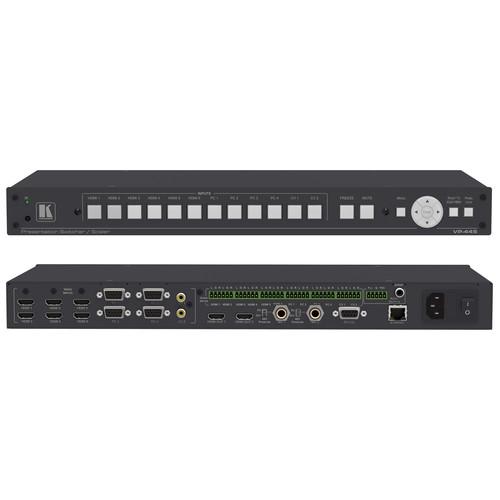 Contents of the user manual for the Kramer VP-445 12-Input Presentation Scaler Switcher
- Product category: Routers & Switchers Kramer
- Brand: Kramer
- Description and content of package
- Technical information and basic settings
- Frequently asked questions – FAQ
- Troubleshooting (does not switch on, does not respond, error message, what do I do if...)
- Authorized service for Kramer Routers & Switchers
|
User manual for the Kramer VP-445 12-Input Presentation Scaler Switcher contain basic instructions
that need to be followed during installation and operation.
Before starting your appliance, the user manual should be read through carefully.
Follow all the safety instructions and warnings, and be guided by the given recommendations.
User manual is an integral part of any Kramer product,
and if it is sold or transferred, they should be handed over jointly with the product.
Following the instructions for use is an essential prerequisite for protecting
health and property during use, as well as recognition of liability on the part of the manufacturer
for possible defects should you make a warranty claim. Download an official Kramer user manual in which you will find instructions on how to install, use, maintain and service your product.
And do not forget – unsuitable use of a Kramer product will considerably shorten its lifespan!
|
Product description The Kramer VP-445 is a high-performance presentation scaler/switcher for HDMI, computer graphics, and composite video signals. The unit scales the video and gives you an option to embed HDMI or analog audio. Then it sends the signal to two HDMI outputs and S/PDIF and balanced stereo audio outputs simultaneously. - Supports maximum resolutions up to UXGA / 1080p
- PixPerfect Scaling technology for precision pixel mapping and high-quality scaling
- Supports 3:2 and 2:2 pulldown deinterlacing and full up and downscaling of all video input signals
- Six HDMI, four 15-pin HD for computer graphics, and two RCA composite video
- 12 unbalanced stereo inputs on terminal blocks, as well as embedded audio for the HDMI inputs, each with individual level controls
- Two microphone inputs for mixing, switching, or talk-over
- Two HDMI scaled outputs (mirrored)
- One S/PDIF, RCA connector, one balanced stereo audio on terminal block and embedded audio on the HDMI outputs
- Companion AFV (Audio-Follow-Video) stereo audio for every video input
- Powerful audio features via DSP technology including audio equalization, mixing, delay, and more
- Multiple aspect ratio selections (full, best fit, over scan, under scan, letter box, and pan scan)
- Built-in ProcAmp for color, hue, sharpness, noise, contrast, and brightness control
- Supports 4:4:4 (RGB and YUV) as well as 4:2:2 (YUV) color sampling in native mode
- Thanks to the constant output sync there is no disruption on the output while switching between inputs and when no video is detected
- Audio mute and freeze frame controls available on front panel
- Non-volatile memory saves final settings
- Offers various control options including front panel buttons, RS-232, IR remote, OSD, Ethernet Web pages, Ethernet using UDP
- 100 to 240 VAC universal power supply
In the Box Kramer VP-445 12-Input Presentation Scaler / Switcher Power Cord Rack Ears IR Remote Control Limited 7-Year Warranty Table of Contents
|
Upload User Manual
Have you got an user manual for the Kramer VP-445 12-Input Presentation Scaler Switcher in electronic form? Please send it to us and help us expand our library of instruction manuals.
Thank you, too, on behalf of other users.
To upload the product manual, we first need to check and make sure you are not a robot. After that, your "Submit Link" or "Upload File" will appear.
Technical parametersKramer VP-445 Specs | Inputs | 6 x HDMI (HDCP version 1.4)
4 x 15-pin HD VGA
2 x RCA Composite Video
12 x Unbalanced stereo audio on terminal blocks
2 x 1/4" (6.3 mm) for Mic (with selectable 48 V phantom power) | | Outputs | 2 x HDMI (HDCP version 1.4)
1 x S/PDIF, RCA
1 x Balanced stereo audio on a 5-pin terminal block connector | | Bandwidth | Up to 1080p, UXGA | | Switching Time | 2 to 3 seconds between inputs | | Video Latency | Less than 2 frames | | Output Native Resolutions | At 60 Hz
640 x 480, 800 x 600, 1024 x 768, 1280 x 768, 1360 x 768, 1280 x 720, 1280 x 800, 1280 x 1024, 1440 x 900, 1400 x 1050, 1680 x 1050, 1600 x 1200, 1920 x 1080, 1920 x 1200, 480p, 720p, 1080i, 1080p
At 50 Hz
576p, 720p, 1080i, 1080p | | Controls | HDMI 1 to HDMI 6, PC 1 to PC 4 and CV 1 to CV 2 input selector buttons
Freeze, mute buttons
Menu and navigation buttons, reset to XGA/1080p and lock buttons, RS232, IR, Ethernet (OSD and Web pages) | | Power Supply | 100 to 240 VAC | | Power Consumption | 30 W maximum | | Operating Temperature | 32 to 104°F (0 to 40°C) | | Storage Temperature | 40 to 158°F (40 to 70°C) | | Relative Humidity | 10 to 90%, non-condensing | | Dimensions | 19 x 7.2 x 1.7" (43.6 x 18.3 x 4.36 cm) | | Weight | 4 lb (1.8 kg) approximately | | | | Package Weight | 6.0 lb | | Box Dimensions (LxWxH) | 21.6 x 11.0 x 4.2" |
Rating90% users recommend this product to others. And what about you?

This product has already been rated by 46 owners. Add your rating and experience with the product.
Discussion
 Ask our technicians if you have a problem with your settings,
or if anything is unclear in the user manual you have downloaded.
You can make use of our moderated discussion.
The discussion is public and helps other users of our website who may be encountering similar problems.
Ask our technicians if you have a problem with your settings,
or if anything is unclear in the user manual you have downloaded.
You can make use of our moderated discussion.
The discussion is public and helps other users of our website who may be encountering similar problems.
The discussion is empty - enter the first post
Post a new topic / query / comment:
|
|


