|
User Manual for Kramer VP-794 8-Input Universal Live Event Scaler and Switcher for Projection & LED Video Walls Click to enlarge the picture
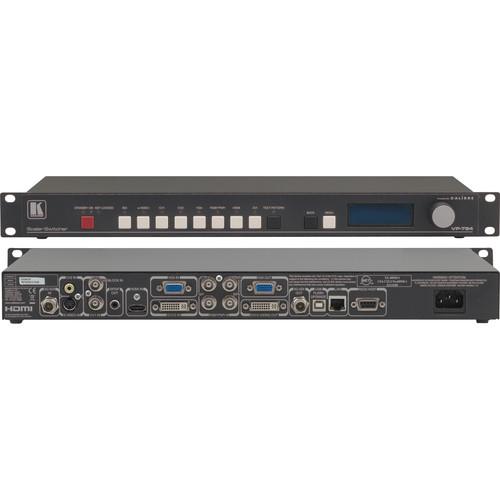 Contents of the user manual for the Kramer VP-794 8-Input Universal Live Event
- Product category: Routers & Switchers Kramer
- Brand: Kramer
- Description and content of package
- Technical information and basic settings
- Frequently asked questions – FAQ
- Troubleshooting (does not switch on, does not respond, error message, what do I do if...)
- Authorized service for Kramer Routers & Switchers
|
User manual for the Kramer VP-794 8-Input Universal Live Event contain basic instructions
that need to be followed during installation and operation.
Before starting your appliance, the user manual should be read through carefully.
Follow all the safety instructions and warnings, and be guided by the given recommendations.
User manual is an integral part of any Kramer product,
and if it is sold or transferred, they should be handed over jointly with the product.
Following the instructions for use is an essential prerequisite for protecting
health and property during use, as well as recognition of liability on the part of the manufacturer
for possible defects should you make a warranty claim. Download an official Kramer user manual in which you will find instructions on how to install, use, maintain and service your product.
And do not forget – unsuitable use of a Kramer product will considerably shorten its lifespan!
|
Product description The VP-794 8-Input Universal Live Event Scaler and Switcher for Projection & LED Video walls is a flexible scaler/switcher for analog and digital video signals designed for driving large screen displays and multiple screen applications from video or graphic sources. It features two composite video, one S-Video, one component video, one VGA, one DVI, one HDMI, and one 3G/HD/SD-SDI video inputs. The VP-794 uses HQV (Hollywood Quality Video) Video Processing to up or down-scale the incoming signal as well as apply flexible warping, geometry correction, and professional grade edge blending to the 3G/HD/SD-SDI, DVI/HDMI, VGA, and S/PDIF outputs. The VP-794 includes dedicated LED video wall, projection, and general scaler/switcher operating modes.
You can control the switcher using the on-screen display, front buttons, and jog wheel on the unit itself, RS-232, TCP/IP API and web server, and the PC-based Warp Map Generator tool. The VP-794 is ideal for professional, broadcast, and corporate AV applications, live events, rental/staging, and premium fixed installs. A power cord, DVI-D cable, and CD-ROM with PC tools come included. - LED Video Wall Mode
- The VP-794 is suitable for professional video wall applications. It features four-sided edge drag and drop for sizing the picture to fit the LED screen, for simple system configuration.
- Projection Mode
- Supports warp mapping and edge blending as well as advanced geometry correction including rotation and portrait mode extraction. In this mode, the VP-794 features four-sided soft edge blending with multi-region black level correction for seamless blending of multiple projectors. It also includes flexible geometry correction functions to correct misshapen images and projector misalignment by dragging and dropping each image corner, pin/barrel rotation, or keystone and rotation.
- Full Warp Mapping
- A PC application is included for easy warp map creation. Third-party generated warp maps can also be processed from automatic image alignment systems for projectors and curved screen tiling.
- Scale/Switcher Mode
- In this mode, the VP-794 becomes a universal scaler/switcher and scan converter for live events, broadcast and high-end fixed install applications.
- Low Image Latency
- Ensures minimal picture lag, which together with 3G/HD/SD-SDI inputs and outputs and bi-level or tri-level sync genlock capability makes the VP-794 ideal for on-stage or in-camera use at live events.
- Additional Features
-
- Multi-format Operation: 3G/HD/SD−SDI, HDMI, DVI, computer graphics, component, composite and S−Video inputs for signals up to 1080p & WUXGA
- HQV video processing with the highest quality de−interlacing (with 3:2 & 2:2 pull down), 4D motion adaptive SD noise reduction and scaling for both SD and HD signals
- HDTV compatible
- HDCP compliant
- Genlock (V−Lock): Accepts bi−level, tri−level sync or black & burst
- Selectable Lock Modes: Genlock (V−Lock), I/O lock or frame rate conversion
- HDMI Deep Color support up to 12-bit per color channel
- Multi-standard support for CVBS & YC in PAL, NTSC, SECAM formats with selectable 3D comb for composite
- Motion adaptive per pixel video de−interlacing with multi−directional diagonal de−interlace filter reduces HD and SD image flicker and artifacts
- Live image capture: Logo/still/backdrop capture with full scale warp/blend of the captured image, four memories
- Selectable processing versus latency: Best picture and low latency modes; latency as low as 0.25−frame progressive inputs, 1.25−field interlaced inputs
- Selectable aspect ratio conversion or incoming aspect ratio preserve mode
- Built-in time base corrector stabilizes unstable video sources
- Flexible color calibration controls: RGB Gains, RGB Cut−Off/Black Level, Saturation, Hue, Brightness, Contrast controls, Gamma selection with separate calibration memories per input channel
- Audio de-embedding from HDMI and 3G/HD/SD−SDI to S/PDIF compatible formats
- Built-in test pattern generator
- USB port for firmware upgrades
- Non-volatile memory auto−saves and recalls settings
- Control via front panel buttons, jog wheel, and LCD menu display, or RS−232, TCP/IP API and Web Server, and PC−based Warp Map Generator tool
- Setting backup: Save complete system config to disk via Web browser interface to clone or restore units
- Front panel lockout
- Picture-in-Picture in LED and scaler modes with flexible pixel−accurate PIP sizing
- Worldwide Power Supply - 100 to 240V AC.
- 1U rackmountable
In the Box Kramer VP-794 8-Input Universal Live Event Scaler and Switcher for Projection & LED Video Walls DVI-D Cable CD-ROM (User Manual and PC Tools) Power Cord Limited 3-Year Warranty Table of Contents
|
Upload User Manual
Have you got an user manual for the Kramer VP-794 8-Input Universal Live Event Scaler and Switcher for Projection & LED Video Walls in electronic form? Please send it to us and help us expand our library of instruction manuals.
Thank you, too, on behalf of other users.
To upload the product manual, we first need to check and make sure you are not a robot. After that, your "Submit Link" or "Upload File" will appear.
Technical parametersKramer VP-794 Specs | Inputs | 1 x Composite Video on BNC connector
1 x Composite Video on RCA connector
1 x S-Video, 4-pin connector
1 x Component video YPbPr(S) or RGsB/RGBS on 3 or 4 BNC connectors
1 x HDMI
1 x DVI, HDCP compliant
1 x VGA, 15-pin HD connector
1 x 3G/HD/SD-SDI, BNC connector
1 x Genlock (V-Lock), accepts bi-level, tri-level sync, or black & burst, 50/59.94/60 Hz formats, BNC connector | | Outputs | 1 x 3G/HD/SD-SDI, BNC connector
1 x DVI/HDMI, DVI connector
1 x VGA, 15-pin HD connector
1 x S/PDIF, RCA connector | | Supported Resolutions | 720p
1080i
1080psf (psf digital only)
1080p 23.97/24/25/30/50/59.94/60
480p (not via SDI)
576p (not via SDI)
625i (576i)
525i (480i)
Common VESA graphics formats from 640x480 to 1920x1200 (with reduced blanking for 1920x1200 and 1600x1200 modes) | | Operating Modes | LED video wall (128x96 pixels minimum)
Projection
Scaler/switcher/scan converter | | Protection Modes | Warping:
Full Warp Mapping
4-Corner
Rotate
Pin/Barrel
Portrait
Keystone
Edge Blending:
48-bit per pixel, 4:4:4 16-bit per color edge blend with de-gamma processing and multi-region black level correction | | Latency | As low as 0.25-frame progressive inputs, 1.25-fields interlaced inputs | | De-interlacing | Motion adaptive per pixel video de-interlacing, multi-directional diagonal de-interlace filter | | Power Source | 100 to 264 VAC, 35W typical | | Operating Temperature | 32 to 104°F (0 to 40°C) | | Storage Temperature | -22 to 158°F (-30 to 70°C) | | Humidity | 10 to 90%, non-condensing | | Dimensions (W x H x D) | 19.00 x 1.75 x 7.20" (48.26 x 4.45 x 18.29 cm) | | Weight | 5.5 lb (2.5 kg) | | | | Box Dimensions (LxWxH) | 43.69 x 18.4 x 8.8" |
Rating100% users recommend this product to others. And what about you?

This product has already been rated by 14 owners. Add your rating and experience with the product.
Discussion
 Ask our technicians if you have a problem with your settings,
or if anything is unclear in the user manual you have downloaded.
You can make use of our moderated discussion.
The discussion is public and helps other users of our website who may be encountering similar problems.
Ask our technicians if you have a problem with your settings,
or if anything is unclear in the user manual you have downloaded.
You can make use of our moderated discussion.
The discussion is public and helps other users of our website who may be encountering similar problems.
The discussion is empty - enter the first post
Post a new topic / query / comment:
|
|
|
| Request for user manual |
You can’t find the operation manual you are looking for? Let us know and we will try to add the missing manual:
I’m looking for a manual / Request for manual
Current requests for instruction manuals:
Call Of Duty World War Two For Xbox...
controller stratus XL...
stratus XL...
smart whatch serie S11 42mm...
Allen & Heath SQ-6 manual...
|
| Discussion |
Latest contributions to the discussion:
AEW R 4100
Name: MAURICIO ANGARITA
Audio-Technica AEW-R4100 UHF Diversity Receiver for
AEW R 4100 has the mute function blocked and does not allow audio to pass. I tried several times to turn off the mute from the transmitter but it does nothing, the mute stays on. Solution?
Thank you...
Instructions for assembling the 2015 Forecast Image Master Consoles GC3-A
Name: mike elam
Forecast Consoles GC3-A ImageMaster Editing Console
Looking for instructions for assembling this console. ...
EMPTY TONER ERROR MESSAGE AFTER REPLACING TONER
Name: LINDA BAD YELLOW EYES
Brother TN223BK Standard-Yield Toner
I HAD TO CHANGE OUT ALL THREE TONERS DUE TO LEAKS IN THE YELLOW AND CYAN. AFTER I REPLACED THEM, THE MACHINE KEEPS GIVING ME AN EMPTY TONER ERROR MESSAGE. HELP!!...
PS480D 20/24 pin Switching 480W Power Supply
Name: swkargo
Logisys 480W Power Supply
This item states in can run -5vdc .It is NOT listed on the board or I beleive is r4 is missing the resitior. Any body have thid issue. Shawn
...
Help needed
Name: Ann Carter
SanDisk 1TB Extreme Portable USB 3.1
When I click the link to download the user manual for my Sandisk Extreme external hard drive, it gives me the manual for the LG Cricket. Can you please change the link so I can download the Sandisk manual and begin using this drive? Thank you....
|
|


