|
User Manual for Line 6 M13 Stompbox Modeler - FX Processor for Electric Guitars Click to enlarge the picture
 Contents of the user manual for the Line 6 M13 Stompbox Modeler -
- Product category: Effects Pedals Line 6
- Brand: Line 6
- Description and content of package
- Technical information and basic settings
- Frequently asked questions – FAQ
- Troubleshooting (does not switch on, does not respond, error message, what do I do if...)
- Authorized service for Line 6 Effects Pedals
|
User manual for the Line 6 M13 Stompbox Modeler - contain basic instructions
that need to be followed during installation and operation.
Before starting your appliance, the user manual should be read through carefully.
Follow all the safety instructions and warnings, and be guided by the given recommendations.
User manual is an integral part of any Line 6 product,
and if it is sold or transferred, they should be handed over jointly with the product.
Following the instructions for use is an essential prerequisite for protecting
health and property during use, as well as recognition of liability on the part of the manufacturer
for possible defects should you make a warranty claim. Download an official Line 6 user manual in which you will find instructions on how to install, use, maintain and service your product.
And do not forget – unsuitable use of a Line 6 product will considerably shorten its lifespan!
|
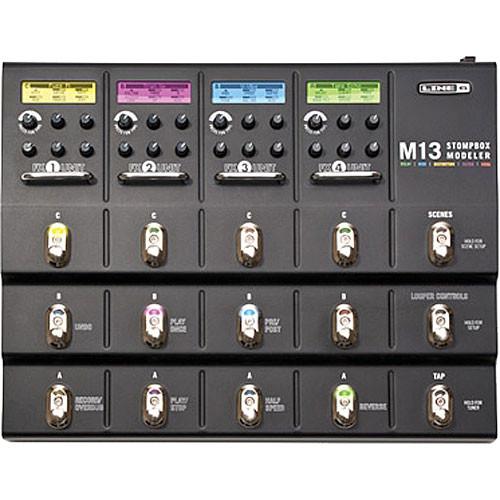
Product description Fashioned in a form factor which aims to reproduce—and perhaps replace—a traditional pedalboard, the Line 6 M13 is a stompbox modeler intended for use with electric guitars. It allows you to arrange a whole host of effects, many of them modeled off of classic pedals from the analog age, into 48 individual scenes, which you can switch up on the spot between songs. You can think of it as 48 different pedalboards with four stompboxes apiece; as such, the unit is quite handy for a touring guitar player, giving you over 15 distortions, more than 20 reverbs, and a panoply of delays, modulation effects, and filters.
The pedalboard gives you the ability to use four individual models at any one time, with six knobs and three footswitches for each effect. An LCD screen at the top of each section gives you a visible readout of each modeled effect, and furthermore, correlates in color with the applicable footswitches for easier view on a dark stage.
The unit also features a 28-second looper with controls for Undo/Redo, Record/Overdub, Play/Stop, and more. For all of the delay, modulation, and filter effects, you can utilize tap tempo to get their various parameters in lock-step and sync. The M13 offers a plethora of connectivity options, giving you two inputs for expression pedals, stereo inputs, stereo outputs, and a set of stereo send/return jacks. All of these connection points are 1/4" terminations, but there is also a MIDI I/O, allowing you to back your scenes up on a computer. Features at a Glance - Sound Features at a Glance
-
- Over 100 stompbox effects, 4 simultaneous in any order and any combination
- Dedicated knobs to control each parameter for every effect
- Create up to 48 pedalboard scenes for instant recall, giving you 48 individual pedalboards available at any time
- Universal tap tempo to sync all your time-based effects
- Hardware Features a Glance
-
- 28-second looper with dedicated footswitch controls for Undo/Redo, Record/Overdub, Play/Stop, Half Speed, Reverse, Play Once, and Pre/Post
- Built-in chromatic tuner with dedicated footswitch
- Metal chassis and footswitches
Effects in Depth - Delays
-
- Digital Delay
- Analog Echo
- Analog w/ Mod
- Tape Echo
- Tape Echo Dry Thru
- Multi-Head
- Sweep Echo
- Sweep Echo Dry Thru
- Reverse
- Tube Echo
- Tube Echo Dry Thru
- Lo Res Delay
- Digital Delay w/ Mod
- Stereo Delay
- Ping Pong
- Dynamic Delay
- Auto-Volume Delay
- Echo Platter
- Echo Platter Dry Thru
- Modulation FX
-
- Opto Tremolo
- Bias Tremolo
- Phaser
- Dual Phaser
- Panned Phaser
- U-Vibe
- Analog Flange
- Jet Flanger
- Analog Chorus
- Tri Chorus
- Pitch Vibrato
- Panner
- Rotary Drum
- Rotary Drum/Horn
- Dimension
- Ring Modulator
- Barber Pole Phaser
- Frequency Shifter
- Script Phase
- AC Flanger
- 80A Flanger
- Pattern Tremolo
- Distortions
-
- Tube Drive
- Screamer
- Overdrive
- Classic Distortion
- Heavy Distortion
- Colordrive
- Buzz Saw
- Facial Fuzz
- Jumbo Fuzz
- Fuzz Pi
- Jet Fuzz
- Line 6 Drive
- Line 6 Distortion
- Sub Octave Fuzz
- Octave Fuzz
- Boost Comp
- Volume Pedal
- Bass Octaver
- Compressors & EQs
-
- Red Comp
- Blue Comp
- Blue Comp Treb
- Vetta Comp
- Vetta Juice
- Tube Comp
- Noise Gate
- Graphic EQ
- Studio EQ
- Parametric EQ
- 4-Band Shift EQ
- Mid Focus EQ
- Filters
-
- Tron Up
- Tron Down
- Seeker
- Obi Wah
- Voice Box
- V Tron
- Throbber
- Spin Cycle
- Comet Trails
- Slow Filter
- Octisynth
- Synth-O-Matic
- Attack Synth
- Synth String
- Growler
- Q Filter
- Vetta Wah
- Fassel
- Weeper
- Chrome
- Chrome Custom
- Throaty
- Conductor
- Colorful
- Smart Harmony
- Pitch Glide
- Reverbs
-
- '63 Spring
- Lux Spring Reverb
- Vintage Plate Reverb
- Room
- Chamber
- Hall
- Ducking
- Octo
- Cave
- Tile
- Echo
- Particle Verb
Features in Depth - FX Units
- The M13 has been split up into four FX units, each sporting three footswitches for quickly storing and running any effect.
- Displays
- Each of the four displays shows the settings of your current FX setup, giving you a read on FX model name, parameters, and memory. The displays' colors correlate with the footswitch lights, so that on a darkened stage, you'll always know which switches correspond to which effects.
- Knobs
- As with an analog stompbox, each knob controls the parameters of the particular effect you've activated. When you turn a knob, the parameters you effect will remain set at the level you've chosen—even after you power the unit off.
- Scenes
- With the M13, you can save up to 48 unique pedalboard arrangements, each one constituting a scene. Now, you no longer need to bother with hook-and-loop fasteners just to swap out a couple of pedals.
- Onboard Tuner
- When activated, this tuner will be displayed in the LCD, and the incoming signal will be muted.
- Tap Tempo
- With this function, you can match the time, speed, and tempo of your delays, modulation effects, and filters to create comprehensive and cohesive textures.
- 28-Second Looper
- In looper mode, the bottom two rows of footswitches become dedicated looper controls, giving you the ability to undo a layer, make it play in half speed, and more.
- Mono/Stereo Operation
- Some models (like Stereo Delay) provide stereo operation. When run before a mono model (like a distortion), the signal will collapse to mono as it feeds the mono effect, and will then be passed on in mono to the next effect or outputs.
- Effect Copy
- An effect can be copied to any other memory location within a scene, or to a completely different scene. Among other uses, this feature can allow you to switch the positions of where your modeled pedals happen to lie.
- Send/Return Jacks
- The rear panel send/return jacks are stompbox/instrument level unbalanced connections that allow you to connect external devices in series with M13 Stompbox Modeler's effects. From the SETUP mode, you choose where this occurs in the signal flow: before all FX Units, inserted between any two of them, or after them all. You can also set the FX loop to the off position. This setting is stored as part of each scene, so different scenes can use the send/return differently.
UPC: 614252006118 In the Box Line 6 M13 Stompbox Modeler - FX Processor for Electric Guitars AC Power Adapter Limited 1-Year Warranty Table of Contents
|
Upload User Manual
Have you got an user manual for the Line 6 M13 Stompbox Modeler - FX Processor for Electric Guitars in electronic form? Please send it to us and help us expand our library of instruction manuals.
Thank you, too, on behalf of other users.
To upload the product manual, we first need to check and make sure you are not a robot. After that, your "Submit Link" or "Upload File" will appear.
Technical parametersLine 6 M13 Specs | Effects | 100 effect models in any order and combination
3 models per effects unit
4 simultaneous FX | | True Bypass | Analog/DSP | | Controls and Indicators | 15 x footswitches
24 x rotary knobs (4 for each section)
4 x LCD displays for parameters | | MIDI Connectors | 5-pin in / out | | Scenes | 48x | | Looper | 28 seconds | | Connections | 2 x 1/4" expression pedal inputs
2 x 1/4" FX send jacks
2 x 1/4" FX return jacks
2 x 1/4" input jacks
2 x 1/4" output jacks | | Dimensions (W x H x D) | 15.0 x 3.0 x 11.0" / 38.1 x 7.6 x 27.9 cm | | Weight | 10.0 lb / 4.5 kg | | | | Package Weight | 12.25 lb | | Box Dimensions (LxWxH) | 21.5 x 13.3 x 4.4" |
Rating70% users recommend this product to others. And what about you?

This product has already been rated by 21 owners. Add your rating and experience with the product.
Discussion
 Ask our technicians if you have a problem with your settings,
or if anything is unclear in the user manual you have downloaded.
You can make use of our moderated discussion.
The discussion is public and helps other users of our website who may be encountering similar problems.
Ask our technicians if you have a problem with your settings,
or if anything is unclear in the user manual you have downloaded.
You can make use of our moderated discussion.
The discussion is public and helps other users of our website who may be encountering similar problems.
The discussion is empty - enter the first post
Post a new topic / query / comment:
|
|
|
| Request for user manual |
You can’t find the operation manual you are looking for? Let us know and we will try to add the missing manual:
I’m looking for a manual / Request for manual
Current requests for instruction manuals:
Call Of Duty World War Two For Xbox...
controller stratus XL...
stratus XL...
smart whatch serie S11 42mm...
Allen & Heath SQ-6 manual...
|
| Discussion |
Latest contributions to the discussion:
AEW R 4100
Name: MAURICIO ANGARITA
Audio-Technica AEW-R4100 UHF Diversity Receiver for
AEW R 4100 has the mute function blocked and does not allow audio to pass. I tried several times to turn off the mute from the transmitter but it does nothing, the mute stays on. Solution?
Thank you...
Instructions for assembling the 2015 Forecast Image Master Consoles GC3-A
Name: mike elam
Forecast Consoles GC3-A ImageMaster Editing Console
Looking for instructions for assembling this console. ...
EMPTY TONER ERROR MESSAGE AFTER REPLACING TONER
Name: LINDA BAD YELLOW EYES
Brother TN223BK Standard-Yield Toner
I HAD TO CHANGE OUT ALL THREE TONERS DUE TO LEAKS IN THE YELLOW AND CYAN. AFTER I REPLACED THEM, THE MACHINE KEEPS GIVING ME AN EMPTY TONER ERROR MESSAGE. HELP!!...
PS480D 20/24 pin Switching 480W Power Supply
Name: swkargo
Logisys 480W Power Supply
This item states in can run -5vdc .It is NOT listed on the board or I beleive is r4 is missing the resitior. Any body have thid issue. Shawn
...
Help needed
Name: Ann Carter
SanDisk 1TB Extreme Portable USB 3.1
When I click the link to download the user manual for my Sandisk Extreme external hard drive, it gives me the manual for the LG Cricket. Can you please change the link so I can download the Sandisk manual and begin using this drive? Thank you....
|
|


