User Manual for Listen Technologies LT-803-072-01 Stationary 3-Channel RF Transmitter Click to enlarge the picture
 Contents of the user manual for the Listen Technologies LT-803-072-01 Stationary 3-Channel RF
- Product category: Components & Accessories Listen Technologies
- Brand: Listen Technologies
- Description and content of package
- Technical information and basic settings
- Frequently asked questions – FAQ
- Troubleshooting (does not switch on, does not respond, error message, what do I do if...)
- Authorized service for Listen Technologies Components & Accessories
|
User manual for the Listen Technologies LT-803-072-01 Stationary 3-Channel RF contain basic instructions
that need to be followed during installation and operation.
Before starting your appliance, the user manual should be read through carefully.
Follow all the safety instructions and warnings, and be guided by the given recommendations.
User manual is an integral part of any Listen Technologies product,
and if it is sold or transferred, they should be handed over jointly with the product.
Following the instructions for use is an essential prerequisite for protecting
health and property during use, as well as recognition of liability on the part of the manufacturer
for possible defects should you make a warranty claim. Download an official Listen Technologies user manual in which you will find instructions on how to install, use, maintain and service your product.
And do not forget – unsuitable use of a Listen Technologies product will considerably shorten its lifespan!
|
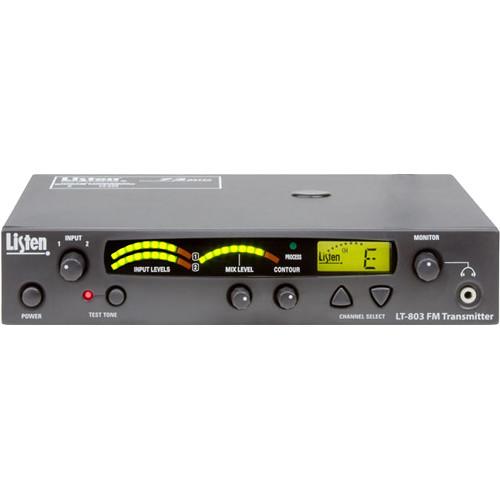
Product description This 72 MHz Stationary RF Transmitter from LISTEN Technologies can be used for assisted listening in a variety of venues and scenarios. The transmitter offers universal inputs, which ensure your ability to interface with audio sources, including mixers, microphones, MP3 players, CD players, and more. The transmitter also features the company's signature Look & Listen LCD, which shows channel, lock, and RF power. A power supply is included. - Three channels simplify use and installation
- Digitally tuned so the transmission won't drift
- Look & Listen LCD shows channel, channel lock, and signal strength
- Reliable clear sound quality - 62 dB Signal-to-noise ratio (SNR)
- Balanced/Unbalanced inputs allow interfacing with many audio sources
- Auto Processor conditions the audio for voice/music prior to transmission
- Multiple accessory options make it suitable for a wide range of applications
UPC: 819267023307 In the Box Listen Technologies LT-803-072-01 Stationary 3-Channel RF Transmitter (72 MHz) Power Supply Limited 5-Year Warranty Table of Contents
|
Upload User Manual
Have you got an user manual for the Listen Technologies LT-803-072-01 Stationary 3-Channel RF Transmitter in electronic form? Please send it to us and help us expand our library of instruction manuals.
Thank you, too, on behalf of other users.
To upload the product manual, we first need to check and make sure you are not a robot. After that, your "Submit Link" or "Upload File" will appear.
Technical parametersListen Technologies LT-803-072-01 Specs | | | Frequency Response | 50 Hz to 15 kHz (+/- 3 dB) | | Signal to Noise Ratio (SNR) | 62 dB (A-Weighted) | | System Distortion | <2% total harmonic distortion (THD) at 80% deviation | | Input | Input 1: 1x Female XLR or 1/4" combo connector, balanced, 0 / -55 dBu (line/mic) nominal input level adjustable, -30 / +21 dBu (line/mic) maximum input level, impedance 20 k / 1 kOhm (line/mic), phantom power 12 VDC - on rear panel
Input 2: 2x phono connectors, unbalanced, -10 / +10 dBu nominal input level adjustable, +30 dBu maximum, impedance 100 kOhms - on rear panel
| | Output | Audio: Input 1 and input 2, mixed output on - rear panel), 2x phono connectors, unbalanced, -10 dBu nominal output level, +15 dBu maximum, impedance 10 Ohms
Headphone: 1x 3.5 mm stereo connector, unbalanced, adjustable output level, +3 dBu maximum, impedance 10 Ohms
| | Audio Processing | Compression can be turned on or off, slope internally adjustable from 1:1 to 4:1, default 2:1 | | Contour | Cuts and boosts frequencies above 5 kHz | | | | Controls | User Controls:
Front Panel: Power, test tone on/off, channel up/down, input levels, mix level, contour, monitor volume control
Rear Panel:
Input 1 - Level, (line, mic, mic-phantom power)
Input 2 - level (-10 / +10 dBu), RF power level (low, mid, high)
Internal Adjustments: Compression ratio for audio processor
Programming: SQ on/off, process on/off, channel lock | | Indicators | Audio Input Status LEDs: Indicate Input 1, Input 2, and Mix audio levels; 10 segment LEDs; 8 green, 2 red
Processing: Indicated by a green LED when on (front panel)
RF Power: Indicated on the LCD (low, mid, high)
LCD: Channel designation, lock status, RF power level, programming (front panel)
Test Tone: Red LED illuminates when test tone is enabled
| | | | Frequency Range | (A) 72.100
(E) 72.900
(H) 75.900
| | Number of Channels | 3x wide band | | Frequency Accuracy | +/- 0.005% stability 32 to 122ºF / 0 to 50ºC | | Transmitter | Transmitter stability: 50 PPM
Transmission Range: Up to 1,500' / 457 m | | Output Power | 80000 uV at 3 m | | Antenna Type | Various antennas available
BNC connectors | | | | Power Supply | In-line power supply, (part number LA-207) | | Power Supply Input | 100 to 240 VAC, 50 to 60 Hz, 0.4 A | | Power Supply Output | 12 VDC, 1.3 A, 15.6 W | | Power Supply Connector | Barrel type:
0.02" (5.0 mm) OD
0.01" (2.5 mm) ID
| | | | Color | Dark gray with white silk screening | | Environmental | Operation temperature: 14 to 104°F (-10 to 40°C)
Storage temperature: -4 to 122°F (-20 to 50°C )
Relative humidity: 0 to 95% relative humidity, non-condensing
| | Compliance | UL, CE, GS, TÜV, RoHS
FCC Part 15, Part 90, Industry Canada | | Dimensions | 1.75 x 8.5 x 9.13" (4.5 x 21.5 x 23.0 cm) | | Weight | With power supply: 4.5 lb (2.0 kg)
Unit weight: 2.60 lb (1.2 kg) | | | | Package Weight | 3.75 lb | | Box Dimensions (LxWxH) | 13.4 x 9.7 x 3.0" |
Rating80% users recommend this product to others. And what about you?

This product has already been rated by 62 owners. Add your rating and experience with the product.
Discussion
 Ask our technicians if you have a problem with your settings,
or if anything is unclear in the user manual you have downloaded.
You can make use of our moderated discussion.
The discussion is public and helps other users of our website who may be encountering similar problems.
Ask our technicians if you have a problem with your settings,
or if anything is unclear in the user manual you have downloaded.
You can make use of our moderated discussion.
The discussion is public and helps other users of our website who may be encountering similar problems.
The discussion is empty - enter the first post
Post a new topic / query / comment:
|
|


