|
User Manual for Lomography Lomo Diana F Deluxe Kit Click to enlarge the picture
 Contents of the user manual for the Lomography Lomo Diana F Deluxe Kit
- Product category: Holga & Lomography Lomography
- Brand: Lomography
- Description and content of package
- Technical information and basic settings
- Frequently asked questions – FAQ
- Troubleshooting (does not switch on, does not respond, error message, what do I do if...)
- Authorized service for Lomography Holga & Lomography
 |
User manual for the Lomography Lomo Diana F Deluxe Kit contain basic instructions
that need to be followed during installation and operation.
Before starting your appliance, the user manual should be read through carefully.
Follow all the safety instructions and warnings, and be guided by the given recommendations.
User manual is an integral part of any Lomography product,
and if it is sold or transferred, they should be handed over jointly with the product.
Following the instructions for use is an essential prerequisite for protecting
health and property during use, as well as recognition of liability on the part of the manufacturer
for possible defects should you make a warranty claim. Download an official Lomography user manual in which you will find instructions on how to install, use, maintain and service your product.
And do not forget – unsuitable use of a Lomography product will considerably shorten its lifespan!
|
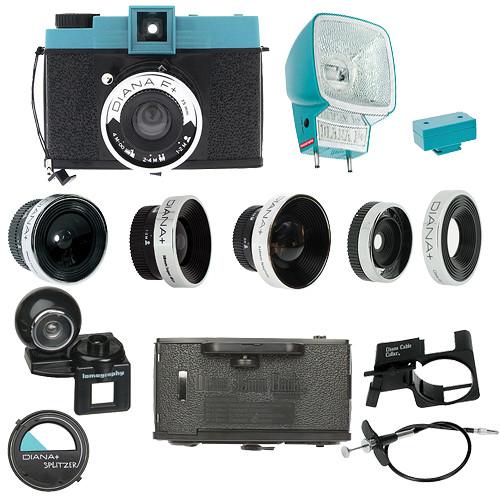
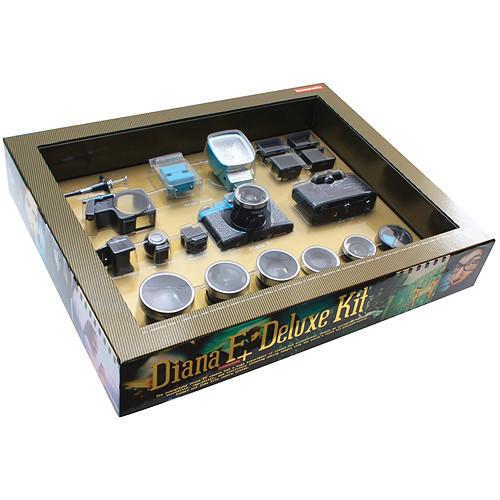
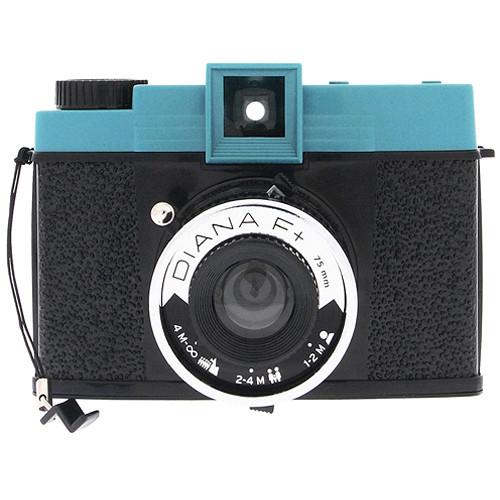
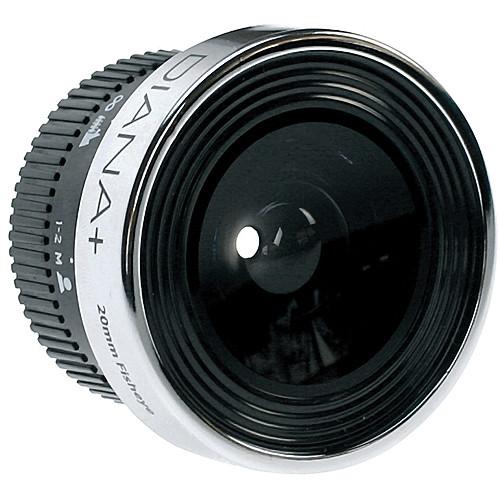
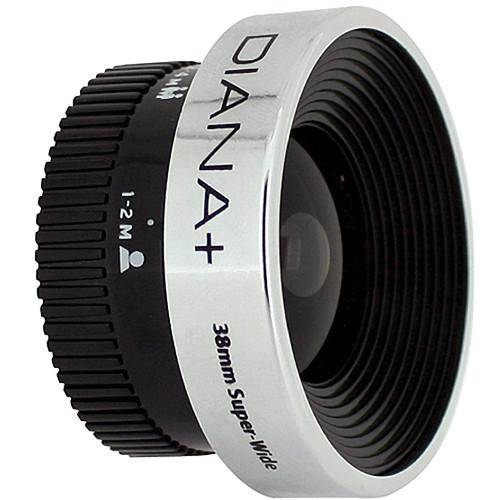
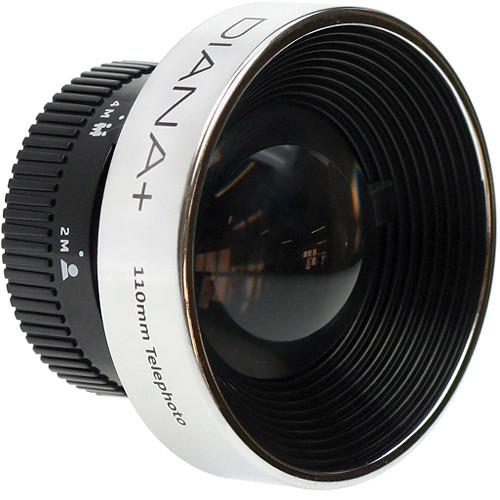
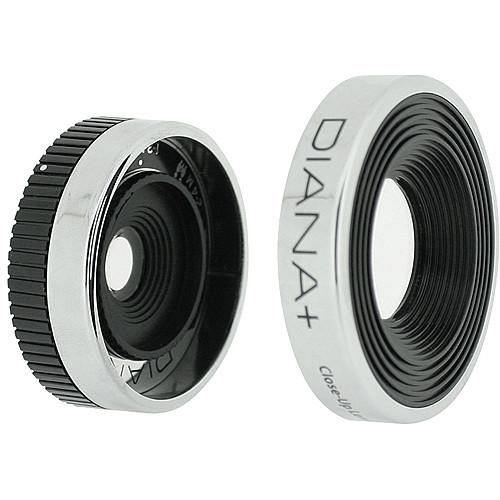
Product description The Ultimate Guide to Lomography Read More The Lomo Diana F+ Deluxe Kit from Lomography contains a Diana F+ camera and all her accessory items. The 120 format camera with its various lenses, and filters enable the photographer to let his or her creativity run wild. The kit includes four Diana+ Lenses, 20mm fisheye, 38mm ultra-wide, 55mm wide, and 110mm telephoto, which mount with a twist onto the main lens.
This camera can shoot strait-forward snapshots, unlimited long exposures, and sweeping panoramas. Photographers have the choice of two shutter speeds, two full-frame image sizes and can create multiple and partial exposures, pinhole photos, round fisheye and wide angle compositions. Plus the kit includes the Diana 35mm back, which is fully interchangeable and easily pops on and off your camera. With this accessory installed you can shoot all types (color, slide, b&w) of 35mm film. With the included Diana+ flash low-light situations can create a whole new vista.
The kit contains all you need to get the most out of this fun to use camera...except for film and your creative imagination. - Two Shutter Speeds
- Choose between "N" for normal daytime snapshots or "B" for unlimited indoor and nighttime exposures.
- Two Image Sizes
- You can choose between the 12 full-frame shots 2 x 2" (5.2x5.2cm), or 16 smaller square images - 1.65 x 1.65" (4.2x4.2cm).
- Multiple and Partial Exposures
- You can advance the Diana+ as much or as little as you like after each shot - making multiple exposures, half-exposed frames, and stretched out crazy-long shots a snap.
- Pinhole Function
- Remove the lens, set the aperture to a super-small pinhole and shoot a super-wide-angle, severely old-school image through a tiny hole.
- Endless Panorama
- Use this setting along with the smaller image format 1.65 x 1.65" (4.2 x 4.2) to place sequential frames right next to each other and create a concurrent and unlimited panoramic image.
- Shutter Lock and Tripod Thread
- Sharp and solid long exposures (especially pinhole images) require a steady camera. To help you out, we've included a standard tripod thread on the bottom of your Diana+ and a small shutter lock that allows you to keep the shutter indefinitely without holding it down.
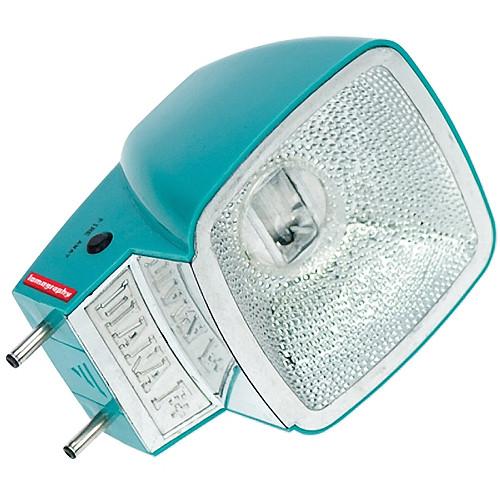
- Diana Flash
- The face is cast of the Diana Flash is reflective silver, and it syncs with the Diana F+ via an old-school metal plug connection.
- Integrated Color Flash
- The Diana F+ includes a small packet of plastic color gel filters. Slip one into your flash and throw a burst of colored light at your subject - day or night!
- Long Exposure Flash
- By setting the Diana F+ to the long exposure "B" setting, you can let ambient light into your image - thereby superimposing a flashed subject against a beautiful background.
- Hot Shoe Adapter
- The Diana Flash works via a two-pronged plug adapter (included). It plugs directly into the Diana F+ camera body. On top of that, a Diana Plug-to-Hotshoe adapter is included, which allows you to use the hi-powered and radiantly beautiful Diana Flash on any standard hotshoe camera - like the LC-A+, Fisheye 2, Holga w/ hotshoe and plenty of others!
- Interchangeable Lenses
- The Diana+ Deluxe Kit comes with a variety of lenses. Merely twist off the basic lens (as if you were going to take a pinhole shot), and instantly mount another lens.
- 20mm Fisheye Lens
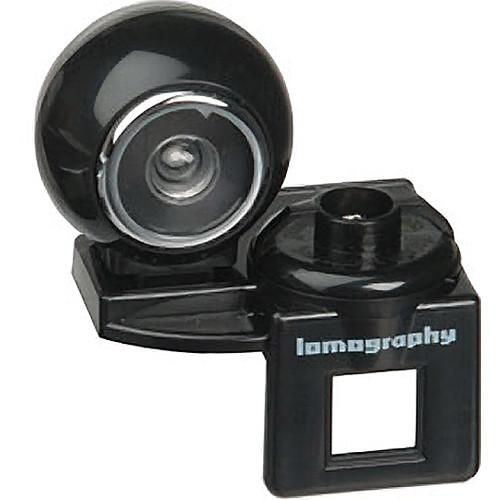
- The 20mm Fisheye Lens is an interchangeable plastic Diana+ lens that offers a a 180-degree field of view, and a completely circular image on a square print. This high-quality plastic lens perfectly captures the signature look of Diana+ Super-wide-angle images produced by the Fisheye come with a wonderful bonus: focused sharpness from the front to the rear of your image. Each fisheye image shows massive depth of field, so your subject and background will be crisp images - warm, saturated colors, soft focus, and that special dreamlike feeling. A viewfinder and plastic mounting bracket is included with your Fisheye lens. Slip a viewfinder and plastic mounting bracket onto the Diana+'s top crown, and get a dazzling preview of the 180-degree view in front of your face.
- Two Fisheye Formats
- Shooting with the 20mm Fisheye on the Diana+'s large 12-shot format results in a perfectly circular image nestled inside a square format. Straight lines move from the center to curve and distort at the images. Try the 16-shot format and let that circle spill right into the square edges. You can shoot a series of partial frames to absolutely cover your film with super-wide-fisheye-distorted content.
- 38mm Diana+ Super Wide Lens
- Roughly equivalent to a 25mm lens on a standard 35mm camera, this classic super-wide perspective is a favorite of street photographers and photojournalists. Close subjects assume an in-your-face urgency (and slightly stretched out noses). City and country-scapes take on a sweeping and grandiose air. It features a 120° view angle, full frame with vignetting and edge distortion. It requires the included dedicated viewfinder.
- 55mm Diana+ Wide & Closeup Lens
- The 55mm Wide lens has a focal length is roughly equivalent to a 34mm lens on a standard 35mm camera. The overall effect is a pleasing wider-than-normal view with that same classic Diana+ vignetting, selective focus, and dazzling color saturation. An accessory viewfinder is included to preview your shots. The Close-Up Lens slides directly onto the 55m Wide Lens, allowing for fast, extreme close-up shots whenever the situation arises. Images have a shallow depth of field: meaning that a tiny bit of foreground is in focus against a soft background.
- 110mm Diana+ Telephoto Lens
- The 110mm Diana+ Lens features "perfect imperfections" of a soft telephoto engineered to produce colorful, soft, slightly blurry, vignetted, snapshots. Zoom into your subject and shoot them from afar. Great for candid shots, street photos, distant mountains, and wild horses. Telephoto images also have a compact perspective meaning that face portraits have unusual features. As the focal length of your lens gets longer, the depth of field becomes more shallow. Shoot on a smaller aperture for a dual-focus effect. A viewfinder plastic mounting bracket is included.
- Diana+ Splitzer
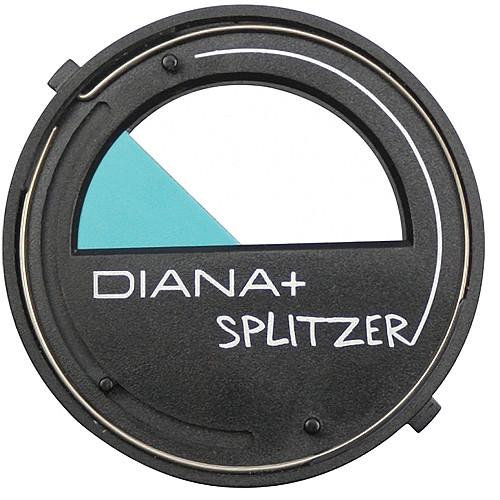
- The Splitzer is a multiple image accessory (included). Slip it onto the top of your Diana F+ lens and twist the blades with your fingers. All you have to do is keep track of what parts of the image you've shot...or not. By slicing and dicing your photos, you can re-combine them to make something entirely new. Shooting lots of double-exposures in the daytime will wash out your image, but users can shoot a full roll of images - changing the Splitzer's position each time. Later on that day, the following day, next month or year, or whatever - reload the film and shoot it again, varying the Splitzer's position for each shot.
- Diana+ 35mm Back
- Expressly designed for the Diana+, this 35mm back is fully interchangeable and easily pops on and off your camera. With this accessory installed you can shoot all types (color, slide, b&w) of 35mm film. It has two integrated exposure counters tell you the precise frame you're on, and gives users four different image formats: panoramic wiht sprocket holes, standard panorama, standard landscape, and square with sprocket holes.
- 2-Year International Warranty
- The Diana+ is covered against any manufacturer defects for a full 2 years from the date of purchase. This warranty is valid throughout the world.
UPC: 839228005708 In the Box Lomography Lomo Diana F+ Deluxe Kit Diana+ Camera Diana Flash Hot Shoe Adapter Cable Release Cable Release Collar Viewfinder Adaptor Universal Viewfinder Fisheye Viewfinder Diana Back 4 x Masks (for 4 Formats) Splitzer Diana+ 20mm Fisheye Lens Diana+ 38mm Fisheye Lens Diana+ 55mm Wide Angle Lens Closeup Lens Diana+ 110mm Telephoto Lens 2-Year International Warranty Table of Contents
|
Upload User Manual
Have you got an user manual for the Lomography Lomo Diana F Deluxe Kit in electronic form? Please send it to us and help us expand our library of instruction manuals.
Thank you, too, on behalf of other users.
To upload the product manual, we first need to check and make sure you are not a robot. After that, your "Submit Link" or "Upload File" will appear.
Technical parametersLomography Diana F+ Specs | Camera Type | Plastic Medium Format | | Film Back/Loading | N/A | | Film Type | 120 or 35mm with Diana 35mm Back (included) | | Formats | 12 Full-frame shots: 2 x 2" (5.2 x 5.2cm)
16 Square images 1.65 x 1.65" (4.2 x 4.2cm)
35mm:
33 x 48mm, Panoramic with sprocket holes
24 x 48mm, Standard panorama
24 x 35mm, Standard landscape
33 x 34mm, Square with sprocket holes | | Lens Mount | Auxillary Lenses twist into basic lens | | Shutter | Variable shutter (daytime & "B" for unlimited long exposures) | | Shutter Release | Button or Cable Release (included) | | Self Timer | No | | Flash Synchronization | Yes, Metal plug connection (included) | | Mirror Lock-Up | No | | Exposure Metering | No | | Exposure Bracketing | No | | Exposure Compensation | No | | Depth-of-Field Preview | No | | Viewfinder | Yes | | Viewfinder Info | Viewfinder requires Adapter (included)
Fisheye viewfinder(included)
Universal viewfinder (included) | | Film Transport | Manual | | Multiple Exposure | Yes | | Focusing System | Fixed Focus | | Power Source | Not Specified by Manufacturer | | Custom Functions | Removable lens for super-wide-angle pinhole shots | | Data Imprinting | No | | Tripod Mount | Yes | | Dimensions | 5 x 3.75 x 3" (12.5 x 9.5 x 7.6cm) | | Weight | Not Specified by Manufacturer | | | | Package Weight | 9.0 lb | | Box Dimensions (LxWxH) | 23.0 x 19.0 x 5.0" |
Rating96% users recommend this product to others. And what about you?

This product has already been rated by 36 owners. Add your rating and experience with the product.
Discussion
 Ask our technicians if you have a problem with your settings,
or if anything is unclear in the user manual you have downloaded.
You can make use of our moderated discussion.
The discussion is public and helps other users of our website who may be encountering similar problems.
Ask our technicians if you have a problem with your settings,
or if anything is unclear in the user manual you have downloaded.
You can make use of our moderated discussion.
The discussion is public and helps other users of our website who may be encountering similar problems.
The discussion is empty - enter the first post
Post a new topic / query / comment:
|
|
|
| Request for user manual |
You can’t find the operation manual you are looking for? Let us know and we will try to add the missing manual:
I’m looking for a manual / Request for manual
Current requests for instruction manuals:
Call Of Duty World War Two For Xbox...
controller stratus XL...
stratus XL...
smart whatch serie S11 42mm...
Allen & Heath SQ-6 manual...
|
| Discussion |
Latest contributions to the discussion:
AEW R 4100
Name: MAURICIO ANGARITA
Audio-Technica AEW-R4100 UHF Diversity Receiver for
AEW R 4100 has the mute function blocked and does not allow audio to pass. I tried several times to turn off the mute from the transmitter but it does nothing, the mute stays on. Solution?
Thank you...
Instructions for assembling the 2015 Forecast Image Master Consoles GC3-A
Name: mike elam
Forecast Consoles GC3-A ImageMaster Editing Console
Looking for instructions for assembling this console. ...
EMPTY TONER ERROR MESSAGE AFTER REPLACING TONER
Name: LINDA BAD YELLOW EYES
Brother TN223BK Standard-Yield Toner
I HAD TO CHANGE OUT ALL THREE TONERS DUE TO LEAKS IN THE YELLOW AND CYAN. AFTER I REPLACED THEM, THE MACHINE KEEPS GIVING ME AN EMPTY TONER ERROR MESSAGE. HELP!!...
PS480D 20/24 pin Switching 480W Power Supply
Name: swkargo
Logisys 480W Power Supply
This item states in can run -5vdc .It is NOT listed on the board or I beleive is r4 is missing the resitior. Any body have thid issue. Shawn
...
Help needed
Name: Ann Carter
SanDisk 1TB Extreme Portable USB 3.1
When I click the link to download the user manual for my Sandisk Extreme external hard drive, it gives me the manual for the LG Cricket. Can you please change the link so I can download the Sandisk manual and begin using this drive? Thank you....
|
|


