|
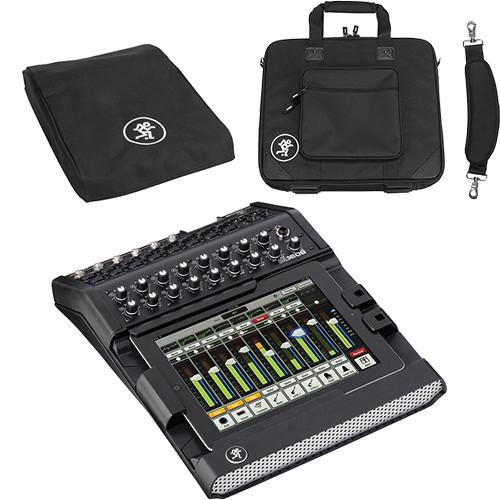
User Manual for Mackie DL1608 iPad-Controlled 16-Channel Lightning Connector Digital Live Sound Mixer with Mixer Bag and Mixer Cover Click to enlarge the picture
 Contents of the user manual for the Mackie DL1608 iPad-Controlled 16-Channel Lightning Connector
- Product category: Digital Mixers Mackie
- Brand: Mackie
- Description and content of package
- Technical information and basic settings
- Frequently asked questions – FAQ
- Troubleshooting (does not switch on, does not respond, error message, what do I do if...)
- Authorized service for Mackie Digital Mixers
|
User manual for the Mackie DL1608 iPad-Controlled 16-Channel Lightning Connector contain basic instructions
that need to be followed during installation and operation.
Before starting your appliance, the user manual should be read through carefully.
Follow all the safety instructions and warnings, and be guided by the given recommendations.
User manual is an integral part of any Mackie product,
and if it is sold or transferred, they should be handed over jointly with the product.
Following the instructions for use is an essential prerequisite for protecting
health and property during use, as well as recognition of liability on the part of the manufacturer
for possible defects should you make a warranty claim. Download an official Mackie user manual in which you will find instructions on how to install, use, maintain and service your product.
And do not forget – unsuitable use of a Mackie product will considerably shorten its lifespan!
|
Product description The Mackie DL1608 iPad-Controlled 16-Channel Lightning Connector Digital Live Sound Mixer with Mixer Bag and Mixer Cover comes with everything you need to start building your mobile live sound rig. It features the DL1608 iPad-Controlled 16-Channel Digital Live Sound Mixer with Lightning Connector, a custom-fit mixer cover, and a custom-fit mixer bag for storage and transport. - Mackie DL1608 iPad-Controlled 16-Channel Digital Live Sound Mixer with Lightning Connector
- Mackie DL32R - Product Presentation (Full Version)
The Mackie DL1608 16-Channel Digital Live Sound Mixer with Lightning Connector allows the entire process of live-sound mixing to be controlled by an iPad. The DL1608 features 16 Onyx microphone preamps, 24-bit A/D & D/A converters, powerful internal DSP processing and an iPad docking faceplate. Integrate your Lightning Apple iPad and complete the setup for a live sound mixing experience that takes advantage of the iPad's touchscreen capabilities and wireless control.Use Mackie's Master Fader app to mix live audio and access the DL1608's internal processing, including 4-band EQ, compression, gate, delay, reverb and 31-band graphic EQ. Add a wireless router (not included) and mix with your iPad remotely, at various locations of a venue, hall, etc. The DL1608 takes full advantage of the iPad's flexibility, and features like Channel Images allow you to take pictures of band members and use the images as channel markers for easy referencing. - Conrol the Mix From Anywhere
- With the Mackie DL1608's seamless wired to wireless mixing capabilities, you can mix in real time from anywhere in the venue on your iPad (requires wireless router, sold separately). Instantly adjust mix functions from tuning front of house trouble spots to ringing out stage monitors.
- 16 Onyx Preamps
- The Mackie DL1608 comes loaded with 16 studio-quality Onyx mic preamps that deliver depth, headroom and immense detail to your live mix. Plus, with 12 XLR and four combo mic/line inputs, connecting mics and instruments is quick and easy.
- 24-Bit Cirrus Logic AD/DA Converters
- The Mackie DL1608's high-end 24bit Cirrus Logic AD/DA converters offer a remarkable 114 dB dynamic range. We align our Onyx pre-amps precisely with the converters to provide you with the most headroom and the lowest noise and distortion possible-resulting in brilliant sound quality from a vocal whisper to a wailing guitar solo.
- Built-In Processing (DSP)
- The DL1608 is loaded with a choice of powerful plug-ins on every channel, so you won't need to set up additional racks of outboard gear. With just the touch of a finger, you have total control over 4-band EQ, compression and gate plug-ins. Plus, sweeten your sound with a full-featured reverb and tap delay or adjust your mix to the room with the 31-band graphic EQ and compressor/limiter on the main and aux outs.
- Multiple iPad Support
- Supporting up to 10 iPads simultaneously, the Mackie DL1608 allows multiple engineers to control the mix. Plus, it gives band members the ability to adjust their own monitors. Now, the band can dial in the mix they want to hear in real time right on stage.
- Snapshot Recall
- The Mackie DL1608 allows you to recall mix functions with just the touch of a finger. With Total Snapshot Recall*, you can now easily save and access sound check settings for multiple bands, complex song mixes, previous mixes from challenging venues, recall scenes for theater productions and more. You can even pre-set the mixing board and be ready to go the moment you arrive. *Mic pre-amp gains are not recallable.
- Channel Presets
- Quickly set up a new mix with the DL1608's Channel Presets. With simple touchscreen control, you can immediately assign a factory or your own custom channel preset for kick drum, bass, guitar, keyboard and more to any channel you choose. And when you've made the perfect settings, easily save them for later use and share them with your friends.
- Record for Easy Sharing
- The Mackie DL1608 lets you to record your mix from the L/R stereo outputs directly to your iPad, allowing you to upload it to your favorite application and share it with others.
- Integrate Music from Any App
- Whether you want to play pre-show music or add a Garage Band track to your live mix, with the Mackie DL1608 you can bring in stereo audio from any iPad application. Best of all, with the pre-assigned iPad channel, you can do it without using up one of the mixer's 16 channels.* *iPad must be docked.
- Channel Images
- The DL1608 lets you take a picture of band members with your iPad or choose your own picture to help you easily identify your assigned channels. There's a choice of included icons to get you up and running.
- Install Friendly Features
- The Mackie DL1608 is perfect for installing in venues. With its easy to use Master Fader iPad application it has never been easier to train up new sound engineers. Plus, forget the bulky racks of outboard gear, the powerfully small, low profile design lets you install it just about anywhere.
- Big on Security
- The DL1608 is big on security. The padlock feature locks down your iPad for permanent installs, while the Kensington lock-the industry standard in protecting technological equipment-secures the mixer to guard it from theft.
- Dock Compatibility
-
- Dock compatible with iPad (2017), iPad Pro 9.7-inch, iPad Air 2, iPad Air, and iPad (4th generation)
- Optional dock available for iPad mini 3, iPad mini 2 and iPad mini
UPC: 663961041590 - Mackie Mixer Bag for DL806 and DL1608 (Black)
- Mackie DL32R - Product Presentation (Full Version)
The black Mixer Bag for DL806 and DL1608 from Mackie uses high-impact, high-density foam, and durable nylon with an EVA (ethylene vinyl acetate) shield to protect your mixer. It features a sturdy, padded shoulder strap for easy transport. It also has a double zipper for faster access to the contents. - Carry-On Form Factor
- FAA and airline carry-on specifications are subject to change without notice, please check with your airline before designating this case as a carry-on item. Most airlines require carry-on items to have an external linear measurement that is equal to or less than 45.0" (114.3 cm). The external dimensions of this case add up to 38.5" (97.8 cm)
UPC: 663961035735 - Mackie Mixer Cover for DL806 and DL1608 (Black)
- Mackie DL32R - Product Presentation (Full Version)
The black Mixer Cover for DL806 and DL1608 from Mackie is used in conjunction with the 806/1608 Bag. It is made of 600-nylon and features a touch-fastened flap for cable access. UPC: 663961035742 In the Box - DL1608 iPad-Controlled 16-Channel Digital Live Sound Mixer with Lightning Connector sbbsvwxzucey
- DL1608 Padlock
- 12 VDC Power Block
- Limited 1-Year Warranty
- Mixer Bag for DL806 and DL1608 (Black) sbbsvwxzucey
- Mixer Cover for DL806 and DL1608 (Black)
Table of Contents
|
Upload User Manual
Have you got an user manual for the Mackie DL1608 iPad-Controlled 16-Channel Lightning Connector Digital Live Sound Mixer with Mixer Bag and Mixer Cover in electronic form? Please send it to us and help us expand our library of instruction manuals.
Thank you, too, on behalf of other users.
To upload the product manual, we first need to check and make sure you are not a robot. After that, your "Submit Link" or "Upload File" will appear.
Technical parameters - Mackie DL1608 iPad-Controlled 16-Channel Digital Live Sound Mixer with Lightning Connector
| | | Input Connections | 12x XLR balanced
4x XLR / 1/4" TRS combo jack | | Mic Preamps | Onyx | | Input Impedances | Channels 1 - 12: 3 kOhms
Channels 13 - 16: 3 kOhms XLR, 30 kOhms 1/4" TRS | | Maximum Input Level | XLR: +21 dBu
1/4" TRS: +30 dBu | | Gain | XLR: 0 to 60 dB
1/4" TRS: -20 to 40 dB | | Phantom Power | +48 V
10 mA max per mic, with up to 8 mics
5 mA max per mic, with up to 16 mics | | Output Connections | 2x XLR balanced (L/R) | | Output Impedance | 600 Ohms | | Maximum Output Level | +21 dBu | | AUX Sends | 1/4" TRS - supports balanced/unbalanced
240 Ohms balanced, 120 Ohms unbalanced
+21 dBu max output level | | | | Sample Rate | 48 kHz | | Bit Depth | 24-bit | | Latency | 1.5 mS | | | | Frequency Response | 20 Hz to 20 kHz, +0 /-1 dB
all inputs to all outputs | | THD | < 0.005%
mic input to main output, 1 kHz @ -1 dBFS | | EIN | -128 dBu @ 150 Ω termination | | Noise | Mic input to main output, A-weighted:
-79 dBu, with channel and main faders @ 0 dB
-90 dBu, with channel and main faders @ -∞ dB | | Crosstalk | Adjacent inputs: < -120 dB @ 1 kHz
Outputs: < - 105 dB @ 1 kHz | | Signal-to-Noise Ratio | 92 dB
ref +4 dBu, one channel and main fader @ 0 dB, A-weighted | | Dynamic Range | 109 dB
one channel and main fader @ 0 dB, A-weighted | | CMRR | > 70 dB @ 1 kHz (60 dB gain) | | | | Connector | 100 MB Ethernet | | Control | Complete | | Simultaneously Connected Remote Stations | Up to 10 iPads | | iPad System Requirements | Lightning connector iPad
iOS v5.0 or higher | | Dock Compatibility | Dock compatible with iPad (2017), iPad Pro 9.7-inch, iPad Air 2, iPad Air, and iPad (4th generation)
Optional dock available for iPad mini 3, iPad mini 2 and iPad mini | | | | External Power Supply | Yes
100-240 VAC, 50-60 Hz, Universal
User-replaceable IEC | | Output Voltage | 12 VDC | | Current | 4 A | | DC Plug | 5.5 x 2.5 mm barrel with locking ring | | Power Consumption | 48 W max | | | | Operating Temperature | 32 to 104°F (0 to 40°C) | | Dimensions (W x H x D) | 11.5 x 3.7 x 15.4" (291 x 95 x 391 mm)
9U rackmount plus space for connections | | Weight | 6.9 lb (3.1 kg) | | | | Box Dimensions (LxWxH) | 19.0 x 18.4 x 6.3" | - Mackie Mixer Bag for DL806 and DL1608 (Black)
| Material | 600-D nylon
High-density, 10 mm foam
EVA (ethylene vinyl acetate) | | Type of Closure | Double zipper | | Exterior Dimensions | 15.0 x 5.0 x 18.5" (38.1 x 12.7 x 47.0 cm) | | Interior Dimensions | Not Specified by Manufacturer | | Carrying/Transport Options | Shoulder strap | | Weight | Not Specified by Manufacturer | | | | Box Dimensions (LxWxH) | 19.1 x 15.4 x 2.4" | - Mackie Mixer Cover for DL806 and DL1608 (Black)
| Material | 600-D nylon | | Type of Closure | Touch-fastened flap | | Exterior Dimensions | 12.5 x 1.0 x 20.5" (31.8 x 2.5 x 52.1 cm) | | Interior Dimensions | Not Specified by Manufacturer | | Carrying/Transport Options | Not Specified by Manufacturer | | Weight | Not Specified by Manufacturer | | | | Box Dimensions (LxWxH) | 19.25 x 10.4 x 1.7" |
Rating70% users recommend this product to others. And what about you?

This product has already been rated by 08 owners. Add your rating and experience with the product.
Discussion
 Ask our technicians if you have a problem with your settings,
or if anything is unclear in the user manual you have downloaded.
You can make use of our moderated discussion.
The discussion is public and helps other users of our website who may be encountering similar problems.
Ask our technicians if you have a problem with your settings,
or if anything is unclear in the user manual you have downloaded.
You can make use of our moderated discussion.
The discussion is public and helps other users of our website who may be encountering similar problems.
The discussion is empty - enter the first post
Post a new topic / query / comment:
|
|
|
| Request for user manual |
You can’t find the operation manual you are looking for? Let us know and we will try to add the missing manual:
I’m looking for a manual / Request for manual
Current requests for instruction manuals:
Call Of Duty World War Two For Xbox...
controller stratus XL...
stratus XL...
smart whatch serie S11 42mm...
Allen & Heath SQ-6 manual...
|
| Discussion |
Latest contributions to the discussion:
AEW R 4100
Name: MAURICIO ANGARITA
Audio-Technica AEW-R4100 UHF Diversity Receiver for
AEW R 4100 has the mute function blocked and does not allow audio to pass. I tried several times to turn off the mute from the transmitter but it does nothing, the mute stays on. Solution?
Thank you...
Instructions for assembling the 2015 Forecast Image Master Consoles GC3-A
Name: mike elam
Forecast Consoles GC3-A ImageMaster Editing Console
Looking for instructions for assembling this console. ...
EMPTY TONER ERROR MESSAGE AFTER REPLACING TONER
Name: LINDA BAD YELLOW EYES
Brother TN223BK Standard-Yield Toner
I HAD TO CHANGE OUT ALL THREE TONERS DUE TO LEAKS IN THE YELLOW AND CYAN. AFTER I REPLACED THEM, THE MACHINE KEEPS GIVING ME AN EMPTY TONER ERROR MESSAGE. HELP!!...
PS480D 20/24 pin Switching 480W Power Supply
Name: swkargo
Logisys 480W Power Supply
This item states in can run -5vdc .It is NOT listed on the board or I beleive is r4 is missing the resitior. Any body have thid issue. Shawn
...
Help needed
Name: Ann Carter
SanDisk 1TB Extreme Portable USB 3.1
When I click the link to download the user manual for my Sandisk Extreme external hard drive, it gives me the manual for the LG Cricket. Can you please change the link so I can download the Sandisk manual and begin using this drive? Thank you....
|
|


