|
User Manual for Mackie SP260 2 x 6 Loudspeaker System Processor Click to enlarge the picture
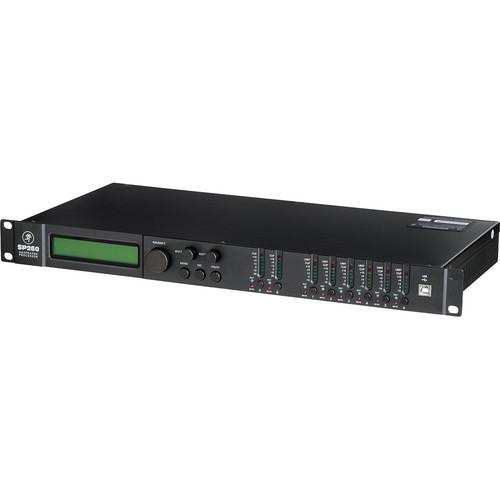 Contents of the user manual for the Mackie SP260 2 x 6 Loudspeaker
- Product category: System Processors Mackie
- Brand: Mackie
- Description and content of package
- Technical information and basic settings
- Frequently asked questions – FAQ
- Troubleshooting (does not switch on, does not respond, error message, what do I do if...)
- Authorized service for Mackie System Processors
 |
User manual for the Mackie SP260 2 x 6 Loudspeaker contain basic instructions
that need to be followed during installation and operation.
Before starting your appliance, the user manual should be read through carefully.
Follow all the safety instructions and warnings, and be guided by the given recommendations.
User manual is an integral part of any Mackie product,
and if it is sold or transferred, they should be handed over jointly with the product.
Following the instructions for use is an essential prerequisite for protecting
health and property during use, as well as recognition of liability on the part of the manufacturer
for possible defects should you make a warranty claim. Download an official Mackie user manual in which you will find instructions on how to install, use, maintain and service your product.
And do not forget – unsuitable use of a Mackie product will considerably shorten its lifespan!
|
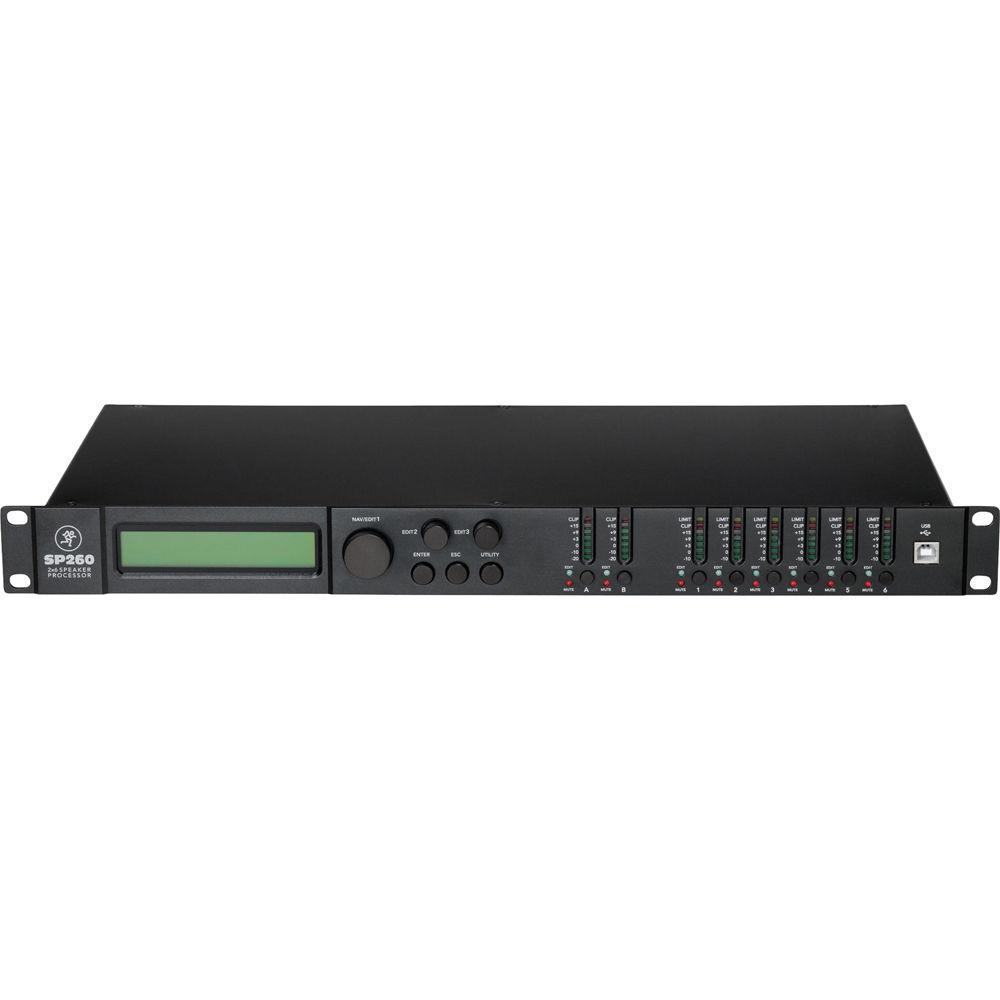
Product description The Mackie SP260 2 x 6 Loudspeaker System Processor offers sophisticated EQ, crossover, dynamics processing, and system protection. It provides complete system optimization for both passive and powered systems. Five different operating modes cover a wide range of systems. Each input and output is loaded with a huge range of processing including flexible EQ, crossover, delay, and limiting solutions. It delivers everything you need to professionally optimize loudspeaker systems of nearly any size.
The SP260 utilizes 24-bit AKM AD/DA converters with 120 dB dynamic range for good sound quality. With 24 user-definable presets and flexible I/O for simple routing and configuration, the SP260 is an ultra-flexible processor, suitable for a wide range of portable and permanent applications.
The processor has 2 inputs that instantly connect your mix into a whole host of processing and routing capabilities. Your input signal will never be the same. Each input features a mute switch and variable gain control. Now, you can easily control the whole system regardless of how many boxes you have. You can turn these down and the entire system turns down. It features 5-band EQ on both inputs. You can choose between parametric or high/low shelving, providing a flexible approach to room tuning that is sure to please any professional engineer. There’s even a 600 ms delay available on each input. This is useful when using multiple SP260s to drive delay stacks in really big venues. You can also time align the stage with the main speakers.
There are 6 individual outputs on the Mackie SP260, providing a wide range of possible connections, depending on your system. To start, each output features a mute switch and individual gain adjustment. This allows you to turn up the subs for a bit more low end or get a little more volume to another zone without having to walk out and adjust the power amps.
Each output also features a dedicated 7-band EQ, complete with selectable parametric or shelving control per band. This feature is critical for properly voicing a loudspeaker for the program material being presented or for the venue it is in. Adjusting the voicing with this comprehensive EQ control allows you dial in the suitable response curve for the system and application at hand.
There are many other ways to optimize your passive or active loudspeaker system. The SP260 high and low pass filters allow you to easily create a crossover for your full-range speakers and subs or bi-/tri amped systems. These filters also allow you to roll off frequencies your speaker may not be able to handle. This helps to focus energy where it’s needed, preventing needless heat loss and possible driver over-excursion. There are 8 different types of filters available with varying degree of slope. The following types are available with slope choices in the first through 4th order: Butterworth, Bessel, and Linkwitz-Reilly. For each output, you also get to choose input routing, from input A, input B, or a mono sum of both (suitable for subwoofers or for sending a mono feed to the foyer).
There’s also a 600 ms delay on each output, giving you a wide range of control. You can use it to create delay stacks down the street at a block party. Maybe extra coverage is needed in a balcony for service. You will want to time align that signal for sure. But, if you want to get uber-professional you can take advantage of the fact that the SP260 can adjust delay down to 20 ms increments. This allows you to time-align drivers on stage to provide superior summing. The display conveniently lets you see delay in ms, feet, or meters depending on the situation. You can combine this with the polarity invert feature for a system that is appropriately summed for optimum response.
There’s even a powerful limiter to protect your system from being tampered. A system lock feature keeps your system safe from the occasional (and, of course, accidental) bump. You can even impose a password protection system for enhanced security. - Professional Sound Quality
- The SP260 is specifically designed for the professional audio engineer. If you know your Butterworths from your Bessels, or if Linkwitz-Reily is your middle name, the SP260 gives you total control over every single parameter. You can adjust the system based on the venue and gear and be rest assured of achieving premium sound quality. With high-end AKM AD/DA converters with 120 dB dynamic range and a DSP engine and algorithms, you can count on superior sound quality every time.
- Simple Setup
- You can easily choose from a range of pre-configured system setups to assign the correct inputs; name outputs and provide the starting crossover point for your system. This saves time when dealing with complicated systems that involve zone control, cry rooms, or with bi- or tri-amped loudspeakers. From there, use all the available input and output processing to optimize your system for the venue. Once that's done, you can easily save the setup in one of the 24 available presets. This is useful when you use your system in the same place often or switch between different sets of gear, depending on the venue. Downloadable presets have been created for popular systems that give you a huge head start for setup. Plus, with the ability to link inputs or any combination of outputs, you can save serious time adjusting parameters that you intend to repeat on other channels.
- Powerful Desktop Software
- With the SP260 Control Application, you have total control over your system from an easy-to-use interface. Just plug in your Windows laptop via the convenient front panel USB port to harness the power of the app. The software auto-detects the SP260 and shows the current settings. Each and every SP260 feature is controllable using the app, which features a high-contrast design suitable for low-lit areas like the front of the house. The smart design of the app is built around maximum workflow, so all processing elements for any input or output are viewable and controllable from a single screen. You can even manage and store your presets on the PC for later implementation. This allows you to setup for shows ahead of time or adjust things you'd like to improve for the next show.
- A Complete System Solution
- Passive, powered, bi-amped, tri-amped, delay stacks, fill stacks, cry rooms, and balcony clusters. Everything is manageable with the SP260. Getting total control over your system and sounding professional has never been easier. The SP260 is a potent piece that suits and protects your powered or passive PA.
- Additional Features
-
- Professional 2-input, 6-output system processor for passive and powered PAs
- Sophisticated, intuitive EQ, crossover, delay, and dynamics processing optimizes and protects your system
- High-end 24-bit AKM AD/DA converters with 120 dB dynamic range
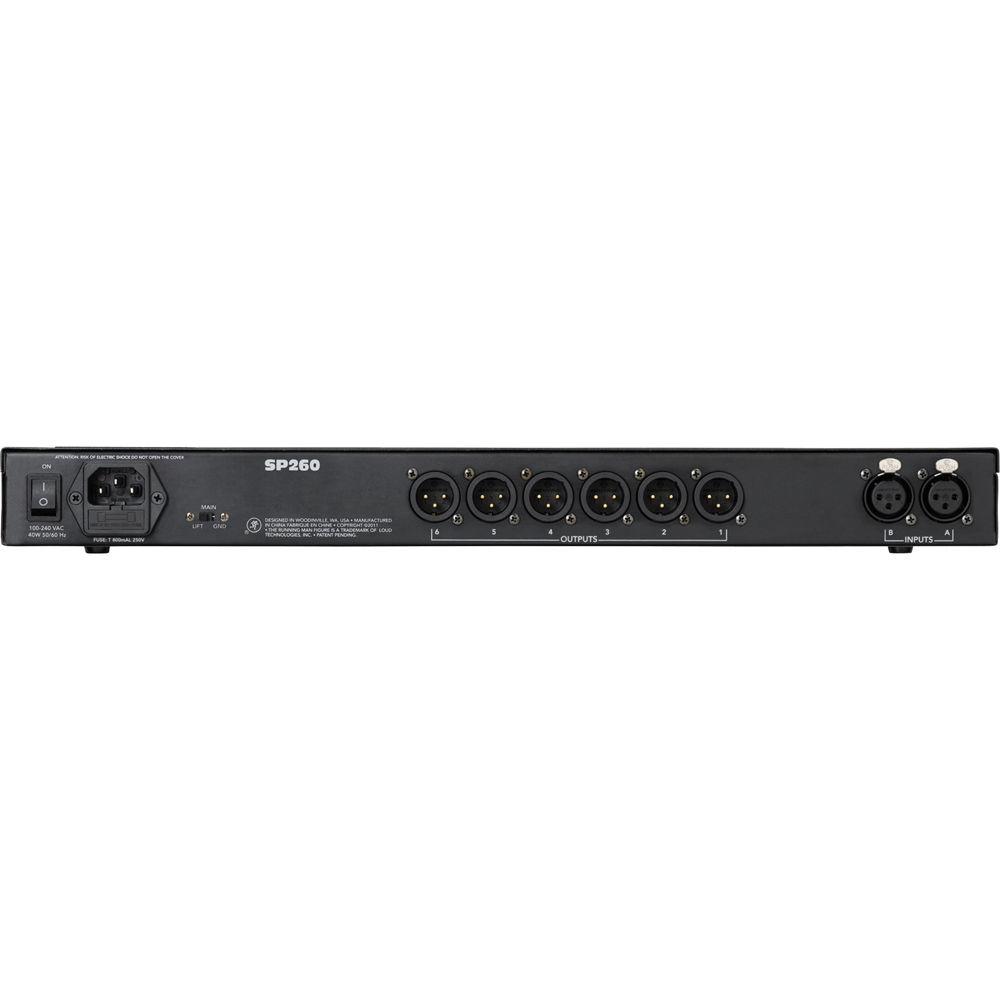
- Two balanced XLR inputs with level control, mute, 600 ms delay, and 5-band parametric/shelving EQ
- Six balanced XLR outputs with level control, mute, polarity invert, dedicated high and low pass filters, 7-band parametric/shelving EQ, 600 ms delay, and limiting
- Powerful limiter on every output for ultimate protection
- Convenient front-panel controls for parameter editing and input/output muting
- USB port for simple programming via PC
- Linkable inputs and outputs for easy stereo configuration
- 7-segment LED metering for input/output level or limiter activity
- 5 Operating Modes: 2 x stereo + sub, 3 x stereo, 2 x 2-way + sub, 2 x 3-way, and 1 x 6-way
- 24 presets for storing your Mackie or other system parameters
- Switchmode Power Supply: 100 to 240V
- Compact, single rack unit design
UPC: 663961036541 In the Box Mackie SP260 2 x 6 Loudspeaker System Processor Limited 1-Year Warranty Table of Contents
|
Upload User Manual
Have you got an user manual for the Mackie SP260 2 x 6 Loudspeaker System Processor in electronic form? Please send it to us and help us expand our library of instruction manuals.
Thank you, too, on behalf of other users.
To upload the product manual, we first need to check and make sure you are not a robot. After that, your "Submit Link" or "Upload File" will appear.
Technical parametersMackie SP260 Specs | | | Operating Modes | 2 x Stereo + Sub: 2 full-range loudspeaker pairs and a pair of (mono by default) subwoofers
2 x 2 Way + Sub: 2 bi-ampable full-range loudspeakers and a pair of (mono by default) subwoofers
2 x 3 Way: 2 tri-ampable full-range loudspeakers
3 x Stereo: 3 full-range loudspeaker pairs
1 x 6 Way: Mono 6-way setup | | | | Gain | ±15 dB
±0.1 dB increments | | Delay | Time (ms): 0.00 to 600.99 ms
±1.00 & ±0.02 ms increments
Distance: 0.00 to 670.23' (0.00 to 204.33 m)
±1.11 & ±0.02' (±0.34 & ±0.007 m) increments | | Bypass | EQ: On or Off | | Band | 5-Band EQ:
Frequency: 20 Hz to 20 kHz, 1/24 octave increments
Bandwidth: 0.05 to 3.0, ±0.05 increments
Gain: ±15 dB, ±0.05 dB increments
High or Low-Shelving: 6 or 12 dB/octave | | | | Name | User-editable | | Source | InA, InB, InA+InB | | Polarity | 180˚ invert | | Gain | -12.0 to +6.0 dB, ±0.1 dB increments | | Bypass | EQ: On or Off | | Band | 7-Band EQ:
Frequency: 20 Hz to 20 kHz, 1/24 octave increments
Bandwidth: 0.05 to 3.0, ±0.05 increments
Gain: ±15 dB, ±0.05 dB increments
High or Low-Shelving: 6 or 12 dB/octave | | Delay | Time: 0.00 to 600.99 ms
±1.00 & ±0.02 ms increments
Distance: 0.00 to 670.23' (0.00 to 204.33 m)
±1.11 & ±0.02' (±0.34 & ±0.007 m) increments | | Filter | High- and Low-Pass:
Frequency: 20 Hz to 20 kHz Filter / Slope: No Cut-Off
Butterworth 6 dB/octave
Butterworth 12 dB/octave
Linkwitz-Riley 12 dB/octave
Bessel 12 dB/octave
Butterworth 18 dB/octave
Butterworth 24 dB/octave
Linkwitz-Riley 24 dB/octave
Bessel 24 dB/octave | | Limiter | Attack: 5 to 200 ms
(5 ms to 20 ms) ±1 ms increments
(20 ms to 30 ms) ±5 ms increments
(30 ms to 100 ms) ±10 ms increments
(100 ms to 200 ms) ±20 ms increments
Release: 0.1 to 3.0 sec, ±0.1 sec increments
Threshold: -10 to +20 dBu, ±0.2 dBu increments | | | | Connector | 2 balanced XLRs | | Max Input Signal | Line Level: +20 dBu | | CMRR | >58 dB | | Input Meters | Range: Clip: -20, -10, 0, +3, +9, +15 dBu | | | | Connector | Outputs: 6 balanced XLRs | | Max Input Signal | Line Level: +21 dBu | | Meter | Output Range:
Level Mode: Limit Mode
Limit: Limit
Clip: 0 dBr
+15 dBu: -3 dBr
+9 dBu: -6 dBr
+3 dBu: -9 dBr
0 dBu: -12 dBr
-15 dBu: -15 dBr | | | | Converter | Type: 24-bit AKM | | Dynamic Range | 120 dB | | Sample Rate | 48 kHz | | Bit Depth | 24-bit | | | | Frequency Response | 20 Hz to 20 kHz, ±0.2 dB | | Dynamic Range | 111 dB A-weighted
108 dB unweighted | | | | Distortion | Frequency: 20 Hz to 20 kHz: <0.004% | | | | Crosstalk | Interchannel: 22 Hz to 22 kHz (unweighted)
-107 dB (+20 dBu @ 1 kHz)
Input to Output: -107 dB (+20 dBu @ 1 kHz) | | | | Format | USB 1.1 USB port for programming via Windows-based computers. App and driver downloadable from the Mackie website. | | | | Power Consumption | AC: 40 W | | Power Supply (AC) | Universal: 100 to 240 VAC, 50 to 60 Hz | | Power Connector | 3-pin IEC | | Operating Temperature | Extended Ambient Temperature: 32 to 104˚F (0 to 40˚C) | | Software Requirements | PC: Microsoft Windows 7 32/64 SP 1, Vista 32/64 SP 2 or XP 32 SP 3
Pentium 4, Celeron, or Athlon XP processor
512 MB RAM | | | | Display | 2 x 24-character LCD with backlight | | Height | 1.8" (46.0 mm)
(1U rack mount design) | | Width | Front: 19.0" (483.0 mm)
Rear: 17.3" (439.0 mm) | | Depth | 9.0" (229.0 mm) | | Weight | 5.8 lb (2.6 kg) | | | | Package Weight | 8.25 lb | | Box Dimensions (LxWxH) | 21.1 x 12.1 x 4.4" |
Rating80% users recommend this product to others. And what about you?

This product has already been rated by 47 owners. Add your rating and experience with the product.
Discussion
 Ask our technicians if you have a problem with your settings,
or if anything is unclear in the user manual you have downloaded.
You can make use of our moderated discussion.
The discussion is public and helps other users of our website who may be encountering similar problems.
Ask our technicians if you have a problem with your settings,
or if anything is unclear in the user manual you have downloaded.
You can make use of our moderated discussion.
The discussion is public and helps other users of our website who may be encountering similar problems.
The discussion is empty - enter the first post
Post a new topic / query / comment:
|
|
|
| Request for user manual |
You can’t find the operation manual you are looking for? Let us know and we will try to add the missing manual:
I’m looking for a manual / Request for manual
Current requests for instruction manuals:
Call Of Duty World War Two For Xbox...
controller stratus XL...
stratus XL...
smart whatch serie S11 42mm...
Allen & Heath SQ-6 manual...
|
| Discussion |
Latest contributions to the discussion:
AEW R 4100
Name: MAURICIO ANGARITA
Audio-Technica AEW-R4100 UHF Diversity Receiver for
AEW R 4100 has the mute function blocked and does not allow audio to pass. I tried several times to turn off the mute from the transmitter but it does nothing, the mute stays on. Solution?
Thank you...
Instructions for assembling the 2015 Forecast Image Master Consoles GC3-A
Name: mike elam
Forecast Consoles GC3-A ImageMaster Editing Console
Looking for instructions for assembling this console. ...
EMPTY TONER ERROR MESSAGE AFTER REPLACING TONER
Name: LINDA BAD YELLOW EYES
Brother TN223BK Standard-Yield Toner
I HAD TO CHANGE OUT ALL THREE TONERS DUE TO LEAKS IN THE YELLOW AND CYAN. AFTER I REPLACED THEM, THE MACHINE KEEPS GIVING ME AN EMPTY TONER ERROR MESSAGE. HELP!!...
PS480D 20/24 pin Switching 480W Power Supply
Name: swkargo
Logisys 480W Power Supply
This item states in can run -5vdc .It is NOT listed on the board or I beleive is r4 is missing the resitior. Any body have thid issue. Shawn
...
Help needed
Name: Ann Carter
SanDisk 1TB Extreme Portable USB 3.1
When I click the link to download the user manual for my Sandisk Extreme external hard drive, it gives me the manual for the LG Cricket. Can you please change the link so I can download the Sandisk manual and begin using this drive? Thank you....
|
|


