User Manual for Magenta HD-One LX HDMI, IR, and RS-232 Extender Kit Click to enlarge the picture
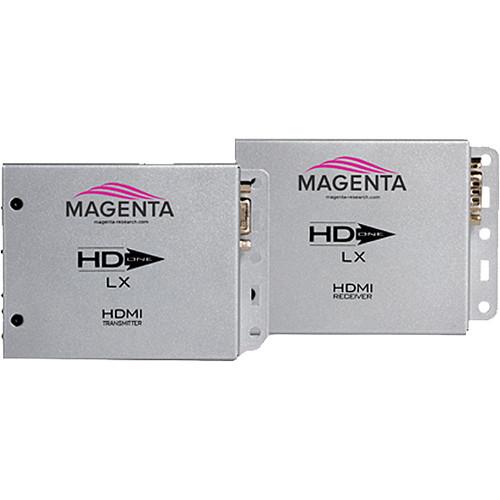 Contents of the user manual for the Magenta HD-One LX HDMI, IR, and
- Product category: Video Extenders & Repeaters Magenta
- Brand: Magenta
- Description and content of package
- Technical information and basic settings
- Frequently asked questions – FAQ
- Troubleshooting (does not switch on, does not respond, error message, what do I do if...)
- Authorized service for Magenta Video Extenders & Repeaters
 |
User manual for the Magenta HD-One LX HDMI, IR, and contain basic instructions
that need to be followed during installation and operation.
Before starting your appliance, the user manual should be read through carefully.
Follow all the safety instructions and warnings, and be guided by the given recommendations.
User manual is an integral part of any Magenta product,
and if it is sold or transferred, they should be handed over jointly with the product.
Following the instructions for use is an essential prerequisite for protecting
health and property during use, as well as recognition of liability on the part of the manufacturer
for possible defects should you make a warranty claim. Download an official Magenta user manual in which you will find instructions on how to install, use, maintain and service your product.
And do not forget – unsuitable use of a Magenta product will considerably shorten its lifespan!
|
Product description The Magenta Research HD-One LX HDMI, IR, and RS-232 Extender Kit delivers reliable, uncompressed, high-definition video over a single CAT5e/6/6e/7 cable to a distance of up to 328’ (100m). It consists of a transmitter and an extender unit.
This LX series extender offers additional support for bi-directional RS-232 and 2-way IR signals. For ease of use, the LX kit comes with a set of IR emitter/receiver cables. The LX receiver is also tunable to 3 different IR bands (36.7, 38.0, or 58.8 kHz). This extender kit is fully HDCP compliant and features plug-and-play functionality.
HDMI cables are difficult to terminate. UTP cables, meanwhile, are both cost-effective and easy to terminate in the field, making it easy for extending and HDMI or DVI source to almost any display. Note: This equipment is not intended for, nor does it support, distribution through an Ethernet network. Do not connect these devices to any sort of networking or telecommunications equipment.
The transmitter and receiver units do not feature daisy chain capability. The extender also supports other category cables, but CAT6 is recommended. For the types of supported cables, please refer to the specifications. - Includes one IR emitter/receiver pair
- Extends HDMI or DVI, serial, and IR signals over Category 5e/6/6a/6e/7 UTP, STP, or FTP cable
- Single UTP cable (sold separately) transfers video, audio, and HDCP signals
- An external switch lets you easily select from the following IR operating modes: 36.7, 38, or 56.8 kHz
- Extends uncompressed HD video (1920x1200 @ 60Hz) up to 328' (100m)
- Audio transmission supports Dolby TrueHD and DTS-HD Master Audio
- HDMI 1.4 and HDCP compliant
- No adjustments or tuning required
- Bi-directional RS-232 interface
- Two-way IR support (two IR dongles included)
- Integrated mounting flange
- Tolerances designed for commercial environments
- Typical applications include museums; large retail environments; high-end security, education, and residential environments; digital signage, wayfinding installations; and home theater
In the Box Magenta HD-One LX HDMI, IR, and RS-232 Extender Kit Transmitter/Emitter Receiver Unit 2 x IR Dongle 2 x Universal Power Supply Unit Limited 3-Year Warranty Table of Contents
|
Upload User Manual
Have you got an user manual for the Magenta HD-One LX HDMI, IR, and RS-232 Extender Kit in electronic form? Please send it to us and help us expand our library of instruction manuals.
Thank you, too, on behalf of other users.
To upload the product manual, we first need to check and make sure you are not a robot. After that, your "Submit Link" or "Upload File" will appear.
Technical parametersMagenta HD-One LX Specs | Connectors | Transmitter & Receiver
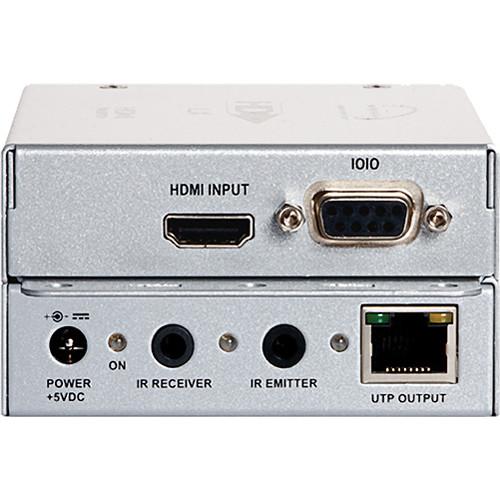
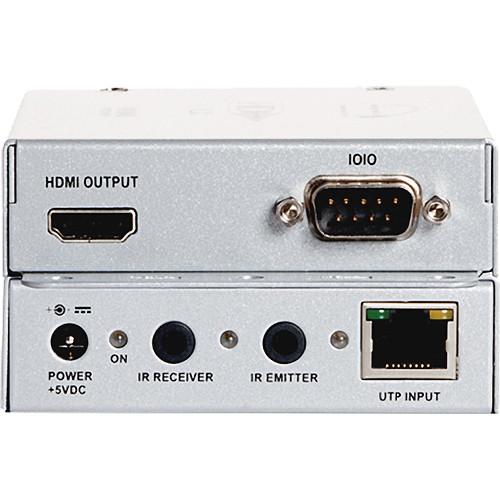
1 x HDMI Type A
1 x RJ45 (UPT in/out)
1 x DC power
1 x RS-232 (DB9 female)
2 x 3.5 mm jack | | Audio In/Out | Embedded with video signal | | Video Supported | HDMI 1.4, HDCP compliant
DVI video modes
Standard formats @ 60 Hz: 640 x 480, 800 x 600, 1024 x 768, 1152 x 864, 1280 x 768, 1280 x 960, 1280 x 1024, 1360 x 760, 1366 x 768, 1600 x 1200,1680 x 1050, 1920 x 1080, 1920 x 1200
HDTV: 480p, 720p, 1080i, and 1080p | | Resolution | WUXGA 1920 x 1200 @ 60 Hz
Note: To achieve maximum resolution and/or distance, it is strongly recommended that you use standard network CAT6 or better cable with a solid 24 AWG copper wire. The use of lower quality cables will lower overall performance. Please contact Magenta for cable recommendations. | | Audio Support | HDMI 1.4 Audio: SPDIF 2-channel PCM or 5.1, 6.1 Dolby Digital or DTS | | Transmission Distance | 328' (100 m)
Note: To achieve maximum resolution and/or distance, it is strongly recommended that you use standard network CAT6 or better cable with a solid 24 AWG copper wire. The use of lower quality cables will lower overall performance. Please contact Magenta for cable recommendations. | | Cables Supported | CAT5e, CAT6, CAT6a, CAT6e, CAT7 UTP, STP, or FTP (CAT6 or better is recommended)
Note: For best performance, use one continuous UTP / STP or FTP cable with as few breaks as possible (i.e., patch bays, wall plates, or floor boxes).
Magenta recommends mounting and connecting all cables to the HD-One DX500 Series components before applying power.
Make sure that the Category cable you intend to use has been tested to comply with the T568B wiring specification.
Magenta recommends that all Category cables be pre-terminated and tested. Cables terminated on-site or in an existing infrastructure should be tested before use to ensure compliance with the TIA-EIA T568B specification. Using incorrectly terminated category cables can damage the extender units. | | Bandwidth | 3.4 Gb/s | | Baud Rate (RS-232) | Up to 115,200 bps, full duplex | | IR Carrier | 36.7, 38, 56.8 kHz modulated emitter output, bi-directional | | Enclosure | Metal | | Indicators | Video status, data link, power | | Compliance | RoHS, CE, FCC Class A | | Power Requirements | Each Unit: 5 VDC @ 2.6 A maximum | | Power Consumption | Transmitter: 5 V @ 400 mA
Receiver: 5 V @ 850 mA These are average values. The AC/DC power-adapter rating must be a bit higher to accommodate the initial inrush-current at turn-on, which is typical of most devices. | | Temperature Tolerance | Operating: 32 to 131°F (0 to 55°C)
Storage: -4 to 185°F (-20 to 85°C) | | Humidity Tolerance | Up to 95% non-condensing | | Dimensions | Each Unit: 5.1 x 3.5 x 1.2" (13.0 x 8.8 x 3.0 cm) | | Weight | Each Unit: 0.60 lb (0.27 kg) | | | | Package Weight | 2.95 lb | | Box Dimensions (LxWxH) | 13.0 x 8.0 x 2.7" |
Rating70% users recommend this product to others. And what about you?

This product has already been rated by 08 owners. Add your rating and experience with the product.
Discussion
 Ask our technicians if you have a problem with your settings,
or if anything is unclear in the user manual you have downloaded.
You can make use of our moderated discussion.
The discussion is public and helps other users of our website who may be encountering similar problems.
Ask our technicians if you have a problem with your settings,
or if anything is unclear in the user manual you have downloaded.
You can make use of our moderated discussion.
The discussion is public and helps other users of our website who may be encountering similar problems.
The discussion is empty - enter the first post
Post a new topic / query / comment:
|
|


