User Manual for MAGIX Entertainment VEGAS Movie Studio 15 Click to enlarge the picture
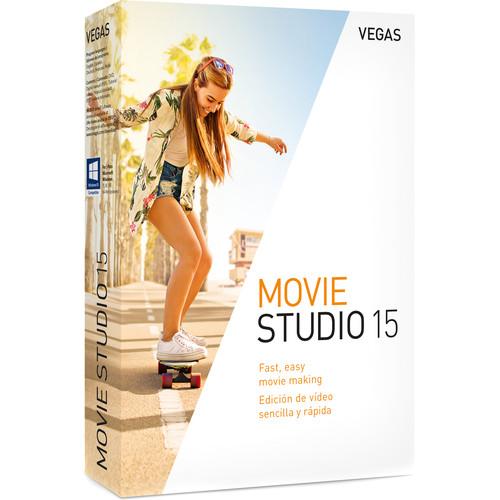 Contents of the user manual for the MAGIX Entertainment VEGAS Movie Studio 15
- Product category: Video Editing MAGIX Entertainment
- Brand: MAGIX Entertainment
- Description and content of package
- Technical information and basic settings
- Frequently asked questions – FAQ
- Troubleshooting (does not switch on, does not respond, error message, what do I do if...)
- Authorized service for MAGIX Entertainment Video Editing
|
User manual for the MAGIX Entertainment VEGAS Movie Studio 15 contain basic instructions
that need to be followed during installation and operation.
Before starting your appliance, the user manual should be read through carefully.
Follow all the safety instructions and warnings, and be guided by the given recommendations.
User manual is an integral part of any MAGIX Entertainment product,
and if it is sold or transferred, they should be handed over jointly with the product.
Following the instructions for use is an essential prerequisite for protecting
health and property during use, as well as recognition of liability on the part of the manufacturer
for possible defects should you make a warranty claim. Download an official MAGIX Entertainment user manual in which you will find instructions on how to install, use, maintain and service your product.
And do not forget – unsuitable use of a MAGIX Entertainment product will considerably shorten its lifespan!
|
Product description MAGIX VEGAS Movie Studio 15 allows you to create pro-level videos complete with effects, titles, transitions, and specialized plug-ins. VEGAS is known for having more audio tools than many peer applications, nevertheless Movie Studio 15 also comes with MAGIX Music Maker audio production software, which will let you apply additional levels of creativity to the music and audio in your projects. VEGAS Movie Studio 15 is compatible with Windows and requires relatively minimal hardware. The application supports up to 10 video tracks on the timeline in standard definition, HD, and 4K resolutions.
Movie Studio 15 provides tools to easily edit your videos and enhance them with features such as Crop, which allows you to cut out any part of an image you don't want and to keep the rest. True to its VEGAS legacy, Movie Studio 15 has a drag-and-drop workflow and the ability to handle various file types on the same timeline. All Features - Editing
-
- (New) Quickstart dashboard
- (New) Definable visible button sets
- (New) Event headers
- (New) Improved Add Media workflow
- (New) Event healing
- Make Movie wizard
- Real-time nondestructive editing
- Cursor object snapping across events and timeline
- Ripple-edit mode
- Track-level video and audio effects
- Clip event-level video and audio effects
- Event grouping
- Tape-style audio scrubbing
- A/V synchronization detection and repair
- Real-time event reverse
- General
-
- Built-in Show Me How tutorials
- Includes Music Maker
- Video
-
- 10 video tracks
- Unlimited video events per track
- Mask Generator plug-in
- Built-in video effects
- Vignette video effect
- Built-in 2D and 3D video transitions
- Credit rolls and text animation
- Automatic slideshow creator
- Chroma Key / Green Screen effect
- Support for 60p and 50p projects
- Built-in Open FX plug-ins
- Gradient Wipe transition
- Audio
-
- Built-in audio effects
- 16-bit/48 kHz max bitrate/bit depth
- Dolby 5.1 surround and stereo AC-3 encoding
- Volume automation envelopes
- Panning automation envelopes
- ACID loop properties support
- ASIO driver support
- Audio and video timestretching
- Slow-motion and fast-motion video
- Hardware / Capture / Export
-
- (New) NVIDIA and QSV hardware acceleration
- Support for Hi DPI monitors
- Render to Apple iPhone, iPad, and iPod compatible formats
- Print-to-tape tools
- Smart Render
- Native Format Support
-
- (New) Expanded support for mobile and other device video formats
- Upload to Vimeo, YouTube, and Facebook
- DSLR (.mov) files
- DV / HDV / AVCHD / NXCAM
- H.264 AVC / AAC MP4
- MPEG-1, -2, and -4 import and encoding
- Windows Media 11
- 4K XAVC S
- XDCAM EX
- BMP, JPG, PNG, TIFF, and WDP image sequences
- FLAC
- MP3
UPC: 639191920592 In the Box MAGIX Entertainment VEGAS Movie Studio 15 (Box) Box with CD and Activation Card Table of Contents
|
Upload User Manual
Have you got an user manual for the MAGIX Entertainment VEGAS Movie Studio 15 in electronic form? Please send it to us and help us expand our library of instruction manuals.
Thank you, too, on behalf of other users.
To upload the product manual, we first need to check and make sure you are not a robot. After that, your "Submit Link" or "Upload File" will appear.
Technical parametersMAGIX Entertainment Vegas Movie Studio 15 Specs | | | Operating System | 64-bit Microsoft Windows 7, 8, 8.1, or 10 | | CPU | 2 GHz processor (multicore or multiprocessor CPU recommended for HD or stereoscopic 3D) | | Hard Disk | 1.5 GB hard disk space for program installation | | RAM | 4 GB RAM (8 GB recommended; 16 GB recommended for 4K) | | Interface | USB 2.0 connection (for importing from AVCHD, XDCAM EX, NXCAM, or DVD camcorders) | | GPU | NVIDIA, AMD or Intel GPU with 512 MB memory | | Sound Card | Windows-compatible sound card | | Internet Connection | Required for download and registration | | Other | Microsoft .NET Framework 4.0 SP1 | | | | NVIDIA | 1 GB recommended for 4K (required for Smart Zoom / Smart Scale / Smart adaptive deinterlacing, and GPU-accelerated video processing)
For Hardware Rendering (NVEnc):
GeForce 600 series and higher (6xx, 7xx, 9xx, 10xx)
Quadro Kxxx, Mxxx, and Pxxx | | AMD/ATI | Requires an OpenCL-enabled GPU and Catalyst driver 11.7 or later with a Radeon HD 57xx or higher GPU. If using a FirePro GPU, FirePro unified driver 8.85 or later is required. | | | | Import | Video:
AVC/AAC, AVI, MPEG-1, MPEG-2, MPEG-4, WMV
Audio:
AAC, AA3, AIFF, FLAC, MP3, OGG, PCA, SND, W64, WAV, WMA
Images:
GIF, JPEG, PNG, WDP, BMP
Other:
CDA, SFA | | Export | Video:
AVC/AAC, AVI, MPEG-2, MPEG-4, WMV, MOV, AVCHD, RM, MVC, XAVC S
Audio:
AAC, AIFF, FLAC, LPEC, MP3, OGG, PCA, W64, WAV, WMA
Images:
BMP, JPEG, PNG, TIFF, WDP, WMPhoto, DDS, DPX, EXR | | | | Package Weight | 0.2 lb | | Box Dimensions (LxWxH) | 7.5 x 5.4 x 1.3" |
Rating90% users recommend this product to others. And what about you?

This product has already been rated by 86 owners. Add your rating and experience with the product.
Discussion
 Ask our technicians if you have a problem with your settings,
or if anything is unclear in the user manual you have downloaded.
You can make use of our moderated discussion.
The discussion is public and helps other users of our website who may be encountering similar problems.
Ask our technicians if you have a problem with your settings,
or if anything is unclear in the user manual you have downloaded.
You can make use of our moderated discussion.
The discussion is public and helps other users of our website who may be encountering similar problems.
The discussion is empty - enter the first post
Post a new topic / query / comment:
|
|


