User Manual for MagMod Basic Kit Click to enlarge the picture
 Contents of the user manual for the MagMod Basic Kit
- Product category: Flash Modifiers Others
- Brand: Others
- Description and content of package
- Technical information and basic settings
- Frequently asked questions – FAQ
- Troubleshooting (does not switch on, does not respond, error message, what do I do if...)
- Authorized service for Others Flash Modifiers
 |
User manual for the MagMod Basic Kit contain basic instructions
that need to be followed during installation and operation.
Before starting your appliance, the user manual should be read through carefully.
Follow all the safety instructions and warnings, and be guided by the given recommendations.
User manual is an integral part of any Others product,
and if it is sold or transferred, they should be handed over jointly with the product.
Following the instructions for use is an essential prerequisite for protecting
health and property during use, as well as recognition of liability on the part of the manufacturer
for possible defects should you make a warranty claim. Download an official Others user manual in which you will find instructions on how to install, use, maintain and service your product.
And do not forget – unsuitable use of a Others product will considerably shorten its lifespan!
|
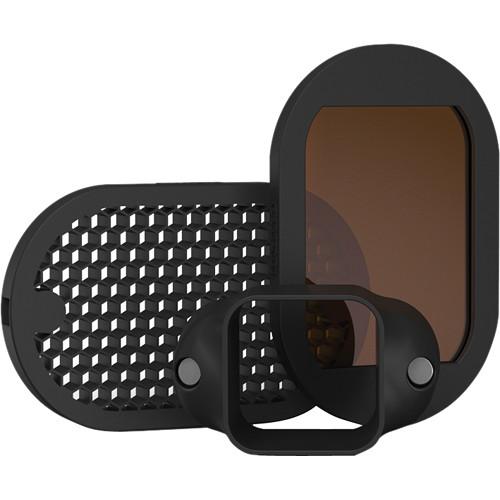
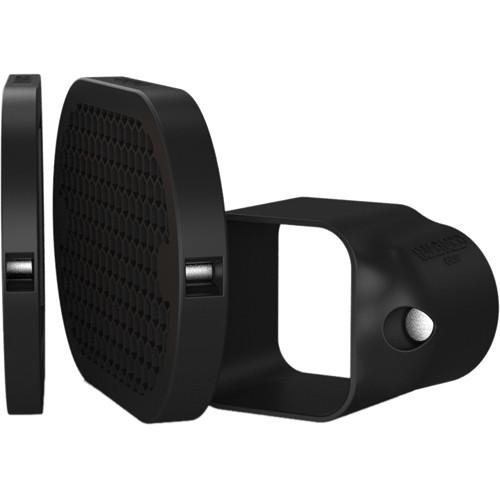
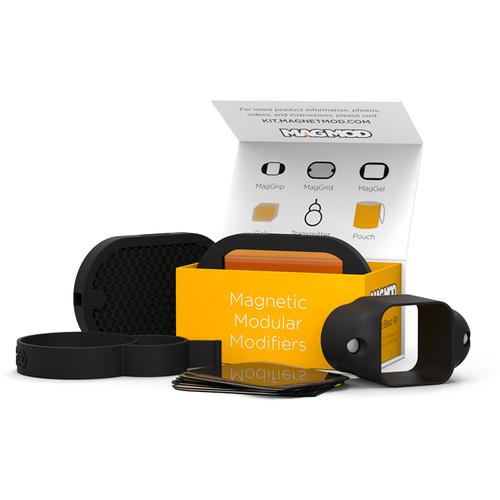
Product description Insert some creativity into your on-camera flash with the MagMod Basic Kit including a few core accessories for the MagMod flash modifier system. It features the MagGrip which stretches over your flash head and enables the use of other MagMod modifiers, such as the included MagGrid and MagGel Slot, which comes with eight different gels. Also bundled are a transmitter band for mounting a radio transmitter cleanly to your flash head and a carrying pouch for convenience. - MagGrip Made from an elastic silicone rubber, the MagGrip from MagMod stretches over the head of most on-camera flash units and provides two neodymium rare-earth magnets for quickly mounting a variety of accessories from the MagMod flash modifier system. The rubber offers a secure, tight grip on the flash head and is durable. Also, the flash head should be about 2.5" wide for the modifiers to be able to properly attach to the flash head.
- Compatible Flashes
- Canon: 380EX, 420EX, 430EX, 430EX II, 540EZ, 550EX, 580EX, 580EX II, 600EX-RT
Nikon: SB-24, SB-25, SB-26, SB-28(DX) SB-50DX, SB-80DX, SB-600, SB-700, SB-800, SB-900, SB-910
Sony: HVL-F60M, HVL-F58AM, HVL-F56AM
Olympus: FL-50R, FL-600R
Yongnuo: YN560, YN560-II, YN560-III, YN568EX-II, YN565EX
Neewer: TT560, NW680/TT680
Bolt: VX-710, VX-760, VS-510, VS-560
Bower: SFD680C, SFD728, SFD885, SFD926, SFD970
Pentax: AF540FGZ, AF540FGZ II, AF360FGZ
Sigma: EF-610
Metz: 44 AF-1, 52 AF-1, 52 AF-2, 58 AF-1, 58 AF-2
Vivitar: DF-286, DF-293, DF-383, DF-483, DF-583, 385HV
Phottix: Mitros, Mitros+
Nissin: i40, i60
Godox: AD200, TT350S, V850II, TT685S, V860II, TT660II, TT520II
This will also fit other similarly sized flash units UPC: 854211005008 - MagGrid Control light spill and narrow your flash's beam angle to 40° with the MagGrid, designed for the MagMod flash modifier system. This grid efficiently focuses the light and attaches to the MagGrip via two neodymium rare-earth magnets. Also, it is stackable with other accessories and even other MagGrids, allowing users to further narrow their beam angle. It is made from molded silicone rubber for a sleek, simple design with good durability. UPC: 854211005015
- Standard Gel Set Insert some color or correct your lighting with the Standard Gel Set, designed for use with the MagMod flash modifier system. The kit includes full, 1/2, and 1/4 CTO, 1/2 blue, 1/2 straw, 1/2 plusgreen, an 8X (3 stop) ND, and opal frost diffusion gels made from a rigid polycarbonate for durability and easier handling. They easily slide into the MagMod gel slot for quick attachment and removal. UPC: 854211005077
In the Box Bundle Items MagGrip MagGrid abvrfrztzswf Standard Gel Set
Also Includes - Transmitter Band
- Carrying Pouch
- Limited 1-Year Warranty
Table of Contents
|
Upload User Manual
Have you got an user manual for the MagMod Basic Kit in electronic form? Please send it to us and help us expand our library of instruction manuals.
Thank you, too, on behalf of other users.
To upload the product manual, we first need to check and make sure you are not a robot. After that, your "Submit Link" or "Upload File" will appear.
Technical parameters - MagGrip
| Material | Silicone Rubber | | Attachment | Elastic Band | | Mount | Magnetic | | Dimensions | 3.5 x 2.1 x 1.7" / 8.9 x 5.4 x 4.3 cm | | Weight | 4 oz / 113 g | | | | Box Dimensions (LxWxH) | 3.2 x 2.1 x 1.5" | - MagGrid
| Modifier Type | Grid | | Attachment Method | Magnetic | | Dimensions | H: 5.0 x W: 3.2 x L: 0.6" / H: 12.7 x W: 8.3 x L: 1.6 cm | | Weight | 4.0 oz / 113 g | | | | Box Dimensions (LxWxH) | 4.8 x 3.2 x 0.8" | - Standard Gel Set
| Modifier Type | Color Filter | | | | Box Dimensions (LxWxH) | 3.5 x 3.0 x 0.3" |
Rating94% users recommend this product to others. And what about you?

This product has already been rated by 61 owners. Add your rating and experience with the product.
Discussion
 Ask our technicians if you have a problem with your settings,
or if anything is unclear in the user manual you have downloaded.
You can make use of our moderated discussion.
The discussion is public and helps other users of our website who may be encountering similar problems.
Ask our technicians if you have a problem with your settings,
or if anything is unclear in the user manual you have downloaded.
You can make use of our moderated discussion.
The discussion is public and helps other users of our website who may be encountering similar problems.
The discussion is empty - enter the first post
Post a new topic / query / comment:
|
|


