|
User Manual for Mamiya Credo 80MP Wide Spectrum Digital Back with Mamiya 645 Mount Click to enlarge the picture
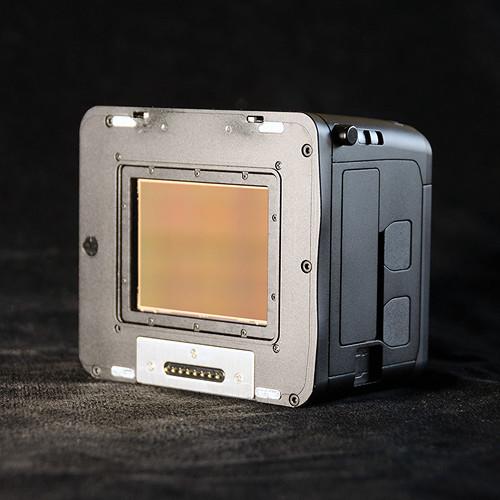 Contents of the user manual for the Mamiya Credo 80MP Wide Spectrum Digital
- Product category: Digital Backs Mamiya
- Brand: Mamiya
- Description and content of package
- Technical information and basic settings
- Frequently asked questions – FAQ
- Troubleshooting (does not switch on, does not respond, error message, what do I do if...)
- Authorized service for Mamiya Digital Backs
|
User manual for the Mamiya Credo 80MP Wide Spectrum Digital contain basic instructions
that need to be followed during installation and operation.
Before starting your appliance, the user manual should be read through carefully.
Follow all the safety instructions and warnings, and be guided by the given recommendations.
User manual is an integral part of any Mamiya product,
and if it is sold or transferred, they should be handed over jointly with the product.
Following the instructions for use is an essential prerequisite for protecting
health and property during use, as well as recognition of liability on the part of the manufacturer
for possible defects should you make a warranty claim. Download an official Mamiya user manual in which you will find instructions on how to install, use, maintain and service your product.
And do not forget – unsuitable use of a Mamiya product will considerably shorten its lifespan!
|
Product description The Credo 80MP Wide Spectrum Digital Back with Mamiya 645 Mount from Mamiya Leaf provides the same 80MP resolving power of the standard Credo 80MP Digital Back, but by replacing its Infrared + Ultra Violet cut filter with a plain glass filter, it enables capture of a wider light spectrum from approximately 380 to 1,100 nanometers. Near infrared and ultra-violet image capture provides benefits to certain photographic applications including landscape and beauty photography as well as scientific and conservation imaging. For example, when utilizing select filters in landscape photography, false colors can be created for expressionistic images, and in portrait work, skin blemishes are less visible in the IR spectrum and flash less noticeable. Another application is art conservation, where certain types of pigments can be detected in older paintings and when shooting vegetation, colors that indicate organic patterns and even disease can be more clearly seen. Of course, optional external filters can be used to selectively block specific wavelengths and let others pass through in order to create mixed color and standard color images. Like the standard Credo 80MP digital back the "WS" model features a 53.7 x 40.3mm DALSA CCD sensor with 35-800 ISO sensitivity range and a dynamic range of 12.5 f-stops. An expansive shutter speed of 1/10,000-120 seconds is enabled and continuous shooting speed is 0.7 fps. FireWire 800 and USB 3.0 connections are supported and 3.2" touch LCD provides image playback as well as camera settings control. Images can be recorded to CompactFlash memory cards or directly to your computer via a tethered connection. In partnership with Phase One, the Credo back offers Capture One workflow software to seamlessly edit, enhance, and present images, and with Capture Pilot, you can immediately preview images with an Apple iPhone or iPad and remotely control your camera. This model of the Credo WS 80MP back provides a Mamiya 645 mount for use with compatible medium format camera and lens systems. - The Credo 80MP Wide Spectrum Digital Back provides the same specs and features as the standard 80MP Credo; however, by replacing the IR+UV cut filter with a plain glass filter, a wider spectrum of light, including near infrared wavelengths, are recorded to the sensor. External filters can be utilized to selectively block specific wavelengths and let other wavelengths be recorded to create false color images as well as standard color images.
- The change in wavelength with the Credo WS results in a shift of the focus plane; when you use IR pass filters you have to adjust by focusing a bit closer to compensate for the focus shift. Infrared light creates a slightly different plane of sharpness compared to visible light, so when shooting with a 720 nm filter, you should always manually correct focus. Instead of using the white mark on the lens' focus scale, use the red mark, which is found on most Mamiya lenses.
- By using IR pass filters, you are essentially blocking longer wavelengths from being recorded; as a result, the red channel can be overexposed. To properly set exposure when shooting with a Leaf Credo WS back, it is important to pay attention to what the histogram says and compensate by using a smaller aperture, lower ISO, higher shutter speed or adjust the EV compensation on the body. If you use other filters (e.g. blue) you should follow the same practice. The high dynamic range of the Credo back allows you to recover shadow detail if necessary.
- 80MP Leaf Credo digital backs utilize the ultra-low-noise 53.7 x 40.3 mm DALSA CCD sensor enabling the capture of fine details, rich tones and accurate colors. 16-bit color depth, ISO sensitivity from 35 to 800 and dynamic range of 12.5 f-stops are supported.
- A high resolution 3.2", 1.15MP touch screen allows for quick and accurate verification of focus, tone, and color. Outdoor usage has been made easier with a viewing angle of 170º and a brighter LCD. An intuitive and user-friendly graphical user interface (GUI) offers responsive and sophisticated navigation and browsing and the touch screen extends beyond the LCD to keep smudges and fingerprints off the viewing area.
- The Leaf Credo is built with a new, dual core microprocessor and extended buffer which offers unlimited shooting and the fastest image viewing, zooming and editing. Also, new FireWire 800 or USB 3.0 connections allow for faster transfer rates.
- Phase One Capture One, one of the most powerful solutions for tethered shooting and RAW file post-processing, is included with all Mamiya Leaf Credo Digital Backs.
- An internal battery charger keeps the back always ready for un-tethered use and the bright LCD with extreme 170º angle of view allows for Live View use even in strong glare. An enclosed battery and weather-sealed construction enables shooting in challenging conditions and a built-in, bi-directional spirit level will keep your lines straight when you're hand-held.
- The Mamiya Leaf digital back has the highest resale value on the market and Mamiya Leaf continues to offer an industry leading upgrade program.
- This Credo 80 WS back is specifically designed to work with Mamiya 645 mount cameras.
In the Box Mamiya Credo 80MP Wide Spectrum Digital Back with Mamiya 645 Mount Phase One Capture One 6 Software Fast Charger for Credo 2900 mAh Battery 12V Power Adapter FireWire 800 Cable USB 3.0 Cable Neutral Test Patch Tweezers for IR Cleaning Cleaning Wipes LCC Calibration Plate 100x100 Limited 1-Year Warranty Table of Contents
|
Upload User Manual
Have you got an user manual for the Mamiya Credo 80MP Wide Spectrum Digital Back with Mamiya 645 Mount in electronic form? Please send it to us and help us expand our library of instruction manuals.
Thank you, too, on behalf of other users.
To upload the product manual, we first need to check and make sure you are not a robot. After that, your "Submit Link" or "Upload File" will appear.
Technical parametersMamiya 010-13028A Specs | Sensor Type | CCD | | Active Pixels | 10,320 x 7752 | | Resolution | 80 MP | | Aspect Ratio | 4:3 | | Pixel Size | 5.2 micron | | ISO Sensitivity | 35-800 | | Exposure Time | 1/10,000 - 120 seconds | | Capture Rate | Full Resolution: 0.7 fps | | RAW File Compression | Large: 80 MB
Small: 54 MB | | Output Image Size | 300 dpi: 87.4 x 65.6 cm
600 dpi: 43.7 x 32.8 cm | | Color Depth | 16 bits (65,536 levels per channel) | | Dynamic Range | 12.5 f-stops | | Color Management System | Range of factory ICC profiles, plus optional ability for users to create their own custom camera profiles | | Display | 3.2", 1.15 MP Touch LCD with 170º viewing angle | | Playback | Preview up to 6 images on one LCD screen, up to 400% zoom | | Onboard Tools | Live View on LCD
Spirit level
ISO
White balance
Histogram
Exposure alarms
Image rating
645DF custom functions | | Languages | English, Chinese, French, German, Italian, Japanese, Spanish | | Storage | CompactFlash including UDMA 6 and 7 | | Connectivity | FireWire 800, USB 3.0, USB 2.0 | | Software | Capture One 6.4 or higher | | System Requirements | Apple Mac: Core Duo 2 or higher, 4GB or more, 10.6 or higher
Windows: Core Duo 2 or higher, 4GB or more, Win 7 or higher | | Battery | 2900 mAh rechargeable Li-ion | | Operating Temperature | 32-104°F (0-40°C) | | Operating Humidity | 15-80% (non-condensing) | | Certifications | FCC (A), CE, RoHS | | Dimensions | 3.8 x 3.15 x 2.4" / 98 x 80 x 61.5 mm | | Weight | 1.23 lb / 562g |
Rating70% users recommend this product to others. And what about you?

This product has already been rated by 28 owners. Add your rating and experience with the product.
Discussion
 Ask our technicians if you have a problem with your settings,
or if anything is unclear in the user manual you have downloaded.
You can make use of our moderated discussion.
The discussion is public and helps other users of our website who may be encountering similar problems.
Ask our technicians if you have a problem with your settings,
or if anything is unclear in the user manual you have downloaded.
You can make use of our moderated discussion.
The discussion is public and helps other users of our website who may be encountering similar problems.
The discussion is empty - enter the first post
Post a new topic / query / comment:
|
|
|
| Request for user manual |
You can’t find the operation manual you are looking for? Let us know and we will try to add the missing manual:
I’m looking for a manual / Request for manual
Current requests for instruction manuals:
Call Of Duty World War Two For Xbox...
controller stratus XL...
stratus XL...
smart whatch serie S11 42mm...
Allen & Heath SQ-6 manual...
|
| Discussion |
Latest contributions to the discussion:
AEW R 4100
Name: MAURICIO ANGARITA
Audio-Technica AEW-R4100 UHF Diversity Receiver for
AEW R 4100 has the mute function blocked and does not allow audio to pass. I tried several times to turn off the mute from the transmitter but it does nothing, the mute stays on. Solution?
Thank you...
Instructions for assembling the 2015 Forecast Image Master Consoles GC3-A
Name: mike elam
Forecast Consoles GC3-A ImageMaster Editing Console
Looking for instructions for assembling this console. ...
EMPTY TONER ERROR MESSAGE AFTER REPLACING TONER
Name: LINDA BAD YELLOW EYES
Brother TN223BK Standard-Yield Toner
I HAD TO CHANGE OUT ALL THREE TONERS DUE TO LEAKS IN THE YELLOW AND CYAN. AFTER I REPLACED THEM, THE MACHINE KEEPS GIVING ME AN EMPTY TONER ERROR MESSAGE. HELP!!...
PS480D 20/24 pin Switching 480W Power Supply
Name: swkargo
Logisys 480W Power Supply
This item states in can run -5vdc .It is NOT listed on the board or I beleive is r4 is missing the resitior. Any body have thid issue. Shawn
...
Help needed
Name: Ann Carter
SanDisk 1TB Extreme Portable USB 3.1
When I click the link to download the user manual for my Sandisk Extreme external hard drive, it gives me the manual for the LG Cricket. Can you please change the link so I can download the Sandisk manual and begin using this drive? Thank you....
|
|


