User Manual for Marantz Professional Turret Broadcaster Ultimate Streaming Kit for Xbox One Click to enlarge the picture
 Contents of the user manual for the Marantz Professional Turret Broadcaster Ultimate Streaming
- Product category: Speakers, Headsets, Mics & Webcams Marantz Professional
- Brand: Marantz Professional
- Description and content of package
- Technical information and basic settings
- Frequently asked questions – FAQ
- Troubleshooting (does not switch on, does not respond, error message, what do I do if...)
- Authorized service for Marantz Professional Speakers, Headsets, Mics & Webcams
|
User manual for the Marantz Professional Turret Broadcaster Ultimate Streaming contain basic instructions
that need to be followed during installation and operation.
Before starting your appliance, the user manual should be read through carefully.
Follow all the safety instructions and warnings, and be guided by the given recommendations.
User manual is an integral part of any Marantz Professional product,
and if it is sold or transferred, they should be handed over jointly with the product.
Following the instructions for use is an essential prerequisite for protecting
health and property during use, as well as recognition of liability on the part of the manufacturer
for possible defects should you make a warranty claim. Download an official Marantz Professional user manual in which you will find instructions on how to install, use, maintain and service your product.
And do not forget – unsuitable use of a Marantz Professional product will considerably shorten its lifespan!
|
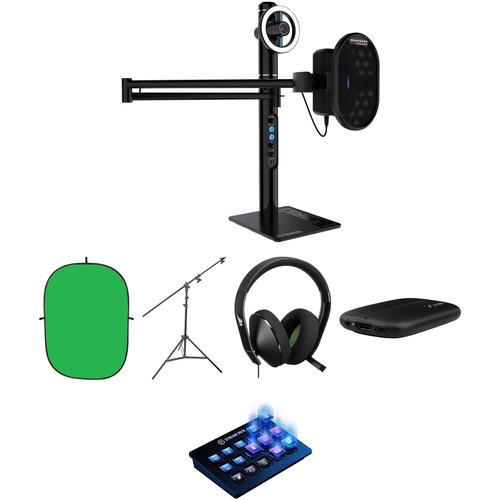
Product description Ramp up your Xbox One gaming stream by broadcasting and recording with the Turret Broadcaster Ultimate Streaming Kit for Xbox One from Photo. This comprehensive kit bundles the HD video Marantz Turret tower system with a 15-key switcher, a 1080p60 recorder, a dedicated gaming headset, and a collapsible green screen with a stand. Use this bundle to add pro-style switching and virtual effects while you stream your game play. - Marantz Professional Turret Broadcaster Video-Streaming System
- Hands-On Review: Marantz Professional Turret Broadcaster
- Marantz Professional Turret - Broadcast Video Streaming System
The Turret Broadcast Video Streaming System from Marantz Professional combines an HD video camera, microphone, ring light, and headphone amplifier with a control tower/stand. Together, these components provide an all-in-one broadcast tool expressly designed for streaming and podcasting. The Turret System's compact, portable size suits it to both desktop and location use with the centrally located camera, microphone, and light controls placed within easy reach on the control tower. The Turret camera features full HD recording at 1080p, automatic low-light correction, a 78° wide-angle lens, auto-focusing, and both Windows and Mac compatibility. H.264 video compression is built-in for easy streaming, and the Turret includes an internal USB hub; a high-speed USB-C output minimizes signal latency. On the audio side, the Turret features a high-performance condenser mic, gain control with an integrated preamp, pop filter, and direct monitoring while recording. To add music or an effects channel, a mix control enables you to blend the mic's audio with a USB audio input. The preamp outputs a pristine signal to your headphones, enabling you to hear your audio output as your audience does. The LED ring light surrounds the Turret camera, providing even illumination of the streamer/podcaster. This dimmable, daylight-balanced LED fixture comes with cool white, and warm filters for matching to the light at your location. Features -
- Complete, freestanding streaming/recording system
- Full HD video at 1080p/30 with H.264 compression, and a 78° wide-angle lens
- Automatic low-light exposure correction
- USB condenser microphone 48 kHz/16-bit with pop filter
- Mix control enables mixing of mic's audio with USB audio input
- Dimmable, daylight-balanced LED ring light provides even illumination
- Outputs to your computer via USB-C port; internal USB hub
- Headphone preamp for accurate monitoring
- Fixed line-level output via 3.5mm TRS jack
- System Compatibility
-
- Windows
- Mac 10.6 or later
- Operates in USB Video Device Class (UVC) mode
UPC: 694318023440 - Impact Collapsible Background - 5 x 7' (Chroma Green)
- Hands-On Review: Marantz Professional Turret Broadcaster
- Marantz Professional Turret - Broadcast Video Streaming System
This Impact Collapsible Background is a small, easy to use accessory for shooting small objects or simple headshots. This background sets-up and folds easily and comes in its own see-thru storage bag. Note: Colors depicted may vary slightly, due to differences in computer monitors, printed media, and variances in manufacturer's dyes or paints. In addition, this product may be folded for storage a number of ways. UPC: 847628010697 - Impact Multiboom Light Stand and Reflector Holder - 13' (4m)
- Hands-On Review: Marantz Professional Turret Broadcaster
- Marantz Professional Turret - Broadcast Video Streaming System
This is an Impact Convertible Boom Arm/Light Stand. As a light stand, it can support a small or medium light head to a height of 13' (4 m). Raise the second section completely, click, and it is a boom stand.
As a boom, it can hold a small light head to an extension of almost 3' from the center of the stand.
It is a reflector holder by means of its two clips, which can support an Impact, Flexfill, or Photoflex light disc as large as 60".
A hole at the end of the arm allows an optional counterweight to be hung, for greater stability. - Instructions for Using This Stand as a Boom
- 1. Loosen the large long handle in the middle of the stand.
2. Loosen the top-most section of the stand. Pull that section all the way up.
3. Pull! - swing it horizontally for the boom feature, and lock it for the desired setup. UPC: 847628012042 - Microsoft Xbox One Stereo Headset
- Hands-On Review: Marantz Professional Turret Broadcaster
- Marantz Professional Turret - Broadcast Video Streaming System
The Xbox One Stereo Headset from Microsoft has an over-ear design to provide you with a comfortable fit during long gaming sessions. It's built with 40mm neodymium drivers capable of delivering rich stereo sound, and a microphone that you can use to chat with teammates and friends. You can also adjust game and chat audio independently to ensure you can hear your teammates over the in-game audio for game-winning plays. Connect it to your wireless Xbox controller using the audio jack and you're all set. Additionally, please note that voice chat requires a separately sold Xbox Live subscription. UPC: 889842159509 - Elgato Game Capture HD60 S High Definition Game Recorder
- Hands-On Review: Marantz Professional Turret Broadcaster
- Marantz Professional Turret - Broadcast Video Streaming System
Record and stream your gaming highlights with low-latency using the Game Capture HD60 S High Definition Game Recorder from elgato. This external capture card has a USB-C 3.0 interface, which features a reversible connector, and supports up to 1080p at 60 frames per second. Advanced hardware H.264 encoding lets you capture in HD yet keeps the file size small. Game freely and never miss a moment with Flashback Recording – simply slide back in time on your PC and hit the record button retroactively. For streaming, Stream Command lets you add in your webcam, overlays, live commentary, and more.The Game Capture HD60 S can record PlayStation 4, Xbox One, Xbox 360, and Wii U gameplay to a Windows PC via a HDMI pass-through. Mac OS X users will have to check the elgado website for software support. -
- Record in 1080p at 60 fps
- Live stream your gameplay on Twitch and YouTube
- Instant Gameview provides you with an instant preview including your webcam and live commentary
- Add your webcam, overlays, and more with Stream Command
- Add your voice with the Live Commentary feature
- Record your PS4, Wii U, Xbox 360, or Xbox One gameplay to a Windows or Mac PC
- Advanced H.264 encoding HDMI pass-through to your TV
- Flashback Recording lets you record retroactively
UPC: 813180020306 - Elgato Stream Deck
- Hands-On Review: Marantz Professional Turret Broadcaster
- Marantz Professional Turret - Broadcast Video Streaming System
If you're an online streamer who broadcasts using Elgato Game Capture, OBS, Twitch, Twitter, TipeeeStream, XSplit, YouTube, Mixer, and more, streamline your streaming setup using the Stream Deck from Elgato Systems. The Stream Deck integrates your tools and helps to automatically detect scenes, media, and audio sources, enabling them to be controlled with the tap of a key. 15 LCD keys can be programmed to launch an array of actions, while a one-touch, tactile operation allows you to switch scenes, launch media, adjust audio, and more. Streams can also be personalized with GIFs, images, videos, audio clips, and intro and outro graphics. The Stream Deck is compatible with macOS 10.11 and later, as well as Windows 10 (64-bit). Connectivity with your host system is accomplished using an integrated USB 2.0 cable. Finally, an adjustable stand is included to keep the Stream Deck within easy reach. General Features - Break Boundaries
- You're creating quality content backed by strong tech, but you want to do more. With the Stream Deck, unleash your creativity make waves across Twitch and YouTube, all while focusing on what matters most: your audience.
- Take Control
- Fifteen LCD keys poised to launch unlimited actions help eliminate the need to map and memorize keyboard shortcuts. One-touch, tactile operation lets you switch scenes, launch media, adjust audio, and more, while visual feedback confirms your commands.
- Streamline Your Setup
- Stream Deck integrates your tools and automatically detects your scenes, media, and audio sources, enabling you to control them with a quick tap of a key. Compatible platforms include Elgato Game Capture, OBS, Twitch, Twitter, TipeeeStream, XSplit, YouTube, Mixer, and more.
- Be Proactive
- Automated alerts help make life easier, but between thanking donors and welcoming new subscribers, there's ample opportunity for self-expression. Employ Stream Deck to level up your on-screen antics with GIFs, images, videos, and audio clips. While you're at it, apply lower thirds and bookend your content with signature intro and outro graphics. Your options are vast, so explore and experiment. Do what you must to sharpen your creative edge, and do it with a personal touch.
- Make It Yours
- Customizing Stream Deck is user-friendly. Simply drag and drop actions onto keys and make them your own with custom icons. Need more actions? Nest folders within folders to amass more actions. Better yet, save unique key configurations as dedicated profiles for different games and apps, switch between them on the fly, and share them with fellow creators.
- Bring It On
- Gone are the days of navigating a myriad of windows to trigger an action, and relying solely on automated plug-ins to expand your production value. Now, you hold the power to pioneer an era of content creation and lead your audience to frontiers of inspiration. You're in control.
UPC: 813180020481 In the Box - Turret Broadcaster Video-Streaming System sdezcxfcsrzrra
- Microphone Pop Filter
- Cool & Warm Ring-Light Filters
- Limited 1-Year Warranty
- Impact - Collapsible Background - 5 x 7' (Chroma Green)
- Impact - Multiboom Light Stand and Reflector Holder - 13' (4m)
- Microsoft - Xbox One Stereo Headset
- Elgato - Game Capture HD60 S High Definition Game Recorder
Table of Contents
|
Upload User Manual
Have you got an user manual for the Marantz Professional Turret Broadcaster Ultimate Streaming Kit for Xbox One in electronic form? Please send it to us and help us expand our library of instruction manuals.
Thank you, too, on behalf of other users.
To upload the product manual, we first need to check and make sure you are not a robot. After that, your "Submit Link" or "Upload File" will appear.
Technical parameters - Marantz Professional Turret Broadcaster Video-Streaming System
| | | Diagonal Field of View (FOV) | 78° | | Optical Resolution | 5 MP native | | Recording | 1080p HD video, up to 1920 x 1080 | | Frame Rates | 1080p: 30 fps
720p: 60 fps | | Video Compression | H.264 | | | | Condenser Capsule | 0.6" (14 mm) diameter | | Sensitivity | -34 dB to
Rating100% users recommend this product to others. And what about you?

This product has already been rated by 74 owners. Add your rating and experience with the product.
Discussion
 Ask our technicians if you have a problem with your settings,
or if anything is unclear in the user manual you have downloaded.
You can make use of our moderated discussion.
The discussion is public and helps other users of our website who may be encountering similar problems.
Ask our technicians if you have a problem with your settings,
or if anything is unclear in the user manual you have downloaded.
You can make use of our moderated discussion.
The discussion is public and helps other users of our website who may be encountering similar problems.
The discussion is empty - enter the first post
Post a new topic / query / comment:
|
|
|
| Request for user manual |
You can’t find the operation manual you are looking for? Let us know and we will try to add the missing manual:
I’m looking for a manual / Request for manual
Current requests for instruction manuals:
Call Of Duty World War Two For Xbox...
controller stratus XL...
stratus XL...
smart whatch serie S11 42mm...
Allen & Heath SQ-6 manual...
|
| Discussion |
Latest contributions to the discussion:
AEW R 4100
Name: MAURICIO ANGARITA
Audio-Technica AEW-R4100 UHF Diversity Receiver for
AEW R 4100 has the mute function blocked and does not allow audio to pass. I tried several times to turn off the mute from the transmitter but it does nothing, the mute stays on. Solution?
Thank you...
Instructions for assembling the 2015 Forecast Image Master Consoles GC3-A
Name: mike elam
Forecast Consoles GC3-A ImageMaster Editing Console
Looking for instructions for assembling this console. ...
EMPTY TONER ERROR MESSAGE AFTER REPLACING TONER
Name: LINDA BAD YELLOW EYES
Brother TN223BK Standard-Yield Toner
I HAD TO CHANGE OUT ALL THREE TONERS DUE TO LEAKS IN THE YELLOW AND CYAN. AFTER I REPLACED THEM, THE MACHINE KEEPS GIVING ME AN EMPTY TONER ERROR MESSAGE. HELP!!...
PS480D 20/24 pin Switching 480W Power Supply
Name: swkargo
Logisys 480W Power Supply
This item states in can run -5vdc .It is NOT listed on the board or I beleive is r4 is missing the resitior. Any body have thid issue. Shawn
...
Help needed
Name: Ann Carter
SanDisk 1TB Extreme Portable USB 3.1
When I click the link to download the user manual for my Sandisk Extreme external hard drive, it gives me the manual for the LG Cricket. Can you please change the link so I can download the Sandisk manual and begin using this drive? Thank you....
|
|


