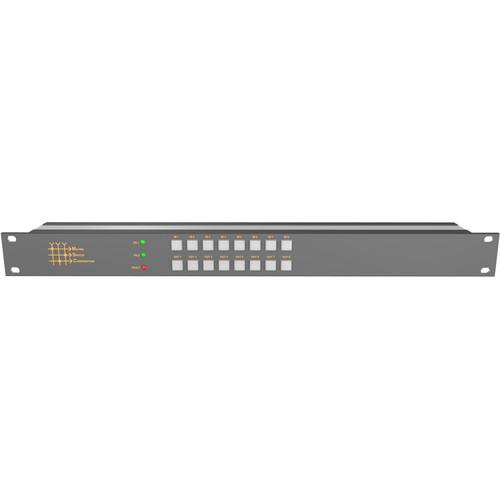
User Manual for Matrix Switch 8 Input 8 Output 12G-SDI Video Router with Button Panel Click to enlarge the picture
 Contents of the user manual for the Matrix Switch 8 Input 8 Output
- Product category: Routers & Switchers Matrix Switch
- Brand: Matrix Switch
- Description and content of package
- Technical information and basic settings
- Frequently asked questions – FAQ
- Troubleshooting (does not switch on, does not respond, error message, what do I do if...)
- Authorized service for Matrix Switch Routers & Switchers
|
User manual for the Matrix Switch 8 Input 8 Output contain basic instructions
that need to be followed during installation and operation.
Before starting your appliance, the user manual should be read through carefully.
Follow all the safety instructions and warnings, and be guided by the given recommendations.
User manual is an integral part of any Matrix Switch product,
and if it is sold or transferred, they should be handed over jointly with the product.
Following the instructions for use is an essential prerequisite for protecting
health and property during use, as well as recognition of liability on the part of the manufacturer
for possible defects should you make a warranty claim. Download an official Matrix Switch user manual in which you will find instructions on how to install, use, maintain and service your product.
And do not forget – unsuitable use of a Matrix Switch product will considerably shorten its lifespan!
|
Product description The MSC-UXD88L SDI Routing Switcher from Matrix Switch has 8 inputs and 8 outputs, supports reclocking of standard 12G/6G/3G/HD/SD SDI rates (including single link 4K and UHD formats), automatic bypass of non-standard rates between 20 Mb/s and 12 Gb/s, and passes all SDI embedded audio/ancillary data. In addition, any output can be independently muted. Switch on vertical sync is provided with the sync reference input with a pass-through connector and provides support for Tri-level sync and NTSC/PAL black burst signals.
With dual BNCs per SDI output on this router, the need for additional distribution amplifiers is often eliminated. It provides several options for control and system integration. The built-in webpage interface offers a convenient method for control and configuration using a PC or mobile device (Interactive Demo). In addition to the easy to use MASCOT protocol, there is also support for some common 3rd party protocols. Additional control interfaces on this router include: USB, RS-485, RS-232, and TCP/IP over the Ethernet interface.
Remote Panels can also be used with this router for remote control up to a virtually unlimited distance over TCP/IP. The built-in button panel provides an additional interface for directly changing the matrix routing state. - Dual BNCs per output often eliminates the need for additional distribution amplifiers
- Re-clocks standard SDI rates 12G (11.88 Gb/s), 6G (5.94 Gb/s), 3G (2.97 Gb/s), HD (1.484 Gb/s), and SD (270 Mb/s)
- Auto bypass of non-standard SDI rates from 20 Mb/s to 12 Gb/s
- Passes SDI embedded audio and ancillary data
- Different SDI rates can be used on different inputs interchangeably and without restriction
- Inputs can be switched to multiple outputs without restriction
- Outputs can be individually muted
- Vertical interval switching using vertical sync input (Tri-level sync or NTSC/PAL black burst)
- Store and recall up to 10 preset salvos
- Includes button control panel interface
- Ethernet port for control via built-in web page interface or TCP/IP ports
- Interactive web page interface
- Serial control via RS-232 port
- RS-485 port for an additional high-speed, long-distance capable control interface
- Support for some common 3rd party protocols for added integration flexibility
- Real Time Operating System (RTOS) with 32-bit ARM processor
- Compact enclosure design with a depth of only 3"
- Redundant power supply included
- Complies with all relevant FCC, U/L, CE, and RoHS requirements
In the Box Matrix Switch 8 Input 8 Output 12G-SDI Video Router with Button Panel 2 x 7.5 VDC, 2A Power Supplies Limited 2-Year Warranty Table of Contents
|
Upload User Manual
Have you got an user manual for the Matrix Switch 8 Input 8 Output 12G-SDI Video Router with Button Panel in electronic form? Please send it to us and help us expand our library of instruction manuals.
Thank you, too, on behalf of other users.
To upload the product manual, we first need to check and make sure you are not a robot. After that, your "Submit Link" or "Upload File" will appear.
Technical parametersMatrix Switch MSC-UXD88L Specs | | | Connector Type | BNC | | Data Rates | 19 Mb/s through 12.0 Gb/s | | Input Return Loss | > 15 dB @ HD, > 12 dB @ 3G | | Input Impedance | 75 Ohms +/- 1% | | Input Level | 800 mV p-p +/- 20% | | Cable Equalization | 1476' / 450 m @ SD, 853' / 260 m @ HD, 590' / 180 m @ 3G, 197' / 60 m @ 6G, 131' / 40 m @ 12G (1694A coax) | | | | Connector Type | BNC | | Data Rates | 19 Mb/s through 12.0 Gb/s | | Re-Clocking Data Rates | 11.88 Gb/s, 5.94 Gb/s, 2.97 Gb/s, 1.485 Gb/s, 270 Mb/s | | Output Return Loss | > 15 dB @ HD, > 12 dB @ 3G | | Output Impedance | 75 Ohms +/- 1% | | Output Level | 800 mV p-p +/- 5% | | Output Jitter | < 0.2 UI | | | | SD Format Support | 625/25 PAL and 525/29.97 NTSC | | HD Format | 720p23.98, 720p24, 720p25, 720p29.97, 720p30, 720p50, 720p59.94, 720p60, 1080p23.98, 1080PsF23.98, 1080p24, 1080PsF24, 1080p25, 1080PsF25, 1080p29.97, 1080PsF29.97, 1080p30, 1080PsF30, 1080i50, 1080i59.94, 1080i60 | | 3G | 1080p50, 1080p59.94, 1080p60 | | 2K Format | 2048 x 1556/23.98/24/25 | | UHD/HD Down Conversion | 2160p23.98, 2160p24, 2160p25, 2160p29.97, 2160p30, 2160p50, 2160p59.94, 2160p60 | | 4K Format Support | 2160p23.98, 2160p24, 2160p25 | | Compliance | SMPTE 259M, SMPTE 292M, SMPTE 296M, SMPTE 310M, SMPTE 372M, SMPTE 425M-A, SMPTE 425M-B, ITU-R BT.656 and ITU-R BT.601 | | Video Sampling | 4:2:2 and 4:4:4 | | Audio Sampling | 24-bit @ 48 kHz | | Color Precision | 4:2:2 and 4:4:4 10-bit | | Color Space | YUV or RGB | | Metadata Support | Ancillary data as defined by SMPTE 352M | | | | Connector Type | Analog BNC with pass-through | | Format | Tri-Level Sync and NTSC/PAL Black Burst | | | | Inputs | 8 | | Outputs | 8 | | Enclosure Type | 1 RU | | Power | 7.5 VDC, 2 A adapters (6 to 18 VDC) | | Power Connector | 5.5 mm OD 2.1 mm ID twist locking coaxial | | Ethernet | 10/100 Base-T Auto MDIX | | Dimensions | 19 x 1.75 x 3" / 48 x 4.44 x 7.6 cm | | Weight | 4 lb / 1.8 kg | | | | Package Weight | 5.15 lb | | Box Dimensions (LxWxH) | 24.0 x 4.5 x 4.5" |
Rating70% users recommend this product to others. And what about you?

This product has already been rated by 08 owners. Add your rating and experience with the product.
Discussion
 Ask our technicians if you have a problem with your settings,
or if anything is unclear in the user manual you have downloaded.
You can make use of our moderated discussion.
The discussion is public and helps other users of our website who may be encountering similar problems.
Ask our technicians if you have a problem with your settings,
or if anything is unclear in the user manual you have downloaded.
You can make use of our moderated discussion.
The discussion is public and helps other users of our website who may be encountering similar problems.
The discussion is empty - enter the first post
Post a new topic / query / comment:
|
|


