|
User Manual for Matrox Monarch HD Click to enlarge the picture
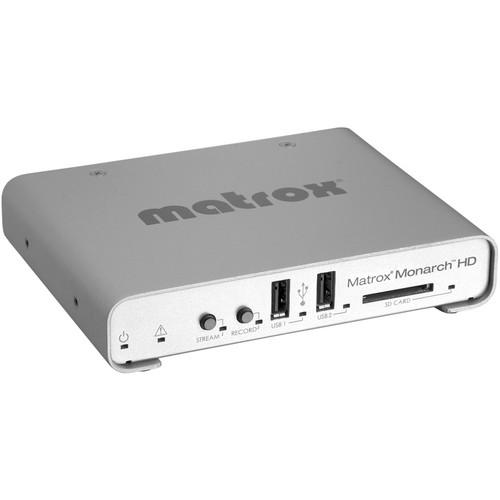 Contents of the user manual for the Matrox Monarch HD
- Product category: Streaming Media Solutions Matrox
- Brand: Matrox
- Description and content of package
- Technical information and basic settings
- Frequently asked questions – FAQ
- Troubleshooting (does not switch on, does not respond, error message, what do I do if...)
- Authorized service for Matrox Streaming Media Solutions
 |
User manual for the Matrox Monarch HD contain basic instructions
that need to be followed during installation and operation.
Before starting your appliance, the user manual should be read through carefully.
Follow all the safety instructions and warnings, and be guided by the given recommendations.
User manual is an integral part of any Matrox product,
and if it is sold or transferred, they should be handed over jointly with the product.
Following the instructions for use is an essential prerequisite for protecting
health and property during use, as well as recognition of liability on the part of the manufacturer
for possible defects should you make a warranty claim. Download an official Matrox user manual in which you will find instructions on how to install, use, maintain and service your product.
And do not forget – unsuitable use of a Matrox product will considerably shorten its lifespan!
|
Product description - Discover Matrox Monarch HD
The Matrox Monarch HD is an HDMI input/output streaming and recording device that can stream live events and record master versions for post-production or storage at the same time. The streaming and recording functions are totally independent of each other, and therefore recording quality is not affected by streaming bandwidth, and record controls can be operated without disturbing streaming operations. Recorded files are available anytime during a streaming session for use as complementary streaming videos.
Monarch HD generates RTSP/RTMP compliant H.264 streams from any HDMI source using a built-in encoder and multi-tap 10-bit scaler and de-interlacer. It records the live streams as H.264 MP4 files with two channels of embedded AAC audio to an optional SD card, USB drive, or network-mapped drive. Network-mapped drives are useful if multiple users will need to access the recorded footage. Streaming bitrates can be assigned at up to 20Mbps and recording bitrates at up to 30Mbps. You can stream to your own server or to CDNs like YouTube.
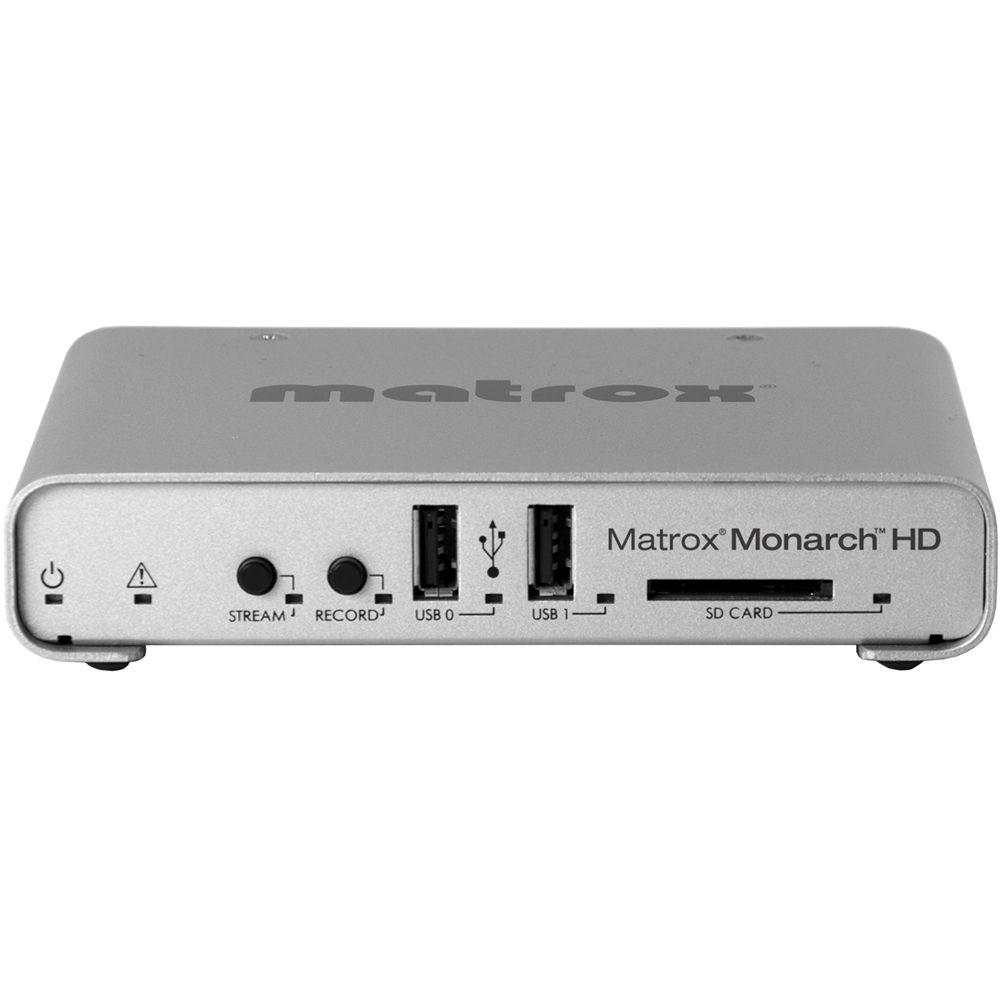
Bitrates, resolution, and other operational details are selectable in a web-application called Command Center. Via an Ethernet connection from Monarch HD to a router, Command Center is accessible on a phone, tablet, or computer. Up to four Monarch HD units can be controlled from Command Center simultaneously. Stream and record start/stop can also be controlled via push buttons on the front panel.
Monarch HD operates on a Linux O/S and isn't vulnerable to any automatic updates or unscheduled exchanges with 3rd party servers. - Overview
- Monarch HD can stream live events from HDMI sources and record master versions for post at the same time. The streaming and recording functions are independent, and recording quality is not affected by streaming bandwidth. Recorded files are available anytime during a streaming session for use as complementary streaming videos.
H.264 Streaming & Recording
Monarch HD encodes video from any HDMI source in H.264 in RTSP/RTMP compliant protocols using a built-in encoder and multi-tap 10-bit scaler and de-interlacer. It records the live streams as H.264 MP4 files with two channels of embedded AAC audio to an optional SD card, USB drive, or network-mapped drive. Network-mapped drives are useful if multiple users will need to access the recorded footage. Streaming bitrates can be assigned at up to 20Mbps and recording bitrates at up to 30Mbps. You can stream to your own server or to CDNs like YouTube.
Compact and Simple-to-Use Design
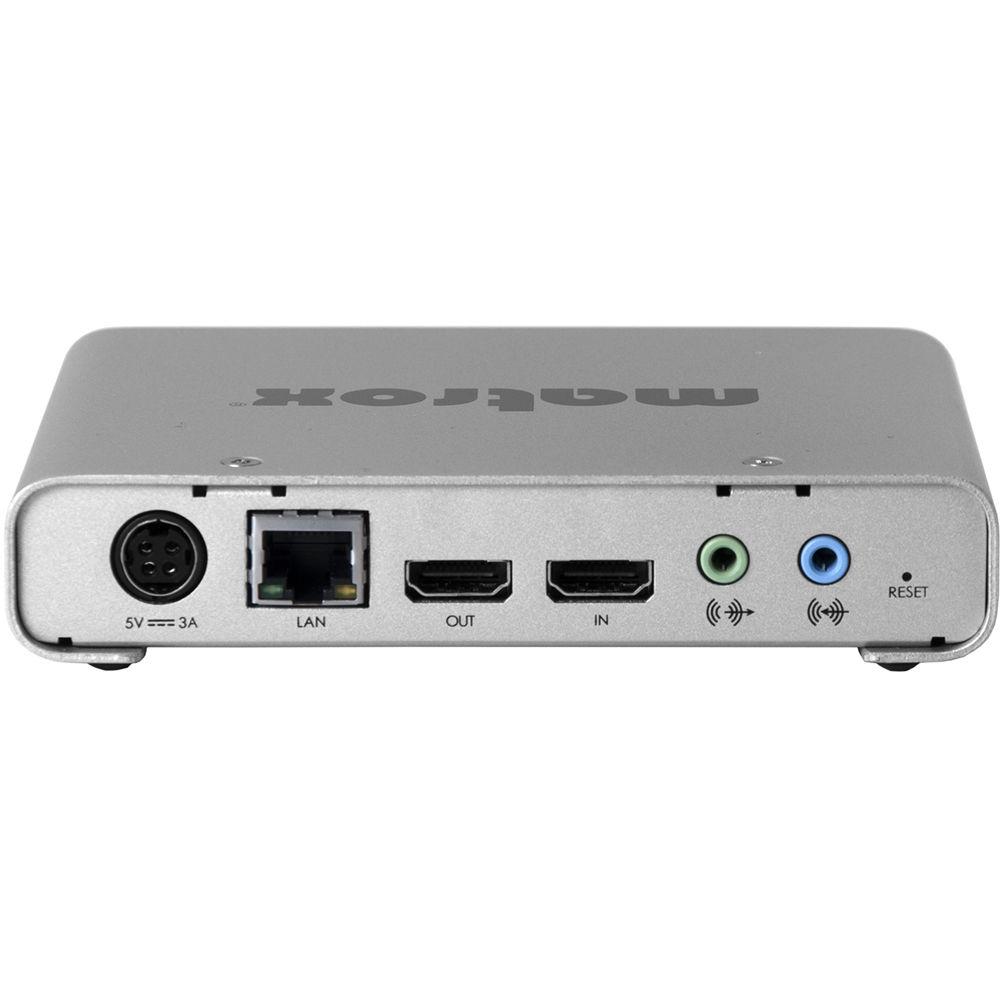
Monarch HD features one-touch stream and record front panel push buttons and an Ethernet jack for Web UI access via connection to a router. It's fanless, consumes little power, and has a locking power connector. It can be used desktop, and three units can be installed in a 1RU rack. - Matrox Command Center Web UI
- Each Monarch HD features its own IP address and can be controlled in a web-application called Command Center. Via an Ethernet connection from Monarch HD to a router, Command Center is accessible on a phone, tablet, or computer. Bitrates, stream/record start and stop, and other operational details are assignable in Command Center, and up to four Monarch HD units can be controlled from it simultaneously. Monarch HD runs on an embedded Linux O/S and is therefore not vulnerable to any automatic updates or unscheduled exchanges with 3rd party servers.
Status Page
The Command Center Status Page provides status information including input video detection and resolution, state and configuration of streaming operation and/or recording operation, error conditions, and more.
Control Page
Features controls for initiating recording and streaming operations, including synchronized start/stop.
Record Settings Page
Allows configuring recording parameters and includes presets based on intended post uses, such as a YouTube preset for VOD uploads and a master quality preset for high quality editing.
Streaming Settings Page
Here's where you enter RTMP or RTSP credentials and encoding parameters. Encoding presets are available for quickly choosing settings based on available bandwidth and desired delivery resolution or bitrate. The target encoding streaming parameters only need to be entered once and saved as a unique profile. Multiple profiles can be saved if the device is used in different environments. Each profile can be loaded instantly without having to reenter data.
Administrative Tools Page
Allows device naming, IP configuration, date/time settings, and other tasks.
Additional Tools Page
Features PC and Mac based utilities to help detect Monarch HD units on a particular network (DHCP server required). UPC: 790750244273 In the Box Matrox Monarch HD External Power Supply IEC-C13 Power Cord (US and EU) GB/AU Adapter 2-Year Limited Warranty with Phone Support Guides & Manuals Table of Contents
|
Upload User Manual
Have you got an user manual for the Matrox Monarch HD in electronic form? Please send it to us and help us expand our library of instruction manuals.
Thank you, too, on behalf of other users.
To upload the product manual, we first need to check and make sure you are not a robot. After that, your "Submit Link" or "Upload File" will appear.
Download User ManualThe user manual for the Matrox Monarch HD can be downloaded in PDF format at the link stated below.
Technical parametersMatrox MHD/I Specs | HDMI Video Input | Progressive:
1920 x 1080 @ 60/59.94/50/24/23.98 fps
1280 x 720 @ 60/59.94/50 fps
Interlaced:
1920 x 1080i @ 29.97/25 fps
Video input format is auto-detected | | HDMI Video Output | Pass-through of video input signal
1 frame delay from input to output | | Audio Input | Processes first two channels of audio embedded in HDMI input signal
Unbalanced analog stereo input via 1/8" jack (3.5 mm)
Line level | | Audio Output | Pass-through of all embedded audio channels in HDMI signal
Unbalanced analog stereo output via 1/8" jack (3.5 mm) -- pass-through of input Line level | | Video Encoder | Built-in H.264/MPEG-4 Part 10 (AVC) | | Resolutions | Selectable encoding resolutions:
96 x 96 to 1920 x 1080 | | Video Bit Rates | 100 kbps to 30 Mbps for recording
100 kbps to 20 Mbps for streaming
When both streaming and recording resolutions are above 1280 x 720, the encode parameters must be identical for both processes. Independent record and streaming settings are available when either the streaming or the recording resolution is 1280 x 720 or below. | | Encode Frame Rates | Encode frame rates representing 1:1, 1/4, and 1/4 of the input frames rates are supported
The maximum encoded frame rate is 30 fps when input resolution is 1920 x 1080 | | Encoding Profiles | Baseline, Main, and High | | Encoding Controls | 2.0, 3.0, 3.1, 4.0, 4.1 level support
IBP GOP size and structure
Variable bit rate support
De-blocking filter | | Audio Encoder | MPEG-4 AAC | | Audio Encoding | Standard AAC-LC | | Sample Frequency | 44.1 and 48 kHz when digitized from analog source | | Channels | 2 channels stereo (L/R) | | Audio Bit Rates | Range from 96 kbps to 256 kbps | | Scaler | High quality multi-tap 10-bit scaler and de-interlacer
Advanced noise filtering
Available to both streaming and recording operations | | Recording Formats | MP4 with two channels of embedded AAC audio | | Network Interface | RJ45 connector providing 10/100/1000 Base-T Ethernet with Static or DHCP addressing
Protocols:
RTMP, RTSP/RTP
IPv4 support
Unicast and Multi Unicast | | User Interface | HTTP computer based control via standard PC or Mac web browser
Front panel push buttons for independent streaming and recording Start/Stop control | | Storage | 2x USB 2.0:
Support for NTFS file system
Monarch HD will support writing to USB 3.0 devices at USB 2.0 speeds
1x SD card slot:
Supports SD and SDHC cards
Network mapped drive:
Support for writing to Shared Folders in computers found on a network using NFS or Windows share protocols | | Transport and Storage | Max operating altitude: 9,842 ft (3,000 m)
Max transport altitude: 39,370 ft (12,000 m)
Storage humidity: 5 to 95% relative humidity (non-condensing) | | Regulatory | FCC Class B, CE Mark Class B, ACMA C-Tick Mark, VCCI
RoHS Directive 2002/95/EC | | Power | Line voltage: 100-240 V AC, 0.5A
Frequency: 50-60 Hz
Input: external AC/DC adapter -- IEC320-C14
Output: +5 VDC, 3A max
Total power consumption: 15 W
DIN4 locking power connector | | Operating Temperature | 32 to 104°F (0 to 40°C) | | Operating Humidity | 20 to 80% relative humidity (non-condensing) | | Dimensions | 5.6 x 4.3 x 1.2" (14.2 x 10.9 x 3 cm)
5.6 x 4.4 x 1.2" (14.2 x 11.2 x 3 cm) with optional SD card inserted | | Weight | 0.66 lb (300 g) excluding power supply | | | | Package Weight | 2.35 lb | | Box Dimensions (LxWxH) | 14.1 x 5.6 x 3.0" |
Rating70% users recommend this product to others. And what about you?

This product has already been rated by 49 owners. Add your rating and experience with the product.
Discussion
 Ask our technicians if you have a problem with your settings,
or if anything is unclear in the user manual you have downloaded.
You can make use of our moderated discussion.
The discussion is public and helps other users of our website who may be encountering similar problems.
Ask our technicians if you have a problem with your settings,
or if anything is unclear in the user manual you have downloaded.
You can make use of our moderated discussion.
The discussion is public and helps other users of our website who may be encountering similar problems.
The discussion is empty - enter the first post
Post a new topic / query / comment:
|
|
|
| Request for user manual |
You can’t find the operation manual you are looking for? Let us know and we will try to add the missing manual:
I’m looking for a manual / Request for manual
Current requests for instruction manuals:
Call Of Duty World War Two For Xbox...
controller stratus XL...
stratus XL...
smart whatch serie S11 42mm...
Allen & Heath SQ-6 manual...
|
| Discussion |
Latest contributions to the discussion:
AEW R 4100
Name: MAURICIO ANGARITA
Audio-Technica AEW-R4100 UHF Diversity Receiver for
AEW R 4100 has the mute function blocked and does not allow audio to pass. I tried several times to turn off the mute from the transmitter but it does nothing, the mute stays on. Solution?
Thank you...
Instructions for assembling the 2015 Forecast Image Master Consoles GC3-A
Name: mike elam
Forecast Consoles GC3-A ImageMaster Editing Console
Looking for instructions for assembling this console. ...
EMPTY TONER ERROR MESSAGE AFTER REPLACING TONER
Name: LINDA BAD YELLOW EYES
Brother TN223BK Standard-Yield Toner
I HAD TO CHANGE OUT ALL THREE TONERS DUE TO LEAKS IN THE YELLOW AND CYAN. AFTER I REPLACED THEM, THE MACHINE KEEPS GIVING ME AN EMPTY TONER ERROR MESSAGE. HELP!!...
PS480D 20/24 pin Switching 480W Power Supply
Name: swkargo
Logisys 480W Power Supply
This item states in can run -5vdc .It is NOT listed on the board or I beleive is r4 is missing the resitior. Any body have thid issue. Shawn
...
Help needed
Name: Ann Carter
SanDisk 1TB Extreme Portable USB 3.1
When I click the link to download the user manual for my Sandisk Extreme external hard drive, it gives me the manual for the LG Cricket. Can you please change the link so I can download the Sandisk manual and begin using this drive? Thank you....
|
|



