|
User Manual for Matrox Monarch HDX Click to enlarge the picture
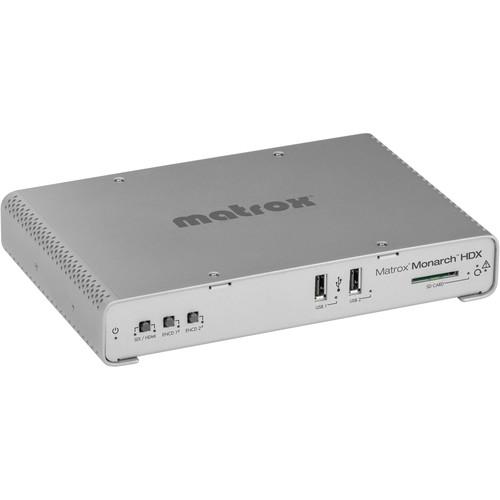 Contents of the user manual for the Matrox Monarch HDX
- Product category: Streaming Media Solutions Matrox
- Brand: Matrox
- Description and content of package
- Technical information and basic settings
- Frequently asked questions – FAQ
- Troubleshooting (does not switch on, does not respond, error message, what do I do if...)
- Authorized service for Matrox Streaming Media Solutions
 |
User manual for the Matrox Monarch HDX contain basic instructions
that need to be followed during installation and operation.
Before starting your appliance, the user manual should be read through carefully.
Follow all the safety instructions and warnings, and be guided by the given recommendations.
User manual is an integral part of any Matrox product,
and if it is sold or transferred, they should be handed over jointly with the product.
Following the instructions for use is an essential prerequisite for protecting
health and property during use, as well as recognition of liability on the part of the manufacturer
for possible defects should you make a warranty claim. Download an official Matrox user manual in which you will find instructions on how to install, use, maintain and service your product.
And do not forget – unsuitable use of a Matrox product will considerably shorten its lifespan!
|
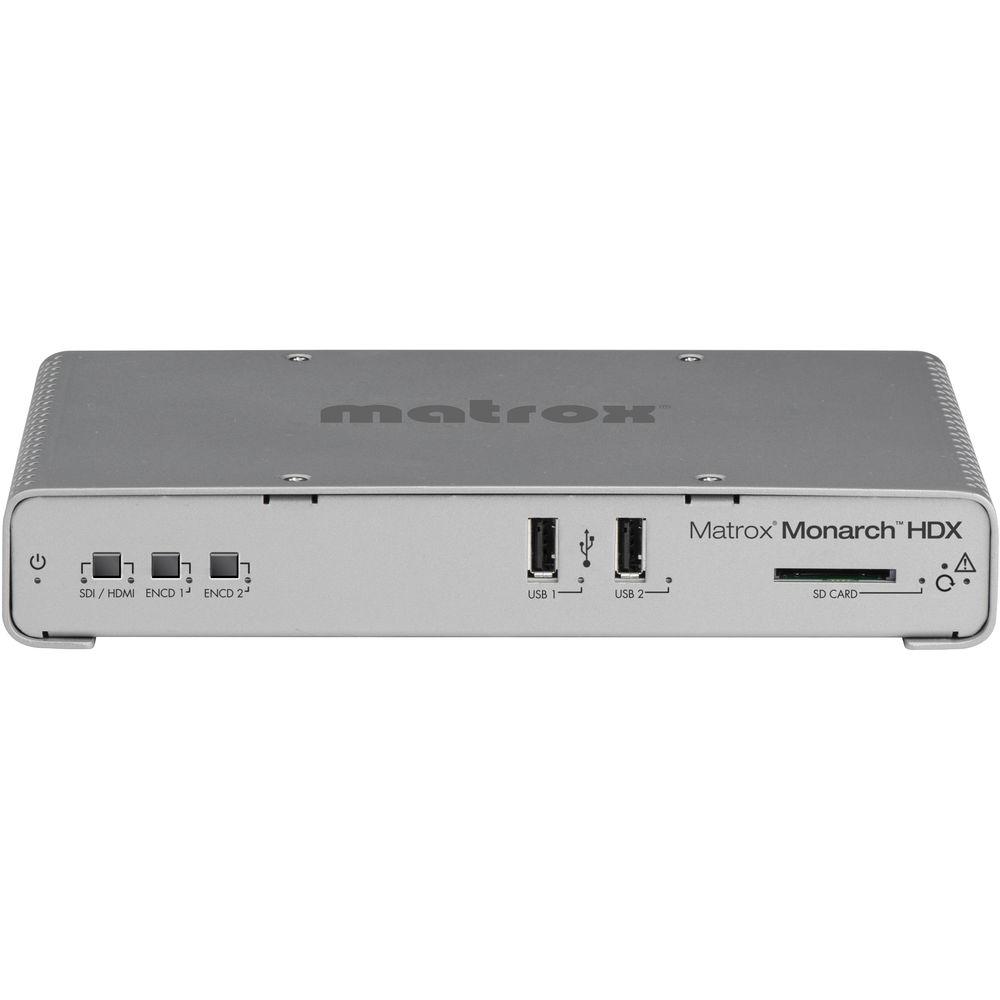
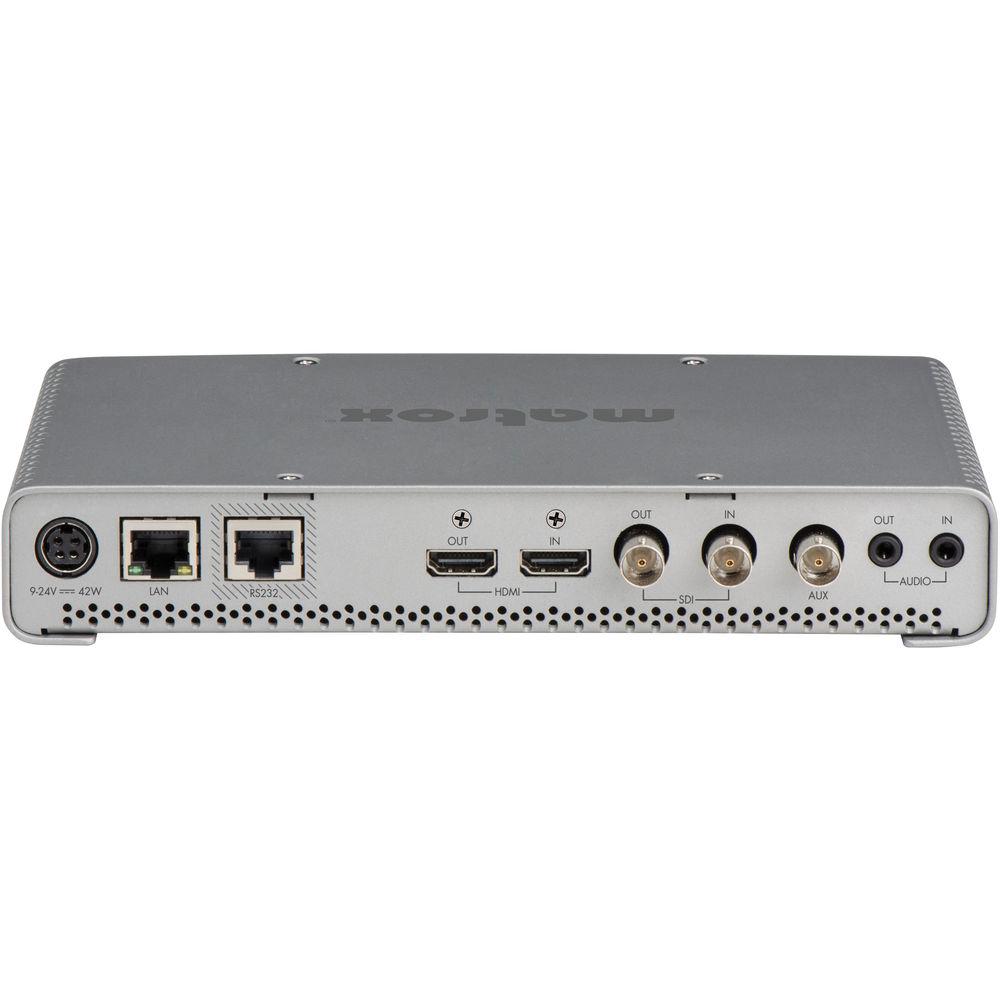
Product description - Meet all streaming and recording needs with Matrox Monarch HDX
Simultaneously stream and record video from SDI and HDMI sources with the Matrox Monarch HDX. Expanding on the Monarch HD, the Monarch HDX adds SDI I/O to the already available HDMI I/O and dual-channel operation with independent H.264 encoders. This functionality makes it suitable for broadcast and other professional workflows that require streaming and recording of content, such as houses of worship and universities. Having discrete encoders allows for each channel to function separately. You can stream to two different locations, record proxy and master files from the same input, and record two inputs simultaneously. You can also use one encoder for streaming video live while the other encoder records a high-quality copy of the broadcast for playback after the live stream. Whether you use it for live streaming or recording, the Monarch HDX can be integrated into SD or HD productions. Features - H.264 Encoding Engine
- The Monarch HDX can share 30 Mbps of encoding capacity across the two channels. Each channel benefits from a powerful scaling, de-interlacing, and noise reduction engine for improving image quality before encoding.
- Dual-Channel Streaming
- When used as a webcasting encoder, the Monarch HDX generates an H.264-encoded stream compliant with RTSP or RTMP protocols. Each channel is assigned separately. Each channel can stream up to 10 Mb/s, allowing you to simultaneously stream to two destinations or set the device for up to 20 Mb/s streaming quality for a single encoding destination.
- Dual-Channel Recording
- Content can be captured in either MOV or MP4 files to ensure that they can be played by your application of choice. Recordings can be stored locally on an SD card, a USB drive, or remotely on a network-mapped drive. Dual channel recording allows the user to simultaneously record content locally and to the network, which means files are immediately available to anybody on the network, but also provides the assurance that no action is lost even if the network goes down. Furthermore, each recording can be done at a different bitrate should there be a need to deliver the content to devices with varying decode capacities.
- Simultaneous Streaming and Recording
- Monarch HDX dual encoders can broadcast a live webstream at one bitrate while simultaneously recording high-quality H.264 files for immediate availability, such as post event VOD or editing with your NLE of choice.
- HDMI and SDI Inputs
- The Monarch HDX H.264 video recorder can accept signals from HDMI or SDI sources. The input can be selected using the web based UI, Matrox Command Center, or directly on the unit itself, allowing for a wide range of connectivity to devices such as cameras, switchers, or routers. Additionally, both inputs are complemented by internal frame synchronizers to ensure uninterrupted streaming and recording operations, regardless of the disturbance on the input. The audio is also selectable between the two channels of the embedded video signal or the analog stereo input. Audio may be dynamically muted or unmuted without affecting the video encoding operation. Regardless of input selection, SDI video, HDMI video, and embedded and analog audio outputs are live. For SDI workflows, the Monarch HDX recorder has an extremely low pass-through latency with a built-in power-loss relay which, in case of power loss, will route the SDI input directly to the SDI output, ensuring signal path integrity.
- Wowza and Flash Support
- The Monarch HDX is a certified "Works with Wowza" live video streaming encoder, allowing users to benefit from enhanced integration with the Wowza streaming engine. As a certified encoder, Wowza Manager can provide an XML file which contains the credentials required for Monarch HDX to easily connect to the Wowza Streaming engine. The Monarch HDX also supports XML files generated for use with Flash Live Media Encoder. These files are often offered by CDNs to allow their customers to easily connect to their service. Both XML files are loaded into the Monarch HDX using the Matrox Command Center, a web based UI.
- Remote Control
- The Monarch HDX can be controlled and configured via the Monarch HDX Command Center using any device on the network that supports a standard web browsing application such as a computer, smart phone or tablet. Designed for operator ease-of-use, master controls provide one-click operation to start streaming, recording or both from anywhere within the user interface. The device also provides convenient controls directly on the unit itself to stop/start recording or streaming, and an additional button to assign the input.
- H.264 Preview Stream
- The Monarch HDX H.264 encoder provides a useful low bitrate preview stream of the input directly in the Command Center UI. This same preview can be viewed using software players such as VLC or on third-party devices, such as Crestron control panels. This stream is available independently of the two encoder channels allowing you to check your video signal before your webcast goes live.
- Profiles and Presets
- The Monarch HDX ships with a number of typical streaming and recording presets that define all the encoding parameters including resolution and bitrate. Whether preset or custom parameters are used, they only need to be entered once and saved as a unique profile. A profile not only contains encoding parameters but also destination information detailing where the encoded video is being sent. Multiple profiles can be saved if the device is used in different environments. Each profile can be loaded instantly without having to re-enter data.
- Matrox Utils Application
- The Matrox Utils application allows operators to remotely scan and find all Monarch HDX's present on their network. The Utils application will also scan the attached Monarch HDX and notify the operator if the unit is up to date with its installed firmware version and will also update the device automatically to ensure that it has the latest software release installed. The Matrox Utils application can also be used to reboot Monarch HDX devices present on the network.
- Closed Captioning Support
- Ideal for broadcasters who require the integration of closed captioning while streaming and/or recording. Retrieving the closed captioning data from the SDI VANC or line 21 protocols, the Matrox Monarch HDX then embeds the data within the H.264 stream, as CEA-608. These caption-enhanced H.264 files can then be streamed (via RTMP) to capable media servers such as Wowza, CDNs including YouTube Live or Ustream, or recorded as MOV/MP4 files, which can then be decoded by players such as Telestream Switch, with captions intact and synced with the video - frame by frame. Note: Requires firmware version 1.1.5.0009 or later, available as a free download from the Matrox website.
UPC: 790750247656 In the Box Matrox Monarch HDX Power Supply 3 x IEC Power Cord (US, GB, EU) Limited 2-Year Warranty Brochure PDF 2.6mb Table of Contents
|
Upload User Manual
Have you got an user manual for the Matrox Monarch HDX in electronic form? Please send it to us and help us expand our library of instruction manuals.
Thank you, too, on behalf of other users.
To upload the product manual, we first need to check and make sure you are not a robot. After that, your "Submit Link" or "Upload File" will appear.
Technical parametersMatrox MHDX Specs | HDMI Video Input | 1920 x 1080p 60/59.94/50/30/29.97/25/24/23.98
1920 x 1080i 29.97/25
1280 x 720p 60/59.94/50 | | HDMI Video Output | Preview output of video input signal
2-frame delay from input to output
SD video output as windowed in an HD output | | SDI Video Input | 1920 x 1080p 60/59.94/50/30/29.97/25/24/23.98
1920 x 1080PsF 29.97/25
1920 x 1080i 29.97/25
1280 x 720p 60/59.94/50
720 x 576i 25
720 x 486i 29.97 | | SDI Video Output | Clean distribution of SDI incoming signal
0-frame latency passthrough of Input signal
Hardware bypass relay present in SDI signal path is "closed" on power failure | | Audio Input | Processes first two channels of audio embedded in HDMI or SDI input signals
Unbalanced analog stereo input via 1/8" jack (3.5 mm)
Line level | | Audio Output | Pass-through of 8 embedded audio channels in HDMI and SDI signals
Unbalanced analog stereo output via 1/8" jack (3.5 mm), pass-through of input Line level | | Frame Synchronization | On both HDMI and SDI inputs. | | Video Encoder | Built-in H.264/MPEG-4 Part 10 (AVC) | | Resolutions | Selectable encoding resolutions:
128 x 128 to 1920 x 1080 | | Video Bit Rates | Single Encoder:
Streaming mode - 20 Mbps
Recording mode - 30 Mbps
Dual Encoder:
Maximum 10 Mbps for streaming channels
Maximum 30 Mbps combining both channels | | Encode Frame Rates | Encode frame rates (fps): 60/50, 30/25/24, 15/12.5
Note: The maximum encoded frame rate is 30 fps when input resolution is 1920 x 1080 | | Encoding Profiles | Baseline, Main, and High | | Encoding Controls | 2.0, 3.0, 3.1, 4.0, 4.1 level support
IBP GOP size and structure
Variable bit rate support
Average min/max data rate controls
De-blocking filter | | Audio Encoder | MPEG-4 AAC | | Audio Encoding | Standard: AAC-LC | | Sample Frequency | 32, 44.1, or 48 kHz when digitized from analog source | | Channels | 2 channels stereo (L/R) | | Audio Bit Rates | Range from 32 kbps to 256 kbps
Note: Audio codec settings are applied to streaming or files delivered by both encoders. | | Scaler | High quality multi-tap 10-bit scaler and de-interlacer
Available to both streaming and recording operations | | Preview | Stream format: H.264
Bitrate: 300 kbps (average)
Stream type: RTSP | | Recording Formats | MP4 and MOV with two channels of embedded AAC audio (maximum file length of 300 minutes) | | Network Interface | RJ45 connector providing 10/100/1000 Base-T Ethernet with Static or DHCP addressing
Protocols:
RTMP, RTSP/RTP
IPv4 support
Unicast and Multi Unicast (from 3 to 10 clients) | | User Interface | HTTP via standard PC or Mac web browser using Monarch HDX Command Center
Front panel push buttons for independent streaming and recording Start/Stop control | | Recording Media Support | 2x USB 2.0:
Support for NTFS file system
Monarch HD will support writing to USB 3.0 devices at USB 2.0 speeds
1x SD card slot:
Supports SD and SDHC cards
Supports SDXC cards formatted with NTFS
Network mapped drive:
Support for writing to Shared Folders in computers found on a network using NFS or Windows share protocols | | Transport and Storage | Max operating altitude: 9,842 ft / 3,000 m
Max transport altitude: 39,370 ft / 12,000 m
Operating humidity: 20 to 80% relative humidity (non-condensing)
Storage humidity: 5 to 95% relative humidity (non-condensing) | | Regulatory | EMI: FCC Class A, CE Mark Class A, ACMA C-Tick Mark, VCCI
Power Supply Safety: UL/CUL(UL60950-1), TUV-GS(EN60950-1), T-LICENSE(BS EN60950-1), CCC(GB4943.1-2011), PSE(J60950), SAA(AS/NZS60950-1), KC-MARK(K60950),S-MARK(IEC60950-1)
RoHS Directive 2002/95/EC | | Power | Line voltage: 100-240 VAC, 0.5 A
Frequency: 50-60 Hz
Input: external AC/DC adapter -- IEC320-C8
Output: 9 to 24 VDC
Total power consumption: 20 to 30 W typical, 42 W max
DIN4 locking power connector | | Operating Temperature | 32 to 104°F / 0 to 40°C | | Dimensions | 5.6 x 8.5 x 1.4" / 14.2 x 21.6 x 3.6 cm
6 x 8.5 x 1.5" / 15.3 x 21.6 x 3.8 cm (including pads and BNC spigots) | | Weight | Not Specified by Manufacturer | | | | Package Weight | 3.6 lb | | Box Dimensions (LxWxH) | 14.1 x 8.8 x 3.4" |
Rating56% users recommend this product to others. And what about you?

This product has already been rated by 35 owners. Add your rating and experience with the product.
Discussion
 Ask our technicians if you have a problem with your settings,
or if anything is unclear in the user manual you have downloaded.
You can make use of our moderated discussion.
The discussion is public and helps other users of our website who may be encountering similar problems.
Ask our technicians if you have a problem with your settings,
or if anything is unclear in the user manual you have downloaded.
You can make use of our moderated discussion.
The discussion is public and helps other users of our website who may be encountering similar problems.
The discussion is empty - enter the first post
Post a new topic / query / comment:
|
|
|
| Request for user manual |
You can’t find the operation manual you are looking for? Let us know and we will try to add the missing manual:
I’m looking for a manual / Request for manual
Current requests for instruction manuals:
Call Of Duty World War Two For Xbox...
controller stratus XL...
stratus XL...
smart whatch serie S11 42mm...
Allen & Heath SQ-6 manual...
|
| Discussion |
Latest contributions to the discussion:
AEW R 4100
Name: MAURICIO ANGARITA
Audio-Technica AEW-R4100 UHF Diversity Receiver for
AEW R 4100 has the mute function blocked and does not allow audio to pass. I tried several times to turn off the mute from the transmitter but it does nothing, the mute stays on. Solution?
Thank you...
Instructions for assembling the 2015 Forecast Image Master Consoles GC3-A
Name: mike elam
Forecast Consoles GC3-A ImageMaster Editing Console
Looking for instructions for assembling this console. ...
EMPTY TONER ERROR MESSAGE AFTER REPLACING TONER
Name: LINDA BAD YELLOW EYES
Brother TN223BK Standard-Yield Toner
I HAD TO CHANGE OUT ALL THREE TONERS DUE TO LEAKS IN THE YELLOW AND CYAN. AFTER I REPLACED THEM, THE MACHINE KEEPS GIVING ME AN EMPTY TONER ERROR MESSAGE. HELP!!...
PS480D 20/24 pin Switching 480W Power Supply
Name: swkargo
Logisys 480W Power Supply
This item states in can run -5vdc .It is NOT listed on the board or I beleive is r4 is missing the resitior. Any body have thid issue. Shawn
...
Help needed
Name: Ann Carter
SanDisk 1TB Extreme Portable USB 3.1
When I click the link to download the user manual for my Sandisk Extreme external hard drive, it gives me the manual for the LG Cricket. Can you please change the link so I can download the Sandisk manual and begin using this drive? Thank you....
|
|


