|
User Manual for Matrox VS4 HD-SDI Capture Card with VS4Recorder Pro Software Bundle Click to enlarge the picture
 Contents of the user manual for the Matrox VS4 HD-SDI Capture Card with
- Product category: Computer Hardware Matrox
- Brand: Matrox
- Description and content of package
- Technical information and basic settings
- Frequently asked questions – FAQ
- Troubleshooting (does not switch on, does not respond, error message, what do I do if...)
- Authorized service for Matrox Computer Hardware
|
User manual for the Matrox VS4 HD-SDI Capture Card with contain basic instructions
that need to be followed during installation and operation.
Before starting your appliance, the user manual should be read through carefully.
Follow all the safety instructions and warnings, and be guided by the given recommendations.
User manual is an integral part of any Matrox product,
and if it is sold or transferred, they should be handed over jointly with the product.
Following the instructions for use is an essential prerequisite for protecting
health and property during use, as well as recognition of liability on the part of the manufacturer
for possible defects should you make a warranty claim. Download an official Matrox user manual in which you will find instructions on how to install, use, maintain and service your product.
And do not forget – unsuitable use of a Matrox product will considerably shorten its lifespan!
|
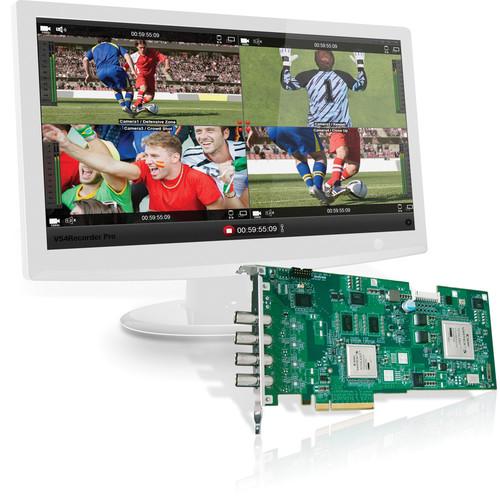
Product description The VS4 HD-SDI Capture Card with VS4Recorder Pro Software Bundle from Matrox features hardware and software allowing you to capture and record up to four channels of HD- or SDI-SDI video simultaneously. In addition, it can be used for Web-streaming applications when combined with separately available streaming software. With the VS4Recorder Pro Software you can frame accurately record up to four live audio/video feeds, either as multi-cam or treated as unrelated streams. It is ideal for recording live multi-camera productions like concerts and sporting events to create video assets that can be easily repurposed and archived with timecode synced ahead of time. In addition, VS4Recorder Pro provides a multi-viewer function allowing you to view all four inputs on a single computer monitor.
For more information on the individual items in this bundle, please follow the link below. - VS4 Quad HD Capture Card for Select Software (vs4Recorder, vMix) The Matrox VS4 Quad HD Capture Card for is a PCIe x8 card that allows you to simultaneously stream and capture from up to four independent SDI video sources using optional vMix, Wirecast, or the full version of VS4 Recorder Pro software applications. The VS4 card includes a trial version of the VS4 Recorder Pro software. The optional VS4Recorder is a versatile application ideal for multi-camera productions that provides HD recording of up to four inputs while simultaneously offering a complete multi-viewer experience, and it provides two recording modes: independent and multi-cam. The optional vMix software is a complete live video production software solution that provides live mixing, switching and streaming.
The capture card also works with select Wirecast software, not included, which allows you to switch between input feeds and add effects to produce a live streaming program. The inputs support PAL, NTSC and various flavors of HD video. Each input works independently, and features auto format detection that allows the card to set the correct input format. This means that the card can accept, stream and encode for capture video from four different inputs with four different formats, even mixing SD and HD, at the same time.
The VS4 features ISO recording, which means that while streaming the program live the VS4 can also encode video from each input at up to 300 Mb/s, to available video storage. The VS4 features codecs compatible with editing solutions from Adobe, Avid and Apple, this allows you to go back and re-edit your show after it has already streamed live. Supporting 8 channels of embedded audio per input, the card encodes audio at 24-bit resolution at 48 kHz for clean clear sound. The VS4 is PC compatible, running on the Windows 7 OS. - Inputs
- Four SD/HD-SDI inputs are active at all times. The VS4 auto senses the video signal and automatically sets each input up for the correct format. Each input is independent of the others, so you can feed a different format to each input with any issues.
- Formats and Codecs
- You can mix and match video formats, stream and capture (to available storage systems) using the VS4 with the Telestream software. The VS4 Matrox supports encoding at up to 300 Mb/s from each input and supports the Matrox MPEG 2 I-Frame codec, DV, DVCPRO, DVCPRO50, and DVCPROHD codecs.
UPC: 630396243486 - VS4Recorder Pro Software Upgrade The Matrox VS4Recorder Pro Software Upgrade allows users of the Matrox VS4 four-input HD-SDI capture card to add the same software that is included in the VS4PRO bundle. With the VS4Recorder Pro Software you can frame accurately record up to four live audio/video feeds using the VS4, either as multi-cam or treated as unrelated streams. It is ideal for recording live multi-camera productions like concerts and sporting events to create video assets that can be easily repurposed and archived with timecode synced ahead of time. In addition, VS4Recorder Pro provides a multi-viewer function allowing you to view all four inputs on a single computer monitor.
- Capture NLE-Friendly Files
- Capture to industry-recognized codecs for use with your NLE of choice without transcoding. The efficient Matrox MPEG-2 I-frame codec at up to 300 Mb/s is provided in an AVI wrapper, H.264 is provided in either MOV or MP4 wrappers, and DV/DVCAM, DVCPRO, DVCPRO50, and DVCPRO HD QuickTime files are provided in MOV wrappers. Global audio settings include audio codecs for .wav and .aac files with bit rate, bit depth and stereo/mono options
- Automatic Input Detection
- Connect your video sources, start VS4Recorder Pro and begin recording - the software will automatically detect your video format. Each input is independent so you can capture HD and SD in the same recording session
- Frame Accurate Recording
- Record multiple angles of a single event with VS4Recorder Pro's multi-cam mode - pressing a single button causes all inputs to begin recording in sync. Once a session is underway, you can stop any input without interrupting the other inputs. When finished, import the files into an NLE - all files will be perfectly in sync on the timeline
- Independent Recording
- Capture real-time content for archiving or repurposing by recording any input independently. Monitor multiple video signals to acquire a video asset at the push of a button
- Hi-Resolution Multi-Viewer
- VS4Recorder Pro offers video monitoring of all inputs, with a special filter applied for maximum quality when viewing interlaced sources on progressive computer monitors. VS4Recorder Pro scales your incoming video signals to suit any video window size and offers single- and quad-view modes for a customizable multi-viewing experience. Use quad-view mode to preview all four inputs simultaneously or switch to single-view mode and cycle through your inputs
- Split-Up the Recording
- VS4Recorder Pro will automatically split your recording into separate files, switching to a new file without losing a single frame. You can begin editing the split files as soon as each one is created
- Unattended Recording
- Set a capture duration. VS4Recorder Pro will stop recording automatically at the end of the time specified
- Customizable On-Screen Display
- Configure your VS4Recorder Pro interface just the way you like it. Label and file name overlays in each quadrant can be set to remain on screen or auto-hide after a period of mouse inactivity. Each quadrant also provides controls for source recording, audio monitoring, view mode, elapsed recording time, and hard drive status in a popover area that appears/disappears on mouse activity/inactivity. VS4Recorder Pro also provides visual cues showing the amount of storage and the length of record time remaining on your target hard drive so you don't miss important content
- Beyond Four Channel Recording
- Use the VS4Control feature for synchronized, frame-accurate recording of an unlimited number of video sources. By networking multiple VS4 machines together in a master-slave configuration, you can capture as many channels as you want. On a single network you can have as many VS4 units as needed and group them into any number of master/slave configurations. Additionally, the master/slave groupings can be re-assigned in any way at any time
- Timecode and Metadata Support
- Metadata support for Adobe Premiere CC and CS6 includes original SDI timecode, the session's timecode, or the system time timecode. Additional metadata support provided by VS4Recorder Pro includes label, file names, session name, machine name, event markers, and more
- Event Markers
- Store event markers while recording for use with Adobe Premiere simply by hitting the "star" key
- Audio Monitoring
- Navigate to any quadrant and click the speaker icon to monitor the input's selected audio pair. VS4Recorder Pro automatically directs the audio source to your computer's sound card. Mouse over any speaker icon and a channel-selection flyout appears, offering all available channels by audio pair. In addition, VU meters let you visually monitor up to eight channels of embedded audio per video input
- Shortcut Keys
- Use your mouse or the predefined shortcut keys to control VS4Recorder Pro. Switch between quad-view, single-view and full-screen modes; cycle through your inputs; or start/stop recording an input or a multi-cam session
- Integrate Matrox VS4Recorder Pro Into Your Own Application
- For remote control of VS4Recoder Pro, Matrox offers the VS4Recorder Pro API that lets you easily create control software to start, stop, and get status information. The API can also be used by automation system programmers to integrate control of VS4Recoder Pro within automation systems such as Crestron
In the Box Bundle Items VS4 Quad HD Capture Card for Select Software (vs4Recorder, vMix) vzczwdeqsecdszttcarcdsyyq VS4Recorder Pro Software Upgrade
Also Includes Table of Contents
|
Upload User Manual
Have you got an user manual for the Matrox VS4 HD-SDI Capture Card with VS4Recorder Pro Software Bundle in electronic form? Please send it to us and help us expand our library of instruction manuals.
Thank you, too, on behalf of other users.
To upload the product manual, we first need to check and make sure you are not a robot. After that, your "Submit Link" or "Upload File" will appear.
Technical parameters - VS4 Quad HD Capture Card for Select Software (vs4Recorder, vMix)
| Inputs | Four SD/HD-SDI inputs are active at all times. The VS4 auto senses the video signal and automatically sets each input up for the correct format. Each input is independent of the others, so you can feed a different format to each input with any issues. | | Supported Video Formats | NTSC/PAL
720p 50/59.94
1080i 50/59.94
1080p 23.98/24/25/29.97/30
1080PsF 23.98/24/25/29.97/30 | | Input | Video
4 x SD/HD-SDI BNC, 75Ω terminated
Compliant with SMPTE 259M, 272M, 292M, 299M
Audio
8 Channels of embedded audio per SDI input
24-bit, 48 kHz | | Optional Software | Streaming
Telestream Wirecast Studio
Telestream Wirecast Pro
Recording
Direct Capture Integration with Telestream Wirecast software
Matrox ISO Recording Capture Tool
Note: Matrox ISO Recording Capture Tool is only available with installation of Wirecast Studio or Pro Software | | | | OS Compatibility | Windows 7, 64-bit | | PCIe Expansion Slots | 1 x PCIe x8 (or greater) | | RAM | 8GB | | Graphics Card Requirements | 256MB display card with 3D accelerations
Note: NVIDIA GeForce or ATI Radeon class card recommended | | Disk Drives | System Drive: 1 x 7200 RPM SATA II
Storage Drive: 2 x 720 RPM Sata II drives in a striped RAID array | | CPU | Single Intel i7 at 3.4 GHz
Record up to four HD-SDI feeds at any video format and data rate
Record to the same video format and data rate as your stream
Stream up to 1080p to a single destination
Dual Intel Xeon at 2.4 GHz
Record up to four HD-SDI feeds at any video format and data rate
Record to a different video format and data rate than your stream
Stream up to 1080p to multiple destinations | | | | Power Consumption | 23.0 w | | Temperature | Operating
32 to 131°F (0 to 55°C)
Storage
-40 to 167°F (-40 to 75°C) | | Humidity (Relative) | Operating
20 to 80%, non-condensing
Storage
5 to 95%, non-condensing | | Altitude | Max Operation Altitude
9,842.5' (3,000 m)
Max Transport Altitude
39,370' (12,000 m) | | Dimension (L x W x Thickness) | 9.13 x 4.2 x 0.75" (23.2 x 10.7 x 1.9 cm)
3/4 length PCI Express x 8 card | | Regulatory Compliance | FCC Class A, CE Mark Class A, ACMA Class A
RoHS Directive 2002/95/EC | | | | Box Dimensions (LxWxH) | 16.3 x 9.6 x 3.7" | - VS4Recorder Pro Software Upgrade
| Recording Formats | AVI Wrapper: Matrox MPEG-2 I-frame
MP4 Wrapper: H.264
MOV Wrapper: H.264, DV/DVCAM, DVCPRO, DVCPRO50, DVCPRO HD | | | | Software | Windows (64-bit) SP1 | | Hardware | Workstation computer with VS4 HD-SDI Capture Card installed |
Rating70% users recommend this product to others. And what about you?

This product has already been rated by 21 owners. Add your rating and experience with the product.
Discussion
 Ask our technicians if you have a problem with your settings,
or if anything is unclear in the user manual you have downloaded.
You can make use of our moderated discussion.
The discussion is public and helps other users of our website who may be encountering similar problems.
Ask our technicians if you have a problem with your settings,
or if anything is unclear in the user manual you have downloaded.
You can make use of our moderated discussion.
The discussion is public and helps other users of our website who may be encountering similar problems.
The discussion is empty - enter the first post
Post a new topic / query / comment:
|
|
|
| Request for user manual |
You can’t find the operation manual you are looking for? Let us know and we will try to add the missing manual:
I’m looking for a manual / Request for manual
Current requests for instruction manuals:
Call Of Duty World War Two For Xbox...
controller stratus XL...
stratus XL...
smart whatch serie S11 42mm...
Allen & Heath SQ-6 manual...
|
| Discussion |
Latest contributions to the discussion:
AEW R 4100
Name: MAURICIO ANGARITA
Audio-Technica AEW-R4100 UHF Diversity Receiver for
AEW R 4100 has the mute function blocked and does not allow audio to pass. I tried several times to turn off the mute from the transmitter but it does nothing, the mute stays on. Solution?
Thank you...
Instructions for assembling the 2015 Forecast Image Master Consoles GC3-A
Name: mike elam
Forecast Consoles GC3-A ImageMaster Editing Console
Looking for instructions for assembling this console. ...
EMPTY TONER ERROR MESSAGE AFTER REPLACING TONER
Name: LINDA BAD YELLOW EYES
Brother TN223BK Standard-Yield Toner
I HAD TO CHANGE OUT ALL THREE TONERS DUE TO LEAKS IN THE YELLOW AND CYAN. AFTER I REPLACED THEM, THE MACHINE KEEPS GIVING ME AN EMPTY TONER ERROR MESSAGE. HELP!!...
PS480D 20/24 pin Switching 480W Power Supply
Name: swkargo
Logisys 480W Power Supply
This item states in can run -5vdc .It is NOT listed on the board or I beleive is r4 is missing the resitior. Any body have thid issue. Shawn
...
Help needed
Name: Ann Carter
SanDisk 1TB Extreme Portable USB 3.1
When I click the link to download the user manual for my Sandisk Extreme external hard drive, it gives me the manual for the LG Cricket. Can you please change the link so I can download the Sandisk manual and begin using this drive? Thank you....
|
|


