|
User Manual for Midas PRO9 Live Audio Mixing System Click to enlarge the picture
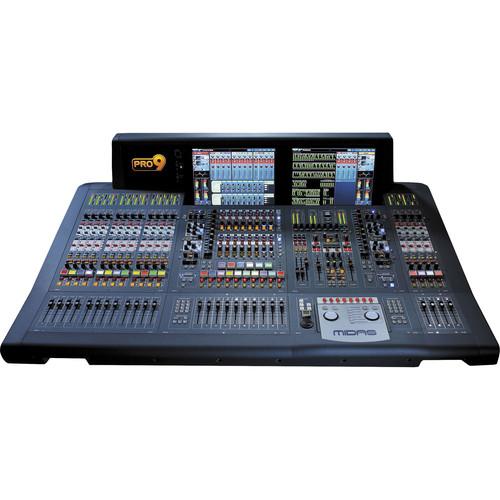 Contents of the user manual for the Midas PRO9 Live Audio Mixing System
- Product category: Digital Mixers Midas
- Brand: Midas
- Description and content of package
- Technical information and basic settings
- Frequently asked questions – FAQ
- Troubleshooting (does not switch on, does not respond, error message, what do I do if...)
- Authorized service for Midas Digital Mixers
|
User manual for the Midas PRO9 Live Audio Mixing System contain basic instructions
that need to be followed during installation and operation.
Before starting your appliance, the user manual should be read through carefully.
Follow all the safety instructions and warnings, and be guided by the given recommendations.
User manual is an integral part of any Midas product,
and if it is sold or transferred, they should be handed over jointly with the product.
Following the instructions for use is an essential prerequisite for protecting
health and property during use, as well as recognition of liability on the part of the manufacturer
for possible defects should you make a warranty claim. Download an official Midas user manual in which you will find instructions on how to install, use, maintain and service your product.
And do not forget – unsuitable use of a Midas product will considerably shorten its lifespan!
|
Product description The touring package version of the MIDAS PRO9 Live Audio Mixing System is designed for live sound reinforcement such as in concert venues, theaters, houses of worship, broadcast, tours, and more. The system requires the Pro9 version of the MIDAS DL371 modular, upgradeable, remote DSP processing engine (sold separately) connected via Cat 5e cabling to a networked system of up to 11 discrete I/O devices depending on the user's specific I/O requirements. An redundant N+1 processing card can be added to the DL371 DSP engine as a backup, in the event that a card within the 371 fails.
The system is designed to be paired with both the DL351 and a DL451 modular stage boxes (sold separately) that feature 56 and 24 MIDAS designed microphone preamps respectively as well as eight analog XLR outputs in each stage box's default configuration.
Additional I/O can also be connected using any of the MIDAS DL series digital I/O units as well as the console's three rear panel card slots that can house any combination of MIDAS DL series I/O cards.
The flexibility of the system allows for it to be quickly reconfigured with whatever connections are required. Redundant power supplies are included with every system as part of the system's failure-tolerant architecture.
Additionally, the console features 8 auxiliary returns, all with 4-band parametric EQ and insert points. The auxiliary returns may be used as returns using the unit's eight internal multi-channel FX processors or as additional microphone input channels.
The console's 88 input channels may be routed to 35 phase coherent mix busses which comprise 16 user-configurable buses (as mixes, subgroups, or mix minus groups) and eight matrix buses. The matrix busses can receive their sources from inputs or groups which allows them to be used as eight additional auxiliary (monitor mix and fx sends) for a total of 32 mixes (plus L, R & Mono) for monitor mixing. All buses can be linked as stereo pairs, except the mono bus. As with other MIDAS digital consoles, the audio paths can be routed to multiple destinations and the console format can be reconfigured live on a scene-by-scene basis.
Increased flexibility can be added to the system by utilizing a Klark Teknik DN9650 Network Bridge digital format converter offering MADI and Dante connectivity.
The standard PRO9 live audio system is modular, allowing for some variations in physical placement and system size. This version of the control console is designed for touring applications and arrives in a custom designed flight case. -
- Live performance digital console control center with up to 88 simultaneous input channels
- 35 time-aligned and phase-coherent mix buses
- 40 bit floating point processing with 96 kHz sample rate
- HyperMAC and AES50 networking allows up to 288 inputs and 294 outputs @ 96 kHz sample rate
- HyperMAC router with 192 bidirectional channels over copper and optical fiber
- Provides dual redundant snake connection to DL371Pro6 Audio System Engine
- Snake connections up to 500 m with optical fiber or 100 m with CAT5/5e cable
- 10 VCA (variable control association) and 8 POPulation groups
- Up to 36 assignable 1/3 octave KLARK TEKNIK DN370 graphic equalizers
- Up to 8 multi-channel digital signal processing effects engines
- 29 MIDAS PRO motorized 100 mm faders
- 2 daylight viewable 15" full color TFT display screens
- Fully interpolated touch sensitive controls
- Optional wireless remote control with MIDAS MIXTENDER App for iPad*
- Three bay auto-ranging universal switch-mode power supplies with N+1 redundancy
- Designed and engineered in England
- Over 40 Years of audio mixing console R&D
- Comprehensive latency management
- Custom Interpolation algorithms
- Comprehensive automatic time alignment of audio
- 70 microseconds of latency per link (hop) via KLARK TEKNIK"S SuperMac implementation
- VCA and POPulation Groups
-
- VCA and POPulation groups both have assignable color coding and digital write-on buttons
- VCA Groups allow access to all the channel faders belonging to any of the VCA groups at the press of a switch
- POP (POPulation) groups can contain any combination of channels that you want to access instantly at the press of a switch
- VCA and POP Groups encourage the development of a mental picture, or "Mind Map", of the whole system
- Selecting a VCA or POP group will bring all of the members of that group to you, rather than you having to go looking for them
- Input channels can be viewed either by scrolling the input faders or by pressing the EXTEND button, which will populate the VCA faders with additional members of that POP group
- Equalization
-
- Fully interpolated controls
- 4-band parametric EQ
- 4 different filter types
- Dynamics Processing
-
- XL8 dynamics processing
- 4 different input compressor algorithms
- 5 different output compressor algorithms
- A wide choice of dynamics processing
- Surround Sound
-
- Quad 4-Channel - L-R front plus L-R rear
- LCRS 4-Channel - L-R-C plus single rear channel
- Quad 6-Channel - L-R-C plus sub plus L-R rear
- FX
-
- 40-bit floating-point audio processing
- Custom-designed FX processors
- Internal FX processors operate within MIDAS' automatic latency compensation
- Automation
-
- 1000 snap shot scenes
- Scene-specific routing
- Scene store and recall can be ''scoped''
- MIDI inputs and outputs provided
- Software versions forward and backward compatible
- Show files compatible with any MIDAS digital console
- Patching
-
- 288 inputs x 294 outputs (max. capacity) point-to-point routing anywhere within the network
- 56 mic / line inputs with MIDAS mic preamps
- Up to 80 simultaneous-input processing channels
- 16 Group / Aux & 16 Matrix - 32 Mixes in ''monitor'' mode
- 35 sample-synchronous, phase-coherent mix buses
- Sample Synchronous Audio
- Uses automatic latency management system for internal processing and compensation for additional A/D & D/A conversions when connecting analog inserts to synchronize samples and insure phase coherency of the outputs
- Analog Potentiometers
- Uses analog potentiometers as opposed to mechanical encoders to access the processing algorithms
- Display Screens
- Features five high-resolution displays that remain visible even in direct sunlight to provide visual feedback for channel strips, system information, 3rd party applications
- Detail Panel Area
- Features a vertically-oriented channel strip layout with configurable controls and multicolor LCD channel select buttons
- Microphone Preamplifiers
- Uses discrete component design with a warmth similar to that found on the MIDAS XL3, XL4, and Heritage consoles with separate analog remote gain and digital trim controls for gain staging
- Navigation Mode
- FLIP Navigation: selecting an output flips the input fader to become the input channel that sends levels to the selected output
FX Navigation: deploys a patched internal FX processor to the display screen and maps the ASSIGNABLE CONTROLS to the FX processor
GEQ Navigation: selects an output which has a GEQ assigned and present the GEQ on the VCA faders
MCA Navigation: deploys the MCA faders of a selected output to the VCA fader bank. In conjunction with Advanced mode, MCA navigation mode controls the contributions of their members to the currently selected bus. - Areas A and B
- Facilitates dual operator use for two independent stereo solo systems with: 4-Channel Configurable "Area B" for dual operators
- Mixtender iPad App
- Provides wireless remote control for key functions of the console. The App automatically selects the right console type so there is no difficult setup procedure.
With the app you can monitor ALL input and output metering simultaneously in real time, and you can remotely EQ any speaker mix with one of the console's on-board KLARK TEKNIK DN370 GEQs.
The app also provides simple, fast local stage mix adjustment by accessing the consoles' MCA (Mix Control Association). Multiple iPads can be used simultaneously and each one can be locked to a single mix, so artists can create their own monitor mixes without changing any other console settings. The app is free to download from Apple's App Store - Third Party System Integration
- Provides an Ethernet tunnel between the stage and mix position with additional bandwidth using HYPERMAC digital snakes, Cat 5e, and the fiber optic option for third party data transfer via standard Ethernet traffic, MIDI message, and GPIO (general Purpose Input and Output signaling)
- Compatible I/O Units
-
- DL251 Fixed Format I/O Unit
- DL252 Fixed Format I/O Unit
- DL351 Modular I/O unit
- DL431 Input Splitter unit
- DL441 Analog Input card
- DL442 Analog Output card
- DL443 TRS card
- DL444 D-Sub card
- DL451 Modular I/O unit
- DL452 AES/EBU card
- Compatible Accessories
-
- DN9331 - Graphic Controller
- DN9610 - AES50 Repeater
- DN9620 - AES50 Extender
- DN9650 - Network Bridge
- DN9696 - AES50 Audio Recorder
In the Box Midas PRO9 Live Audio Mixing System (Touring Package) PRO9 Control Center Mains Cable (8-off) Custom Touring Flight Case Limited 3-Year Warranty Table of Contents
|
Upload User Manual
Have you got an user manual for the Midas PRO9 Live Audio Mixing System in electronic form? Please send it to us and help us expand our library of instruction manuals.
Thank you, too, on behalf of other users.
To upload the product manual, we first need to check and make sure you are not a robot. After that, your "Submit Link" or "Upload File" will appear.
Technical parametersMidas PRO9 Specs | I/O | Maximum Input Capacity: 288
Maximum Output Capacity: 294
Primary Inputs: 80
Return Inputs: 8
Maximum simultaneous mix channels: 104
Number of groups/auxes: 16
Number of matrices: 16
Groups that provide mixes in monitor mode: 32
Mix buses: 35
VCAs: 10
POPulation groups: 6
Effects devices: 8
Maximum Klark Teknik Teknik DN370: 36
Configurable 'area B': yes | | Expandability | Digital snake: dual redundant HyperMac (192 x 192) Cat 53 digital snake included
Fiber-optic connections for optional maximum 500 m snake Additional I/O options:
DL251 Audio System I/O
DL351 Modular I/O
DL431 Mic Splitter
DL451 Modular I/O
I/O Card Options
DL441 analog input (mic module)
DL442 analog output module
DL443 analog jack I/O module
DL444 8 analog mic in and 8 analog line out module
DL452 AES/EBU input and output module
Option of 150 m fiber optic cable | | Processor | 32-bit | | Reverb | Hall, Plate, Chamber and Room, with five variations of each | | Effects | Live, Non-Linear, Reverse, Delay, ADT, Multitap Echo, Sound-On-Sound and Infinite Room | | Parameters | Pre-delay: 0 to 990 ms
Pattern (density) Adjustable 0 to 9 increments (Grainy to Dense)
Level (depth) Adjustable 0 to 9 increments (Distant to Close)
Decay time 0.1 to 18 seconds
Room size 8 to 90 meters linear dimension
LF decay Adjustable ±7 increments ref. 1 kHz decay time
HF decay Adjustable ±7 increments ref. 1 kHz decay time | | Controls | Input mute: Removes audio feed from reverberation section. Reverb mute: Clears unwanted reverberant signal.
Input level control: From 6dB gain to infinite attenuation.
Headroom indicator: 10-point LED display, 0 dB to -27 dB.
Display" Simultaneous display of all parameter information. Parameter selection and store functions are verified by individual LEDs | | Sampling Frequency | 96 kHz | | Latency Delay | <2 ms input to master (no compensation) | | Dynamic Range | 110 dB, 22 to 22,000 Hz (no pre-emphasis) | | Maximum Voltage Gain | 80 dB inputs to subgroups and masters
86 dB inputs to aux and matrix | | Maximum Voltage Gain | 80 dB inputs to subgroups and masters
86 dB inputs to aux and matrix | | Crosstalk | At 1 kHz: -100 dB physically adjacent input channels ,b>At 10 kHz: -100 dB physically adjacent input channels | | Cut and Mix Transitions | Fader/pan cut off at 1 kHz: -100 dB
Fader/pan cut off at 10 kHz: -100 dB | | Display Screen | 2x 15" daylight-viewable color screens | | LCD | 33x RGB color | | Faders | 29x touch-sensitive faders with 1024 steps of resolution | | Encoders | 102x touch-sensitive with 512 steps | | Power Requirements | 100 to 240 VAC, 50 to 60 Hz | | Operating Temperature | 41 to 104°F (+5 to 40° C) | | Storage Temperature | -4 to 140° (-20 to 60°C) | | Dimensions | Control Center: 51.18 x 39.37 x 15.75" (1300 x 1000 x 400 mm)
Accessories (sold separately)
DL251 I/O Box (5U): 19.0 x 17.5 x 16.1" (48.3 x 44.5 x 41.0 mm)
DL351 I/O Box (7U): 19.0 x 24.5 x 16.1" (48.3 x 62.2 x 41.0 mm)
DL371 I/O Box (7U): 19.0 x 24.5 x 16.1" (48.3 x 62.2 x 41.0 mm)
DL451 I/O Box (3U): 19.0 x 10.5 x 16.1" (48.3 x 26.7 x 41.0 mm) | | Weight | Control center: 265 lb (120 kg)
Accessories (sold separately)
DL351: 110 lb (50 kg)
DL371: 66 lb (30 kg)
DL451: 29 lb (13 kg) |
Rating100% users recommend this product to others. And what about you?

This product has already been rated by 04 owners. Add your rating and experience with the product.
Discussion
 Ask our technicians if you have a problem with your settings,
or if anything is unclear in the user manual you have downloaded.
You can make use of our moderated discussion.
The discussion is public and helps other users of our website who may be encountering similar problems.
Ask our technicians if you have a problem with your settings,
or if anything is unclear in the user manual you have downloaded.
You can make use of our moderated discussion.
The discussion is public and helps other users of our website who may be encountering similar problems.
The discussion is empty - enter the first post
Post a new topic / query / comment:
|
|
|
| Request for user manual |
You can’t find the operation manual you are looking for? Let us know and we will try to add the missing manual:
I’m looking for a manual / Request for manual
Current requests for instruction manuals:
Call Of Duty World War Two For Xbox...
controller stratus XL...
stratus XL...
smart whatch serie S11 42mm...
Allen & Heath SQ-6 manual...
|
| Discussion |
Latest contributions to the discussion:
AEW R 4100
Name: MAURICIO ANGARITA
Audio-Technica AEW-R4100 UHF Diversity Receiver for
AEW R 4100 has the mute function blocked and does not allow audio to pass. I tried several times to turn off the mute from the transmitter but it does nothing, the mute stays on. Solution?
Thank you...
Instructions for assembling the 2015 Forecast Image Master Consoles GC3-A
Name: mike elam
Forecast Consoles GC3-A ImageMaster Editing Console
Looking for instructions for assembling this console. ...
EMPTY TONER ERROR MESSAGE AFTER REPLACING TONER
Name: LINDA BAD YELLOW EYES
Brother TN223BK Standard-Yield Toner
I HAD TO CHANGE OUT ALL THREE TONERS DUE TO LEAKS IN THE YELLOW AND CYAN. AFTER I REPLACED THEM, THE MACHINE KEEPS GIVING ME AN EMPTY TONER ERROR MESSAGE. HELP!!...
PS480D 20/24 pin Switching 480W Power Supply
Name: swkargo
Logisys 480W Power Supply
This item states in can run -5vdc .It is NOT listed on the board or I beleive is r4 is missing the resitior. Any body have thid issue. Shawn
...
Help needed
Name: Ann Carter
SanDisk 1TB Extreme Portable USB 3.1
When I click the link to download the user manual for my Sandisk Extreme external hard drive, it gives me the manual for the LG Cricket. Can you please change the link so I can download the Sandisk manual and begin using this drive? Thank you....
|
|


