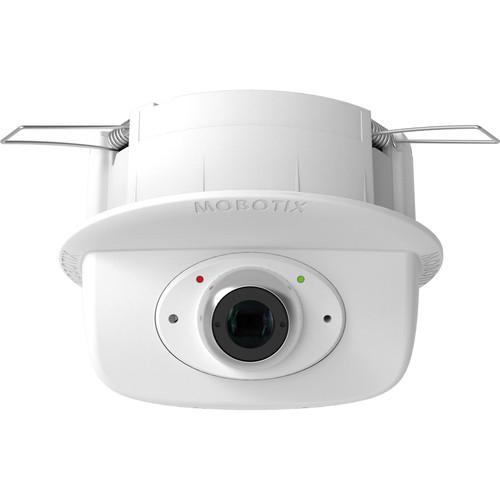
User Manual for MOBOTIX p26 6MP Network Camera with Night Sensor Module Click to enlarge the picture
 Contents of the user manual for the MOBOTIX p26 6MP Network Camera with
- Product category: Wired IP Cameras MOBOTIX
- Brand: MOBOTIX
- Description and content of package
- Technical information and basic settings
- Frequently asked questions – FAQ
- Troubleshooting (does not switch on, does not respond, error message, what do I do if...)
- Authorized service for MOBOTIX Wired IP Cameras
|
User manual for the MOBOTIX p26 6MP Network Camera with contain basic instructions
that need to be followed during installation and operation.
Before starting your appliance, the user manual should be read through carefully.
Follow all the safety instructions and warnings, and be guided by the given recommendations.
User manual is an integral part of any MOBOTIX product,
and if it is sold or transferred, they should be handed over jointly with the product.
Following the instructions for use is an essential prerequisite for protecting
health and property during use, as well as recognition of liability on the part of the manufacturer
for possible defects should you make a warranty claim. Download an official MOBOTIX user manual in which you will find instructions on how to install, use, maintain and service your product.
And do not forget – unsuitable use of a MOBOTIX product will considerably shorten its lifespan!
|
Product description The p26 6MP Network Camera with Night Sensor Module (No Lens) from MOBOTIX is designed to be mounted onto a wall. Its 6MP 1.1/8" progressive scan CMOS sensor captures up to 3072 x 2048 resolution video at 12 fps.
The camera's built-in temperature sensor, illumination sensor, movement sensor, and MxActivitySensor all trigger an alarm for event management. The camera features an RJ45 Ethernet connection with PoE for quick installation, while the included 4GB microSD card provides local storage. This camera operates with built-in firmware allowing remote access from Windows and Mac computers via a web browser, or using the free MOBOTIX app for iOS devices. - Night sensor module included
- 3072 x 2048 resolution video at up to 12 fps
- 4GB microSD card for local storage
- RJ45 Ethernet connection with PoE for quick installation
- MxLEO, backlight compensation, automatic white balance, and distortion correction
- Temperature sensor, illumination sensor, movement sensor, MxActivitySensor, and MxAnalytics
- IP20- and IK06-rated for indoor use
- Remote access and control via Windows and Mac on a web browser
In the Box MOBOTIX p26 6MP Network Camera with Night Sensor Module (No Lens) Blind Cover 19.7" (50cm) Ethernet Patch Cable 4GB microSD Card Flathead Screwdriver 1.5mm Allen Wrench Limited 1-Year Warranty Table of Contents
|
Upload User Manual
Have you got an user manual for the MOBOTIX p26 6MP Network Camera with Night Sensor Module in electronic form? Please send it to us and help us expand our library of instruction manuals.
Thank you, too, on behalf of other users.
To upload the product manual, we first need to check and make sure you are not a robot. After that, your "Submit Link" or "Upload File" will appear.
Technical parametersMOBOTIX p26 Specs | Image Sensor | 6 MP 1/1.8" progressive scan CMOS sensor | | Maximum Image Resolution | 3072 x 2048 (6 MP) | | Minimum Illumination | B&W: 0.02 lux at 1/60 sec, 0.001 lux at 1 sec | | Frame Rates | MxPEG: 42 fps at 1280 x 720, 34 fps at 1920 x 1080, 24 fps at QXGA, 15 fps at 5 MP, 12 fps at 6 MP
MJPEG: 26 fps at 1280 x 720, 13 fps at 1920 x 1080, 9 fps at QXGA, 5 fps at 5 MP, 4 fps at 6 MP
H.264: 25 fps at 1920 x 1080, 20 fps at QXGA | | Video Compression | MxPEG, MJPEG, JPEG (maximum output size 6 MP)
H.264 (maximum output size QXGA, bandwidth limitation applicable) | | Maximum Image Size | 6 MP (3072 x 2048) | | Image Formats | Freely configurable 4:3, 8:3, 16:9 or custom formats (image cropping) including 2592 x 1944 (5 MP), 2048 x 1536 (QXGA), 1920 x 1080, and 1280 x 960 (MEGA) | | Image Processing | MxLEO, backlight compensation, automatic white balance, image distortion correction, panorama correction | | PTZ | Digital pan, tilt, zoom, continuous zoom up to 8x | | DVR | microSD card slot (4 GB microSD card included), USB device or NAS, separate live image and full image recording via MxFFS with archiving function, pre- and post-alarm images, automatic DVR monitoring with error notification | | Software | MxManagementCenter | | Interoperability | ONVIF | | Indicator LEDs | Green, red | | Alarm/Events | Temperature sensor, microphone (Mx-c26A-AU only), additional sensors/IOs via MxMessageSystem, notification via email, FTP, IP telephony (VoIP, SIP) | | Intelligent Video Analytics | MxActivitySensor, video motion analysis, MxAnalytics | | Interfaces | Ethernet 100BaseT (MxRJ45), mini-USB (MxMiniUSB) | | Security | User/group management, HTTPS/SSL, IP address filter, IEEE 802.1x, intrusion detection, digital image signature, MxFFS | | Certifications | EN55022:2010, EN55024:2010, EN50121-4:2006, EN61000-6-1:2007, EN 61000-6-2:2005, EN61000-6-3:2007+A1:2011, EN61000-6-4:2007+A1:2011, AS/NZS CISPR22:2009+A1:2010, CFR47 FCC Part 15 B | | Power Supply | Power over Ethernet IEEE 802.3af | | Power Consumption | 4 W typical | | Software Features | Intelligent video analysis, digital zoom, programmable exposure windows, single image recording, Full Featured Recording (MxFFS Archive, Continuous Recording, Full Image Recording), time and event driven, week programs including public holidays, web functions, logo generator, linked event logic, master/slave activation, several time-driven privacy zones, remote activation, program interface / HTTP API | | Ambient Temperature | 32 to 104°F / 0 to 40°C | | IP Rating | IP20 | | IK Rating | IK06 | | Installation | Drop ceilings, suspended ceilings | | Housing | White, PBT-30GF | | Dimensions | Overall: 3.5 x 4.72" / 89 x 120 mm
Recommended Installation Depth: 1.97" / 50 mm
Minimum Installation Depth: 1.1" / 39 mm | | Weight | Approximately 9.5 oz / 270 g |
Rating90% users recommend this product to others. And what about you?

This product has already been rated by 03 owners. Add your rating and experience with the product.
Discussion
 Ask our technicians if you have a problem with your settings,
or if anything is unclear in the user manual you have downloaded.
You can make use of our moderated discussion.
The discussion is public and helps other users of our website who may be encountering similar problems.
Ask our technicians if you have a problem with your settings,
or if anything is unclear in the user manual you have downloaded.
You can make use of our moderated discussion.
The discussion is public and helps other users of our website who may be encountering similar problems.
The discussion is empty - enter the first post
Post a new topic / query / comment:
|
|


