User Manual for Mole-Richardson Inbetweenie, Betweenie, Tweenie, Teenie 4-Light Pro Kit Click to enlarge the picture
 Contents of the user manual for the Mole-Richardson Inbetweenie, Betweenie, Tweenie, Teenie 4-Light
- Product category: Tungsten Lights Mole-Richardson
- Brand: Mole-Richardson
- Description and content of package
- Technical information and basic settings
- Frequently asked questions – FAQ
- Troubleshooting (does not switch on, does not respond, error message, what do I do if...)
- Authorized service for Mole-Richardson Tungsten Lights
|
User manual for the Mole-Richardson Inbetweenie, Betweenie, Tweenie, Teenie 4-Light contain basic instructions
that need to be followed during installation and operation.
Before starting your appliance, the user manual should be read through carefully.
Follow all the safety instructions and warnings, and be guided by the given recommendations.
User manual is an integral part of any Mole-Richardson product,
and if it is sold or transferred, they should be handed over jointly with the product.
Following the instructions for use is an essential prerequisite for protecting
health and property during use, as well as recognition of liability on the part of the manufacturer
for possible defects should you make a warranty claim. Download an official Mole-Richardson user manual in which you will find instructions on how to install, use, maintain and service your product.
And do not forget – unsuitable use of a Mole-Richardson product will considerably shorten its lifespan!
|
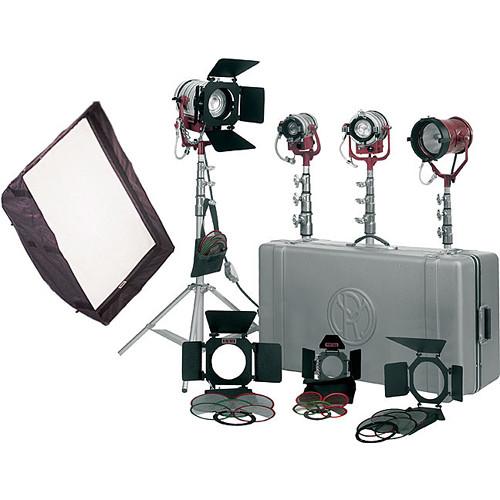
Product description This 1800 total watt Mole Richardson Inbetweenie, Betweenie, Tweenie, Teenie 4 Light Pro Kit consists of three Fresnels, one open-face fixture, a 16 x 22" softbox, barndoors, scrims, gels, a Gaffer Kit, 8.5' stands, bulbs, and a hard travel case. The fixtures range from 200 to 650 watts, enough light for an architectural study, group portrait, or multi-item product setup. The Teenie-Mole works as the 650-watt main or key light. It may be used direct or bounced, and it has a focusing knob to slightly vary the beam intensity. The InBetweenie, Betweenie, and Tweenie Fresnels each offer variable and smooth focus control over their output. - The Chimera Video Pro Plus 1 softbox intensifies, softens, and broadens the light from the Teenie-Mole.
- Use the included barndoor sets and scrims to adjust the shape and light output of each fixture.
- The hard plastic, wheeled case with interior partitions makes storage and transport easy.
- Front and rear knobs on the Fresnels offer focusing from spot to wide flood.
In the Box Mole-Richardson Inbetweenie, Betweenie, Tweenie, Teenie 4-Light Pro Kit 200W InBetweenie Fresnel Solarspot (3101) 300W Betweenie Fresnel Solarspot (3131) 650W Tweenie Fresnel Solarspot (4821) 650W Teenie Open Face Light (4051) 4 x Bulbs (FVL, FKW, FRK, FAD) 4 x 4-Leaf Barndoor Sets (2904, 4054, 2 x 40445A) Accessory Holder for Teenie-Mole (4055) 4 x Diffuser Frames (2903, 4053, 2 x 40437A) 4 x Scrim Sets, 1 ea:
Half Single, Full Single, Half Double
(5526S, 5523S, 5526D, 2908S, 2909S, 2908D, 4058S, 4059S, 4058D) 8 x Full Double Scrims
(2 x 2909D, 2 x 4059D, 4 x 5523D) 4 x Scrim Bags (G12050, G136, 2 x G135) Chimera 16 x 22" Video Pro Plus 1 Softbox with Adapter Ring
(CH8114, CH9660AL) Gaffer Pack:
Gloves, Mitt Clip
Cube Tap, C-47, Gel Pack, Ditty Bag 4 x Litewate Kit Stands (3631) Moleded Case (58111) Table of Contents
|
Upload User Manual
Have you got an user manual for the Mole-Richardson Inbetweenie, Betweenie, Tweenie, Teenie 4-Light Pro Kit in electronic form? Please send it to us and help us expand our library of instruction manuals.
Thank you, too, on behalf of other users.
To upload the product manual, we first need to check and make sure you are not a robot. After that, your "Submit Link" or "Upload File" will appear.
Technical parametersMole-Richardson 58223P Specs | Rating | InBetweenie: 250 W
Betweenie: 300 W
Tweenie: 650 W
Teenie-Mole: 650 W | | Socket (Lampholder) | InBetweenie: Miniature 2-pin (G5.3)
Betweenie, Tweenie: 2-pin prefocus
Teenie-Mole: Compressible single contact | | Lens (Condenser) | InBetweenie: 2" / 5 cm Fresnel
Betweenie: 3" / 7.6 cm Fresnel
Tweenie: 4.5" / 11.4 cm Fresnel
Teenie-Mole: Not applicable | | Reflector (Mirror) | Alzak aluminum | | Mounting | Fits on standard 5/8" stand | | Yoke | Cast aluminum, fits any standard 5/8" standard spud or hanger spud | | Cable | 25' / 7.6 m, Type SO, 3-conductor #18 AWG with 3-prong grounding house plug (other plugs available upon request) | | Focusing | InBetweenie, Betweenie, Tweenie: Rotating plastic knob on front and back
Teenie-Mole:Screw type knob on back of fixture | | Weight | InBetweenie: 3.75 lbs / 1.7 kg
Betweenie: 4.5 lb / 2 kg
Tweenie: 6.75 lb / 3.1 kg
Teenie-Mole: 5.25 lbs / 2.4 kg | | Dimensions | InBetweenie: 5.9 x 3.6 x 4.75" / 14.9 x 9.2 x 12.1 cm
Betweenie: 6.1 x 7 x 9" / 15.6 x 18.8 x 22.3 cm
Tweenie: 8.75 x 8.75 x 11.1" / 22.2 x 22.2 x 28.1 cm
Teenie-Mole: 6.25 x 7.4" / 16 x 18.1 cm
Kit in Case: 40 x 18 x 11.5" / 101.6 x 45.7 x 29.2 cm | | Kit Weight | 80 lb / 36.3 kg | | | | Box Dimensions (LxWxH) | 44.0 x 21.0 x 21.0" |
Rating100% users recommend this product to others. And what about you?

This product has already been rated by 45 owners. Add your rating and experience with the product.
Discussion
 Ask our technicians if you have a problem with your settings,
or if anything is unclear in the user manual you have downloaded.
You can make use of our moderated discussion.
The discussion is public and helps other users of our website who may be encountering similar problems.
Ask our technicians if you have a problem with your settings,
or if anything is unclear in the user manual you have downloaded.
You can make use of our moderated discussion.
The discussion is public and helps other users of our website who may be encountering similar problems.
The discussion is empty - enter the first post
Post a new topic / query / comment:
|
|


