|
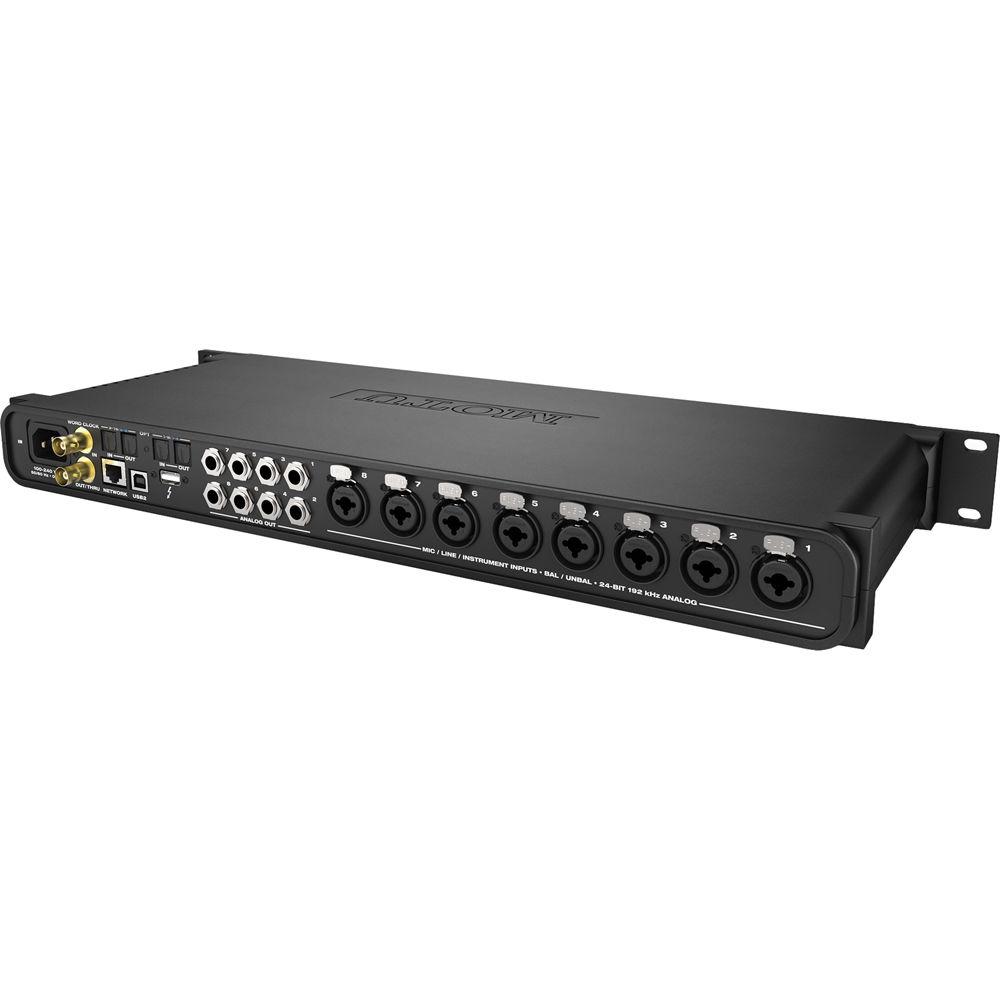
User Manual for MOTU 8M - Thunderbolt and USB Audio Interface With AVB Networking and DSP Click to enlarge the picture
 Contents of the user manual for the MOTU 8M - Thunderbolt and USB
- Product category: Audio Interfaces & Systems MOTU
- Brand: MOTU
- Description and content of package
- Technical information and basic settings
- Frequently asked questions – FAQ
- Troubleshooting (does not switch on, does not respond, error message, what do I do if...)
- Authorized service for MOTU Audio Interfaces & Systems


 |
User manual for the MOTU 8M - Thunderbolt and USB contain basic instructions
that need to be followed during installation and operation.
Before starting your appliance, the user manual should be read through carefully.
Follow all the safety instructions and warnings, and be guided by the given recommendations.
User manual is an integral part of any MOTU product,
and if it is sold or transferred, they should be handed over jointly with the product.
Following the instructions for use is an essential prerequisite for protecting
health and property during use, as well as recognition of liability on the part of the manufacturer
for possible defects should you make a warranty claim. Download an official MOTU user manual in which you will find instructions on how to install, use, maintain and service your product.
And do not forget – unsuitable use of a MOTU product will considerably shorten its lifespan!
|
Product description The MOTU 8M - Thunderbolt and USB Audio Interface With AVB Networking and DSP (24x26, 8 Mic/Line/Instrument) is designed for studio recording, installed sound, and live sound reinforcement applications such as mixing a band in a club or music venue. The 1U 19" rackmountable device features eight balanced combination microphone/line/instrument inputs with individually switchable +48V phantom power and pads, v-limiting circuitry to prevent clipping, 8 analog outs, one front panel stereo headphone output with gain control, 2 x 8-channel ADAT optical, and RCA S/PDIF (with sample rate conversion). Additional I/O can be added to the system through AVB networking.
The audio interface utilizes ESS Sabre32 Ultra converters to provide a dynamic range of 123 dB (A-weighted 20 to 20,000 HZ) on balanced TRS analog outputs, a THD+N rating of -110 dB, and a total system latency of 32 samples (0.66 ms) while recording at up to 24-bit 192 kHz resolution. A front panel backlit 324 x 24 LCD provides detailed metering for all analog and digital I/O as well as provide a GUI for adjusting hardware settings.
Using Thunderbolt connectivity, the audio interface can stream 128 audio channels in and 128 channels out to the interface's physical outputs, the DSP-powered 48 digital routing matrix, or AVB audio network streams. The interface can also use high speed USB 2.0 (3.0 compatible) using class compliant drivers to work with most digital audio workstations.
The 48-channel digital mixer can mix physical inputs on the interface, audio channels from your host computer software, AVB audio network streams, or mixer outputs. It features seven stereo auxiliary busses, three groups, a reverb bus that can serve as an alternate 4th group, a main mix bus, and a separate monitor bus that can function as a solo buss.
The mixer includes 32-bit floating point precision DSP-powered models of three British analog console EQ profiles, a classic compressor module with optional peak/RMS operation, and a model of the legendary Telextronix LA-2A optical leveling amplifier with automatic gain control (AGC) characteristics. Each input channel strip features a high-pass filter, a gate, a four-band parametric EQ, and a compressor.
The device's digital routing matrix allows you to route any source signal such as an analog or digital interface input, computer channel, mixer bus output, or network stream to any destination such as an interface output, host software input, mixer input, or any other device (or computer) on the AVB network. A single input or stereo pair can also be split and sent to multiple destinations.
The first of its kind, this interface features an AVB Ethernet port that adopts the AVB industry networking standard for transporting high-bandwidth, low-latency audio and video over Ethernet. It was developed by the IEEE and enables connection to a second MOTU AVB audio interface (1248, 8M, or 16A) via a CAT-5E or CAT-6 Ethernet cable. The standard is open meaning it is not proprietary and will allow for open interoperability across different devices and brands.
The system can be further expanded through connection to a MOTU AVB Switch (sold separately), for five total devices and the capacity to stream over 512 channels on the network. Sixteen 8-channel network streams may broadcasted while simultaneously listening to sixteen 8-channel network streams. The AVB network provides its own network-wide time base for phase locking all connected devices and also allows one of the connected devices to be assigned as the master clock. An added benefit of the AVB network standard is the automatic device discovery for self-configuration, 100 meter cable runs, as well as the system's Stream Reservation Protocol which provides guaranteed Quality of Service (QoS) and an uninterrupted point-to-point network connection.
The audio interface's on-board DSP, mixing, device settings, and network audio routing can all be controlled through a web application running on a web browser from a laptop, tablet, or smartphone connected by wire or Wi-Fi to your local area network. This allows the interface to be controlled using Mac, Windows, Linux, iOS, and Android devices provided they share the same network. By connecting an Apple Airport or other Wi-Fi router directly to the interface with a standard Ethernet cable, the mixing and DSP controls of the interface can be managed using a smartphone or tablet, without the need for a computer. This is useful for situations such as mixing live sound. A total of up to 12 independent stereo mixes can all be independently controlled by different engineers or musicians via Wi-Fi connected iPhones or iPads.
The device includes a collection of quick setup presets designed for different applications in the studio, on stage, or for installed sound such as a recording interface or network snake. Presets can be customized using the digital routing matrix as well as saved for future recall. - Audio Quality
- Provides 123 dB dynamic range and a THD+N of -110 dB (0.0003%) at -1 dBFS, un-weighted, 1 kHz
- Universal Connectivity
- Connects to computer with Thunderbolt or high-speed USB 2.0 (compatible with USB 3.0) with class-compliant firmware and industry standard drivers to work with any audio software
- On-Board DSP With Mixing And Effects
- Provides flexible 48 input digital mixer modeled after large format mixing consoles with 12 stereo busses and DSP effects including reverb, 4-band EQ, gate, and compression
- 32-Bit Floating Point Processing
- Provides ample headroom for mixing and effects DSP
- Modeled Vintage Effects Processing
- Provides classic reverb, compression modeled after historic LA-2A compressor, and EQ modeled after analog console EQs
- System Expansion and Audio Networking
- Allows you to add a 2nd MOTU AVB interface (1248, 8M, or 16A) with a Cat-5e or Cat-6 Ethernet cable and up to five devices using a MOTU AVB Switch (sold separately). Multiple interfaces can be networked together with over 100 meter cable runs to stream audio between devices and computers on the network
- Matrix Routing and Splitting
- Provides flexible digital matrix routing and splitting for any analog or digital input, computer channel or network stream to any computer, output, or network devices. A single input can be split to multiple output destinations
- 256 Channels of Network Audio I/O To Host Computer
- Allows monitoring and recording of up to 128 network audio channels in and 128 network channels out through a Thunderbolt connection to a host computer
- Web App Control
- Controls on-board DSP, mixing, device settings, and network audio routing from web app software running in a web browser on a computer, laptop, tablet, or Smartphone connected by a wire or Wi-Fi to your local area network
- Standalone Mixing With Wireless Control
- Allows you to connect an Apple Airport or other Wi-Fi router directly to the audio interface with a standard Ethernet cable and control the device's mixing and DSP effects from a smartphone or tablet, without a computer such as in live sound mixing applications
- ADAT Digital I/O
- Allows connection of outboard digital processors, digital mixers or other gear, 16 channels at 44.1/48 kHz or 8 channels at 88.2/96 kHz
- Comprehensive Metering
- Features large backlit 324 x 24 LCD that allows you to view all signal activity at a glance with detailed metering of analog and digital I/O, as well as access to hardware settings from font panel GUI
UPC: 839128005914 In the Box MOTU 8M - Thunderbolt and USB Audio Interface With AVB Networking and DSP (24x26, 8 Mic/Line/Instrument) Power Cord Limited 2-Year Warranty User Manual PDF 7mbyetaddsrxyvvtsrwcuzfqtsywfwrf Table of Contents
|
Upload User Manual
Have you got an user manual for the MOTU 8M - Thunderbolt and USB Audio Interface With AVB Networking and DSP in electronic form? Please send it to us and help us expand our library of instruction manuals.
Thank you, too, on behalf of other users.
To upload the product manual, we first need to check and make sure you are not a robot. After that, your "Submit Link" or "Upload File" will appear.
Technical parametersMOTU 9310 Specs | | | Channels of I/O | 24 Inputs / 26 Outputs at 48 kHz
16 Inputs / 18 Outputs at 96 kHz
8 Inputs / 10 Outputs at 192 kHz | | Max Sample Rate/Resolution | 192 kHz / 24-Bit | | Display and Indicators | 1 x Graphic LCD (Menu Navigation, Metering) | | | | Host Connection | 1 x Thunderbolt (MDP) (Thunderbolt 2)
1 x USB Type-B (USB 2.0)
1 x RJ45 (Network) | | Analog I/O | 8 x Combo XLR / 1/4" Mic/Line/Hi-Z Input
8 x 1/4" (6.3 mm) TRS Balanced Line Output
1 x 1/4" (6.3 mm) TRS Headphone Output | | Phantom Power | +48 V (On 8 Channels) | | Digital I/O | 1 x BNC (Word Clock) Input
1 x BNC (Word Clock) Output
2 x TOSLINK / ADAT, S/MUX Input
2 x TOSLINK / ADAT, S/MUX Output
1 x RJ45 / AVB In/Out | | MIDI I/O | None | | | | Gain Range | Headphone Outputs:
128 dB
Inputs:
0 to +53 dB
Line Inputs:
+2 to +24 dBu
Line Outputs:
-4 to +20 dBu
Mic Inputs:
53 dB | | Max Input Level | Line Inputs:
+17 dBu
Mic Inputs:
+24 dBu (Pad On) | | Max Output Level | Line Outputs:
+20 dBu (Balanced) | | Headphone Output Power | 80 mW (Max) | | Dynamic Range | Outputs:
102 dBA
Line Inputs:
112 dBA
Line Outputs:
123 dBA
Mic Inputs:
112 dBA | | THD+N | Headphone Outputs:
-92 dB
Line Inputs:
-102 dB
Line Outputs:
-110 dB
Mic Inputs:
-104 dB | | | | Sample Rates | 44.1, 48, 88.2, 96, 176.4, and 192 kHz | | Sync Sources | Word Clock | | | | OS Compatibility | macOS 10.8 or Later
Windows 8 or Later | | Processor Requirement | Mac:
1 GHz Intel
PC:
1 GHz Intel Pentium | | RAM Requirements | 2 GB (4 GB Recommended) | | Storage Requirements | 500 GB | | Required Hardware | Available Thunderbolt Port or USB 2.0 Port | | Internet Connection | Required for Remote Control | | | | AC Input Power | 100 to 240 VAC at 50/60 Hz | | | | Package Weight | 7.8 lb | | Box Dimensions (LxWxH) | 23.5 x 11.4 x 5.3" |
Rating100% users recommend this product to others. And what about you?

This product has already been rated by 73 owners. Add your rating and experience with the product.
Discussion
 Ask our technicians if you have a problem with your settings,
or if anything is unclear in the user manual you have downloaded.
You can make use of our moderated discussion.
The discussion is public and helps other users of our website who may be encountering similar problems.
Ask our technicians if you have a problem with your settings,
or if anything is unclear in the user manual you have downloaded.
You can make use of our moderated discussion.
The discussion is public and helps other users of our website who may be encountering similar problems.
The discussion is empty - enter the first post
Post a new topic / query / comment:
|
|
|
| Request for user manual |
You can’t find the operation manual you are looking for? Let us know and we will try to add the missing manual:
I’m looking for a manual / Request for manual
Current requests for instruction manuals:
Call Of Duty World War Two For Xbox...
controller stratus XL...
stratus XL...
smart whatch serie S11 42mm...
Allen & Heath SQ-6 manual...
|
| Discussion |
Latest contributions to the discussion:
AEW R 4100
Name: MAURICIO ANGARITA
Audio-Technica AEW-R4100 UHF Diversity Receiver for
AEW R 4100 has the mute function blocked and does not allow audio to pass. I tried several times to turn off the mute from the transmitter but it does nothing, the mute stays on. Solution?
Thank you...
Instructions for assembling the 2015 Forecast Image Master Consoles GC3-A
Name: mike elam
Forecast Consoles GC3-A ImageMaster Editing Console
Looking for instructions for assembling this console. ...
EMPTY TONER ERROR MESSAGE AFTER REPLACING TONER
Name: LINDA BAD YELLOW EYES
Brother TN223BK Standard-Yield Toner
I HAD TO CHANGE OUT ALL THREE TONERS DUE TO LEAKS IN THE YELLOW AND CYAN. AFTER I REPLACED THEM, THE MACHINE KEEPS GIVING ME AN EMPTY TONER ERROR MESSAGE. HELP!!...
PS480D 20/24 pin Switching 480W Power Supply
Name: swkargo
Logisys 480W Power Supply
This item states in can run -5vdc .It is NOT listed on the board or I beleive is r4 is missing the resitior. Any body have thid issue. Shawn
...
Help needed
Name: Ann Carter
SanDisk 1TB Extreme Portable USB 3.1
When I click the link to download the user manual for my Sandisk Extreme external hard drive, it gives me the manual for the LG Cricket. Can you please change the link so I can download the Sandisk manual and begin using this drive? Thank you....
|
|


