|
User Manual for MOTU The Masterworks Collection - Audio Processing Plug-In Bundle Click to enlarge the picture
 Contents of the user manual for the MOTU The Masterworks Collection - Audio
- Product category: Virtual Processor Plug-Ins MOTU
- Brand: MOTU
- Description and content of package
- Technical information and basic settings
- Frequently asked questions – FAQ
- Troubleshooting (does not switch on, does not respond, error message, what do I do if...)
- Authorized service for MOTU Virtual Processor Plug-Ins
 |
User manual for the MOTU The Masterworks Collection - Audio contain basic instructions
that need to be followed during installation and operation.
Before starting your appliance, the user manual should be read through carefully.
Follow all the safety instructions and warnings, and be guided by the given recommendations.
User manual is an integral part of any MOTU product,
and if it is sold or transferred, they should be handed over jointly with the product.
Following the instructions for use is an essential prerequisite for protecting
health and property during use, as well as recognition of liability on the part of the manufacturer
for possible defects should you make a warranty claim. Download an official MOTU user manual in which you will find instructions on how to install, use, maintain and service your product.
And do not forget – unsuitable use of a MOTU product will considerably shorten its lifespan!
|
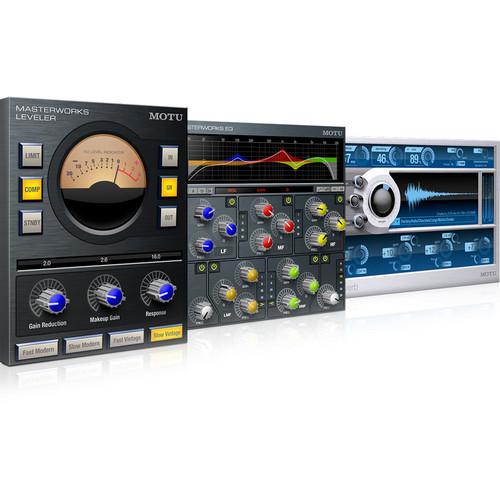
Product description The Masterworks Collection from MOTU is a bundle of three plug-ins featuring EQ, dynamics and reverb, for use with applications that run under Mac OS X. MasterWorks EQ is modeled after the legendary British console EQs and delivers the look, feel, and sound of the classic analog EQ. The MasterWorks Leveler provides vintage automatic gain control and is an accurate model of the legendary Teletronix LA-2A optical leveling amplifier, known for its unique automatic gain control characteristics. ProVerb is a CPU-efficient convolution reverb processor that can reproduce stunningly realistic acoustic spaces, from soaring cathedrals to the best professional studio rooms. Mono, stereo and surround processing is available with up to six different channel configurations supported, depending on the plug-in and host. These include mono to mono, mono to stereo, mono to surround, stereo to stereo, stereo to surround, and surround to surround. And with support for all Mac plug-in formats, the bundle delivers the coveted sound of the MasterWorks series plug-ins to Pro Tools, Logic, Cubase and other applications. Highlights -
- Three premium audio processors suitable for even the most demanding mixing situations
- Accurate modeling
- CPU-efficient performance
- 32-bit and 64-bit internal floating point processing
- Mono, stereo and surround channel configurations (with supporting host software)
- Share MasterWorks plug-in presets among different hosts
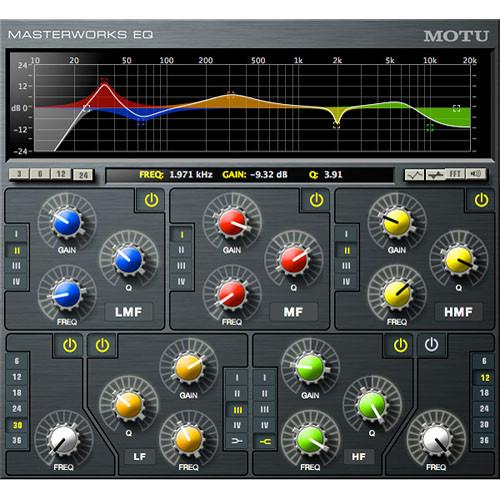
MasterWorks EQ - Graphic editing with Real-Time FFT
- Get a bird's-eye view and hands-on editing of all seven filters
- Drag control points and filter width (Q) bars to dial in settings interactively as you listen
- Show and hide filter curves and other elements in the display to focus when needed
- You can also view a real-time FFT display of the audio material being EQ'd to immediately see the effects of the filter on the frequency content of your audio
Seven Filters - Each of the seven EQ filters is clearly indicated by a unique color
- Create highly customized filtering for even the most demanding situations
- Two mid bands each include a shelf filter option, and the two outside bands provide high-pass and low-pass filtering with variable slopes from a flexible range of 6dB to 36dB per octave
Four EQ Styles - Each center-frequency band provides four EQ types that represent current popular EQ styles and vintage analog EQ styles alike
- These filter types faithfully model the magic of analog equalization, and they've been carefully crafted and meticulously engineered to produce musical results in a wide variety of applications
Modeled Gain and Q Behavior - Each filter type uniquely handles the dynamic interaction between Gain and Q
- This crucial relationship has been modeled to emulate the smooth and musical character of classic analog EQ circuits, in which the gain/Q dependency was dictated by the actual circuit design and electrical components used
- The resulting filter types exhibit astonishing versatility, from minor corrective tasks to highly creative applications
- Type I - provides the most precision, with the least interaction between gain and Q. A smooth, yet precise modern EQ
- Type II - produces constant Q response during boost or cut, emulating classic consoles. Good for controlling resonance on drums and percussion tracks
- Type III - this style emulates the classic Neve EQs, their modern derivatives, and later SSL G series EQs. Many current popular boutique hardware EQs exhibit this same gain/Q relationship
- Type IV - a more extreme form of Type III, this filter exhibits a high degree of interaction between Q and gain in order to maintain as closely as possible an equal amount of area under the response curve as gain is adjusted. Ideal for any applications where subtle changes in the overall character of the sound are desired
MasterWorks Leveler - Classic Automatic Gain Control
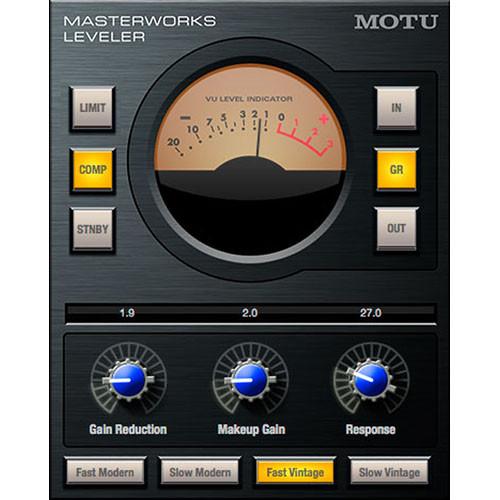
- Accurate model of the legendary Teletronix LA-2A optical leveling amplifier, known for its unique Automatic Gain Control (AGC) characteristics
T4 Module - The heart of the LA-2A is the T4 opto-coupler, a photoelectric device with (signal dependent) self-adjusting behavior that makes optical compressors the tool of choice for top engineers worldwide
Apply to Just About Anything - Use MasterWorks Leveler to smooth out just about any audio material, from vocals to bass guitar to full-program mixes, without destroying perceived dynamics
- Thanks to incredibly high CPU-efficient performance, you can apply the Leveler as needed to any elements of your mix
Authentic Controls for Authentic Sound - The MasterWorks Leveler controls match the front panel of the original LA-2A - Gain Reduction and Makeup Gain knobs, along with Limiter and Compressor buttons, plus an accurately modeled VU meter that adheres to IEC standards
Four Models in One - The LA-2A evolved over the years, producing slightly different characteristics in each generation, so the MasterWorks Leveler also provides four different LA-2A models - Slow Vintage, Fast Vintage, Slow Modern, and Fast Modern
ProVerb - Convolution Reverb
- Convolution is a process where the sound of a real acoustic space, such as concert hall or cathedral, is "sampled" (captured) and then faithfully reproduced, down to the last detail and nuance
- Because it is sampled, not synthesized, convolution reverb is known for its stunning realism
- ProVerb delivers processor-efficient performance
- The convolution engine process four separate channels for stereo processing: two channels (left and right) for the left side and two channels for the right side
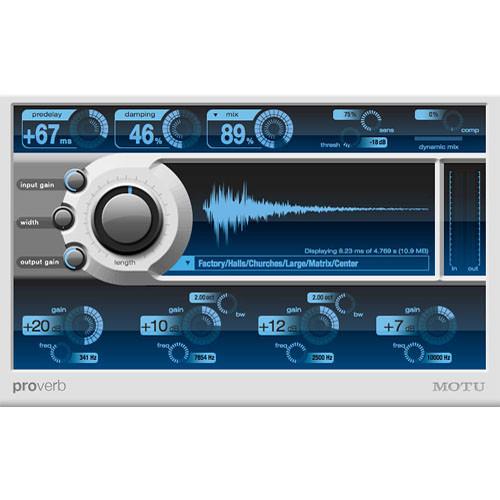
Real Acoustic Spaces - Dozens of preset acoustic spaces (impulse responses) are included, from halls and stages, to plates and cathedrals
- For many presets, you get a sub-menu of different locations within the space. Need a cathedral? Choose your position - the altar, front pew, middle pew, or back row pew.
- Many presets also offer left, center, and right, so you can spread different elements of your mix
Drag and Drop to Add Your Own Spaces - Simply drag and drop any standard audio file into ProVerb's waveform display to add your own presets
- On the web, there are many acoustic spaces for you to choose from, in the form of "impulse response" (IR) audio files that you can download, either for purchase or for free
Special Effects and Sound Design - ProVerb can be used as a powerful special effects processor
- Again, simply drag and drop any audio onto ProVerb's waveform display and then process audio through it to produce incredible special effects and signature sound design elements
- Try just about any audio as an impulse response - results are unpredictable and often simply incredible
Sculpt in Real-Time - ProVerb is heavily optimized so that all parameters can be adjusted in real-time, even when modifying the impulse response waveform
- Quickly sculpt your sound with pre-delay, damping, four bands of EQ, and wet/dry mix
Dynamic Mixing - Dynamic Mix feature automatically "ducks" the wet signal as the dry input signal rises, then raises the wet mix as the dry signal level subsides
- Properly tuned, this feature allows a "wetter" mix while retaining intelligibility of the input signal Threshold, sensitivity and strength settings are provided, allowing the feature to function just like a mix engineer expertly "riding" the wet/dry mix control during playback
Surround Support - ProVerb supports six different channel format variations, including mono-to-stereo, stereo-to-stereo, and even stereo-to-surround and surround-to-surround
UPC: 839128005716 Table of Contents
|
Upload User Manual
Have you got an user manual for the MOTU The Masterworks Collection - Audio Processing Plug-In Bundle in electronic form? Please send it to us and help us expand our library of instruction manuals.
Thank you, too, on behalf of other users.
To upload the product manual, we first need to check and make sure you are not a robot. After that, your "Submit Link" or "Upload File" will appear.
Technical parametersMOTU 7710 Specs | System Requirements | Minimum: PowerPC G5 2.0GHz or faster (multiple CPUs or multi-core CPU required), or Intel Core Duo CPU or faster
OS X 10.5.8 or 10.6
2GB RAM or more
CD/DVD drive for installation
Display with 1024 x 768 or larger resolution
Available USB port for the iLok USB key
Pro Tools, Logic, Cubase, Live, or other digital audio workstation application (or host) that supports Audio Units, MAS, RTAS, or VST3 plug-in formats
Recommended: Intel Core 2 Duo CPU 2.0GHz or faster
4GB RAM or more
1280 x 1024 or larger display resolution | | Other | Note for Digital Performer and AudioDesk Users The MAS version of the MasterWorks Collection is included with Digital Performer version 6. Owners of Digital Performer 6, who would also like to use the MasterWorks plug-ins in other hosts such as Pro Tools, Logic, etc., need to purchase the MasterWorks Collection to obtain the RTAS, VST, and Audio Unit versions of the plug-ins. Owners of DP Version 5 or earlier can upgrade to the latest version of DP to obtain the MasterWorks Collection (MAS only). Owners of AudioDesk, you can either purchase the MasterWorks Collection (requires AudioDesk version 3.2 or higher), can upgrade to the latest version of Digital Performer (MAS only). | | | | Package Weight | 0.9 lb | | Box Dimensions (LxWxH) | 10.2 x 8.9 x 3.1" |
Rating80% users recommend this product to others. And what about you?

This product has already been rated by 62 owners. Add your rating and experience with the product.
Discussion
 Ask our technicians if you have a problem with your settings,
or if anything is unclear in the user manual you have downloaded.
You can make use of our moderated discussion.
The discussion is public and helps other users of our website who may be encountering similar problems.
Ask our technicians if you have a problem with your settings,
or if anything is unclear in the user manual you have downloaded.
You can make use of our moderated discussion.
The discussion is public and helps other users of our website who may be encountering similar problems.
The discussion is empty - enter the first post
Post a new topic / query / comment:
|
|
|
| Request for user manual |
You can’t find the operation manual you are looking for? Let us know and we will try to add the missing manual:
I’m looking for a manual / Request for manual
Current requests for instruction manuals:
Call Of Duty World War Two For Xbox...
controller stratus XL...
stratus XL...
smart whatch serie S11 42mm...
Allen & Heath SQ-6 manual...
|
| Discussion |
Latest contributions to the discussion:
AEW R 4100
Name: MAURICIO ANGARITA
Audio-Technica AEW-R4100 UHF Diversity Receiver for
AEW R 4100 has the mute function blocked and does not allow audio to pass. I tried several times to turn off the mute from the transmitter but it does nothing, the mute stays on. Solution?
Thank you...
Instructions for assembling the 2015 Forecast Image Master Consoles GC3-A
Name: mike elam
Forecast Consoles GC3-A ImageMaster Editing Console
Looking for instructions for assembling this console. ...
EMPTY TONER ERROR MESSAGE AFTER REPLACING TONER
Name: LINDA BAD YELLOW EYES
Brother TN223BK Standard-Yield Toner
I HAD TO CHANGE OUT ALL THREE TONERS DUE TO LEAKS IN THE YELLOW AND CYAN. AFTER I REPLACED THEM, THE MACHINE KEEPS GIVING ME AN EMPTY TONER ERROR MESSAGE. HELP!!...
PS480D 20/24 pin Switching 480W Power Supply
Name: swkargo
Logisys 480W Power Supply
This item states in can run -5vdc .It is NOT listed on the board or I beleive is r4 is missing the resitior. Any body have thid issue. Shawn
...
Help needed
Name: Ann Carter
SanDisk 1TB Extreme Portable USB 3.1
When I click the link to download the user manual for my Sandisk Extreme external hard drive, it gives me the manual for the LG Cricket. Can you please change the link so I can download the Sandisk manual and begin using this drive? Thank you....
|
|


