User Manual for Moza Air 3-Axis Gimbal Stabilizer Kit with 7" Monitor and Articulating Arm Click to enlarge the picture
 Contents of the user manual for the Moza Air 3-Axis Gimbal Stabilizer Kit
- Product category: See All Gimbal Stabilizers Moza
- Brand: Moza
- Description and content of package
- Technical information and basic settings
- Frequently asked questions – FAQ
- Troubleshooting (does not switch on, does not respond, error message, what do I do if...)
- Authorized service for Moza See All Gimbal Stabilizers
|
User manual for the Moza Air 3-Axis Gimbal Stabilizer Kit contain basic instructions
that need to be followed during installation and operation.
Before starting your appliance, the user manual should be read through carefully.
Follow all the safety instructions and warnings, and be guided by the given recommendations.
User manual is an integral part of any Moza product,
and if it is sold or transferred, they should be handed over jointly with the product.
Following the instructions for use is an essential prerequisite for protecting
health and property during use, as well as recognition of liability on the part of the manufacturer
for possible defects should you make a warranty claim. Download an official Moza user manual in which you will find instructions on how to install, use, maintain and service your product.
And do not forget – unsuitable use of a Moza product will considerably shorten its lifespan!
|
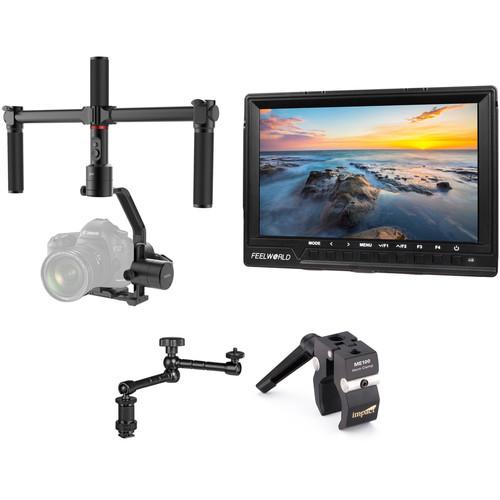
Product description With a 5.5-pound load capacity, this Moza Air 3-Axis Gimbal Stabilizer Kit with 5.5" Monitor and Articulating Arm from B&H can easily support most DSLR and mirrorless cameras. The Air's two-handed grip allows for comfortable operation in underslung, suitcase, or standard operating modes. The grip is removable for single-handed operation. Since your camera's screen may be difficult to see in order to gauge exposure and critical focus, this kit includes a 7" HD monitor from FeelWorld. To mount the monitor to your Moza Air, use the included articulating arm and clamp. See below for more information on the individual items included in this kit. - Moza Air 3-Axis Motorized Gimbal Stabilizer
- Introducing MOZA Air: 3-Axis Handheld Gimbal Stabilizer for Mirrorless Cameras and DSLRs
Compact and configurable, the MOZA Air 3-Axis Motorized Gimbal Stabilizer can stabilize your mirrorless or DSLR camera for smooth, professional-looking footage. Since the Air can be used in either one or two-handed configurations, supporting setups that approach the 7.1-pound payload capacity won't sacrifice usability. The built-in handgrip control offers directional control and mode selection at your fingertips. Other control options include using the free smartphone app or the separately available Wireless Thumb Controller. The Thumb Controller is especially useful in the two-handed configuration. Auto-tuning can be done through the app to ensure optimal performance. The MOZA Air itself and the included batteries, charger, cables, and accessories all fit in the included hard carry case for convenient storage and transport. -
- Aircraft-grade aluminum construction
- Dual handle for capturing stable handheld shots
- MOZA Assistant app allows you to create smooth, dynamic time-lapse video on your smartphone or tablet
- Humanized interval and duration settings
- Can adapt to your specific shooting scenario with two handheld modes
- Can be mounted onto a tripod, slider, jib, crane, or anything else via the 1/4"-20 screw hole at the bottom
- Slip-ring technology employed in the motors allows the gimbal to rotate 360° on yaw, tilt, and roll axis settings, allowing for better camera movement
- "Inception" mode lets you use the full 360° of the roll axis for creative camera moves
- Sport Gear mode tunes the motors for following faster-moving subjects
- Handgrip houses three lithium batteries with 2000mAh capacity that offers a standby time of 12 hours
- Yaw-follow, pitch-follow, yaw-pitch follow, roll-follow, and all-lock operation modes
- Auto-center shooting mode minimizes the need for frequent adjustments
UPC: 611982477812 - FeelWorld FW760 7" On-Camera LCD Monitor
- Introducing MOZA Air: 3-Axis Handheld Gimbal Stabilizer for Mirrorless Cameras and DSLRs
Monitor SD, HD, and UHD 4K video with the Feelworld FW760 7" On-Camera LCD Monitor. A display resolution of 1920 x 1200 can display 1080p signals without scaling, as well as higher and lower resolution content. HDMI and analog composite video inputs are offered on the side of the monitor. For added security, a simple HDMI cable lock is included, ensuring a stable connection.Despite its slim form factor, the FW760 offers many helpful functions that are useful across many different kinds of workflows. Various focus-checking functions such as peaking, zoom, and 1:1 pixel mapping assist in getting sharp images. Framing functions include anamorphic desqueeze, frame lines, markers, and image flip. Rounding out the internal feature set are the exposure functions which include histogram, false color, and zebras.In addition to the aforementioned HDMI cable lock, a Mini HDMI to HDMI cable, sunshade, shoe mount, and L-Series battery plate are included in the box. Whether you're shooting with an SD DV camera, HD camcorder, DSLR, or 4K mirrorless camera, the FW760 will display your images. - Monitoring Tools
-
- Histogram
- Audio level meters
- Focus peaking
- False color
- Zebras (0-100 IRE selectable)
- R/G/B-only and luma-only modes
- Over/underscan
- 4, 9 and 16x zoom
- Anamorphic de-squeeze
- Image flip
- Nine-grid zoom-in
- 1:1 pixel mapping
- Frame markers
- Pearstone 11" Articulating Arm
- Introducing MOZA Air: 3-Axis Handheld Gimbal Stabilizer for Mirrorless Cameras and DSLRs
The Pearstone 11" Articulating Arm is an arm used to mount small displays on prosumer and professional camcorders. The arm's unique design features a single-point locking mechanism, which gives the user maximum flexibility. Moving the display on multiple axes is quick and easy, allowing users to find the best possible viewing angle. In addition, the bottom verticle spacer piece is removeable to reveal a 1/4"-20 male screw, and the bottom shoe mount is removeable to reveal a 1/4"-20 female thread. The full length of this arm (tip-to-tip) measures 11", and the usable extension range (end-joint to end-joint) measures 8.3". - Maximum mounting flexibility
- Single point locking mechanism
- Fits on any standard shoe mount
UPC: 847628015005 - Impact Atom Clamp with Ratchet Handle
- Introducing MOZA Air: 3-Axis Handheld Gimbal Stabilizer for Mirrorless Cameras and DSLRs
The Impact Atom Clamp is a smaller version of the popular Impact Super Clamp. Weighing in at a mere 4.0 oz, the Atom Clamp can support a payload of over 15 lb. This, and the fact that it comes with 1/4"-20 and 3/8" female sockets, makes it ideal for use with most standard camera and grip accessories. It's ideal for small sets or tabletop photography. The Atom Clamp is made of lightweight aluminum and features a textured, non-slip jaw grip that is optimized to work with poles or flat objects. - Light and compact enough to carry around in your jacket pocket or camera bag
UPC: 847628540248 In the Box - Air 3-Axis Motorized Gimbal Stabilizer rewqfrxf
- Handgrip
- 3 x 26350 Battery
- Charger
- Dual Handle Set
- Lens Support
- 1/4"-20 Screw
- USB Cable
- 3 x Camera Control Cable (Sony a7, Canon DSLR, GH4)
- ARCA-SWISS Converter
- Quick Release Plate
- Carry Case
- Limited 1-Year Warranty
- FeelWorld - FW760 7" On-Camera LCD Monitor
- Pearstone - 11" Articulating Arm
- Impact - Atom Clamp with Ratchet Handle
Table of Contents
|
Upload User Manual
Have you got an user manual for the Moza Air 3-Axis Gimbal Stabilizer Kit with 7" Monitor and Articulating Arm in electronic form? Please send it to us and help us expand our library of instruction manuals.
Thank you, too, on behalf of other users.
To upload the product manual, we first need to check and make sure you are not a robot. After that, your "Submit Link" or "Upload File" will appear.
Technical parameters - Moza Air 3-Axis Motorized Gimbal Stabilizer
| | | Number of Axes | 3-Axis (Pitch, Roll, Yaw) | | Rotation Range | Yaw (Pan): 360
Rating50% users recommend this product to others. And what about you?

This product has already been rated by 60 owners. Add your rating and experience with the product.
Discussion
 Ask our technicians if you have a problem with your settings,
or if anything is unclear in the user manual you have downloaded.
You can make use of our moderated discussion.
The discussion is public and helps other users of our website who may be encountering similar problems.
Ask our technicians if you have a problem with your settings,
or if anything is unclear in the user manual you have downloaded.
You can make use of our moderated discussion.
The discussion is public and helps other users of our website who may be encountering similar problems.
The discussion is empty - enter the first post
Post a new topic / query / comment:
|
|
|
| Request for user manual |
You can’t find the operation manual you are looking for? Let us know and we will try to add the missing manual:
I’m looking for a manual / Request for manual
Current requests for instruction manuals:
Call Of Duty World War Two For Xbox...
controller stratus XL...
stratus XL...
smart whatch serie S11 42mm...
Allen & Heath SQ-6 manual...
|
| Discussion |
Latest contributions to the discussion:
AEW R 4100
Name: MAURICIO ANGARITA
Audio-Technica AEW-R4100 UHF Diversity Receiver for
AEW R 4100 has the mute function blocked and does not allow audio to pass. I tried several times to turn off the mute from the transmitter but it does nothing, the mute stays on. Solution?
Thank you...
Instructions for assembling the 2015 Forecast Image Master Consoles GC3-A
Name: mike elam
Forecast Consoles GC3-A ImageMaster Editing Console
Looking for instructions for assembling this console. ...
EMPTY TONER ERROR MESSAGE AFTER REPLACING TONER
Name: LINDA BAD YELLOW EYES
Brother TN223BK Standard-Yield Toner
I HAD TO CHANGE OUT ALL THREE TONERS DUE TO LEAKS IN THE YELLOW AND CYAN. AFTER I REPLACED THEM, THE MACHINE KEEPS GIVING ME AN EMPTY TONER ERROR MESSAGE. HELP!!...
PS480D 20/24 pin Switching 480W Power Supply
Name: swkargo
Logisys 480W Power Supply
This item states in can run -5vdc .It is NOT listed on the board or I beleive is r4 is missing the resitior. Any body have thid issue. Shawn
...
Help needed
Name: Ann Carter
SanDisk 1TB Extreme Portable USB 3.1
When I click the link to download the user manual for my Sandisk Extreme external hard drive, it gives me the manual for the LG Cricket. Can you please change the link so I can download the Sandisk manual and begin using this drive? Thank you....
|
|


