User Manual for MuxLab 500251 Component Video Hub Click to enlarge the picture
 Contents of the user manual for the MuxLab 500251 Component Video Hub
- Product category: Video Extenders & Repeaters MuxLab
- Brand: MuxLab
- Description and content of package
- Technical information and basic settings
- Frequently asked questions – FAQ
- Troubleshooting (does not switch on, does not respond, error message, what do I do if...)
- Authorized service for MuxLab Video Extenders & Repeaters
|
User manual for the MuxLab 500251 Component Video Hub contain basic instructions
that need to be followed during installation and operation.
Before starting your appliance, the user manual should be read through carefully.
Follow all the safety instructions and warnings, and be guided by the given recommendations.
User manual is an integral part of any MuxLab product,
and if it is sold or transferred, they should be handed over jointly with the product.
Following the instructions for use is an essential prerequisite for protecting
health and property during use, as well as recognition of liability on the part of the manufacturer
for possible defects should you make a warranty claim. Download an official MuxLab user manual in which you will find instructions on how to install, use, maintain and service your product.
And do not forget – unsuitable use of a MuxLab product will considerably shorten its lifespan!
|
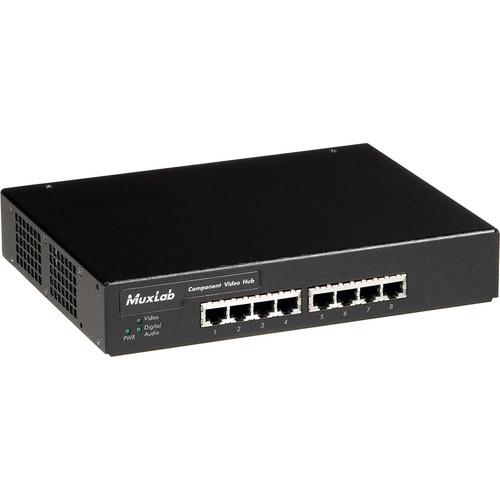
Product description The MuxLab 500251 Component Video Hub (8 Ports, 220/240V) allows the distribution of 1 full component video (YPbPr/RGB) source and 1 digital/analog audio source up to 8 ports. Modular RJ45 connectors are provided on both input and output, and the hub can be cascaded up to 2 levels.
The Video Hub can support up to 1000’ (305m) at 480i/p via Cat5, up to 500’ (152m) at 720p via Cat5, and up to 500’ (152m) at 1080i/p via Cat5. In addition to ground loop isolation on each port, it supports digital/analog audio on 4 twisted pairs and can seamlessly integrate with MuxLab Baluns (500050, 500051, 500052, 500053, 500054, 500055, 500056, and 500057 baluns).
Being compatible with DVD players, DVR, AV matrix switchers, DLP projectors, plasmas, monitors, and home theater, the 500251 Component Video Hub is suitable for applications such as digital signage, boardroom systems, residential and commercial multi-display systems, classroom training, retail systems, electronic billboards, electronic signs, video kiosks, point-of-sale displays, and in-store video. - Allows the distribution of 1 full component video (YPbPr/RGB) source and 1 digital/analog audio source up to 8 ports
- Modular RJ45 connectors provided on both input and output
- Cascadable up to 2 levels
- Supports up to 1000' (305m) at 480i/p via Cat5, up to 500' (152m) at 720p via Cat5, and up to 500' (152m) at 1080i/p via Cat5
- Ground loop isolation on each port
- Supports digital/analog audio on 4 twisted pairs
- Seamlessly integrates with MuxLab Baluns (500050, 500051, 500052, 500053, 500054, 500055, 500056, and 500057 baluns)
- Connects with DVD players, DVR, AV matrix switchers, DLP projectors, plasmas, monitors, and home theater
- Applications - digital signage, boardroom systems, residential and commercial multi-display systems, classroom training, retail systems, electronic billboards, electronic signs, video kiosks, point-of-sale displays, and in-store video
In the Box MuxLab 500251 Component Video Hub (8 Ports, 220/240V) 2-Year Warranty Table of Contents
|
Upload User Manual
Have you got an user manual for the MuxLab 500251 Component Video Hub in electronic form? Please send it to us and help us expand our library of instruction manuals.
Thank you, too, on behalf of other users.
To upload the product manual, we first need to check and make sure you are not a robot. After that, your "Submit Link" or "Upload File" will appear.
Technical parametersMuxLab 500251 Specs | Environment | Component baseband video (YPbPr/RGB) and Digital or Mono Analog Audio | | Devices | DVD players, DVR, AV matrix switchers, DLP projectors, plasmas, monitors, home theater | | Transmission | Transparent to the user | | 3dB Bandwidth | Video: DC to 77 MHz. Digital Audio: DC to 52 MHz. Analog Audio: 20 to 20 KHz | | Withdrawl Force | Video: -0.8 dB @ 4 MHz
Digital Audio: -1.26 dB @ 4 MHz
Analog Audio: 1 dB @ 4 MHz | | Video Return Loss | -23dB @ 4 MHz | | Common Mode Rejection | (Input: balanced, Output: balanced)
Video: Greater than 40 dB over the frequency range
Digital Audio: Greater than 31.5 dB over the frequency range
Analog Audio: Greater than 60 dB @ 1 KHz; Greater than 40 dB over the frequency range | | Crosstalk Immunity | -60 dB @ 4 MHz | | Total Harmonic Distortion (THD) | Analog Audio: Less than 0.007% @ 1 KHz | | Max. Distance via Cat 5 Twisted Pair | Max. Distance via Cat 5 Twisted Pair (UTP)* -
Component Video (YPbPr):
480i/p: 1000' (305m)*
720p and 1080i: 500' (152m)*
Digital Audio: 600' (182m)*
Analog Audio: 3250' (990m)*
*Measured between Source (ie: DVD) and Destination (ie: Monitor) with Hub placed anywhere between the source and destination | | Compatible Baluns | 500000, 500002, 500009, 500020, 5000021, 500050, 500051, 500052, 500053
Not compatible with p/n 500058 | | Cascadability | Up to two (2) levels | | Ground Loop Isolation | Ground loop isolation on every port | | Cable-UTP | 24 gauge or lower solid copper twisted pair wire impedance: 100 ohms at 1 MHz Cat 3 or better | | Connectors | Source Input: One (1) RJ45S on rear panel
Looping Output: One (1) RJ45S on rear panel
Distribution Outputs: Eight (8) or sixteen (16) RJ45S on front panel | | Configuration Switch | Sets Hub to digital or analog audio on fourth twisted pair. Factory default: analog audio | | LED Diagnostics | Power (green), Video Sync (green), Digital Audio Sync (green) | | Power Supply | External AC: 220/240V
DC: 12VDC, 1.25A (8-port model) or 2.5A (16-port model) | | Temperature | Operating: 32 to 104°F (0 to 40°C)
Storage: -4 to 185°F (-20 to 85°C) | | Humidity | Up to 95% non-condensing | | Dimensions | 9.125 x 6.75 x 1.75" (23.18 x 17.15 x 4.45 cm) | | Weight | 3.3 lb (1.5kg) | | Compliance | FCC, CE-EMC Directive 89/336/EEC, RoHS, WEEE |
Rating70% users recommend this product to others. And what about you?

This product has already been rated by 08 owners. Add your rating and experience with the product.
Discussion
 Ask our technicians if you have a problem with your settings,
or if anything is unclear in the user manual you have downloaded.
You can make use of our moderated discussion.
The discussion is public and helps other users of our website who may be encountering similar problems.
Ask our technicians if you have a problem with your settings,
or if anything is unclear in the user manual you have downloaded.
You can make use of our moderated discussion.
The discussion is public and helps other users of our website who may be encountering similar problems.
The discussion is empty - enter the first post
Post a new topic / query / comment:
|
|


