User Manual for MuxLab Audio-Video Hub Click to enlarge the picture
 Contents of the user manual for the MuxLab Audio-Video Hub
- Product category: Video Extenders & Repeaters MuxLab
- Brand: MuxLab
- Description and content of package
- Technical information and basic settings
- Frequently asked questions – FAQ
- Troubleshooting (does not switch on, does not respond, error message, what do I do if...)
- Authorized service for MuxLab Video Extenders & Repeaters
|
User manual for the MuxLab Audio-Video Hub contain basic instructions
that need to be followed during installation and operation.
Before starting your appliance, the user manual should be read through carefully.
Follow all the safety instructions and warnings, and be guided by the given recommendations.
User manual is an integral part of any MuxLab product,
and if it is sold or transferred, they should be handed over jointly with the product.
Following the instructions for use is an essential prerequisite for protecting
health and property during use, as well as recognition of liability on the part of the manufacturer
for possible defects should you make a warranty claim. Download an official MuxLab user manual in which you will find instructions on how to install, use, maintain and service your product.
And do not forget – unsuitable use of a MuxLab product will considerably shorten its lifespan!
|
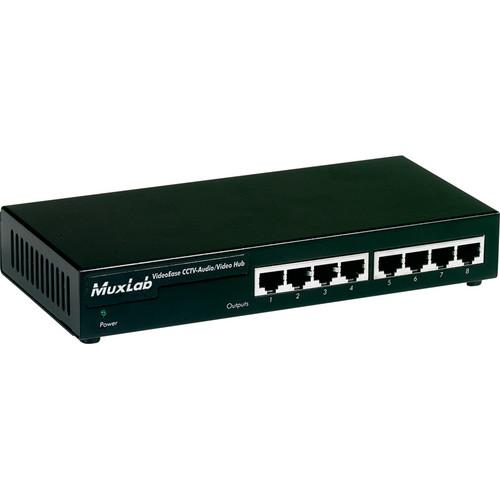
Product description The MuxLab Audio-Video Hub (220-240V) allows you to distribute up to 2 composite or 1 S-Video signal and up to 2 line level analog audio signals to up to 8 destinations via Cat5/6 UTP cable.
When used in pairs, the audio-video hub supports transmission of color signals up to 2200’ (670m) and b&w signals up to 2500’ (762m) via Cat 5/6 cable. It can be cascaded up to 2 levels to support up to 72 displays and can work in conjunction with other MuxLab baluns that support composite video, S-Video, and analog audio.
Supporting composite video, S-Video, and line level analog audio, the hub can be used in boardroom systems, classroom training, and digital signage. It allows you to connect composite video and analog audio equipment such as DVD, cable boxes, PC video servers, matrix switchers, monitors, projectors, plasmas, and LCD displays.
The Audio-Video Hub is compatible with the 500000, 500001, 500009, 500012, 500016, 500017, 500019, 500021, 500027, 500027, 500038, and 500039 baluns. - Allows to distribute up to 2 composite or 1 S-Video signal and up to 2 line level analog audio signals to up to 8 destinations via Cat5/6 UTP cable
- Supports transmission of color signals up to 2200' (670m) and b&w signals up to 2500' (762m)
- Can be cascaded up to 2 levels to other hubs to support up to 72 displays
- Works in conjunction with other MuxLab baluns that support composite video, S-Video, and analog audio
- Supports composite video (NTSC, PAL), S-Video, line level analog audio
- Compatible with the 500000, 500001, 500009, 500012, 500016, 500017, 500019, 500021, 500027, 500027, 500038, and 500039 baluns
UPC: 627699002018 In the Box MuxLab Audio-Video Hub (220-240V) 2 Year Warranty Table of Contents
|
Upload User Manual
Have you got an user manual for the MuxLab Audio-Video Hub in electronic form? Please send it to us and help us expand our library of instruction manuals.
Thank you, too, on behalf of other users.
To upload the product manual, we first need to check and make sure you are not a robot. After that, your "Submit Link" or "Upload File" will appear.
Technical parametersMuxLab 500201 Specs | Environment | Composite video (NTSC, PAL), S-Video, line level analog audio | | Devices | DVD, cable boxes, PC video servers, matrix switchers, monitors, projectors, plasmas, LCD displays and other composite video and analog audio equipment | | Transmission | Transparent to the user | | Impedance | Source Impedance Requirements
Video Out: 75 ohms
Audio Out: 600 ohms max.
Destination Impedance Requirements
Video In: 75 ohms
Audio In: 600 ohms min.
Hub Impedance
Video In: 100 ohm balanced
Audio In: 10 kohms min. balanced
Video Out: 100 ohms balanced
Audio Out: 600 ohm balanced | | Bandwidth | 3 dB Bandwidth
Video: DC to 8 MHz
Audio: 50 Hz to 16 kHz | | Differential | Max. Differential Input
Video: 0.55 Vp-p
Audio: .50 Vp-p
Max. Differential Output
Video: 0.55 Vp-p
Audio: .50 Vp-p | | Insertion Loss | Video: 0 dB max. @ 4 MHz
Audio: 1 dB max. @ 1 kHz
(differential) | | Return Loss | Video Return Loss: 24 dB minimum | | Common Mode Rejection | (Input: balanced. Output: unbalanced)
Video: Greater than 40 dB over the frequency range
Audio: Greater than 60 dB over the frequency range Measured between source (i.e. DVD) and destination (i.e. monitor) with hub placed anywhere between the source and destination | | Crosstalk | Crosstalk Immunity: 60 dB minimum over the frequency range | | Maximum Distance | (via Cat 5/6 Twisted Pair - UTP)
Composite Video Color: 2200' (670m)
Composite Video B&W: 2500' (762m)
S-Video: 1000' (305m) | | Cable | UTP: 24 gauge or lower solid copper twisted pair wire impedance: 100 ohms at 1 MHz, Cat 3 or better | | Connectors | Source Input: 1 RJ45 on rear panel
Cascade Output: 1 RJ45 on rear panel
Distribution Outputs: 8 RJ45 on front panel | | Pins | Video 1: Ring 7 Tip 8
Audio 1: Ring 1 Tip 2
Video 2: Ring 4 Tip 5
Audio 2: Ring 3 Tip 6 | | Compatibility | Compatible Baluns: 500000, 500001, 500009, 500012, 500016, 500017, 500019, 500021, 500027, 500027, 500038, 500039 | | Diagnostics | Power LED - green | | Power Supply | External AC: 110V and 220/240V DC: +/- 12VDC, 5W total max. | | Power Connector | 5-pin DIN; pin 1 GND, pin 2 GND, pin 4 -12V, pin 5 +12V | | Temperature | Operating: 32 ~ 131°F (0 ~ 55°C)
Storage: -4 ~ 185°F (-20 ~ 85°C)
Humidity: up to 95% | | Dimensions | 8.5 x 4 x 1.3" (21.6 x 10.2 x 3.3cm) | | Weight | 2.1 lb (1kg) | | Compliance | FCC, CE-EMC Directive 89/336/EEC | | | | Package Weight | 2.9 lb | | Box Dimensions (LxWxH) | 12.5 x 9.3 x 3.6" |
Rating70% users recommend this product to others. And what about you?

This product has already been rated by 11 owners. Add your rating and experience with the product.
Discussion
 Ask our technicians if you have a problem with your settings,
or if anything is unclear in the user manual you have downloaded.
You can make use of our moderated discussion.
The discussion is public and helps other users of our website who may be encountering similar problems.
Ask our technicians if you have a problem with your settings,
or if anything is unclear in the user manual you have downloaded.
You can make use of our moderated discussion.
The discussion is public and helps other users of our website who may be encountering similar problems.
The discussion is empty - enter the first post
Post a new topic / query / comment:
|
|


