User Manual for MuxLab Multimedia 16x16 Matrix Switch Chassis Click to enlarge the picture
 Contents of the user manual for the MuxLab Multimedia 16x16 Matrix Switch Chassis
- Product category: Routers & Switchers MuxLab
- Brand: MuxLab
- Description and content of package
- Technical information and basic settings
- Frequently asked questions – FAQ
- Troubleshooting (does not switch on, does not respond, error message, what do I do if...)
- Authorized service for MuxLab Routers & Switchers
|
User manual for the MuxLab Multimedia 16x16 Matrix Switch Chassis contain basic instructions
that need to be followed during installation and operation.
Before starting your appliance, the user manual should be read through carefully.
Follow all the safety instructions and warnings, and be guided by the given recommendations.
User manual is an integral part of any MuxLab product,
and if it is sold or transferred, they should be handed over jointly with the product.
Following the instructions for use is an essential prerequisite for protecting
health and property during use, as well as recognition of liability on the part of the manufacturer
for possible defects should you make a warranty claim. Download an official MuxLab user manual in which you will find instructions on how to install, use, maintain and service your product.
And do not forget – unsuitable use of a MuxLab product will considerably shorten its lifespan!
|
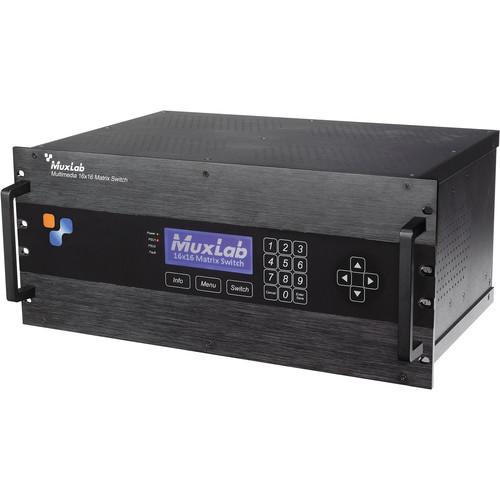
Product description The MuxLab Multimedia 16x16 Matrix Switch Chassis is a 5RU modular switcher supporting four HDMI, DVI, 3G-SDI, and VGA input cards and four HDMI and HDBaseT output cards, sold separately. The cards each feature four ports and are hot-swappable. The switcher supports resolutions up to 1080p60/50, which it can transmit for up to 230 ft via HDBaseT output cards to compatible receivers (Model # 500451), sold separately.
Matrixes can be designated in 4x4, 4x8, 4x16, 8x4, 8x8, 8x16, 16x4, 16x8, 16x12, and 16x16 configurations. The switcher can be controlled via the front panel, RS-232, webserver interface via a provided IP address, USB control via a free-download software, and 3rd party drivers, including Control4 home automation and commercial A/V systems. The front panel features an LCD screen, numerical keypad, arrow keys, and other controls. The housing is aluminum and has a sleek design and look and features installation handles. Dual redundant power supply is supported and one 100-240V power supply with interchangeable US, UK, and European power cords is included. LED diagnostics indicate power, PSU1 and PSU2, Fault, and LAN activities in different colors. - Key Features
-
- 5RU modular A/V switcher in sleek aluminum housing
- Supports four 4-port HDMI, DVI, 3G-SDI, and VGA input cards
- Supports four 4-port HDMI and HDBaseT output cards
- Transmits up to 1080p60/50 for up to 230 ft via optional HDBaseT output cards
- 4x4, 4x8, 4x16, 8x4, 8x8, 8x16, 16x4, 16x8, 16x12, 16x16 matrix designations
- Front panel, RS-232, USB, webserver interface, and 3rd party driver control
- Dual redundant power supply supported; US, UK, and EU PSU included
UPC: 627699004708 In the Box MuxLab Multimedia 16x16 Matrix Switch Chassis Replacement Power Supply for 16 x 16 Matrix Switch sbbsvwxzucey 2-Year Limited Warranty Table of Contents
|
Upload User Manual
Have you got an user manual for the MuxLab Multimedia 16x16 Matrix Switch Chassis in electronic form? Please send it to us and help us expand our library of instruction manuals.
Thank you, too, on behalf of other users.
To upload the product manual, we first need to check and make sure you are not a robot. After that, your "Submit Link" or "Upload File" will appear.
Technical parametersMuxLab 500470 Specs | Switching Configurations | 4x4, 4x8, 4x16, 8x4, 8x8, 8x16, 16x4, 16x8, 16x12, 16x16 | | Backplane Bandwidth | 12.75 Gbps per channel | | Input Card Slots | 4 slots supporting 4-port modular input cards: HDMI, DVI, 3G-SDI, VGA | | Output Card Slots | 4 slots supporting 4-port modular output cards: HDMI, HDBaseT | | Connectivity | Ethernet LAN (RJ45), USB (Type B), RS-232 (DB9) | | Maximum Distance | 230 ft (70 m) in 1080p60/50 over UTP/STP Cat 5e/6 (HDBaseT output card required) | | CAT Cables Supported | Cat 5e/6 UTP/STP cables (or better) required for HDBaseT ports (HDBaseT output card required) | | Control | Front panel, RS-232, USB cable connection to a computer, web server interface | | Power | AC 100-240 V 50/60 Hz
Dual redundant power supply: 100-240 VAC to 12 VDC @ 25 A (300 W) | | LED Diagnostics | Power (Blue)
PSU1 and PSU2 (Green)
Fault (Red)
LAN (Green: Link, Yellow: Activity) | | Operating Temperature | 32 to 122°F (0 to 50ºC) | | Storage Temperature | -4 to 185°F (-20 to 85ºC) | | Humidity | Up to 95% non-condensing | | Regulatory | FCC, CE, RoHS, WEEE | | Safety | CSA (pending) | | Rack Height | 5 RU | | Dimensions | 17.7 x 11 x 7.5" (45 x 28 x 19 cm)
Power supply: 7.9 x 4 x 1.6" (20 x 10.1 x 4 cm) | | Weight | 18.1 lb (8 kg)
Power supply: 4 lb (1.8 kg) | | | | Package Weight | 27.0 lb | | Box Dimensions (LxWxH) | 21.75 x 16.5 x 16.0" |
Rating70% users recommend this product to others. And what about you?

This product has already been rated by 21 owners. Add your rating and experience with the product.
Discussion
 Ask our technicians if you have a problem with your settings,
or if anything is unclear in the user manual you have downloaded.
You can make use of our moderated discussion.
The discussion is public and helps other users of our website who may be encountering similar problems.
Ask our technicians if you have a problem with your settings,
or if anything is unclear in the user manual you have downloaded.
You can make use of our moderated discussion.
The discussion is public and helps other users of our website who may be encountering similar problems.
The discussion is empty - enter the first post
Post a new topic / query / comment:
|
|


