User Manual for NewBlueFX Elements 3 Ultimate Click to enlarge the picture
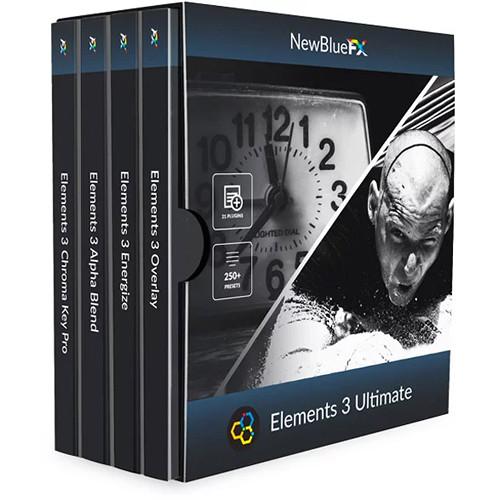 Contents of the user manual for the NewBlueFX Elements 3 Ultimate
- Product category: Video Editing Plug-Ins NewBlueFX
- Brand: NewBlueFX
- Description and content of package
- Technical information and basic settings
- Frequently asked questions – FAQ
- Troubleshooting (does not switch on, does not respond, error message, what do I do if...)
- Authorized service for NewBlueFX Video Editing Plug-Ins
|
User manual for the NewBlueFX Elements 3 Ultimate contain basic instructions
that need to be followed during installation and operation.
Before starting your appliance, the user manual should be read through carefully.
Follow all the safety instructions and warnings, and be guided by the given recommendations.
User manual is an integral part of any NewBlueFX product,
and if it is sold or transferred, they should be handed over jointly with the product.
Following the instructions for use is an essential prerequisite for protecting
health and property during use, as well as recognition of liability on the part of the manufacturer
for possible defects should you make a warranty claim. Download an official NewBlueFX user manual in which you will find instructions on how to install, use, maintain and service your product.
And do not forget – unsuitable use of a NewBlueFX product will considerably shorten its lifespan!
|
Product description The comprehensive Elements 3 Ultimate Collection (Download) from NewBlueFX provides 21 compositing tools with over 250 presets for use with your popular NLE system. This bundle includes all plug-ins in the NewBlue FX Chroma Key Pro, Elements 3 Alpha Blend, Energize, and Overlay packs. The Elements 3 Ultimate tools enable you to combine several visual elements into a single shot, maximizing your frame area. Multi-step tasks are simplified, decreasing the time you'll spend on compositing. The Elements 3 Ultimate Collection works with a wide array of 64-bit Mac and Windows–based NLE systems. Compatible programs include After Effects, Avid Media Composer, DaVinci Resolve, Final Cut Pro, Grass Valley, Magix, and Premiere. - Chroma Key Pro (Download) The Chroma Key Pro (Download) plug-in from NewBlueFX provides a range of keying tools to use with your NLE system. Employ the variety of presets to quickly key out green or blue screen backgrounds, or use the full range of controls for fine-tuning your keying. Chroma Key Pro also includes drop shadow function for adding depth to your shots, and outline effects for highlighting your subjects to make them "pop." Features include range, sensitivity, and spill control, a garbage matte, and scaling. The Chroma Key Pro plug-in works with a wide array of 64-bit Mac and Windows–based NLE systems. Compatible programs include After Effects, Avid Media Composer, DaVinci Resolve, Final Cut Pro, Grass Valley, Magix, and Premiere.
Features - Chroma-keying presets and full controls for fine-tuning your green- or blue-screen keys
- Shadow function adds depth to shots for a more realistic look
- Outline effect for adding visual emphasis to subjects
- Garbage matte, scaling, range, sensitivity, and spill control
- Compatible with a wide array of 64-bit Mac and Windows-based NLE systems
- Hosting Compatibility
- NewBlue Titler Pro 2+ Magix Vegas Pro 10+ (64-bit OpenX)
Magix Video Pro X & Vegas Movie Studio
Black Magic DaVinci Resolve 11+
Adobe Premiere CS6/6.5, CC
Adobe After Effects CS6/CC or later
Apple Final Cut Pro X
Avid Media Composer & Symphony 6+
Grass Valley EDIUS 7 & 8 - Elements 3 Alpha Blend (Download) The Elements 3 Alpha Blend (Download) plug-in from NewBlueFX provides a range of eight compositing tools to use with your NLE system. Apply these compositing tools to quickly add dramatic effects to your footage. The Alpha Blend pack includes drop shadow, color manipulation, gradient fill, outline glow, and overlay functions. Fine-tuned control over gradients, thickness, fill, angle, opacity, and color enable you to customize effects for video, images, and text elements. The Chroma Key Pro plug-in works with a wide array of 64-bit Mac and Windows–based NLE systems. Compatible programs include After Effects, Avid Media Composer, DaVinci Resolve, Final Cut Pro, Grass Valley, Magix, NewBlue, Titler Pro 2 or later, and Premiere.
Features - Eight compositing tools dramatize your footage with outlining, drop shadows, overlays, and color manipulation
- Fine-tuned control over gradients, thickness, fill, angle, opacity, and color
- Apply effects to video, images, and/or text
- Compatible with a wide array of 64-bit Mac and Windows-based NLE systems
- Compositing Styles
-
- Alpha Processor - processes the alpha channel of your video - including inverting, blurring, and width-adjustment
- Drop Shadow - creates a drop shadow for overlays on any keying effect or animated matte
- Garbage Matte - cleans up a key by isolating and removing unwanted junk from the alpha channel
- Gradient Fill Pro - manipulates, boosts, or completely alters the color of both your image and text
- Luma Key - uses light levels to key out areas of the video
- Outline - adds a colored outline to text, chromakey, or other visuals with transparent borders
- Time Clock - offers a variety of presets to overlay a running timer on your screen
- Viewfinder - simulates the on-screen display of a video camera recording
- Hosting Compatibility
- NewBlue Titler Pro 2+ Magix Vegas Pro 10+ (64-bit OpenX)
Magix Video Pro X & Vegas Movie Studio
Black Magic DaVinci Resolve 11+
Adobe Premiere CS6/6.5, CC
Adobe After Effects CS6/CC or later
Apple Final Cut Pro X
Avid Media Composer & Symphony 6+
Grass Valley EDIUS 7 & 8 - Elements 3 Energize The Elements 3 Energize (Download) plug-in from NewBlueFX provides a range of six compositing tools to use with your NLE system. Apply these compositing tools to quickly add kinetic effects and depth to your footage. The Energize pack includes a background generator, handheld camera shake, mirrored reflection, and additional functions. Add energy or reconstruct your image with tiling, auto-pan, and cutaways.The Energize plug-in works with a wide array of 64-bit Mac and Windows–based NLE systems. Compatible programs include After Effects, Avid Media Composer, DaVinci Resolve, Final Cut Pro, Grass Valley, Magix, NewBlue, Titler Pro 2 or later, and Premiere.
Features - Six kinetic compositing tools for dramatizing your footage
- Includes camera shake, reflections, auto-panning, image-tiling, and background generation
- Compatible with a wide array of 64-bit Mac and Windows-based NLE systems
- Compositing Styles
-
- Active Camera - simulates a wide variety of camera jitter, from agitated hand-held to jackhammer, or a gentle train
- Auto Pan - makes quick work of panning and zooming on stills or video, without resorting to keyframes
- Background Generator - magnifies and alters your video image, turning it into a beautiful backdrop, complete with perpetual panning motion
- Cut Away - uses various shapes and outlines to magnify a selected region of your shot
- Reflection - creates and controls a mirrored reflection of your image
- Tile - replicates your image into a video wall with beautifully controlled variants
- Hosting Compatibility
- NewBlue Titler Pro 2+ Magix Vegas Pro 10+ (64-bit OpenX)
Magix Video Pro X & Vegas Movie Studio
Black Magic DaVinci Resolve 11+
Adobe Premiere CS6/6.5, CC
Adobe After Effects CS6/CC or later
Apple Final Cut Pro X
Avid Media Composer & Symphony 6+
Grass Valley EDIUS 7 & 8 - Elements 3 Overlay (Download) The Elements 3 Overlay (Download) plug-in from NewBlueFX provides a range of six compositing tools to use with your NLE system. Use these compositing tools to quickly add image overlays to your footage, making the most of your frame's real estate. Apply fine-tuned controls to morphing, outline, feather, and drop-shadow elements. The Overlay pack includes an Image Mapper, Picture Grid, Flying PiP, PiP, and Picture-in-Shape functions. The Overlay plug-in works with a wide array of 64-bit Mac and Windows–based NLE systems. Compatible programs include After Effects, Avid Media Composer, DaVinci Resolve, Final Cut Pro, Grass Valley, Magix, NewBlue, Titler Pro 2 or later, and Premiere.
Features - Six overlay compositing tools for illustrating your footage
- Create PiP (picture-in-picture), Picture-in-Shape, and Flying PiP effects
- Includes Image Mapper, Split Screen, and Picture Grid functions
- Fine-tuned controls for adjusting morph, outlines, feathering, and drop-shadows
- Compatible with a wide array of 64-bit Mac and Windows-based NLE systems
- Compositing Styles
-
- Flying Picture-in-Picture - creates an animated picture-in-picture including outline, drop shadow, and motion blur without keyframing
- Image Mapper - four-corner mapper easily overlays video on top of objects
- Picture Grid - creates PIPs on a grid structure, for fast and effective multi-image story telling
- Picture-in-Picture - adds a sophisticated picture-in-picture with 3D geometry, border, shadow, and reflection features
- Picture-in-Shape - creates a picture-in-picture with an organic 4-point shape, including flexible rotation and position controls and drop shadow
- Split Screen - elegantly displays two shots at once with a variety of geometric and aesthetic options
- Hosting Compatibility
- NewBlue Titler Pro 2+ Magix Vegas Pro 10+ (64-bit OpenX)
Magix Video Pro X & Vegas Movie Studio
Black Magic DaVinci Resolve 11+
Adobe Premiere CS6/6.5, CC
Adobe After Effects CS6/CC or later
Apple Final Cut Pro X
Avid Media Composer & Symphony 6+
Grass Valley EDIUS 7 & 8 In the Box Bundle Items Chroma Key Pro (Download) trxcwxqyfzdrbcsewbstwyrr Elements 3 Alpha Blend (Download) Elements 3 Energize Elements 3 Overlay (Download) Table of Contents
|
Upload User Manual
Have you got an user manual for the NewBlueFX Elements 3 Ultimate in electronic form? Please send it to us and help us expand our library of instruction manuals.
Thank you, too, on behalf of other users.
To upload the product manual, we first need to check and make sure you are not a robot. After that, your "Submit Link" or "Upload File" will appear.
Technical parameters - Chroma Key Pro (Download)
| | | Delivery Method | Download | | Version | Standard | | Number of Users Supported | 1 | | | | Supported Operating Systems | Windows 7 or Later
macOS X 10.1 or Later | | Memory Requirement | 2 GB (4 GB Recommended) | | Storage Requirement | 400 MB | | CPU Requirement | 2 GHz Dual-Core and Faster | | VRAM Requirement | 256 MB (Minimum) | | OpenGL Graphics Requirement | 2.1 | - Elements 3 Alpha Blend (Download)
| | | Delivery Method | Download | | Version | Standard | | Number of Users Supported | 1 | | | | Supported Operating Systems | macOS X 10.1 or Later
Windows 7 or Later | | Memory Requirement | 2 GB (4 GB Recommended) | | Storage Requirement | 400 MB | | CPU Requirement | 2 GHz Dual-Core and Faster | | VRAM Requirement | 256 MB (Minimum)
512 MB (Recommended) | | OpenGL Graphics Requirement | 2.1 | - Elements 3 Energize
| | | Delivery Method | Download | | Version | Standard | | Number of Users Supported | 1 | | | | Supported Operating Systems | macOS X 10.1 or Later
Windows 7 or Later | | Memory Requirement | 2 GB (4 GB Recommended) | | Storage Requirement | 400 MB | | CPU Requirement | 2 GHz Dual-Core and Faster | | VRAM Requirement | 256 MB (Minimum)
512 MB (Recommended) | | OpenGL Graphics Requirement | 2.1 | - Elements 3 Overlay (Download)
| | | Delivery Method | Download | | Version | Standard | | Number of Users Supported | 1 | | | | Supported Operating Systems | macOS X 10.1 or Later
Windows 7 or Later | | Memory Requirement | 2 GB (4 GB Recommended) | | Storage Requirement | 400 MB | | CPU Requirement | 2 GHz Dual-Core and Faster | | VRAM Requirement | 256 MB (Minimum)
512 MB (Recommended) | | OpenGL Graphics Requirement | 2.1 |
Rating90% users recommend this product to others. And what about you?

This product has already been rated by 43 owners. Add your rating and experience with the product.
Discussion
 Ask our technicians if you have a problem with your settings,
or if anything is unclear in the user manual you have downloaded.
You can make use of our moderated discussion.
The discussion is public and helps other users of our website who may be encountering similar problems.
Ask our technicians if you have a problem with your settings,
or if anything is unclear in the user manual you have downloaded.
You can make use of our moderated discussion.
The discussion is public and helps other users of our website who may be encountering similar problems.
The discussion is empty - enter the first post
Post a new topic / query / comment:
|
|


