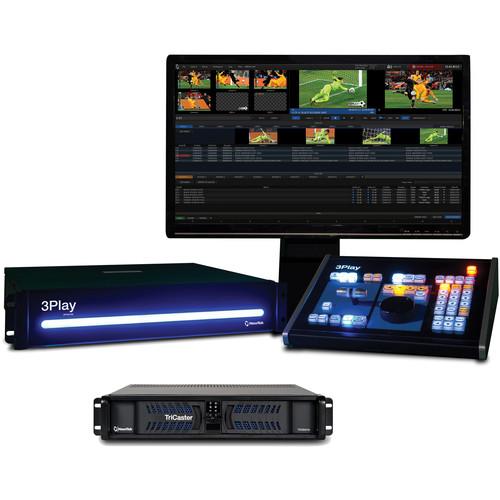
User Manual for NewTek Live Sports 410 Solution: TriCaster 410 & 3Play 440 Click to enlarge the picture
 Contents of the user manual for the NewTek Live Sports 410 Solution: TriCaster
- Product category: Production Switchers NewTek
- Brand: NewTek
- Description and content of package
- Technical information and basic settings
- Frequently asked questions – FAQ
- Troubleshooting (does not switch on, does not respond, error message, what do I do if...)
- Authorized service for NewTek Production Switchers
|
User manual for the NewTek Live Sports 410 Solution: TriCaster contain basic instructions
that need to be followed during installation and operation.
Before starting your appliance, the user manual should be read through carefully.
Follow all the safety instructions and warnings, and be guided by the given recommendations.
User manual is an integral part of any NewTek product,
and if it is sold or transferred, they should be handed over jointly with the product.
Following the instructions for use is an essential prerequisite for protecting
health and property during use, as well as recognition of liability on the part of the manufacturer
for possible defects should you make a warranty claim. Download an official NewTek user manual in which you will find instructions on how to install, use, maintain and service your product.
And do not forget – unsuitable use of a NewTek product will considerably shorten its lifespan!
|
Product description This NewTek Live Sports 410 Solution combines the TriCaster 410 Production Switcher and 3Play 440 Instant Replay System into a complete video switching and instant replay solution for broadcast and sports venue productions. It also includes the TriCaster 460 Control Surface for use with the 410 Switcher.
In a typical scenario, you'll have the 3Play out in the field and the TriCaster back in the studio, with the two systems integrated over a local network. The TriCaster can send cross-platform macro commands to the 3Play for remote operation of 3Play cueing and playback, and it gets access to 3Play's internal and external storage drives. Both systems support up to 1080p30/p24/i60.
TriCaster 410 is a 2RU switcher supporting 4 live camera inputs and allowing you to simultaneously broadcast, project, stream, and record. It has 4 standard M/E buses, 15 channels in total, and is configurable for up to 5 outputs. It features collections of visual effects and transitions, over 30 3D and holographic virtual sets, and more. 3Play 440 is also a 2RU system supporting four live cameras and up to 140 hours of recording to internal and removable drives in mixed inputs, formats, and frame rates. - TriCaster 410 The NewTek TriCaster 410 is an all-in-one, 4-camera SDI production solution that allows you to simultaneously broadcast, project, stream, and record. With the TriCaster 410 you get all the gear you need in an all-in-one, 2RU system that's easy to use and ready to travel.
Built for live event producers and web casters on-the-move, the TriCaster 410 delivers a full live production package. Create high-quality shows with custom visuals like 3D holographic virtual sets, and improve your workflow with a wide variety of productivity enhancing tools. Providing creative flexibility, but staying free of workflow and post-production extras, the TriCaster 410 cuts down equipment expenditure to fit your business needs.
You have many choices for handling live operations with compatible TriCaster and third party control surfaces along with support for breakout control of audio, camera, key commands, and even on-camera sequence triggering. The TriCaster 410 gives you complete control, whether you are producing for broadcast, streaming live to the Web, projecting to a big screen, creating an engaging second-screen experience, or all of the above. Included with the unit is a keyboard, mouse, power cord, four rubber feet for desktop use, two set of keys, and a BNC removal tool. - All-in-One Live Production Switcher
- The TriCaster 410's multiple turnkey functions do the work that usually requires racks of equipment, but integrates it all into a turnkey solution that saves space, setup, cabling, and expense. With just one system you can record, encode, switch, submix, playback, mix audio, create advanced graphics and titling, and more.
- Travel Ready
- Produce a network-quality show from places you've never been able to before. Make the most of just 2RU of rack space in a production vehicle or other space. Expand the horizon of your live production comfort zone with a new freedom of movement that's just not possible with racks of individual components pieced together.
- SDI Input/Output
- The TriCaster 410 provides SDI connectivity for integration with professional equipment and workflows. Input up to 4 cameras and color correct, key, crop, scale, and frame sync them with varying SD and HD resolutions and formats. Use SDI output connections to send your program out to multiple destinations and displays, including another TriCaster on the network via a network output.
- 15-Channel, 4-Camera Production
- Control productions in resolutions up to 1080p and connect up to 4 SDI cameras to the TriCaster 410. Add digital media from two built-in graphic and sound slots, and share computer displays from two network sources. Four M/E-style virtual inputs let you stage live virtual sets, create custom picture effects and presets, and submixes that can act as upstream switchers.
- Automation
- Automation functions let you streamline operation sequences that are too complex for live execution. Unlimited external control functions with MIDI sequencing enables show control of nearly any command, or offloading tasks to additional crew. Using hotspots, talent can trigger automated sequences with on-camera gestures, effectively controlling a segment without an operator. You can add remotely controlled robotic cameras as input sources, without the need to add camera operators.
- External and Third-Party Applications
- Through Newtek's third-party developer network, the TriCaster 410 supports an extended set of products that work directly with the system to provide innovative solutions and workflows in several different areas of your live production, including streaming, graphics, content, and controllers. Newtek's SDK enables developers and customers to tap into the power of TriCaster functionality, add applications that enhance the production workflow, and further extend integration with standard and custom installations. The suite of peripheral applications and hardware control surfaces rounds out the total solution.
- User Interface
- Provides complete control over live production, streaming, recording, and media publishing operations.
- Recordable Macros
- Make your favorite series of commands automatic. Record any sequence of operations as a macro event, make adjustments as needed with the built-in Macro editor, then trigger with a single click, keystroke, or button press. Talent can also trigger macros by making contact with configurable on-screen hotspots.
- Mix mode: Enables secondary switcher operation for output, submix or recording, with Program/Preview workflow and transitions
- Effects mode: Enables multi-layer compositing, effects generation and virtual set application, with per-source 3D DVE, scaling, cropping and keying
- Workspaces
- Choose a view that works for you with a variety of selectable layouts for user interface and multi-view monitor displays.
- HD Live streaming with Simultaneous Archive
- Launch a live streaming video of your show to the Web with a simultaneous archive, at the touch of a button. The TriCaster 410 includes presets for the most common streaming profiles, in resolutions up to 720p, with support for custom multi-bitrate stream profiles.
- Presets in up to 720p, supporting most common streaming profiles and custom multi-bitrate streaming profiles, including RTMP streaming using H.264 (ex. Adobe Flash Media Server), Microsoft Windows Media Push/Pull, and browser-based streaming applications, with Ustream and Livestream native integrated support
- Streaming Profile Manager with integrated Web browser
- Grab
- Snap photos from program output to build a collection of HD still images, then post them to social media sites or use them during your show.
- Recording
- Capture and archive your show at full resolution, or record the footage from any single camera angle. Files are recorded at native resolution and compatible with every major NLE, media management application, computer operating system, and media sharing website.
- Export Media Format
- Export media application for batch copying with optional transcoding of files to compatible formats for different applications and devices, including Apple ProRes, AVI, DV, DVCPro, DVD, H.264, MOV, MPEG-2, MJPEG, MP4, WebM and more.
- Media Publishing
- Publish content instantly to popular social media sites like YouTube, Facebook, and Twitter, upload to FTP sites, or transfer to storage volumes and network locations. Share clips and stills during live production or upload your full-length show within moments after production wraps.
- Live Desktop Monitors
- DVI and HDMI monitor outputs for user interface and multiview displays.
- Preview all sources or select sources in a variety of layouts and dual-monitor display combinations via Workspaces control panel
- A/V indicator and guide overlays configurable per viewport
- Cameras
- Connect up to four live cameras or video sources in any supported resolution over SDI, including robotic Pan-Tilt-Zoom (PTZ) cameras.
- Pan-Tilt-Zoom (PTZ) Camera Control
- Control up to four robotic PTZ cameras directly from the User Interface, including camera orientation, zoom, focus, and iris. Position presets with thumbnail preview make it easy to setup shots remotely and change angles on the fly.
- Network Sources
- Share computer screens or displays from wireless Apple AirPlay devices, like iPads, iPhones, or iPods, connected to the same local network. The TriCaster 410 also accepts video over IP, streaming servers, USB video sources, NewTek 3Play, and TriCaster systems, as well as a variety of third-party partner solutions as network inputs.
Supported network sources include:
- Network computer via NewTek iVGA clint application
- Wireless Apple AirPlay devices
- TriCaster 8000, 860, 460, or 410
- 3Play 4800, 820, or 425
- USB sources
- Video over IP sources
- RTMP or RTSP streams
- HTTP streaming video sources
- Direct-to-Disk Recording (DDR)
- It allows you to load and playback video clips, packages, and motion graphics. The TriCaster 410 offers native support for almost every file format, with per-clip audio levels, scaling, and aspect ratio conversion, allowing you to work with essentially any media asset you have been given.
- Graphics
- Display images, apply titles, or present static graphics. Choose from and edit templates in a variety of styles and designs, or import your own graphics for a custom-branded live production.
- Look-Ahead Preview Monitor
- Setup and preview your next shot before it goes live, including any titles and overlays to be applied.
- Program Monitor
- View the primary video output being broadcast, streamed, projected, and/or recorded.
- Live Virtual Sets
- Get the look of a network-style studio, complete with real-time reflections, and specular highlights. The TriCaster 410 includes more than 30 HD virtual sets in a variety of styles and settings, each with multiple angles, customizable pan, zoom, and pedestal animations, shot presets and support for interactive hotspots.
- Holographic Live Virtual Sets
- Create custom, photorealistic virtual environments from panoramic images snapped with a Smartphone, point-and-shoot, or DSLR camera, with support for 3D positioning of sources and live virtual camera movements.
- Mix/Effect Buses
- Mix multi-source compositions or create complex video effects, and configure for output, feed upstream to the main switcher or designate as an alternative recording mix. The TriCaster 410 features 4 M/E buses, each a complete switcher with independent keying and positioning effects per selected source, Key layer, the powerful TransWarp effects engine, and presets. M/E buses also support 3D video production, macro hotspots, and live virtual sets.
- M/E Effects
- Apply titles, graphics, and spectacular effects to M/E compositions. Each M/E bus accommodates a transition effect between the A and B rows in Mix mode, supports a layering effect or virtual set in Effect mode, and includes a fully configurable key layer with independent keying, positioning effects, transition controls, and support for TransWarp effects.
- Switcher Effects
- Apply titles, graphics, and spectacular effects to live video. The switcher supports dynamic TransWarp effects on the primary video layer, and on 2 fully-configurable Downstream Keyers. Each Downstream Key also includes independent keying, positioning effects, and transition controls.
- TransWarp Effects
- Supported on every available effects channel, the TransWarp effects engine is a powerful integrated effects system in live production. The TriCaster 410 electrifies live video, Downstream Keys, and overlays with full-color animation store transitions, complete with embedded audio and 3D warping of video. The integrated Animation Store Creator application also allows you to build custom transitions and effects, with eye-catching visuals like real-time cloth dynamics, 3D transformations, and motion overlays.
- Media
- Load video clips, motion graphics, sounds, titles, and stills of virtually any file format for live playback or overlay. Build play lists before or during a show, and save frequently used video and graphics collections as presets.
- Buffers
- Access up to 15 additional graphic sources instantly during live production with still and title buffers. View and manage buffer content via the integrated multi-viewer, including presets, and live title editing.
- Multi-Channel Audio Mixer
- Integrated multi-channel audio mixer for internal and external audio sources, outputs, stream and headphones, with 4 fully independent stereo output mixes: 2 Master, 2 AUX.
- Pan control, solo auditioning, seven-band equalizer and stereo compressor/limiter per input and output, with per-input audio delay control
- Multi-bus routing of audio source channels to any combination of outputs, with independent level control over channels 1/2 and 3/4 for quad sources
- Audio Follow Video system enabling audio to follow multiple video sources, with support for unlimited audio grouping combinations
- Digital audio inputs equipped with audio time-base synchronizers
- Supports companion iPad audio mixing app and Avid® Artist Mix audio control surface
- Session Management
- Setup and store session settings in reusable template sessions.
- NewTek SpeedHQ Codecs
- NewTek SpeedHQ codecs for Mac and PC included for extended file compatibility
- TriCaster 460 Control Surface The Newtek TriCaster 460 Control Surface, part of the complete TriCaster 460 solution, lets you maintain a small production footprint without sacrificing manual control. With an intuitive layout, familiar live production controls, and compact frame, the TriCaster 460 Control Surface is suitable for mobile production or tight spaces.
- Intuitive layout, suitable for both TriCaster 460 and TriCaster 410, mapped directly to the user interface for maximum interaction
- Full-featured workflow for optimal live production performance
- Illuminated buttons for heightened visibility of control surface activity under any environmental lighting conditions
- Premium T-Bar and 3-axis joystick for precision control of effects, zooms, and transitions
- Seamless, simultaneous changeover of multiple production elements with versatile, multi-select delegate controls
- Durable, ergonomic design for confident, comfortable performance
- TriCaster 460 Control Surface is also backward compatible with TriCaster 455, 450 EXTREME, and 450 models
- 3Play 440 Instant Replay System with Control Surface The NewTek 3Play 440 Instant Replay System with Control Surface is a multi-channel instant replay system for small to mid-size live sports productions. You can use it standalone or with any TriCaster for a combination of instant replay and video switching. 3Play 440 supports up to four channels of live video input and recording in any combination of supported inputs, formats, and frame rates.
Video inputs consist of four HD/SD-SDI and HD/SD Component / Composite / Y/C, all on BNC connectors. Video outputs consist of two HD/SD-SDI, two analog, HDMI, and several display output ports, with DVI the main user interface output port. Recording formats range from 480/60i to 1080/30p/24p/60i, and you can record up to 140 hours of 1080i onto 3TB of internal storage and an included 3TB removable drive, simultaneously recording up to two channels per drive. A full-function control surface is included with backlit buttons, a rotary dial, and a T-bar. - Overview
-
- 4 video inputs
- 2 simultaneous, switchable; fully independent playout channels
- 4 recording channels
- 140 hours base recording capacity (HD)
- HQ QuickTime recording format
- -200% to 200% multi-speed live playback
- External video router support
- Media publishing
- Network output to TriCaster
- HDMI output
- AUX output
- Grab stills
- Transition between playout channels
- Animation store transitions
- TransWarp effects
- Animation store creator
- All supported playlist transitions
- Playlist music track
- DSK overlays
- Network inputs
- Animation buffers
- Watch folders
- Metadata entry
- Keyword tagging engine
- FastClip asset management
- Macros
- MIDI support
- TriCaster workflow integration
- Advanced Media Protocol (AMP) support
- Scoreboard data feed support (via LiveText)
- External asset management platform integration
- Multiview monitoring
- Auxiliary display ports
- Multi-angle clip preview
- Clip bookmarks
- Automatic input color correction
- Advanced color correction and shading
- External monitor color control
- Template sessions
- Batch media import/export
- Single pane operation
- Undo/Redo commands
- Genlock
- Downstream system tally support
- SDK support
- Hardware fail-safe
- Software fail-safe
- 3TB removable storage drive
- Control Surface included
- 2RU rack mount
- Key Features
- 3Play 440 is a multi-channel instant replay system for small to mid-size live sports productions. It can be used standalone or combined with a TriCaster for instant replay with video switching.
Integrated Mobile Sports Production
Doing the work of multiple systems with its 4-camera ISO recording, 140 hours of HD storage and playback, pristine slow motion, multi-camera replay switching, media publishing, highlights creation, camera color correction and more, 3Play 440's single 2RU rack mount solution lets moderate and smaller sports productions without the traditional requirement of racks of equipment.
Self-Contained Live Shows
Perform essential end-to-end game production even in minimalist in-house setups, and feed a spectacular fan experience to the board. Even without a dedicated switcher, the smallest crew can use 3Play 440 to switch the game for up to 4 cameras, in both live and replay segments; add internal and external sources to play back clips, effects, overlays and transitions; include titles and scoreboard feeds from across the field or over the network; and provide the highlights to social media networks - all in real time.
Multi-Angle Switching
Keep all the action right in front of you and the audience, with built-in, multi-view monitoring and switching of every live video source and captured content channel. Preview and switch between every angle simultaneously from either the UI or the controller, and add custom animated transitions and 3D warping video effects.
ISO Camera Capture
Multiple angles can all be recorded automatically and made available immediately for rapid-turnaround handoff to postproduction in high-quality QuickTime in your native HD resolution.
Built-In Color Matching
3Play 440's advanced proc amp toolbox automates color calibration across all sources, and provides not only consistency but also algorithmically calculated precision to make every lighting change or shift in the weather practically invisible to anyone watching on screen.
Automation & Control
One operator can streamline processes, with one-click macros for complicated or frequently performed actions and sequences. More operators - whether new to the crew, or advanced at their specialty - can breakout control of certain tasks to button-push MIDI devices. Trucks and venues with compatible switchers can use Advanced Media Protocol (AMP) to control clip and playlist actions remotely.
Play Review
Game-clock overlay shows the synchronized sources of camera and timer. Simultaneous playback of multiple angles give a visual comparison side-by-side or picture-in-picture.
Show-Stopping Motion Control
3Play 440 uses your existing, standard HD and SD cameras, feeds them into its breakthrough super-resolution algorithm, and adds T-Bar and jog-wheel control of playback from nearly a standstill to double speed, backward and forward.
Intuitive Clip Access
With 3Play 440's FastClip context-aware text field, you can cut up to 30% of extraneous keystrokes. Whether you're renaming, searching for, or moving a clip, FastClip uses what you're typing to automatically determine what to do.
Overlay Visuals
3Play 440 allows you to apply exotic overlays without the multiple creative workstations normally required. Any video, graphic, animation, effect, replay, or camera feed stored in the system - or any live source brought in over the network, like telestration, titles, or motion graphics - can be keyed over in full motion, and positioned, scaled, and cropped to create the highest-impact compositions. - Capture
-
Automatic Replay Recording
When you set your first Mark In or Mark Out point, 3Play 440 automatically triggers the Record button to capture incoming video signals.
Multi-Channel Recording
3Play 440 records multiple channels of video at native resolution simultaneously. Capture every angle of live action for instant replay, playback, or archive.
Synchronized, Continuous Capture
When you press the Record button, configured sources are continuously captured and stored until you manually deactivate recording. Freely focus on 3Play 440's other functions without interrupting capture.
Clip Playback
Capture and mark live action as 3Play 440 events, then replay clips from multiple angles. You can also import clips and operate 3Play 440 as a media server.
Delayed Output
Once you begin recording, you can initiate playback whenever you like. Output recorded video seconds, minutes, even hours after recording starts.
Dual Playout Channels
3Play 440 provides two fully independent, simultaneous playout channels for output, each capable of supplying a live feed or playback of recorded content to a downstream display or production system, like having two playback devices in one.
Interpolated Slow Motion
Amplify the intensity of highlights or analyze the action frame-by-frame with smooth, interpolated slow motion. Replay the action at half-speed, quarter-speed, and more with incredible clarity and detail.
List Playback
Choose and compile clips for sequenced playback. Create highlight reels or build blocks of content, then hit play to roll from one clip to the next automatically.
Live Output
Send any incoming video signal directly to one or both output channels to supply a live feed to downstream displays or production systems.
Multi-Speed Playback
Choose to replay captured clips or roll imported media in real time or at variable speeds. Show the action again at game speed, or alter the playback rate for dramatic emphasis.
Simultaneous HD/SD Output
Record and playback content in HD and SD simultaneously, with configurable output resolutions. - Control
-
Control Surface
Included with 3Play 440 is a control surface that provides accessibly into all the capabilities of the system and allows you to take a hands-on, more intuitive approach to operation.
Macros
Make commonly used series of commands automatic, or just simplify complex ones. Record any sequence of operations as a macro event, then trigger with a mouse click, keystroke, or MIDI button press.
MIDI Support
Make automation of your production even easier or breakout control tasks to additional crew with 3Play 440's extensive MIDI support. Add one or any number of MIDI devices that fit your application and budget, assign macros to controller buttons, and provide dedicated control over 3Play 440 operations - even combing commands with a TriCaster on the network or meshing them with other live elements like sound, lighting, effects and more.
Transport Controls
3Play 440 features fundamental playback controls that let you stop, play, cycle, and scrub through clips. - Operation
-
Event Marking
Start and end events and clips at the exact frame you want with pinpoint Mark In and Mark Out controls. Each marked segment enters the Clips List as an event, a collection of the actively recording camera angles, and becomes available for playback.
Highlight Reel Creation
Build and organize clip sequences in real time using the Play List. Configure audio settings and playback speed for each clip selected, add transitions, then select a background music track - and you have a highlight reel that's ready for in-show playback or export for later use.
Multi-Angle Clip Preview
In addition to monitoring all incoming live feeds, you can preview every angle of recorded clips simultaneously with 3Play 440. Simply turn on the embedded clip monitors and preview stored footage in the user interface, multi-view display or both.
Multi-View Monitoring
Observe all incoming camera feeds and playout signals without an expensive, space-eating bank of monitors. You can even customize your screen layout to align with your preferred view of the action.
Program-Preview Workflow
With 3Play 440, you can use the dual playout channels in tandem to enable switcher-style operation - cueing and preparing content on one channel, outputting the other, and using your choice of effects to transition between the two - to simplify your workflow or enhance production value.
Session Format Support
3Play 440 supports live production in all industry-standard interlaced and progressive scan formats up to 1080p, with a variety of frame rates to choose from.
Zero Degradation Signal Processing
3Play 440 processes signals at their native resolution, meaning no in-between down conversion or up conversion that can affect image quality.
Visual Indicators
Real-time feedback in the form of color-coded visual indicators provides live cues while a production is in progress. Easily see the cameras currently recording, audio levels of incoming signals, clips currently displayed, and more. - Asset Management
-
Bookmarks
Mark key points in clips using the timecode bookmark system in 3Play 440. Bookmarks are marked independently of In and Out points, so your original clip remains intact as you create specific points to jump to in the recorded video.
Event Filtering
Search for and filter clips by metadata descriptions to quickly and easily find the assets you're looking for. Simply enter keywords, and 3Play 440 will display only the events with matching text.
List Organization
Organize all of your recorded content and stored media across multiple pages in both the Clips List and Play List, arranging assets by team, player, play type, time period, and more.
MAM Platform Integration
Integrate 3Play 440 with supported Media Asset Management (MAM) platforms, including axle Gear and Square Box Systems CatDV, to optimize any facility or workflow with dependencies on shared use and management of stored media assets.
Metadata
Enter custom descriptions for each clip to easily identify, organize, and manage 3Play 440 assets.
Tagging Engine
Create your own coding system for instant metadata entry using the intelligent tagging engine of 3Play 440. Assign keywords to teams, players, and more, then log clips with just a couple of clicks or button taps to stay organized and on top of the action. - Workflow
-
Channel Info
View critical information about the signal currently assigned to the output channels, including the control mode, timecode, playback speed, and more.
Media Browser
3Play 440 features a familiar interface for easier navigation through stored media files, with intuitive organization and filtering for efficient, effortless asset retrieval.
Media Export
Optimize stored media files for virtually any post-production purpose, with a versatile Export Media module that converts files into the most appropriate format or formats for their next destination, ready for use before they even leave 3Play 440.
Media Import
Import Media module enables batch import of files with or without transcoding, and automatically categorizes and distributes incoming files to the appropriate locations for production use. All media formats are compatible.
Play List Export
Build a sequence of clips or a highlight reel in the Play List, then render as a single file available for playback from the Clips List and export for transfer or archive.
Production Clocks
Keep tabs on production time with a primary clock matched to the current timecode, as well as a secondary clock matched to the custom-configured Start or End time, and hit every mark your show needs to hit.
Timecode
Scrub through and sequence recorded files quickly and easily with embedded timecode. 3Play 440 can generate a local timecode from the internal system clock or support an external linear timecode (LTC) reference. - Configuration
-
Automatic Color Correction
Manually adjust additional characteristics of incoming signals connected to 3Play 440 with advanced color correction and shading - or alternatively enable automatic adjustments to video inputs, matching color characteristics to a specific camera or mean characteristics of all incoming signals.
Per-Asset Configuration
Fine-tuning at your fingertips. Freely configure input connection types and names, audio settings, color correction, clip settings and more to your specifications. 3Play 440's configuration options are extensive, easy-to-use, and customizable to your particular needs.
Proc Amp Controls
Make subpar sources look better - and all of them perfectly consistent. Adjust color characteristics and levels for input sources, including brightness, contrast, hue and saturation, as well as white balance settings, to perform a quick-fix for visuals and boost the look of your camera angles.
Recording Configuration
Freely choose the destination drive for each active recording and other assets associated with your 3Play 440 session.
Session Templates
Set up and store session settings in reusable templates to jump right to your custom configuration during pre-show activities. - Visuals
-
Animated Transitions
Raise production values beyond any standard replay system, with custom-created Animation Store Transitions. Embed your logo or signature visuals into transitions via full-color animated overlays, along with individual sounds for transitioning in and out.
Buffers
Access additional pre-produced video, motion graphics, titles, bugs, and animated effects instantly, and enjoy remote, real-time updating of buffers over a local network.
Play List Transitions
Roll from clip to clip in the Play List using hard cuts, or include transitions between clips for added effect.
Program-Preview Transitions
Operate the A and B output channels like a video mixer, cutting and transitioning between the two creatively, with hundreds of industry-standard wipes, dissolves, DVE effects, and more.
Real-Time Layering
Apply titles, graphics, and animations to live output and video playback; layer one playback angle over another for picture-in-picture replay; or capture the game clock and layer over playback for official review.
Warping Effects
Add another dimension to animated transitions with imaginative effects, like real-time cloth dynamics, 3D warping, and transformations. - Audio
-
Audio Configuration
3Play 440's video input supports independent configuration of the audio channel and audio input type for the simultaneously recorded sound, enabling you to standardize the audio between recordings, or pair an audio source with a specific input for capture.
Mix-and-Match Audio Inputs
Use common digital or analog audio devices to capture natural sound, commentary, and more. 3Play 440 accepts any combination of supported audio connections for flexible setup and top-quality sound. - Multimedia
-
Background Music for Highlights
Import an MP3 or WAV file of your favorite music bed or song, apply it to your Play List, and add background audio tracks to your highlight reels.
File Format Support
Add media of virtually any file format to the Clips List or Play List for playback, and intermix with captured footage for content variety.
Media Playback
Load and playback both long and short-form video clips, pre-produced video packages and motion graphics, with support for an extensive range of file formats to work with essentially any media asset.
Network Source Support
Connect 3Play 440 to a local network and tap into a variety of compatible devices for supplemental production content - even selecting from multiple connected sources while live.
Still Grab
Capture freeze frames of the action from every angle simultaneously with 3Play 440. Still images can be saved for later use or published in real time to supported storage locations and social media platforms. - Integration
-
AMP Support
3Play 440 provide for seamless integration with third-party products supporting Advanced Media Protocol (AMP), enabling compatible systems to issue commands for more fluid and sophisticated workflows.
Backup and Restore
Run your production operation with a safety net. Easily restore factory defaults, or create a bootable clone of 3Play 440's system drive on another hard drive inserted into one of the removable drive bays, or connected externally.
Display Ports
Dual VGA display ports supply auxiliary output feeds to local monitors or projectors, expanding user workspace and on-site viewing options.
Genlock
Synchronize 3Play 440 with cameras and other equipment in the video chain using the genlock connection on the rear panel. Each 3Play 440 system is capable of locking to HD or SD reference signals.
Mix-and-Match Video Inputs
Go with new video cameras and get the most out of your existing inventory. 3Play 440 supports digital and analog cameras in HD and SD, with resolutions, frame rates and connection types freely configurable for each live video input.
Multi-Tiered Fail-Safe
For added protection and safeguarding, 3Play 440 includes multiple "Always on Air" features that create a multi-tiered redundant fail-safe system that keeps your live production in tip-top shape, with minimal disruption even in the face of catastrophe.
Rackmount Form Factor
Industry-standard 2RU rackmount chassis mean you can install 3Play 440 into any production environment with ease. Slide 3Play 440 into the rack to replace racks of other equipment, or to work alongside your current workflow.
Removable Storage
When marathon recording is a must, take advantage of a surplus of recording capacity with 3Play 440's removable drive bays. Extend the base recording capacity even further by swapping out the included drives for fresh storage as needed.
Router Support
Scale your production to accommodate higher camera counts, flex from project to project, or simply integrate into an existing infrastructure with external video router support. 3Play 440 can both access and control upstream video routers right from the user interface, including models from Blackmagic Design, AJA, Miranda, Ensemble Designs, Utah Scientific and brands supporting Grass Valley Native Protocol (GVNP).
Scoreboard Data Feed
Feed real-time scoreboard information into on-screen graphics. 3Play 440's network sources support data feeds from compatible scoreboards through NewTek's LiveText companion software and developer network solutions over the local network, enabling display of the score, game clock and other statistical information.
Turnkey Solution
3Play 440 features multi-camera live video, multi-channel recording, instant replay with interpolated slow motion, in-game highlights and more, built into one compact frame. - Publishing
-
Clip Publishing
Prepare recorded files for publishing, marking in and out points on the frames of preference, then uploading to the desired destination for internal use or external viewing.
FTP & File Copy
Duplicate and transfer saved files and recordings for internal and external distribution, delivering content quicker and more efficiently.
Social Media Share Panel
Take over second and third screens with built-in social media sharing. Real-time publishing instantly links you with all of your social networks - like Facebook, Twitter, and YouTube - so you can share, distribute and engage instantly, even when you don't have dedicated social media producer on site. - Total Solution
-
Cross-Platform Control
Connect TriCaster and 3Play 440 to the same local network to enable remote operation of 3Play 440 clip cueing and playback from the TriCaster interface, and consolidate control by combining macro commands that trigger operations across both platforms.
Network Output to TriCaster
Supply 3Play 440 output feeds over the network to TriCaster. When connected to the same local network, TriCaster recognizes 3Play 440 and can accept the output signals as live sources through the network inputs.
SDK Program and Developer Network
Create a live sports production ecosystem around 3Play 440, thanks to a growing list of organizations and developers using NewTek's SDK program to produce partner solutions. Developed specifically for NewTek products, these partner solutions can help you create more efficient and compelling workflows.
Easy Updates
3Play 440 features a "check for updates" function to ensure your system has the most current support. - Video Inputs
- - Up to 4 simultaneous live sources (any combination of supported inputs/formats/frame rates)
- Third-party video router support
- HD/SD-SDI, HD/SD Component, Y/C, or Composite inputs
- Compatible with external video routers from AJA, Blackmagic Design, and more
- Per-input configuration, scaler (including 3:2 pull-down) and frame synchronizer, enabling mixing of formats
- Optionally enable automatic color correction and shading to match color characteristics between inputs - Video Outputs
- 2 fully independent playout channels, individually configurable for output via SDI or Analog (configurable for Component or Y/C + Composite)
- Recording Capacity
- Trayless SATA III removable drive bay with hot-swap support for extended storage and backup; simultaneous recording of 2 channels per drive
- Playback
- Multi-speed playback via T-Bar or transport buttons; dual range modes for 0% to 100% playback speed or -200% to 200% playback speed (supports fast reverse)
- Grab
- Grab still images from output or all inputs and outputs
- Media Publishing
- Integrated application for content upload to YouTube, Facebook, Twitter, FTP, local volumes, or network servers
- Overlays
- One overlay per playout channel, with independent transition, positioning, scaling, and cropping, and support for picture-in-picture layering of live camera, playback angle, game clock signal and more
- Network Inputs
- Two live inputs for overlay application via Gigabit connection, selectable from any available network sources with support for video, audio and alpha channel
- Tally Display
- Supports tally display from NewTek TriCaster system (or other supported system via NewTek SDK) over local network
In the Box Bundle Items TriCaster 410 yfusdyztrtbe - 4 x Attachable Rubber Feet (for Desktop Use)
- Virtual Set Editor Information Insert
TriCaster 460 Control Surface 3Play 440 Instant Replay System with Control Surface - 3TB Removable Media Drive
Table of Contents
|
Upload User Manual
Have you got an user manual for the NewTek Live Sports 410 Solution: TriCaster 410 & 3Play 440 in electronic form? Please send it to us and help us expand our library of instruction manuals.
Thank you, too, on behalf of other users.
To upload the product manual, we first need to check and make sure you are not a robot. After that, your "Submit Link" or "Upload File" will appear.
Technical parameters - TriCaster 410
| Switcher | 15 Channels:
6 external
5 internal
4 M/E buses | | Video Input | 4 x SDI | | Network Sources | 2 live inputs via RJ-45 Gigabit Ethernet connection
Selectable from any available network sources with support for video, audio, and alpha channel | | Robotic Camera Support | Up to 4 live Pan-Tilt-Zoom (PTZ) robotic cameras via standard serial and network protocols
Preset system and user interface control over camera orientation, zoom, focus, and iris | | Media | 4 integrated digital media sources for video, graphics and sounds
2 x DDRs 1 x GFX 1 x Sound | | Encoding Formats | 2 primary DSK channels
1 additional key layer per M/E bus, each with independent transition controls, 3D DVE, scaling, cropping, and integrated TransWarp effects | | Hotspots | Up to 8 freely configurable, interactive hotspots per input for macro control | | Video Output | Configurable for up to 5 output connections, with support for key output and per-connection signal settings
2 x SDI
1 x HDMI output | | Recording | QuickTime (XDCAM HD compatible, 4:2:2 encoding, 24-bit audio)
MPEG-2 (high or normal profile)
AVI (SpeedHQ)
H.264 (high or web quality) | | Media Publishing | Direct content upload to YouTube, Facebook, Twitter, FTP, local or external volumes, and network servers | | Live Streaming | HD live streaming with simultaneous archive
Presets in up to 720p | | Audio Inputs | 4 x SDI embedded
1 x L/R balanced XLR (mic/line)
1 x L/R balanced 1/4" (mic/line) | | Audio Outputs | 2 x SDI embedded
1 x L/R balanced XLR
1 x 2 balanced 1/4" (AUX)
1 x Stereo 1/4" (phones) | | Supported Formats | NTSC Model: 1080/30p, 1080/24p, 1080/60i, 720/60p, 720/30p, 720/24p, 480/60i | | Playback Media Formats | AVI, DV, DVCPro, DVCProHD, FLV, F4V, H.263, H.264, MOV, MKV, MJPEG, MPEG (1, 2, all profiles, program or transport streams), MP4, WMV, WebM, PSD, PNG, TGA, BMP, JPEG, EXR, RAW, TIF, AIFF, MP3, WAV, and more, with Import Media application for batch import with optional transcoding of files (including Apple ProRes) | | Export Media Formats | Apple ProRes, AVI, DV, DVCPro, DVD, H.264, MOV, MPEG-2, MJPEG, MP4, WebM and more | | Monitoring | For user interface and multi-view displays
1 x DVI
1 x HDMI | | Signal Monitoring | Integrated waveform and vectorscope
Full field rate with digital calibration
Color preview
Support for ITU-R Rec. 601 and 709 | | Latency | Ultra-low, between 1 and 2 frames | | Processing | Video: 4:4:4, 32-bit floating point
Audio: 4 channels, 96 kHz, 32-bit floating point | | Standards | A/V Standards: HD-SDI video conforms to SMPTE 292M
SD video conforms to SMPTE 259M and ITU-R BT.656
Analog audio levels conform to SMPTE RP-155 | | MIDI | Support for standard MIDI protocol enabling third-party MIDI device control of TriCaster operations via macros | | Power Supply | 430 W | | Rack Mountable | 2RU rack mount, with 430 W power supply and multi-tiered hardware and software fail-safe | | Dimensions | 19.0 x 3.5 x 21.5" (48.3 x 8.9 x 54.6 cm) | | | | Box Dimensions (LxWxH) | 25.75 x 24.75 x 9.5" | - TriCaster 460 Control Surface
| | | Box Dimensions (LxWxH) | 33.5 x 15.5 x 10.0" | - 3Play 440 Instant Replay System with Control Surface
| Video Inputs | 4x HD/SD-SDI on BNC
4x Component or Composite + Y/C on BNC
1x Genlock (and 1x loop-through) on BNC | | Video Output | 2x HD/SD-SDI on BNC
2x Component or Composite + Y/C on BNC
1x HDMI (follows the actively-controlled playout channel)
1x DVI main user interface multiview port
1x DVI auxiliary port for display
1x VGA auxiliary port for display
1x HDMI auxiliary port for display | | Standards | HD-SDI video conforms to SMPTE 292M
SD video conforms to SMPTE 259M and ITU-R BT.656
Analog audio levels conform to SMPTE RP-155 | | Other Connections | 1x Gigabit Ethernet port for networking
4x USB for storage and keyboard/mouse
1x PS/2 port for keyboard/mouse
1x eSATA for storage
1x Tally 15-pin | | Audio Inputs | 4x HD/SD-SDI embedded on BNC
3x 2 balanced 1/4" ports
1x 2 balanced XLR | | Audio Outputs | 2x HD/SD-SDI embedded on BNC
1x 2 balanced 1/4" ports
1x 2 balanced XLR | | Output Modes | A, B, A + B with transitions between playout channels | | Recording | Simultaneous recording of up to 4 live video sources | | Recording Format | Native recording up to 1080/30p resolution in high-quality QuickTime format (XDCAM-HD at 100 Mbps) | | Recording Capacity | 140 hours of 1080i onto 3 TB internal drive and 3 TB removable media drive (included) | | Supported Formats | 1080/30p, 1080/24p, 1080/60i, 720/60p, 720/30p, 720/24p, 480/60i | | Processing | Video: 4:4:4:4, 32-bit floating point
Audio: 4 channels, 96 kHz, 32-bit floating point | | Rack Height | 2 U | | Dimensions | 19 x 3.5 x 21.5" (48 x 9 x 55 cm)
Control surface: 12.7 x 1 x 11.7" (32 x 2.5 x 30 cm) | | Weight | 26 lb (12 kg)
Control surface: 7.5 lb (3.4 kg) | | | | Box Dimensions (LxWxH) | 28.0 x 24.5 x 18.25" |
Rating100% users recommend this product to others. And what about you?

This product has already been rated by 84 owners. Add your rating and experience with the product.
Discussion
 Ask our technicians if you have a problem with your settings,
or if anything is unclear in the user manual you have downloaded.
You can make use of our moderated discussion.
The discussion is public and helps other users of our website who may be encountering similar problems.
Ask our technicians if you have a problem with your settings,
or if anything is unclear in the user manual you have downloaded.
You can make use of our moderated discussion.
The discussion is public and helps other users of our website who may be encountering similar problems.
The discussion is empty - enter the first post
Post a new topic / query / comment:
|
|


