|
User Manual for NewTek Live Sports 460 Solution: TriCaster 460 & 3Play 425 Click to enlarge the picture
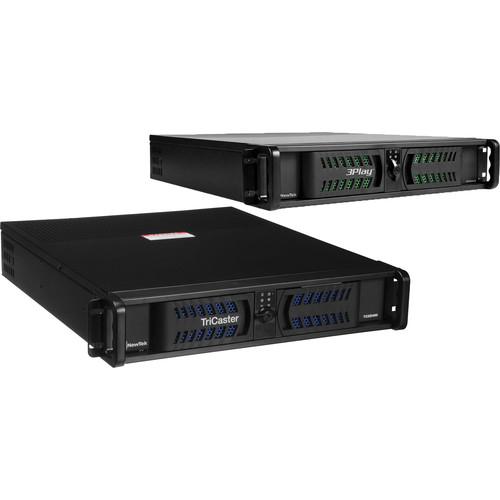 Contents of the user manual for the NewTek Live Sports 460 Solution: TriCaster
- Product category: Production Switchers NewTek
- Brand: NewTek
- Description and content of package
- Technical information and basic settings
- Frequently asked questions – FAQ
- Troubleshooting (does not switch on, does not respond, error message, what do I do if...)
- Authorized service for NewTek Production Switchers
|
User manual for the NewTek Live Sports 460 Solution: TriCaster contain basic instructions
that need to be followed during installation and operation.
Before starting your appliance, the user manual should be read through carefully.
Follow all the safety instructions and warnings, and be guided by the given recommendations.
User manual is an integral part of any NewTek product,
and if it is sold or transferred, they should be handed over jointly with the product.
Following the instructions for use is an essential prerequisite for protecting
health and property during use, as well as recognition of liability on the part of the manufacturer
for possible defects should you make a warranty claim. Download an official NewTek user manual in which you will find instructions on how to install, use, maintain and service your product.
And do not forget – unsuitable use of a NewTek product will considerably shorten its lifespan!
|
Product description The NewTek Live Sports 460 Solution: TriCaster 460 and 3Play 425 pairs a live production switcher with a multi-camera replay system for small venue broadcast and local sports productions, each with a dedicated control surface. The solution supports resolutions up to 1080/30p and 1080/60i, and allows you to create, replay, record, publish, and stream live broadcast and sporting events. The TriCaster 460 supports four cameras and features an audio mixer, titles, warping transitions, buffers, virtual sets, DSK, and DVE effects. The 3Play 425 integrates with the TriCaster via a network connection and adds four live camera inputs and instant replay, slow motion, and in-game highlights features. The output feed for the 3Play is recognized as a live video source on the TriCaster via its network input.
Housed in a 2U rack mount chassis, the TriCaster 460 features built-in IsoCorder technology for recording of up to four isolated, simultaneous feeds during live production, from any combination of the HD-SDI, HD Component, SD-SDI, SD Component, S-Video, or Composite input connections. You can instantly publish content to popular social media sites, upload to FTP sites, transfer to storage volumes/network locations, share clips and stills during production, or upload your entire show within minutes after production wraps. Custom memory presets and key commands allow you to streamline sophisticated operation sequences that are too complex for real-time action execution. 3TB of internal storage is included for approximately 70 hours of 1080i recording.
The 3Play 425 is a 2U rack mount live replay solution for small sporting events. It supports up to four channels of live video input and recording in any combination of supported inputs, formats, and frame rates. Video inputs consist of HD-SDI, HD Component, SD-SDI, SD Component, S-Video, and Composite, all on BNC connectors. Video outputs consist of two HD/SD SDI, two analog, HDMI, and several display output ports, with DVI as the main user interface output port. You can record up to 40 hours of 1080i video onto an internal storage and an included 1TB removable drive, simultaneously recording up to two channels per drive.
The output from the 3Play can be sent to the TriCaster over a local network via an Ethernet connection, enabling remote operation of 3Play clip cueing and playback from the TriCaster interface. 3Play output signal appears as a live source through the TriCaster network inputs. Integration between the two system lets you consolidate control by combining macro commands to trigger operations across both platforms. You can also send tally status across the network as well as access and play files written between the two shared network storage drives, without having to import and host locally.
Please see the links below for more information on the components of this bundle. - 3Play 425 Full Unit Replay System with Controller The 3Play 425 Full Unit Replay System with Controller from NewTek is a 6-channel instant-replay slow-motion HD video server with a controller unit designed for use in control rooms and production vehicles of all sizes.With support for removable storage devices and a recording capacity of up to 30 hours, you can perform marathon recording with ease, whenever and wherever required. The Unit Replay System uses session management to help ensure your data stays organized. It also comes with a slow-motion feature that enables you to break down highlights or analyze pivotal moments frame-by-frame.It can be used as a standalone unit, paired with the existing production system, or it can be teamed up with TriCaster over a local network. You can also streamline your entire operation with the NewTek live sports combo and have a complete, integrated live production solution using a fraction of the space typically required for sports production.
- Big-Game Capability
- Hitting the 6-channel sweet spot for sports producers with 4 cameras in, 2 fully independent channels out, and a lightweight price point, this system offers professional, multi-camera replay coverage.
- Small Team Player
- What your crew lacks in numbers, it makes up for in terms of efficiency, productivity, and skills. With this system's ease of operation, any utility player on your team, from the rookie to the veteran, can step in and shine. The intuitive replay workflow is easy to learn, so your bases are always covered, no matter who the players are.
- Booth and Van-Friendly
- From mobile unit to press booth, this sleek unit's network-quality replay system tackles the away games as easily as it powers the home games. Slide easily into any existing production space or produce from places you've never been able to before. Every angle is just an SDI connection away.
- Multi-Game Workflow
- With 30 hours of recording capacity and removable storage you can easily perform marathon recording whenever required. Session management lets you keep games and clips organized. Additionally, built-in applications in this unit allow for importing and exporting of media content to handle any in-game or post-game file requirements.
- Show-Stopping Slow Motion
- Enjoy network-style presentation with smooth, interpolated slow motion. Break down highlights or analyze pivotal moments frame by frame, and with incredible detail.
- In-Game Highlights
- Build highlight or sponsor blocks at breakneck speed for instant replay on command during timeouts, or going into a break. Package the best plays, critical mistakes, and monumental moments together, and then add transitions and background sound for a strong finish.
- Standalone and Switcher-Friendly
- Functioning independently, connected to your existing production setup, or teamed up with TriCaster over a local network, this unit plays well with others. You can plug in the 3Play to multiply the inputs of your switcher. It also enables you to streamline your entire operation with the NewTek live sports combo and have a complete, integrated live-production solution using a fraction of the space traditionally needed for sports production.
In the Box Bundle Items
Also Includes - TriCaster 460 Multi-Camera Production System with Control Surface
3Play 425 Full Unit Replay System with Controller vwfbwrtwbvv - Controller with Premium T-Bar, Speed Presets & Jog Wheel
Table of Contents
|
Upload User Manual
Have you got an user manual for the NewTek Live Sports 460 Solution: TriCaster 460 & 3Play 425 in electronic form? Please send it to us and help us expand our library of instruction manuals.
Thank you, too, on behalf of other users.
To upload the product manual, we first need to check and make sure you are not a robot. After that, your "Submit Link" or "Upload File" will appear.
Technical parameters - 3Play 425 Full Unit Replay System with Controller
| Video Input | 4 simultaneous inputs
Any combination of:
HD-SDI, HD component, SD-SDI, SD component, composite, or Y/C (BNC) | | Video Output | 2 fully independent, simultaneous play-out channels
HD-SDI, HD Component, SD-SDI, SD Component, Composite, or Y/C (BNC)
HDMI output
Dedicated HDMI multi-view output
Network output for over-the-network input to TriCaster | | Mode | A; B; A+B | | Video Formats | NTSC Model: 1080/30p, 1080/24p, 1080/60i, 720/60p, 720/30p, 720/24p, 480/60i
Supports 16:9 and 4:3 aspect ratios | | Channels | Recording: 4 | | Recording Capacity | More than 30 hours of combined 1080i storage across internal drive and removable drive (15+ hours per drive)
MPEG-2 all I-frame | | Genlock | Locks to HD or SD analog signals
Supports either tri-level or bi-level sync sources | | Multi-viewer | Supported with 2nd display, including HUD | | Audio Inputs | 4 x SDI embedded
3 x 2 balanced 1/4" (Mic/Line)
1 x 2 balanced XLR (Mic/Line) | | Audio Outputs | 2 x SDI embedded
1 x 2 balanced XLR
1 x 2 balanced 1/4" | | Audio Processing | Audio is uncompressed and sampled at 96 kHz, 32-bit | | Time Code | LTC | | Standards | For Audio/Video:
HD-SDI video conforms to SMPTE 292M
SD video conforms to SMPTE 259M and ITU-R BT.656
Analog audio levels conform to SMPTE RP-155 | | Controller | Dedicated controller with T-bar, jog wheel, speed presets, and clip transport | | Dimensions | 19.0 x 3.5 x 22.5" (48.3 x 8.9 x 57.2 cm) | | Weight | 28.0 lb (12.7 kg) | | | | Box Dimensions (LxWxH) | 26.0 x 25.0 x 16.5" |
Rating90% users recommend this product to others. And what about you?

This product has already been rated by 16 owners. Add your rating and experience with the product.
Discussion
 Ask our technicians if you have a problem with your settings,
or if anything is unclear in the user manual you have downloaded.
You can make use of our moderated discussion.
The discussion is public and helps other users of our website who may be encountering similar problems.
Ask our technicians if you have a problem with your settings,
or if anything is unclear in the user manual you have downloaded.
You can make use of our moderated discussion.
The discussion is public and helps other users of our website who may be encountering similar problems.
The discussion is empty - enter the first post
Post a new topic / query / comment:
|
|
|
| Request for user manual |
You can’t find the operation manual you are looking for? Let us know and we will try to add the missing manual:
I’m looking for a manual / Request for manual
Current requests for instruction manuals:
Call Of Duty World War Two For Xbox...
controller stratus XL...
stratus XL...
smart whatch serie S11 42mm...
Allen & Heath SQ-6 manual...
|
| Discussion |
Latest contributions to the discussion:
AEW R 4100
Name: MAURICIO ANGARITA
Audio-Technica AEW-R4100 UHF Diversity Receiver for
AEW R 4100 has the mute function blocked and does not allow audio to pass. I tried several times to turn off the mute from the transmitter but it does nothing, the mute stays on. Solution?
Thank you...
Instructions for assembling the 2015 Forecast Image Master Consoles GC3-A
Name: mike elam
Forecast Consoles GC3-A ImageMaster Editing Console
Looking for instructions for assembling this console. ...
EMPTY TONER ERROR MESSAGE AFTER REPLACING TONER
Name: LINDA BAD YELLOW EYES
Brother TN223BK Standard-Yield Toner
I HAD TO CHANGE OUT ALL THREE TONERS DUE TO LEAKS IN THE YELLOW AND CYAN. AFTER I REPLACED THEM, THE MACHINE KEEPS GIVING ME AN EMPTY TONER ERROR MESSAGE. HELP!!...
PS480D 20/24 pin Switching 480W Power Supply
Name: swkargo
Logisys 480W Power Supply
This item states in can run -5vdc .It is NOT listed on the board or I beleive is r4 is missing the resitior. Any body have thid issue. Shawn
...
Help needed
Name: Ann Carter
SanDisk 1TB Extreme Portable USB 3.1
When I click the link to download the user manual for my Sandisk Extreme external hard drive, it gives me the manual for the LG Cricket. Can you please change the link so I can download the Sandisk manual and begin using this drive? Thank you....
|
|


