User Manual for NewTek TriCaster 410 Advanced with 460 Control Surface Click to enlarge the picture
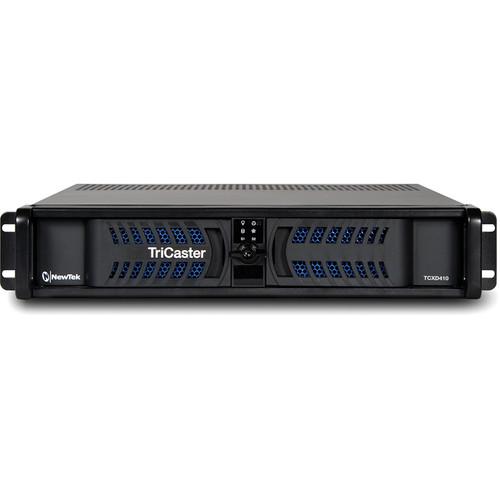 Contents of the user manual for the NewTek TriCaster 410 Advanced with 460
- Product category: Production Switchers NewTek
- Brand: NewTek
- Description and content of package
- Technical information and basic settings
- Frequently asked questions – FAQ
- Troubleshooting (does not switch on, does not respond, error message, what do I do if...)
- Authorized service for NewTek Production Switchers
 |
User manual for the NewTek TriCaster 410 Advanced with 460 contain basic instructions
that need to be followed during installation and operation.
Before starting your appliance, the user manual should be read through carefully.
Follow all the safety instructions and warnings, and be guided by the given recommendations.
User manual is an integral part of any NewTek product,
and if it is sold or transferred, they should be handed over jointly with the product.
Following the instructions for use is an essential prerequisite for protecting
health and property during use, as well as recognition of liability on the part of the manufacturer
for possible defects should you make a warranty claim. Download an official NewTek user manual in which you will find instructions on how to install, use, maintain and service your product.
And do not forget – unsuitable use of a NewTek product will considerably shorten its lifespan!
|
Product description The Newtek TriCaster 410 Advanced with 460 Control Surface is a multi-camera, multi-input, multi-format 2 RU sized switcher system that allows you to simultaneously broadcast, project, stream, and record. It supports real-time, 4 M/E compositing and offers 3D and holographic virtual sets, transitions, and brand elements, and audio is adjustable for all input sources.
Built-in IsoCorder technology allows recording up to five isolated, simultaneous feeds during live production. You can instantly publish content to popular social media sites, upload to FTP sites, transfer to storage volumes/network locations, share clips and stills during production, or upload your entire show within minutes after production wraps. Custom memory presets and key commands allow you to streamline sophisticated operation sequences that are too complex for real-time action execution.
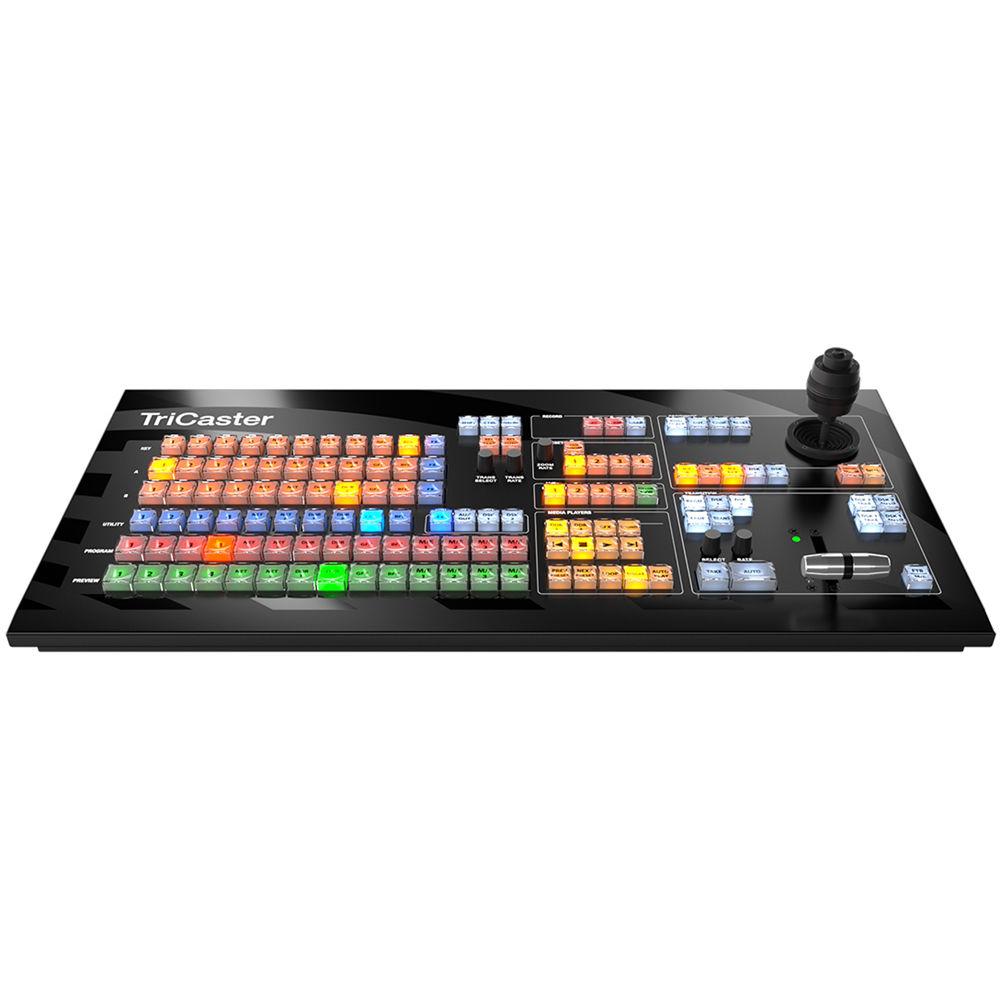
An advanced control interface is built into the system, and the TriCaster 460 Control Surface is also included. Its intuitive key layout, illuminated buttons, and durable design help you switch and control your broadcasts with ease. Visual - Alpha Channel
- Utilize sources with embedded alpha channel transparency for compositing or overlay, or key video and images in real time using integrated LiveMatte technology.
- Animated Transitions
- Select from a variety of included animation store transitions or create custom transition effects, embedding branding, logos, and other visuals into full-color animated overlays with sound effects.
- Border Effects
- Create and customize on-screen elements by adding borders and shadows to video layers.
- Box Effects
- Use a variety of included box effects to creatively frame two or more video sources sharing the screen simultaneously.
- LiveMatte
- Composite multiple video signals, enable green-screen and matte effects, or configure live virtual sets with integrated real-time chromakeying technology.
- Photoshop Blend
- Apply any of the standard Adobe Photoshop blending modes between M/E layers for complex compositing and creative effects.
- Rendering Engine
- Enjoy clear picture quality with video processing optimized for image sampling, downscaling, and warping.
- Transitions
- Apply transitions to your video mix, sub-mixes, and overlays with multiple effects channels and hundreds of industry-standard wipes, dissolves, trajectories, and more.
- Warping Effects
- Generate animated transitions with video effects like real-time cloth dynamics, 3D warping, and transformations.
Audio - 7-Band Equalizer
- Shape sound to your preference, configuring the tonal range of seven separate frequencies for each audio input and output.
- Audio Delay
- Compensate for external synchronization issues between incoming audio and video sources with a configurable audio delay setting for every audio input.
- Audio Follow Video (AFV)
- Attach an audio source (or sources) to an associated video source (or sources), so that when the video source is selected, the desired audio source is automatically selected to provide supporting sound.
- Audio Routing
- Independently route audio input channels to any and all audio mixer buses to produce customized sound combinations for output and recording.
- Compressor/Limiter
- Configure multiple parameters for each audio input and output, including Threshold, Ratio, Attack, Release, and Gain, to enhance sound and prevent distortion, clipping, and excessive variation.
- Dante Audio Networking
- Integrated support for the Dante networking protocol from Audinate for interfacing with compatible audio devices over IP.
* Requires Dante Virtual Soundcard license from Audinate (sold separately) - Headphones
- Listen to production audio privately, with a discrete stereo output jack and independent volume control for headphones.
- Level Control
- Fine-tune sound with independent control for every channel of every audio source.
- Media File Audio Level
- Save time configuring audio levels for non-native clips and sound files by assigning a preset level to all files added to media players.
- Mix-and-Match Audio Connections
- Use any combination of supported digital, analog, and network audio devices, including microphones, mixers, and sound systems, to input and output high-quality audio.
- Multi-Channel Audio Mixer
- Configure and manage audio levels and settings for internal and external sound sources, plus output signals, with a built-in audio mixer and professional-quality audio tools.
- Noise Gate
- Manage audio signals with greater precision using noise gate settings in the audio mixer to exclude low-level sounds.
- Pan
- Create a rich, layered sound experience, moving sound from audio source channels between the stereo channels of the audio mix, dividing equally between channels or assigning all or part of the sound to a specific channel.
- Recording Source
- Select the sound that accompanies each video recording with independent audio configuration for each recording channel.
- Solo
- Isolate and audition individual audio sources to listen to their post-fader sound separate from all other audio sources.
- Talk Over
- Reduce the volume of all other audio sources by 20 dB to enable a selected audio source (typically a microphone) to be heard over all other sound.
- VU Metering
- Monitor and adjust audio levels using configurable VU meter displays built into the audio mixer and optional VU meter overlays for each multiviewer viewport.
Configuration - Alpha Matte
- Configure the secondary output as an alpha matte source for compositing using downstream devices.
- Auto Color
- Optionally enable automatic color matching between video inputs to account for variable lighting conditions and camera settings.
- Clip Thumbnails
- Optionally customize the thumbnail image for each media file in the DDR and the Media Browser for at-a-glance identification and organization.
- Crop Edges
- Define the top, bottom, left, and right margins for a video source independently, cropping unwanted or unnecessary parts from the image.
- Custom Labeling
- Assign custom labels to video inputs, media player files, buffers, audio sources, and presets to suit your naming conventions and workflow preferences.
- Fill + Alpha
- Create composite video images, combining one or more pairs of inputs and configuring one video input as the alpha channel for its paired source.
- Input Grouping
- Link source rows together in color-coded groups to synchronize and streamline multi-channel switcher operations.
- Layer Management
- Identify, monitor, and manage switcher BKGD, DSK, and KEY layer video sources in real time with an integrated layer priority system and full-time, full-motion confidence monitors.
- Positioner
- Move and size video layers and overlays within the frame to achieve the desired positioning and scale for your composition.
- Presets
- Configure M/Es, LiveSet shots, media playlists, transitions and more with your most frequently used setups and content using multiple preset slots.
- Proc Amp Controls
- Individually adjust color characteristics and levels for each input source, including brightness, contrast, hue, and saturation.
- Rotation
- Customize the appearance of composite layers and overlays with independently configurable X-axis, Y-axis, and Z-axis rotation settings.
- Sessions
- Configure and store the framework and assets for your productions, including the video standard and resolution, input and output configuration, switcher and media player setup, and more.
- Session Templates
- Set up and store sessions with your user preferences in reusable templates and jump right into your custom configuration for any production.
- White Balance
- Ensure accurate color properties for your video with manual and automatic white balance controls.
Control - Autoplay
- Enable media playback to start and stop automatically, and optionally advance to the next item in the playlist when playback of the current item concludes.
- Control Panels
- Take a hands-on approach to operation with companion hardware control panels that map to the user interface.
- Hotspots
- Turn on-screen areas into interactive macro controls, enabling the live motion of talent or objects to trigger automated operation sequences.
- MIDI
- Optionally connect any of thousands of compatible MIDI devices to extend macro control and to integrate video operations with other MIDI-compatible live-production elements like sound, lighting, and effects.
- User Interface
- Operate with point-and-click simplicity, with a dedicated software user interface and the included USB mouse and keyboard.
- Web Interface
- Access resources and manage elements of live operation from the browser of any supported device on the same network with a system-specific web-based interface.
Data - DataLink
- Map real-time data from internal and external sources to titles, comments, file names, and other fields in graphics templates.
- DataLink Extension
- Add the DataLink extension to the Google Chrome browser of any networked computer to send text or images from the web across the network to your system for use in titles and graphics.
- DataLink File Watcher
- Transform raw spreadsheet data from CSV, XML, or ASCII files into production-ready title pages that can be edited and updated in real time.
- Metadata
- Attach comments to sources, clips, and images to serve as internal data sources for DataLink operations.
Integration - Mix-and-Match Video Inputs
- Connect video cameras or devices of any supported connection type, resolution, frame rate, and aspect ratio, with per-input configuration.
- Mix-and-Match Video Outputs
- Configure multiple video outputs for any combination of supported signals and connection types.
- PTZ
- Supports input of robotic pan-tilt-zoom cameras via serial and network protocols, including RS-232, RS-422, and IP.
- PTZ Camera Control
- Operate robotic pan-tilt-zoom cameras directly from the user interface, including camera orientation, zoom, focus, and iris, with position presets, speed control, and preview images.
- Router Support
- Select and switch between router sources directly from the user interface when connected to a compatible upstream video router.
- Storage
- Import, record, and store hours of video, images, graphics, and more for your production using supported storage methods.
IP - Native IP Processing
- True IP switching, with native software-driven processing maintaining native resolution of every signal from input to output and eliminating the need for conversion to and from baseband video.
- NDI
- Send and receive video, audio, and data over IP to and from compatible production systems, devices, and applications across a network with integrated Network Device Interface (NDI) technology.
Automation - Macro Automation
- Record, store, and automate favorite settings, frequent actions, and complex operation sequences, triggering with a single action.
- Macro Triggers
- Trigger macros manually with a mouse click, keyboard shortcut, control panel button, MIDI button, GPI trigger, hotspot interaction, or other compatible control method.
- Macro Editor
- Edit the action, timing, and order of steps in a macro sequence, insert and delete steps, and easily modify macro data with cut, copy, and paste commands.
- Snapshot
- Reduce an entire macro sequence to a single step, configuring a macro trigger to snap to the end result of the associated macro sequence with a specialized speed setting.
- State Change Macros
- Configure macros to trigger automatically according to internal events and state changes, including audio, media playback, tally, and specific switcher actions.
Monitoring - Multiviewers
- Monitor the multiple video signals from external inputs, internal sources, and outputs simultaneously with viewports built into the user interface display, and optionally extend monitoring to additional displays.
- Production Clocks
- View the system clock, generate and display local timecode, and set start and end times for your video program, including countdown, to time productions precisely.
- Tally Indicators
- Easily identify the sources selected or included in a composition selected on the Preview and Program rows with distinct visual indicators.
- Viewport Configuration
- Customize each multiviewer viewport individually, including selecting the video signal and applying optional overlays to include checkerboard, safe areas, center cross, hotspots, VU meters, and more.
- Visual Indicators
- Obtain real-time feedback from a variety of on-screen visual indicators to easily assess the status of production activities.
- Workspaces
- Configure the multiviewers to display the desired type, quantity, and arrangement of video signals with a variety of layout presets.
Multimedia - Animation Buffers
- Load multiple video loops, motion graphics, and animations into dedicated memory slots for instant recall and playback.
- Buffers
- Load multiple images, graphics, and titles into dedicated memory slots for instant recall and display.
- Grab
- Grab full-resolution still images from your video program for real-time export and post-production use.
- Graphics
- Store and display photos, images, and full-screen and partial-screen graphics of virtually any file format, individually or in playlist format.
- Live Title Editing
- Edit and update title text in real time to create new or revise current titles while a live production is in progress.
- Playlists
- Load and sequence media player items into storyboard-style playlists with simple, drag-and-drop organization, optional Autoplay setting, and multiple presets.
- Playlist Effects
- Add custom transitions between playlist items and combine real-time, slow-mo, and fast-mo with per-clip playback speed settings.
- Sounds
- Load and play sound files including audio tracks, music beds, and sound effects, individually or in playlist format.
- Titles
- Apply titles to live video, choosing from hundreds of included templates in a variety of styles and colors, building your own designs, or importing custom CG elements.
- Transport Controls
- Use a simple set of familiar controls to manage playback and playlist functions, including Play, Stop, Previous, and Next.
- Trim and Scrub
- Change the duration of media player items by adjusting the start and end points, and cue to a specific frame by changing the play position to the desired point in the file.
- Video Servers
- Store and play back short-form and long-form video clips, motion graphics, and packages of virtually any file format, individually or in playlist format.
- Watch Folders
- Edit buffer content, including graphics, titles, and images, in real time, and update across the network from a compatible workstation.
Operation - Auto-Detect
- Reduce setup time with automatic detection of resolution and frame rate for most session-format SDI cameras.
- Automatic Media Retrieval
- Save time locating and restoring media for your production session with automatic media retrieval, even when drive settings have changed on the system or a session backup has been restored.
- Backup and Restore
- Protect your system against unforeseen hardware and software issues using a comprehensive system restore function to return your system to factory defaults, or by creating a bootable clone of the system drive on an external drive for backup.
- Frame Sync
- Work with a wide range of video sources while eliminating signal timing concerns with an internal frame synchronizer enabled for all sources.
- Multi-Tiered Failsafe
- Ensure productions continue through unexpected circumstances with multiple, redundant failsafe mechanisms that monitor and resolve error conditions with minimal disruption.
- Resolutions
- Launch your session in any of the supported interlaced or progressive scan resolutions and frame rates, including HD and SD selections.
- Signal Processing
- Maintain signal quality from end to end with video and images processed at their native resolution-no up conversion or down conversion required.
- Tally Connector
- Connect external tally lights or similar devices to enable talent and crew to see the video camera or device currently selected on the Program row.
- Undo/Redo
- Erase the effects of recent actions, returning to prior switcher states with convenient undo and redo commands.
- USB 3.0/3.1 Gen 1
- Utilize USB 3.0/3.1 storage media for high-speed file transfer and external capture workflows. NOTE: USB 3.0 and 3.1 Gen 1 feature a maximum throughput of 5 Gb/s. USB 3.0 and USB 3.1 Gen 1 are synonymous.
- Video Standards
- Produce video anywhere in the world, with comprehensive support for all common NTSC and PAL video standards.
- Waveform and Vectorscope
- Calibrate and monitor video signals for broadcast compliance and viewing quality with built-in waveform and vectorscope displays.
Outputs - Display Outputs
- Output video to a projector, monitor, digital signage, videoboard or other external display using one or more supplemental ports.
- M/E Output
- Output the video mix from one or more M/E buses for simulcasting, sub-mixing, archive, or distribution purposes.
- NDI Mix Output
- Supply up to four video mix outputs to the network via NDI, allowing other NDI-enabled devices connected to the network to use the signals for input or delivery.
- NDI Source Output
- Translate select local video sources to NDI and output to the network for use by other NDI-enabled devices throughout your studio, facility, or pipeline.
- Program Clean Output
- Output a 'clean' version of the primary video mix without graphics and text overlays for simulcasting, archive, or distribution purposes.
- Program Output
- Switch live cameras, play back stored media, apply overlays, and more, then output the composite result as your primary video mix.
- Simultaneous HD/SD Output
- Output video in both standard and high definition simultaneously with configurable output resolutions.
- Simultaneous SDI/IP Output
- Output video to local and network destinations at the same time, with video mix outputs configurable for simultaneous SDI and IP video delivery.
- Stream Output
- Output live streaming video from your production to the web, with configurable audio and video sources.
Pre- and Post-Production - Animation Store Creator
- Generate custom, full-color transitions and animated effects with alpha channel and embedded audio from your own logos and graphics using the included Animation Store Creator application.
- LiveText
- Create custom title templates and graphics for your production using the built-in character generator application, LiveText.
- Virtual Set Editor
- Purchase and install this optional software to customize live virtual set templates, import your own virtual studios created using your choice of design applications, or transform panoramic images into 360° virtual environments.
Publishing - Auto Queue
- Optionally enable media designated for sharing to be uploaded and exported to publishing destinations automatically.
- File Export
- Live export media from your production for local or remote collaboration, delivering to FTP sites, or copying to local or external storage locations, including network servers.
- Social Media Export
- Login and publish media to popular social media accounts directly from your system, including Facebook, Imgur, LinkedIn, Twitter, Vimeo, YouTube, and more.
- Trim
- Set new in and out points for video clips you plan to share to change the duration or edit for content.
Recording - Add to Playlist
- Enable instant, in-show turnaround of captured content, optionally adding recorded clips to DDR playlists for immediate playback.
- Export Active Recordings
- Designate active recordings for upload and export to social media, FTP, or storage locations.
- H.264 Recording
- Record your production to H.264 for distribution purposes with multiple selectable profiles.
- M/E Record
- Optionally designate one or more M/E buses as capture sources to record specialized sub-mixes or alternate cuts of your video program.
- MP3 Audio Recorder
- Optionally capture an audio-only recording of any selectable input or output with an independently configurable MP3 audio recorder.
- Multi-Channel ISO Recording
- Record multiple channels of video to internal, external, or shared storage simultaneously with integrated IsoCorder technology.
- Program Record
- Record your entire program to a full-resolution video file for upload, archive, or distribution.
- QuickTime Recording
- Full-resolution ISO recording to high-quality, multi-platform, application-friendly QuickTime file format, with timecode, for archival use.
- Source Record
- Optionally designate one or more individual video sources for capture to acquire raw footage from your production.
- Time-Shifting
- Delay the broadcast of live productions or video feeds by adding active recordings to the DDR for playback at a later time.
Replay - Replay Operation
- Capture and replay highlights with on-screen controls and other replay elements, including intro and outro transitions, clip speed and duration, angle selection, and auto-playback action.
- Replay Shortcuts
- Create basic highlight clips for instant playback and publishing with shortcut commands.
- Replay Controller
- Add dedicated, single-channel capture, clip marking, and playback control with an optional TimeWarp replay controller.
Streaming - Live Streaming
- Configure and launch live streaming video to the web, using your choice of connection types, resolutions, and streaming providers, including multiple preset options and custom profile settings.
- Stream File Archive
- Automatically and independently capture your live stream as a web-ready video file for archive or upload for on-demand viewing.
- Streaming Presets
- Use any of a number of default streaming provider presets, including Facebook Live, Microsoft Azure, Periscope, Twitch, Ustream, YouTube Live, and more, or configure your own custom connection and designate as a preset.
- Web Browser
- Connect, test, preview, and monitor your live video stream using the integrated web browser.
Switching - Mix/Effects Buses
- Switch video sub-mixes, create multi-source compositions, produce complex video effects, and configure live virtual sets for delivery to the production switcher or directly to output with multiple mix/effects (M/E) buses.
- Overlays
- Apply titles, graphics, animations, and picture-in-picture video to your video program, layering elements over live cameras and other video sources with downstream key (DSK) and upstream key (KEY) channels.
- Production Switcher
- Mix multiple live cameras and video feeds with stored media, including video clips, still images, graphics, and animations; plus video over IP, layered compositions, and live virtual sets.
- Program/Preview Workflow
- Sequence and switch between camera angles and other video sources using your choice of transitions, and set up and see the composition of your next shot before you take it live to air.
- PREVIZ
- Configure and preview settings for the switcher or M/Es with sandbox-style control on a discrete bus, then take live or apply across multiple buses with copy-and-paste simplicity.
Virtual Sets - Augmented Reality Effects
- Add another dimension to virtual set scenes with augmented reality effects that track with LiveSet zoom and pan movements, including Parallax setting for enhanced motion.
- Holographic Live Virtual Sets
- Create a custom live virtual set from any real-world location, converting panoramic images from a smartphone, DSLR, or point-and-shoot camera into a photorealistic virtual environment with the optional Virtual Set Editor software.
- Live Virtual Sets
- Transform any location into a simulated studio environment, choosing from a variety of included live virtual sets, purchasing ready-made premium sets, or creating and importing your own set designs with the optional Virtual Set Editor software.
- LiveSet Technology
- Composite live video sources into complex virtual environments with multiple set locations and camera angles, real-time reflections, specular highlights, and optional animated lens flares.
- Virtual Cameras
- Simulate the effect of having camera operators within your live virtual set, with manual and animated virtual camera control and configurable shot presets
Workflow - File Format Interoperability
- Work with a wide range of stored media file formats natively and interchangeably, including video, images, graphics, and audio, with optional transcoding to optimize real-time performance.
- Media Browser
- Use a familiar browser interface to explore and select media, transitions, effects, and live virtual sets from accessible storage locations.
- Media Export
- Easily convert and export media files from your production, including batch export, with file format preset and destination configurable per asset.
- Media Import
- Easily import and optionally transcode media assets, including batch import, with files automatically categorized according to type and assigned to the appropriate locations for production use.
- Real-Time Production Engine
- Simultaneously perform the combined functions of multiple individual components in a single, all-in-one integrated production platform with high-performance system architecture.
- Timecode
- Time productions, cue video files, synchronize and log recorded media, and more, using multiple timecode fields and settings.
- Ultra-Low Latency
- Minimize signal delay in IMAG installations with ultra-low throughput latency
- Video Codecs
- Download and install free codecs for Microsoft Windows and Apple macOS platforms to enhance media file compatibility between your system and third-party software applications.
460 Control Surface - Compact Design
- Compact frame, intuitive layout, durable, ergonomic design for confident, comfortable performance.
- Controls
-
- Illuminated buttons for heightened visibility of control surface activity.
- Premium T-Bar and three-axis joystick for precision control of effects.
- Synchronized control of multiple production elements with versatile, multi-select delegate controls.
In the Box NewTek TriCaster 410 Advanced with 460 Control Surface TriCaster 460 Control Surface ddcfrzqqyxuuafwdztuvewxy Rackmount Ears (2 RU) Power Cord Limited 1-Year Warranty Table of Contents
|
Upload User Manual
Have you got an user manual for the NewTek TriCaster 410 Advanced with 460 Control Surface in electronic form? Please send it to us and help us expand our library of instruction manuals.
Thank you, too, on behalf of other users.
To upload the product manual, we first need to check and make sure you are not a robot. After that, your "Submit Link" or "Upload File" will appear.
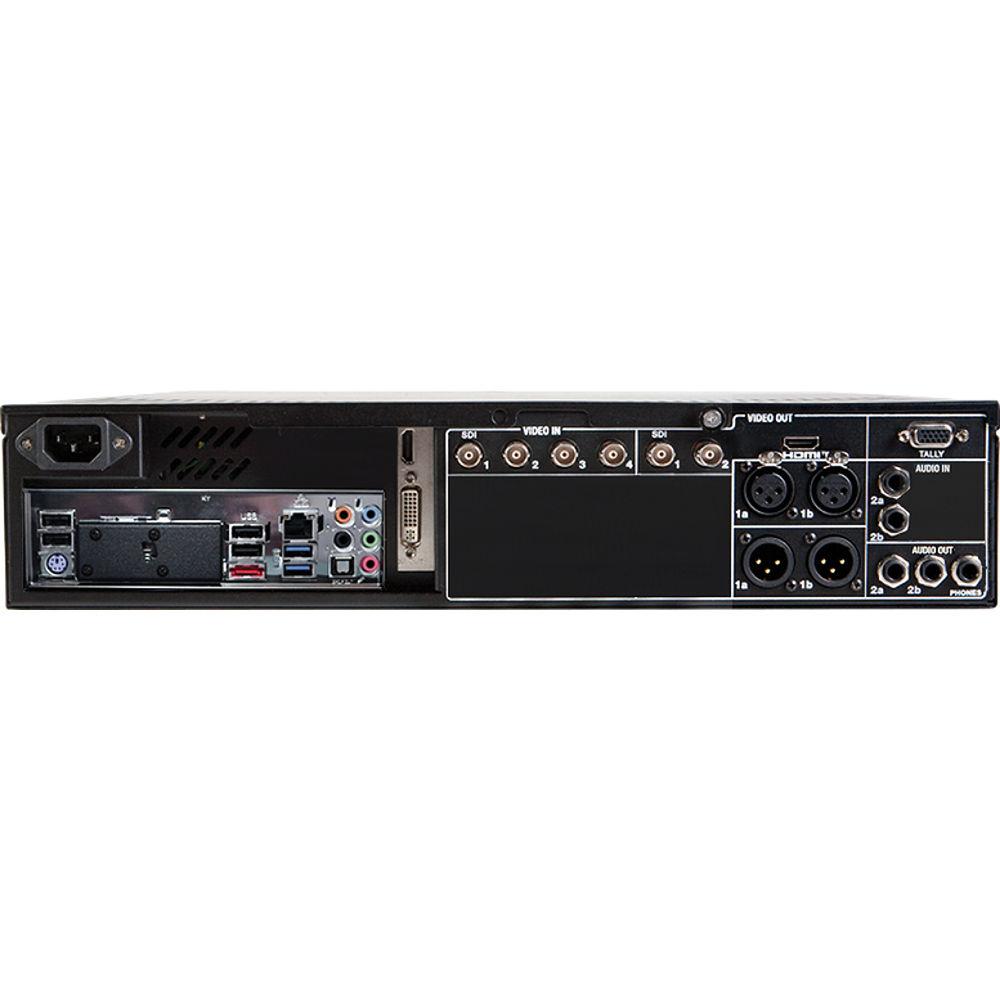
Technical parametersNewTek 410 Specs | Video Input | 4 x BNC SDI | | Video Output | 2 x BNC SDI
1 x HDMI | | Audio Input | 4 x SDI embedded
1 x Balanced 1/4" / 6.35 mm Stereo Pair
1 x Balanced XLR Stereo Pair | | Audio Output | 1 x Balanced 1/4" / 6.35 mm Stereo Pair
1 x Balanced XLR stereo pair (Line)
1 x Stereo 1/4" / 6.35 mm (Headphones) | | Network Interface | 1 x Gigabit Ethernet | | Network Inputs | 8 x NDI, Any Source Combination | | Network Outputs | 4 x NDI, Any Source Combination | | IP Streaming | 1 x Stream | | Monitor Outputs | 1 x DVI
1 x HDMI Multiview
1 x HDMI
1 x VGA | | Tally | 1 x DB15
Hardware, NDI, and Blackmagic Design SDI Tally Support | | Mix / Effect Buses | 4 x M/E Buses | | Audio Mixing | 4 x 4 x 4 Audio Input Channel Routing
4 x Independent Output Mixes
2 x SDI Embedded | | DSKs | 2 x DSK Channels | | Media Players | 2 x DDR
2 x GFX
1 x Sound | | Supported Media Formats | Video: AVI, DV, DVCPro, DVCProHD, FLV, F4V, H.263, H.264, MOV, MKV, MJPEG, MPEG, MP4, WMV, WebM, and More
Still: PSD, PNG, TGA, BMP, JPEG, JPEG-XR, JPEG2000, EXR, RAW, TIF, WebP, and More
Audio: AIFF, MP3, WAV, and More | | Supported Resolutions | 1080p: 29.97, 25, 24, 23.976
1080i: 59.94, 50
720p: 59.94, 50, 29.97, 25, 24, 23.976
576i: 25
480i: 59.94 | | Buffers | 10 x Still Buffers
5 x Animation Buffers | | Keyers | LiveMatte Chroma and Luma | | Advanced Features | Integrated Waveform, Vectorscope, Full Field Rate with Digital Calibration, Color Preview, Support for ITU-R Rec.709, GPI, MIDI Support | | Internal Storage | 1 x 3 TB Drive | | Processing | Video: Floating Point, YCbCr +A 4:4:4:4
Audio: Floating Point, 96 kHz | | Latency | ~1.5 to 2 Frames | | External Storage | 4 x USB 3.0/3.1 Gen 1 | | File Transfer Method | Social Media, FTP, File Server, Internal/External Storage | | Power | 430 W | | Dimensions | 19 x 3.5 x 21.6" / 48.3 x 8.9 x 54.9 cm (2 RU) | | Weight | 26 lb / 12 kg | | | | Package Weight | 84.0 lb | | Box Dimensions (LxWxH) | 33.5 x 25.0 x 23.0" |
Rating70% users recommend this product to others. And what about you?

This product has already been rated by 78 owners. Add your rating and experience with the product.
Discussion
 Ask our technicians if you have a problem with your settings,
or if anything is unclear in the user manual you have downloaded.
You can make use of our moderated discussion.
The discussion is public and helps other users of our website who may be encountering similar problems.
Ask our technicians if you have a problem with your settings,
or if anything is unclear in the user manual you have downloaded.
You can make use of our moderated discussion.
The discussion is public and helps other users of our website who may be encountering similar problems.
The discussion is empty - enter the first post
Post a new topic / query / comment:
|
|


