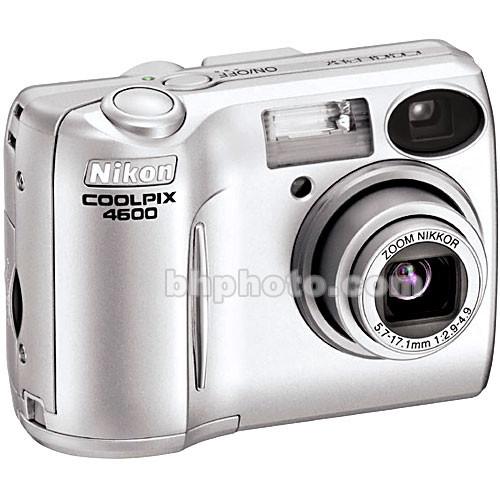
User Manual for Nikon Coolpix 4600, 4.0 Megapixel, 3x Optical 4x Digital Zoom, Digital Camera - Refurbished Click to enlarge the picture
 Contents of the user manual for the Nikon Coolpix 4600, 4.0 Megapixel, 3x
- Product category: Uncategorized Nikon
- Brand: Nikon
- Description and content of package
- Technical information and basic settings
- Frequently asked questions – FAQ
- Troubleshooting (does not switch on, does not respond, error message, what do I do if...)
- Authorized service for Nikon Uncategorized
|
User manual for the Nikon Coolpix 4600, 4.0 Megapixel, 3x contain basic instructions
that need to be followed during installation and operation.
Before starting your appliance, the user manual should be read through carefully.
Follow all the safety instructions and warnings, and be guided by the given recommendations.
User manual is an integral part of any Nikon product,
and if it is sold or transferred, they should be handed over jointly with the product.
Following the instructions for use is an essential prerequisite for protecting
health and property during use, as well as recognition of liability on the part of the manufacturer
for possible defects should you make a warranty claim. Download an official Nikon user manual in which you will find instructions on how to install, use, maintain and service your product.
And do not forget – unsuitable use of a Nikon product will considerably shorten its lifespan!
|
Product description The Zoom Nikkor Lens in the Coolpix 4600 gives you the power of a 3x optical zoom lens, while Macro capability lets you get as close as 1.6 inch. This combination is supported by Nikon's world-renowned optical technology delivering crisp, clear images while minimizing chromatic aberration. Furthermore, The Coolpix 4600 exclusive image processing technology takes true-to-life images a step closer to reality. The Nikon Coolpix 4600 Digital camera has been designed so you can shoot longer and more often by increasing battery life and adding more internal memory. You can shoot up to 230 images on a single set of the included AA Alkaline batteries. The oversized 1.8" LCD screen and updated interface can be viewed as icons or as a list, making the camera even easier to use than previous models - and if you get confused, just hit the Help Button - It will explain the function in the main menu. Finally, the included PictureProject software lets you share your photos with friends and family quickly and easily - without going to a website or attaching them to e-mails. You can send and receive photo albums to anyone with an Internet connection, enjoy full-screen slide shows with just one mouse click, automatically receive albums from trusted senders: or add a message to the photos you send. The people you send photos to can download the PictureProject In Touch software for free - then they'll be able to enjoy your photos just by looking in the application's in-box. PictureProject In Touch is simple to use, even for inexperienced computer users, and it's compatible with both Windows and Mac OS X operating systems. - 4.0 Effective Megapixels
- Capture highly detailed images and produce stunning prints up to 11 x 17 inches
- High Quality 3x Zoom Nikkor lens
- The 3x Optical Zoom-Nikkor lens has a 35mm equivalent focal length of 34-102mm and produces incredibly sharp, clear images - plus there is a 4x digital zoom for a total zoom of 12x.
- 16 Scene Modes
- With 16 Scene modes - with Scene Assist to guide you in taking better pictures - you'll always get a great shot. Scene modes include Portrait, Landscape, Sports, Night portrait, Party/Indoor, Beach/Snow, Sunset, Dusk/Dawn, Night landscape, Close up, Museum, Fireworks show, Copy, Back light, Panorama assist, Underwater, BSS (Best Shot Selector)
- Long Battery Life
- Greater power efficiency allows you to shoot hundreds of images with two AA batteries.
- Exclusive Nikon In-Camera Red-Eye Fix
- This Unique feature automatically fixes most typical red-eye producing situations; you may never see red-eyes again.
- Large, Bright 1.8 inch LCD
- For easy viewing and playback of pictures a large 1.8' LCD display is provided that is bright enough to use in daylight
- Exclusive D-Lighting Feature
- Nikon's D-Lighting automatically lightens overly dark images in playback.
- Help Button
- The Help Button instantly displays an explanation for all functions on the main menu
In the Box Nikon Coolpix 4600, 4.0 Megapixel, 3x Optical/4x Digital Zoom, Digital Camera 2x AA Alkaline Batteries USB Cable Video Cable Wrist Strap Software CD-ROM (PictureProject software) User's Guide 90-Day Refurbished Warranty Table of Contents
|
Upload User Manual
Have you got an user manual for the Nikon Coolpix 4600, 4.0 Megapixel, 3x Optical 4x Digital Zoom, Digital Camera - Refurbished in electronic form? Please send it to us and help us expand our library of instruction manuals.
Thank you, too, on behalf of other users.
To upload the product manual, we first need to check and make sure you are not a robot. After that, your "Submit Link" or "Upload File" will appear.
Technical parametersNikon 25524B Specs | Camera Type | Compact Point-and-shoot Digital Camera | | | | Image Sensor | 1/2.5" 4.23 Megapixel CCD | | Effective Resolution | 4.0 million pixels | | Color Depth | 24-Bit RGB | | Color Modes | Standard Color, Vivid Color, Black & White, Sepia, Cool | | Image File Formats | JPEG (High, Normal) | | Recorded Resolution | 4M (2288 x 1716)
2M (1600 x 1200)
PC (1024 x 768)
TV (640 x 480) | | Video Recording | AVI Motion JPEG
TV movie: 640x48 @ 15 fps
Small size: 320x240 @ 15 fps
Smaller size: 160x120 @ 15 fps
Clip length limited only by available memory | | Audio Recording | No | | | | Lens Type | Zoom-Nikkor Lens (7 elements in 6 groups) | | Optical Zoom | 3x | | Lens Focal Length | 5.7mm - 17.1mm (34mm - 102mm equivalent) | | Digital Zoom | 4x | | Minimum Focus Distance | 1.6" | | Maximum Aperture | f/2.9 | | Optical Image Stabilization | No | | Accessory Lens/Filter Mount | No | | | | Focus Type | Contrast Detect AF | | Focus Modes | Single AF, Continuous AF | | Focus Range | 1.6" - infinity | | | | Sensitivity | ISO 50 with Auto gain-up | | Shutter Type | Not Specified | | Shutter Speed | 4 - 1/3000 second | | Aperture Range | f/2.9, f/4.9 (2 steps) | | Exposure Metering | 256-segment matrix metering | | Exposure Modes | Programmed auto exposure | | White Balance Modes | Auto with TTL control, 5-mode manual, Pre-set white balance | | Scene Modes | Portrait, Landscape, Sports, Night portrait, Party/Indoor, Beach/Snow, Sunset, Dusk/Dawn, Night landscape, Close up, Museum, Fireworks show, Copy, Back light, Panorama assist, Underwater, BSS (Best Shot Selector) | | | | Built-in Flash | Built-in Speedlight (Auto, Auto with Red-eye Reduction (Advanced Red-eye Reduction), Anytime Flash, Flash Cancel and Slow sync.) | | Effective Flash Range | 1.3 - 10.8' (0.4 - 3.3m) (wide) | | External Flash Connection | No | | External Flash Control | Not Applicable | | | | Start-Up Time | Not Specified | | Shutter Lag | Not Specified | | Time Between Shots | Approx. 1.5 seconds | | Burst Capability | Continuous: 1.3 fps up to 3 frames
Multi-shot 16: 16 consecutive frames 1/16 in size | | Self Timer | 10 seconds | | Interval Recording | No | | Date & Time Stamp | Yes | | | | Built-in Memory | 14.5MB | | Compatible Memory Cards | Secure Digital (SD)/MultiMediaCard (MMC) | | Recording Capacity | Includes 14.5MB Built-in Memory Still Image Capacity
| | High | Normal | | 4M | 7 | 14 | | 2M | - | 29 | | PC | - | 70 | | TV | - | 180 | Video Capacity
| Video Mode | Record Time | | TV movie | 9 seconds | | Small Size | 28 seconds | | Smaller Size | 90 seconds | | | Battery Type | 2x AA Batteries (Alkaline, NiMH, NiMn, Lithium) | | Power Adapter | EH-62B AC adapter (optional) | | | | Computer Interface | USB 1.1 | | Direct Print Capable | Yes (PictBridge, USB Direct Print) | | Remote Control | No | | Video Output | Yes (NTSC & PAL) | | Web-Cam Capable | No | | System & Software Requirements | Windows System - Windows 98SE, Me 2000, XP
- 64MB RAM or more 60MB Hard Disk Space required for installation
- Available USB Port
- 800 x 600 Display with 16-bit color (full color recommended)
- CD-ROM drive required for installation
Macintosh System - Mac OS X (10.1.5 or later)
- 64MB RAM or more
- 60MB Hard Disk Space required for installation
- Built-in USB Port
- 800 x 600 Display with 16-bit color (full color recommended)
- CD-ROM drive required for installation
| | | | Viewfinder | Real-image viewfinder | | LCD Display | 1.8" amorphous silicon TFT color LCD (80,000 pixels) with brightness adjustment | | Language Options | English, Spanish, French, German, Italian, Dutch, Swedish, Japanese, Simplified Chinese, Traditional Chinese, Korean | | Playback Options | 1 frame, Thumbnail (4/9 segments), Slide show, Zoom playback (max 10x: 0.2 steps at 1x to 6x, 1 step at 6x to 10x, position selectable), Shooting information display Delete Function (Delete all frames, delete selected frames, protect function available, card format) | | | | Dimensions (HxWxD) | 2.4 x 3.3 x 1.4" (60 x 85 x 35mm) | | Weight | 4.6 oz (130g)
without battery | | | | Package Weight | 1.5 lb | | Box Dimensions (LxWxH) | 7.8 x 5.4 x 3.4" |
Rating50% users recommend this product to others. And what about you?

This product has already been rated by 90 owners. Add your rating and experience with the product.
Discussion
 Ask our technicians if you have a problem with your settings,
or if anything is unclear in the user manual you have downloaded.
You can make use of our moderated discussion.
The discussion is public and helps other users of our website who may be encountering similar problems.
Ask our technicians if you have a problem with your settings,
or if anything is unclear in the user manual you have downloaded.
You can make use of our moderated discussion.
The discussion is public and helps other users of our website who may be encountering similar problems.
The discussion is empty - enter the first post
Post a new topic / query / comment:
|
|


