User Manual for Nikon Coolpix P500 Digital Camera - Refurbished Click to enlarge the picture
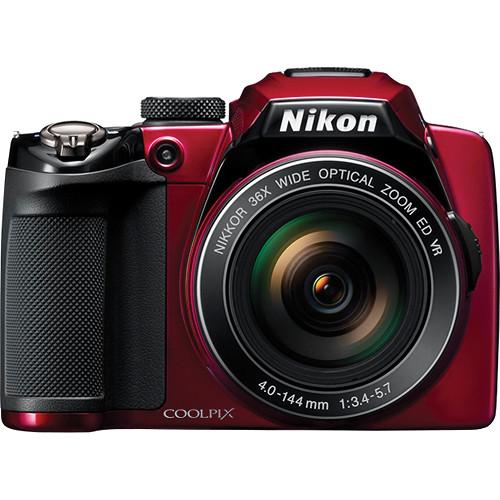 Contents of the user manual for the Nikon Coolpix P500 Digital Camera -
- Product category: Uncategorized Nikon
- Brand: Nikon
- Description and content of package
- Technical information and basic settings
- Frequently asked questions – FAQ
- Troubleshooting (does not switch on, does not respond, error message, what do I do if...)
- Authorized service for Nikon Uncategorized
|
User manual for the Nikon Coolpix P500 Digital Camera - contain basic instructions
that need to be followed during installation and operation.
Before starting your appliance, the user manual should be read through carefully.
Follow all the safety instructions and warnings, and be guided by the given recommendations.
User manual is an integral part of any Nikon product,
and if it is sold or transferred, they should be handed over jointly with the product.
Following the instructions for use is an essential prerequisite for protecting
health and property during use, as well as recognition of liability on the part of the manufacturer
for possible defects should you make a warranty claim. Download an official Nikon user manual in which you will find instructions on how to install, use, maintain and service your product.
And do not forget – unsuitable use of a Nikon product will considerably shorten its lifespan!
|
Product description The Coolpix P500 Digital Camera (Red) from Nikon is a super zoom camera, with a 36x Nikkor ED zoom lens that gives you camera angles from the ultra wide-angle 22.5mm all the way to a telescopic 810mm, suitable for shooting wildlife, sports or anything where you want to as close to the action as possible.
This remarkable zoom range is matched by the other features in the P500: 12.1MP CMOS sensor for greatly improved low-light performance and reduced noise, sensitivity up to 3200 ISO, a high-resolution (921K dots) 3" tilting LCD monitor, spectacular full 1920 x 1080 HD video with stereo sound (including slow-motion), and 5-way VR image stabilization for rock-solid images. Dual image processors make many of these functions possible.
The P500 thrives on challenges--the Easy Panorama mode automatically stitches together shots into breathtaking 180° or 360° panoramas, while Advanced Night Landscape and Advanced Night Portrait modes quickly take multiple shots and combine them into one dazzling picture, without using a tripod. Scene mode has 19 different scenes to choose from for ideal settings, or use the manual controls (aperture priority, shutter priority, or completely manual) for ultimate control.
The Smart Portrait System can make every picture of your friends and family a flattering masterpiece--Blink Warning tells you if someone blinked in a photo, red-eye is automatically corrected while shooting, Face Priority can focus on up to 12 faces and Skin Softening mode smoothes out wrinkles and imperfections in faces. And Macro mode lets you shoot as close as 0.4" from the lens. - Put Yourself in the Center of the Action
- You've never been closer to the action than you are with this 36x wide-angle optical Zoom-Nikkor ED glass lens. Its optical zoom (22.5-810mm) pulls you in from wide panoramas to crisp close ups. Plus, a side zoom control marks the end of shaky zooms-freeing you to capture great action photos with minimal blur. So whether you're shooting a mountain vista or zooming in on a snowboarder, say goodbye to missed shots. This lens catches it all. It even allows for macro shooting as close as 0.4 inches!
- Whatever You Want to Shoot, the COOLPIX P500 is Ready
- You'll never miss a shot with this versatile camera because it starts right up, has a quick autofocus, and shoots five shots in approximately one second-at full resolution. Plus, multiple Continuous Modes allow for a variety of high speed shooting options up to a blazing 120 frames per second (reduced resolution).When a single picture just isn't enough, the versatile COOLPIX P500 features a One-Touch record button that lets you shoot Full HD (1080p) movies at 30fps while recording audio with a built-in stereo microphone. It's great for sporting events because it will record high speed activity in slow motion, catching action missed by the human eye. The COOLPIX P500 also has an HDMI-CEC output for simple playback on your HDTV or computer-so now it's as easy to watch your own movies as it is to shoot them.
- Stunning Photos in Not-So-Stunning Shooting Conditions
- Whether you're aiming at a midnight skyline or zooming in on a hang-glider in a sun drenched sky, Nikon enables you to take incredible photographs and movies. With its 12.1-megapixel backside-illuminated CMOS sensor, dual image processors and Nikon's EXPEED C2 image processing engine, it frees you to shoot highly detailed images with minimal noise and distortion.The COOLPIX P500 is ideal for shooting high speed action, so you're sure to capture the fastest skateboarders, skiers, and windsurfers. It's armed with ISO speeds up to 3200 and equipped with a five-way Vibration Reduction (VR) Image Stabilization System that reduces the streaky images associated with shaky cameras. The COOLPIX P500 even has a motion detector that identifies moving subjects and then adjusts the camera's settings to ensure that you won't miss a frame of the action.
- Any Angle. Any Lighting. Any Shot.
- The COOLPIX P500 is all you need to shoot eye-catching photographs, thanks to the three-inch, tilting, vari-angle monitor. This 921,000-dot display not only makes it easy to capture, review, and share images, but it also enables you to shoot from unusual angles and tricky vantage points. The Clear Color Display has a brightness adjustment and an anti-glare coating, so it remains vivid in the most challenging lighting conditions. And for those who want even more compositional freedom, the versatile COOLPIX P500 comes with an eye-level electronic viewfinder.
- Panoramas: Seamless, Effortless, Genius
- Mountains. Canyons. Sunsets. The glory of these vistas is the breadth and grandeur of their natural beauty. That's why the COOLPIX P500 includes Easy Panorama Mode that combines multiple shots into a seamless 180- or 360-degree panoramic picture. Simply move the camera as you shoot and let the COOLPIX P500 combine the shots for you. Choose from 19 different Scene Modes or let the camera automatically select the most appropriate settings. Either way, you'll have a panoramic shot that captures the size, scope, and splendor of the most majestic scenes imaginable.
- The COOLPIX P500 Puts You in Control
- Whether you're shooting a scenic overlook or a competitive speedboat race, the COOLPIX P500 captures images the way you want them. It lets you select aperture and shutter priorities, and includes a Manual Exposure Mode that puts you in complete control. And shooting at night is a breeze with the Advanced Night Landscape and Advanced Night Portrait Modes. Simply press the shutter release and the COOLPIX P500 will shoot multiple shots and automatically combine them into a single, superior image.
- Whatever You're Shooting, It Couldn't Be Easier Than With the COOLPIX P500
- The COOLPIX P500 is master of convenience-and the ideal choice for capturing fast action, low-light images, panoramas, and stunning portraits. And its Smart Portrait System includes a Blink Warning that warns you when your subject may have blinked. It also includes in-camera Red-Eye technology that automatically fixes red-eye, a Face-Priority feature that can focus up to 12 faces and a Skin Softening feature that smoothes out skin tones at three different levels. This versatile camera even allows for macro shooting as close as 0.4 inches. Plus, it comes with a rechargeable Li-ion battery that lasts for approximately 220 pictures.
- Autofocus (AF) Focus-Area Selection
- Auto (9-area automatic selection), Center, Face priority, Manual with 99 focus areas, Subject tracking
- 19 Scene Modes
- Back Light, Beach, Black and White Copy, Close Up, Dusk/Dawn, Fireworks Show, Food, Landscape, Museum, Night Landscape, Night Portrait, Panorama, Party/Indoor, Pet Portrait, Portrait, Scene Auto Selector, Snow, Sports, Sunset
- In-Camera Image Editing
- Black Border, Crop, D-Lighting, Filter Effects, Quick Retouch, Skin Softening, Small Pic
- Supported Languages
- Arabic, Czech, Chinese (Simplified and Traditional), Danish, Dutch, English, Finnish, French, German, Greek, Hungarian, Indonesian, Italian, Japanese, Korean, Norwegian, Polish, Portuguese, Romanian, Russian, Spanish, Swedish, Thai, Turkish, Ukrainian
In the Box Nikon Coolpix P500 Digital Camera (Red) Strap EN-EL5 Lithium-Ion Battery (3.7v 1100mAh) EH-69P AC Adapter Charger USB Cable Audio/Video Cable Lens Cap Nikon ViewNX 2 Software CD 90-Day Refurbished Warranty Table of Contents
|
Upload User Manual
Have you got an user manual for the Nikon Coolpix P500 Digital Camera - Refurbished in electronic form? Please send it to us and help us expand our library of instruction manuals.
Thank you, too, on behalf of other users.
To upload the product manual, we first need to check and make sure you are not a robot. After that, your "Submit Link" or "Upload File" will appear.
Technical parametersNikon 26257B Specs | | | Pixels | Actual: 12.75 Megapixel
Effective: 12.1 Megapixel | | Sensor | 1/2.3" CMOS | | File Formats | Still Images: JPEG
Movies: AVC/H.264
Audio: AAC | | Max Resolution | 12 MP: 4000 x 3000 | | Aspect Ratio | 4:3 | | | | Lens | NIKKOR, 14 Elements in 9 Groups
Effective Focal Length: 4.0 to 144.0mm (35 mm Equivalent: 22.5 to 810mm)
Aperture: f/3.5 (W) to f/5.7 (T) | | Zoom | Optical: 36x
Digital: 4x | | Focus Range | Wide: 1.64' to Infinity / 49.99 cm to Infinity
Telephoto: 7.22' to Infinity / 2.2 m to Infinity
Wide Macro: 3.94" to Infinity / 10.01 cm to Infinity
Super-Macro: 0.39" to Infinity / 0.99 cm to Infinity | | | | ISO Sensitivity | Auto, 160 to 800 (High Sensitivity Mode:Auto, 160 to 1600) Highest ISO Sensitivity: 3200 | | Shutter | Type: Electronic & Mechanical
Speed: 2 to 1/1500 | | Exposure Metering | Center-Weighted, Matrix, Spot | | Exposure Modes | Modes: Aperture Priority, Auto, Manual, Shutter Priority
Compensation: -2 EV to +2 EV (in 1/3 EV Steps) | | White Balance | Auto, Manual | | Continuous Shooting | Up to 8 fps at 12 MP for up to 5 Exposures | | Self-Timer | 2 Sec | | | | Flash Modes | Auto | | Effective Flash Range | Wide:1.64 to 26.25' / 0.50 to 8.00 m
Telephoto:7.22 to 14.76' / 2.20 to 4.50 m | | | | Built-In Memory | 102 MB | | Memory Card Type | SD
SDHC
SDXC | | | | Video Recording | Yes, NTSC/PAL | | | | Audio Recording | With Video + Voice Memo (Stereo) | | | | Screen | 3" LCD Rear Screen (921,000 Pixels) | | | | Connectivity | HDMI C (Mini)
AV Output
HDMI C (Mini) | | | | Battery | EN-EL5 Rechargeable Lithium-Ion Battery Pack | | | | Dimensions (W x H x D) | 4.6 x 3.3 x 4.1" / 11.7 x 8.4 x 10.4 cm | | Weight | 17.43 oz / 494.14 g Including Battery and Memory Card | | | | Package Weight | 2.15 lb | | Box Dimensions (LxWxH) | 7.8 x 5.2 x 5.2" |
Rating86% users recommend this product to others. And what about you?

This product has already been rated by 59 owners. Add your rating and experience with the product.
Discussion
 Ask our technicians if you have a problem with your settings,
or if anything is unclear in the user manual you have downloaded.
You can make use of our moderated discussion.
The discussion is public and helps other users of our website who may be encountering similar problems.
Ask our technicians if you have a problem with your settings,
or if anything is unclear in the user manual you have downloaded.
You can make use of our moderated discussion.
The discussion is public and helps other users of our website who may be encountering similar problems.
The discussion is empty - enter the first post
Post a new topic / query / comment:
|
|


