User Manual for Nikon Coolpix S4100 Digital Camera - Refurbished Click to enlarge the picture
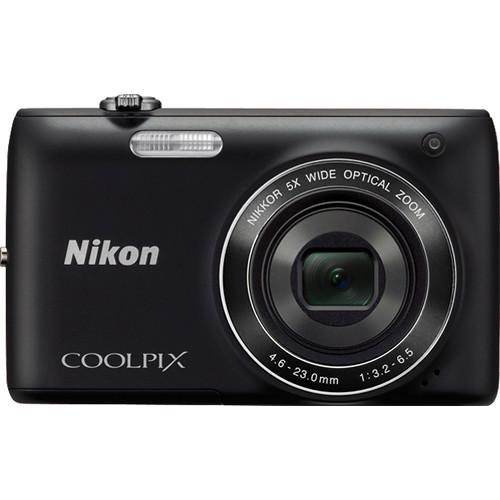 Contents of the user manual for the Nikon Coolpix S4100 Digital Camera -
- Product category: Uncategorized Nikon
- Brand: Nikon
- Description and content of package
- Technical information and basic settings
- Frequently asked questions – FAQ
- Troubleshooting (does not switch on, does not respond, error message, what do I do if...)
- Authorized service for Nikon Uncategorized
 |
User manual for the Nikon Coolpix S4100 Digital Camera - contain basic instructions
that need to be followed during installation and operation.
Before starting your appliance, the user manual should be read through carefully.
Follow all the safety instructions and warnings, and be guided by the given recommendations.
User manual is an integral part of any Nikon product,
and if it is sold or transferred, they should be handed over jointly with the product.
Following the instructions for use is an essential prerequisite for protecting
health and property during use, as well as recognition of liability on the part of the manufacturer
for possible defects should you make a warranty claim. Download an official Nikon user manual in which you will find instructions on how to install, use, maintain and service your product.
And do not forget – unsuitable use of a Nikon product will considerably shorten its lifespan!
|
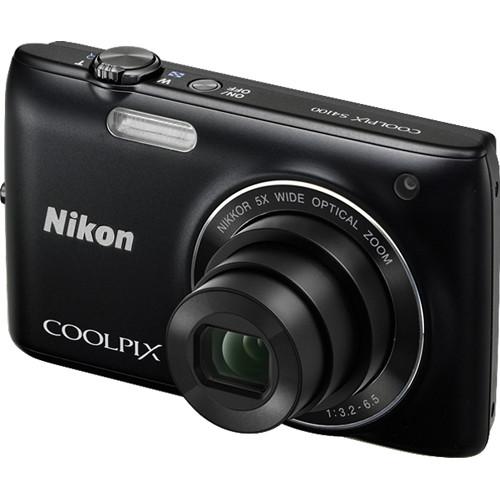
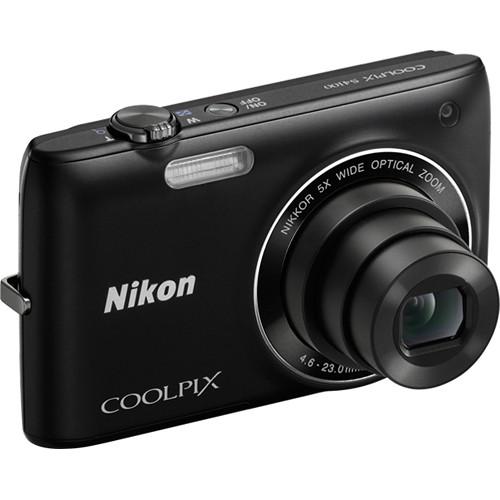
Product description Nikon's Coolpix S4100 Digital Camera (Black) has everything you need in a compact camera, all beautifully contained in a stylish little pocketable package less than 1" thick, and weighing in at 4.7 oz (131 g). Start with a serious 14MP CCD sensor for great image quality, add a sharp 5x wide-angle Nikkor 26-130mm (equivalent in 35mm format) lens and a brilliant 3" LCD touch screen monitor with 460K-dot resolution--you can focus by just touching a point on the screen.The S4100 isn't just another pretty face, either--it's got one-touch 720p HD video, 4-way VR image stabilization to banish blurry pictures forever, sensitivity up to 3200 ISO that lets you keep shooting even when it gets dark, Subject Tracking Autofocus that locks onto a moving subject to keep it in focus at all times, and a Macro mode that produces fantastic pictures by focusing as close as 4" from the lens.The Smart Portrait System makes every person you photograph look good, by automatically capturing a smile, warning you when someone blinks in a picture, automatically correcting red-eye and smoothing out wrinkles and blemishes on faces. There are 20 scene modes, including Pet Portrait, Night Landscape, Sports, Party/Indoor, Sunset, and lots more. This is a camera that's easy to live with, and will always treat you right. - One Touch HD Movie Recording
- Staying connected means sharing life's happiest and most poignant moments with people you care about-and HD movies do it well. The COOLPIX S4100 is the full-featured camera you'll want for shooting high quality HD 720p movies. With One-Touch recording, movie making has never been easier. Digital zoom allows you to get close to the action whether you're at sporting events, beach parties, or music concerts. And since the compact COOLPIX S4100 has pull-from-your-pocket, easy-to-carry convenience, you can shoot college graduations, birthday toasts, and other once-in-a-lifetime events discreetly, so the action is always spontaneous and memorable.When your movie is complete, watching and sharing it is also simple, with in-camera playback. Or, you can opt for playback on your TV or computer.
- First It Turns Heads … Then It Shoots Their Pictures.
- With its rounded body and sleek lines, the ultra-light COOLPIX S4100 is a favorite choice of the stylish and design-conscious. But while this camera is full of personality, it's also packed with versatile Nikon features that make it an ideal everyday camera. Slip the COOLPIX S4100 into your purse or coat pocket. At 0.8 inches thin and a feather weight 4.7 ounces, you'll hardly know it's there, and yet it's ready to shoot high quality stills or HD movies at a party, on the beach, or at a ballgame. You live life in high gear. You deserve a camera that keeps up with you every step of the way.
- High Quality, High Resolution Touch Display
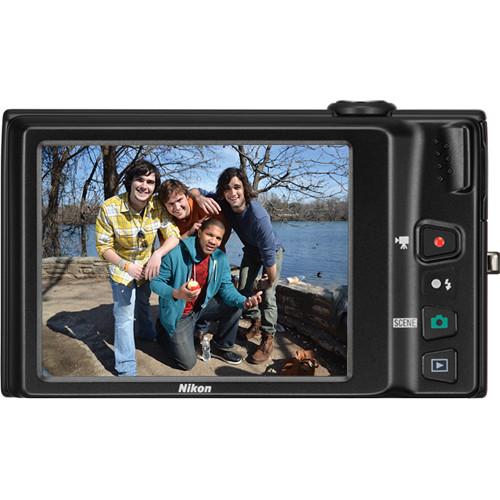
- If you love fingertip operation with a cool, intuitive graphic interface, wait 'til you start taking photos with the COOLPIX S4100. The camera's clear, bright, three-inch touch LCD monitor comes alive with 460,000-dot detail. In shooting mode, Touch Shutter lets you choose a focus point simply by touching any part of the frame. There's also Touch AF/AE (Auto Focus/Auto Exposure) for convenient auto focus by touch. Plus, with Subject Tracking, you can touch any subject on the display and the COOLPIX S4100 will follow it through the frame.The COOLPIX S4100 provides touch control in playback with features such as Paint Functions and Slide Show, which offers fun "character" effects and Image Scrolling. The COOLPIX S4100 is also equipped with several filter effects that let you add a personal touch to your photos and include Soft Focus, Selective Color, Color Options, Fisheye, Miniature, and Cross Screen.
- Take Great Stills and Movies With a Powerful Photo Partner
- Nikon has equipped the Coolpix S4100 with a 14.0-megapixel CCD sensor that assures exceptional image quality. It's paired with a 5x wide-angle optical Zoom-NIKKOR glass lens that offers you excellent compositional freedom. Nikon's true glass lens boasts a focal length from 26-130mm, a range that zooms in for your best portrait shots and has a wide angle to cover beautiful landscapes. The COOLPIX S4100 even has 20 Scene Modes, including Scene Auto Selector, so you can leave it to this intelligent camera to automatically determine what type of photo you're taking and adjust the setting to assure a flawless photo every time. And just when you think this camera is maxed out with features, its formidable movie recording capabilities capture all the action in 720p HD.
- Hassle-Free Nikon Technology Produces Great Shots Every Time
- Imagine an affordable, compact camera that's also smart enough to automatically correct for camera shake, take a series of shots and save only the sharpest ones, or intuitively adjust shutter speed when you're focused on moving objects. The remarkable COOLPIX S4100 does all that and much more. It's equipped with a four-way Electronic VR Image Stabilization system that minimizes blurred images. Its Motion Detection identifies moving objects and adjusts both shutter speed and ISO to create optimal settings to achieve the best picture.With the COOLPIX S4100, Nikon has thought of everything. When you're shooting in low-light, you're sure to get optimum results with high ISO speeds up to 3200. For both still images and movies that are sharp and clear, count on EXPEED C2 to heighten fine detail and image quality-and do it all with exceptional processing speed.
- Convenient Features
- This innovative camera is ready to take on your imagination. Not only is it equipped with 20 Scene Modes that automatically adjust camera settings to assure optimum results for specific scenes, but also comes with new PET Mode feature. In this mode, it finds and focuses on the face of a dog or cat.The COOLPIX S4100's Smart Portrait System includes Smile Timer, which automatically recognizes when a subject is smiling and releases the shutter. Face-Priority AF finds and focuses up to 12 faces. Blink Warning alerts you when your friends may have blinked. What's more, in-camera Red-Eye Fix corrects most instances of red-eye, while Skin Softening smoothes skin tones. The COOLPIX S4100 also has macro shooting capabilities as close as 4.0 inches, and a supplied EN-EL 19 Li-ion rechargeable battery for approximately 190 still shots.
- Autofocus (AF) Focus-Area Selection
- Auto (9-area automatic selection), Center, Face priority, Manual (focus area can be selected using the touch panel), Subject tracking
- 20 Scene Modes
- Back Light, Beach, Black and White Copy, Close Up, Draw, Dusk/Dawn, Fireworks Show, Food, Landscape, Museum, Night Landscape, Night Portrait, Panorama Assist, Party/Indoor, Pet Portrait, Portrait, Scene Auto Selector, Snow, Sports, Sunset
- In-Camera Image Editing
- Crop, D-Lighting, Filter Effects, Quick retouch, Glamour Retouch, Paint, Perspective Control,Quick retouch, Small Pic, Stretch
- Supported Languages
- Arabic, Czech, Chinese (Simplified and Traditional), Danish, Dutch, English, Finnish, French, German, Greek, Hungarian, Indonesian, Italian, Japanese, Korean, Norwegian, Polish, Portuguese, Romanian, Russian, Spanish, Swedish, Thai, Turkish, Ukrainian
In the Box Nikon Coolpix S4100 Digital Camera (Black) Strap EN-EL19 Lithium-Ion Battery (700mAh) Replacement EH-69P AC Adapter Charger USB Cable A/V Cable Nikon ViewNX 2 Software CD Stylus 90-Day Refurbished Warranty Table of Contents
|
Upload User Manual
Have you got an user manual for the Nikon Coolpix S4100 Digital Camera - Refurbished in electronic form? Please send it to us and help us expand our library of instruction manuals.
Thank you, too, on behalf of other users.
To upload the product manual, we first need to check and make sure you are not a robot. After that, your "Submit Link" or "Upload File" will appear.
Technical parametersNikon 26259B Specs | | | Pixels | Actual: 14.48 Megapixel
Effective: 14 Megapixel | | Sensor | 1/2.3" CCD | | File Formats | Still Images: JPEG
Movies: AVI, MJPEG
Audio: WAV | | Max Resolution | 14 MP: 4320 x 3240 | | Aspect Ratio | 4:3, 16:9 | | Image Stabilization | Optical | | | | Lens | NIKKOR, 6 Elements in 5 Groups
Effective Focal Length: 4.6 to 23mm (35 mm Equivalent: 26 to 130mm)
Aperture: f/3.2 (W) to f/6.5 (T) | | Zoom | Optical: 5x
Digital: 4x | | Focus Range | Wide: 1.64' to Infinity / 49.99 cm to Infinity
Telephoto: 2.62' to Infinity / 79.86 cm to Infinity
Macro: 0.33' to Infinity / 10.06 cm to Infinity | | | | ISO Sensitivity | Auto, 80 to 3200 | | Shutter | Type: Electronic & Mechanical
Speed: 4 to 1/2000 | | Exposure Metering | Center-Weighted, Matrix | | Exposure Modes | Modes: Programmed Auto
Compensation: -2 EV to +2 EV (in 1/3 EV Steps) | | White Balance | Auto, Manual | | Continuous Shooting | Up to 0.7 fps at 14 MP for up to 3 Exposures | | Self-Timer | 2 Sec | | | | Flash Modes | Auto | | Effective Flash Range | Wide:1.64 to 14.76' / 0.50 to 4.50 m
Telephoto:1.64 to 7.22' / 0.50 to 2.20 m | | | | Built-In Memory | 20 MB | | Memory Card Type | SD
SDHC
SDXC | | | | Video Recording | Yes, NTSC/PAL | | | | Audio Recording | With Video + Voice Memo (Mono) | | | | Screen | 3" LCD Rear Touchscreen (460,000 Pixels) | | | | Connectivity | AV Output
USB 2.0 | | | | Battery | EN-EL19 Rechargeable Lithium-Ion Battery Pack | | AC Power Adapter | Charging AC Adapter EH-69P (Included) | | | | Dimensions (W x H x D) | 2.3 x 3.8 x 0.8" / 5.8 x 9.7 x 2.0 cm | | Weight | 4.62 oz / 130.98 g Including Battery and Memory Card | | | | Package Weight | 1.15 lb | | Box Dimensions (LxWxH) | 7.8 x 5.3 x 3.4" |
Rating86% users recommend this product to others. And what about you?

This product has already been rated by 98 owners. Add your rating and experience with the product.
Discussion
 Ask our technicians if you have a problem with your settings,
or if anything is unclear in the user manual you have downloaded.
You can make use of our moderated discussion.
The discussion is public and helps other users of our website who may be encountering similar problems.
Ask our technicians if you have a problem with your settings,
or if anything is unclear in the user manual you have downloaded.
You can make use of our moderated discussion.
The discussion is public and helps other users of our website who may be encountering similar problems.
The discussion is empty - enter the first post
Post a new topic / query / comment:
|
|


