|
User Manual for Nintendo Switch Kit with Super Mario Odyssey Click to enlarge the picture
 Contents of the user manual for the Nintendo Switch Kit with Super Mario
- Product category: Nintendo Switch Systems Nintendo
- Brand: Nintendo
- Description and content of package
- Technical information and basic settings
- Frequently asked questions – FAQ
- Troubleshooting (does not switch on, does not respond, error message, what do I do if...)
- Authorized service for Nintendo Nintendo Switch Systems
|
User manual for the Nintendo Switch Kit with Super Mario contain basic instructions
that need to be followed during installation and operation.
Before starting your appliance, the user manual should be read through carefully.
Follow all the safety instructions and warnings, and be guided by the given recommendations.
User manual is an integral part of any Nintendo product,
and if it is sold or transferred, they should be handed over jointly with the product.
Following the instructions for use is an essential prerequisite for protecting
health and property during use, as well as recognition of liability on the part of the manufacturer
for possible defects should you make a warranty claim. Download an official Nintendo user manual in which you will find instructions on how to install, use, maintain and service your product.
And do not forget – unsuitable use of a Nintendo product will considerably shorten its lifespan!
|
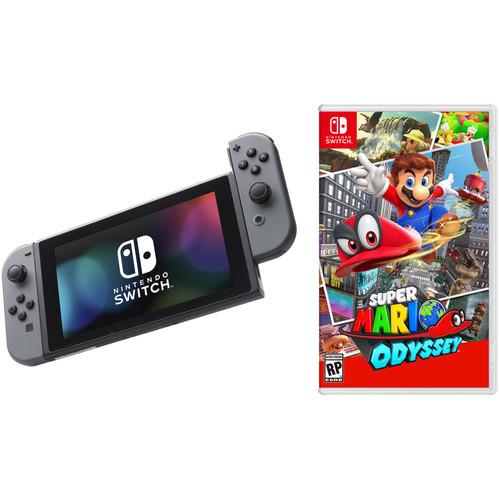
Product description Things We Love: Nintendo Switch Read More Get the Nintendo Switch and Super Mario Odyssey with this kit from . - Nintendo Switch with Gray Controllers
- Nintendo Switch Anytime, Anywhere
In addition to providing single- and multi-player thrills at home, the Nintendo Switch system can be taken on the go, so players can enjoy a full home console experience anytime, anywhere.
At home, the system rests in the Nintendo Switch Dock, which lets you play with family and friends on a TV in the comfort of your living room. By simply lifting Nintendo Switch from the dock at any time, the system near-instantly transitions to handheld mode, and the same great gaming experience now travels with you. The portability of Nintendo Switch is enhanced by its 6.2" screen, which displays bright, high-definition gameplay at the park, on an airplane, in a car, or at a friend's apartment.
The Nintendo Switch comes with two Joy-Con, each of which can act as a standalone controller with an analog stick, a full complement of face and shoulder buttons, built in motion-sensing, and "HD Rumble" technology. They can be inserted into the included Joy-Con Grip accessory, allowing them to be used like a traditional controller; held comfortably in each hand, allowing for independent arm movement; or shared between two players, allowing for instant multiplayer gaming. Thanks to the built-in kickstand, you can have two-player sessions in front of the TV or anywhere else. - Home Gaming System
- At home, the main unit rests in the Nintendo Switch Dock, which connects the system to the TV and lets you play with family and friends in the comfort of your living room.
- On-the-Go
- Lift the Nintendo Switch from the dock, and it near-instantly transitions to handheld mode for on-the-go gaming. By sharing Joy-Con, players can go head-to-head while away from your TV. You can also enjoy the same great games in tabletop mode by using the built-in kickstand to prop the system up.
- New Play Styles
- Remove the detachable Joy-Con from either side of Nintendo Switch for more play styles: one player can use a Joy-Con in each hand, or two players can each take one. Connect up to eight Joy-Con controllers for a variety of gameplay options.
- Joy-Con Controllers
-
- When used together, the Joy-Con replicate traditional inputs of previous platforms, including dual two analog sticks, A/B/X/Y buttons and directional buttons (in lieu of a d-pad), and four shoulder buttons.
- Each Joy-Con can be used as a single controller. When playing this way, Joy-Con (L) and Joy-Con (R) have the same layout. When a Joy-Con is held horizontally, the SL and SR buttons on top can be use as shoulder buttons. (Attaching the included Joy-Con Strap makes these buttons more prominent.)
- Capture Button: The Capture Button is located on Joy-Con (L) and is used to take gameplay screen shots. The player can then view, edit (add text of various sizes, colors and positions), and post them to popular social media networks
- Motion Control: Each Joy-Con includes a gyroscope and accelerometer.
- HD Rumble: Both Joy-Con include advanced HD Rumble, which can provide compatible games with subtle, realistic vibrations, allowing you to, for example, feel the sensation of individual ice cubes colliding inside a glass when shaking a Joy-Con.
- IR Motion Camera: Joy-Con (R) includes an IR Motion Camera that can detect the distance, shape, and motion of nearby objects in specially designed games. For example, it can tell how far away a player's hand is, and even if the hand is forming a rock, paper or scissors shape.
- amiibo: There is an NFC reader/writer located on Joy-Con (R). (This is also included in the separately sold Nintendo Switch Pro Controller.) The Nintendo Switch is compatible with existing amiibo; usage is game-dependent.
- Rechargeable: Joy-Con charge while attached to a Nintendo Switch system, both in the Dock and in handheld mode. They can also be charged using a Nintendo Switch Charging Grip accessory (sold separately).
- Release Button: On the back of each Joy-Con is a small button that is pressed to detach the controller from the main unit. They slide on and off using a built-in rail system.
- Enhanced Parental Controls
- The system includes various on-device parental controls, but parents can also download a smart device application that can be used to easily and conveniently monitor and set parental controls for a Nintendo Switch system.
More System Features - Screen
- Nintendo Switch has a 6.2-inch capacitive multi-touch screen with a resolution of 1280 x 720.
- Video Output
- When using the Nintendo Switch Dock, signals up to 1080p can be output via HDMI.
- Audio Output
- TV Mode supports 5.1-channel surround sound. Using the system's built-in audio jack, stereo speakers or headphones can be used when played in handheld or tabletop modes.
- Battery
- Battery life can last for up to six hours, but this will vary depending on the software and usage conditions. For example, The Legend of Zelda: Breath of the Wild can be played for roughly three hours on a single charge. While away from home, Nintendo Switch can be charged via its USB Type-C port.
- Storage
- Nintendo Switch has 32GB of internal storage, a portion of which is reserved for use by the system, and has the option to expand its capacity using microSDXC or microSDHC memory cards.
- USB Ports
- USB ports on the Nintendo Switch dock can be used to charge accessories, such as the Nintendo Switch Pro Controller and Joy-Con attached to a Joy-Con charging grip.
- Networking
- The Nintendo Switch can connect to the Internet via a wireless (IEEE 802.11ac) connection. In addition, up to 8 systems can connect over a local wireless connection in compatible multiplayer games. While docked, Nintendo Switch can also use a wired Internet connection by connecting a separately available USB LAN Adapter.
UPC: 045496590086 - Nintendo Super Mario Odyssey (Nintendo Switch)
- Nintendo Switch Anytime, Anywhere
Join Mario on a massive, globe-trotting 3D adventure in Super Mario Odyssey from Nintendo. Join forces with Cappy and discover abilities, such as the cap throw and cap jump. You can even take control of all sorts of things, including objects and enemies, with the capture ability. Explore unique environments, like the NYC-inspired New Donk City. Interact with familiar friends and fight against longtime foes. Use your abilities to collect Moons so you can power up your airship, the Odyssey, and rescue Princess Peach from Bowser's wedding plans. Super Mario Odyssey is rated E10+ for Everyone 10+ for:
Cartoon Violence
Comic Mischief Features - Explore huge 3D kingdoms filled with secrets and surprises, including costumes for Mario and lots of ways to interact with the diverse environments — such as cruising around them in vehicles that incorporate the HD Rumble feature of the Joy-Con controller or exploring sections as Pixel Mario.
- Thanks to the assistance of Cappy, Mario has moves for you to master, like the cap throw, cap jump, and capture. With capture, Mario can take control of all sorts of things, including objects and enemies.
- Visit unique locales, like the skyscraper-packed New Donk City, and run into familiar friends and foes as you try to save Princess Peach from Bowser's clutches and foil his dastardly wedding plans.
- A set of three amiibo figures — Mario, Princess Peach, and Bowser in their wedding outfits — will be released at launch (sold separately). Some of the previously released amiibo will also be compatible with this title. Tap supported amiibo to receive gameplay assistance while others will also unlock costumes for Mario.
UPC: 045496590741 In the Box - Switch with Gray Controllers wtcrrxxfubaawfqsdedsfud
- Switch Dock
- Joy-Con (L)
- Joy-Con (R)
- 2 x Joy-Con Strap
- Joy-Con Grip
- HDMI Cable
- AC Adapter
- Limited 1-Year Warranty
- Super Mario Odyssey (Nintendo Switch)
Table of Contents
|
Upload User Manual
Have you got an user manual for the Nintendo Switch Kit with Super Mario Odyssey in electronic form? Please send it to us and help us expand our library of instruction manuals.
Thank you, too, on behalf of other users.
To upload the product manual, we first need to check and make sure you are not a robot. After that, your "Submit Link" or "Upload File" will appear.
Technical parameters - Nintendo Switch with Gray Controllers
| Processor | Custom NVIDIA Tegra processor | | Storage | 32 GB | | Display | HDMI | | Supported Resolutions | Up to 1080p | | Wi-Fi | 802.11ac | | Dimensions | Not Specified by Manufacturer | | Weight | Not Specified by Manufacturer | | | | Box Dimensions (LxWxH) | 13.8 x 7.8 x 3.8" | - Nintendo Super Mario Odyssey (Nintendo Switch)
| Platform | Nintendo Switch | | ESRB Rating | E10+ (Everyone 10+) | | Developer | Nintendo | | Publisher | Nintendo | | | | Box Dimensions (LxWxH) | 6.6 x 4.1 x 0.5" |
Rating92% users recommend this product to others. And what about you?

This product has already been rated by 00 owners. Add your rating and experience with the product.
Discussion
 Ask our technicians if you have a problem with your settings,
or if anything is unclear in the user manual you have downloaded.
You can make use of our moderated discussion.
The discussion is public and helps other users of our website who may be encountering similar problems.
Ask our technicians if you have a problem with your settings,
or if anything is unclear in the user manual you have downloaded.
You can make use of our moderated discussion.
The discussion is public and helps other users of our website who may be encountering similar problems.
The discussion is empty - enter the first post
Post a new topic / query / comment:
|
|
|
| Request for user manual |
You can’t find the operation manual you are looking for? Let us know and we will try to add the missing manual:
I’m looking for a manual / Request for manual
Current requests for instruction manuals:
Call Of Duty World War Two For Xbox...
controller stratus XL...
stratus XL...
smart whatch serie S11 42mm...
Allen & Heath SQ-6 manual...
|
| Discussion |
Latest contributions to the discussion:
AEW R 4100
Name: MAURICIO ANGARITA
Audio-Technica AEW-R4100 UHF Diversity Receiver for
AEW R 4100 has the mute function blocked and does not allow audio to pass. I tried several times to turn off the mute from the transmitter but it does nothing, the mute stays on. Solution?
Thank you...
Instructions for assembling the 2015 Forecast Image Master Consoles GC3-A
Name: mike elam
Forecast Consoles GC3-A ImageMaster Editing Console
Looking for instructions for assembling this console. ...
EMPTY TONER ERROR MESSAGE AFTER REPLACING TONER
Name: LINDA BAD YELLOW EYES
Brother TN223BK Standard-Yield Toner
I HAD TO CHANGE OUT ALL THREE TONERS DUE TO LEAKS IN THE YELLOW AND CYAN. AFTER I REPLACED THEM, THE MACHINE KEEPS GIVING ME AN EMPTY TONER ERROR MESSAGE. HELP!!...
PS480D 20/24 pin Switching 480W Power Supply
Name: swkargo
Logisys 480W Power Supply
This item states in can run -5vdc .It is NOT listed on the board or I beleive is r4 is missing the resitior. Any body have thid issue. Shawn
...
Help needed
Name: Ann Carter
SanDisk 1TB Extreme Portable USB 3.1
When I click the link to download the user manual for my Sandisk Extreme external hard drive, it gives me the manual for the LG Cricket. Can you please change the link so I can download the Sandisk manual and begin using this drive? Thank you....
|
|


