|
User Manual for NuGen Audio SigMod - Modular Signal Flow Modification Software for Pro Audio Applications Click to enlarge the picture
 Contents of the user manual for the NuGen Audio SigMod - Modular Signal
- Product category: Virtual Processor Plug-Ins NuGen Audio
- Brand: NuGen Audio
- Description and content of package
- Technical information and basic settings
- Frequently asked questions – FAQ
- Troubleshooting (does not switch on, does not respond, error message, what do I do if...)
- Authorized service for NuGen Audio Virtual Processor Plug-Ins
|
User manual for the NuGen Audio SigMod - Modular Signal contain basic instructions
that need to be followed during installation and operation.
Before starting your appliance, the user manual should be read through carefully.
Follow all the safety instructions and warnings, and be guided by the given recommendations.
User manual is an integral part of any NuGen Audio product,
and if it is sold or transferred, they should be handed over jointly with the product.
Following the instructions for use is an essential prerequisite for protecting
health and property during use, as well as recognition of liability on the part of the manufacturer
for possible defects should you make a warranty claim. Download an official NuGen Audio user manual in which you will find instructions on how to install, use, maintain and service your product.
And do not forget – unsuitable use of a NuGen Audio product will considerably shorten its lifespan!
|
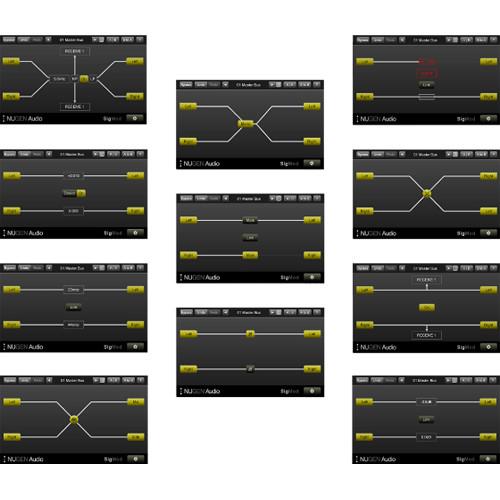
Product description Available for download, NuGen Audio SigMod is a plug-in designed to provide signal flow modifications to channel strips in your DAW. A single instance of this plug-in allows you to rebalance stereo signals, flip the polarity of a mono or stereo signal, decode/encode signal into M/S, and much more. Eleven modules are available in the plug-in, including Mid/Side, Mono, Switch, Delay, Phase, Trim, DC Offset, Tap, Crossover, and others.
Here's a use-case for in-the-box mastering engineers: Say you'd like to use the UAD Manley Massive Passive to equalize not in stereo, but in M/S. This isn't possible with the UAD plug-in as it stands, but it can be accomplished with SigMod. Put SigMod before Massive Passive and encode the signal into M/S, then slap a second instance of SigMod after Massive Passive to decode from M/S to stereo.Other features are quite useful in mastering and mixing processing, including DC offset and stereo trim. Mono summing and phase-checking are also possible.
Modules in SigMod are easily enabled. All you need to do is click the plus signs to add modules. Disabling is equally simple by using the X signs provided. SigMod is compatible with Mac and Windows platforms, and works with most DAWs. Modules - Input Module
- The Input module is a permanent module, fixed at the beginning of the signal flow. Left/Right (or optionally Mid/Side inputs, selectable in the options panel) are shown. Inputs may be activated or disabled by clicking the appropriate button control.
- Output Module
- The Output module is a permanent module, fixed at the end of the signal flow. Left/Right or Mid/Side outputs are automatically deduced from the signal path settings. Outputs may be activated/disabled using the appropriate button control.
- Mid/Side Module
- The Mid/Side module can be used to encode a Left/Right input to Mid/Side output or to decode a Mid/Side signal to Left/Right output. The mode of operation is determined by the settings of the Input module (above).This is useful for Mid/Side signal monitoring, accessing the Mid/Side signal components independently, or using Mid/Side recordings in a traditional Left/Right stereo context.Using two instances of SigMod on either side of a third-party plug-in with independent control over left and right channel allows this third-party plug-in to be used in Mid/Side mode. (Use the Switch LR to MS preset on the first instance of SigMod, and the Switch MS to LR preset on the second).
- Mute/Solo Module
- The Mute/Solo module introduces Mute or Solo controls into the signal path. Mute or Solo functionality is determined using the drop-down option in the settings panel. The Link control links both functions together in the case of the Mute control. Link is not available when the Solo function is active (null control). The Mute/Solo control can be useful for quickly auditioning either side of a stereo signal, or in conjunction with the Mid/Side module, to monitor the Mid and Side signals independently.
- Phase Module
- The Phase module introduces phase inversion switches (Polarity) into the signal path. These can be useful for checking the polarity of dual microphone setups, fixing phase inverted channels.
- Mono Module
- The Mono module inserts a mono switch in to the signal path. Activating the mono button adds the two signal components (L/R or M/S) together. Useful for checking mono compatibility of a mix, an FX plug-in or a synth, as well as checking phase coherence within dual mic set-ups.
- Switch Module
- The Switch module adds the ability to switch channel components (L/R to R/L, and M/S to S/M). Channel outputs automatically reflect and changes made.
- Delay Module
- The Delay module adds the ability to delay signal components independently. The Link control links the value of both components together. Double click to enter a value directly, or click drag up/down to increase/decrease the value. Units of milliseconds or samples can be selected from the settings panel. This module can be useful for minimizing phase issues and plug-in delay compensation errors.
- Trim Module
- The Trim module adds a gain offset to each channel component. The Link control links the value of both sides together. Double click to enter a value directly, or click drag up/down to increase/decrease the value. This module can be used to correct minor imaging errors or modify the stereo image by adjusting the ratio of Mid to Side components.
- DC Offset Module
- The DC Offset module detects or manually offsets incoming audio, removing bias in the audio recording. To automatically detect the offset, play the affected audio and click the Detect button. This feature will then listen to the incoming audio for a few moments before calculating an appropriate value.
- Crossover Module
- The Crossover module allows the signal to be split at a specified frequency, with the signal above or below the crossover point (depending upon the filter chosen) passing through for further processing. The HPF (High Pass Filter) can be generally very useful in removing unwanted low frequencies from microphone recordings, and removing excessive sub-bass to increase digital headroom.
- Tap Unit
- Optionally, the NUGEN Audio Receive plug-in can be attached to allow the removed signal to be sent to another track for incorporation into the mix. This is useful parallel processing, adding effects to only part of the frequency spectrum or adding different effects above and below the crossover frequency.
- Protect Module
- The Protect module monitors the audio signal level (in dBTP) and automatically mutes the output level if the selected level is exceeded. Placed on the master bus, the Protect unit can help protect both equipment and hearing from sudden noise bursts due to feedback or incorrectly functioning equipment.Several reset modes are available via the settings screen:
- Manual: The signal path will need to be restored by clicking the signal path in the plug-in
- Auto (1, 2, 3, 5 secs): The plug-in automatically resets after the chosen time period
- Popup: A system popup window is triggered. This can be useful if the plug-in is installed as a matter of routine protection and it's operation is forgotten. The pop-up saves hunting around for the reason behind the sudden signal drop-out
Table of Contents
|
Upload User Manual
Have you got an user manual for the NuGen Audio SigMod - Modular Signal Flow Modification Software for Pro Audio Applications in electronic form? Please send it to us and help us expand our library of instruction manuals.
Thank you, too, on behalf of other users.
To upload the product manual, we first need to check and make sure you are not a robot. After that, your "Submit Link" or "Upload File" will appear.
Technical parametersNuGen Audio Sigmod Specs | Supported Operating Platforms | Mac and Windows computers | | System Requirements | Not specified by manufacturer |
Rating70% users recommend this product to others. And what about you?

This product has already been rated by 98 owners. Add your rating and experience with the product.
Discussion
 Ask our technicians if you have a problem with your settings,
or if anything is unclear in the user manual you have downloaded.
You can make use of our moderated discussion.
The discussion is public and helps other users of our website who may be encountering similar problems.
Ask our technicians if you have a problem with your settings,
or if anything is unclear in the user manual you have downloaded.
You can make use of our moderated discussion.
The discussion is public and helps other users of our website who may be encountering similar problems.
The discussion is empty - enter the first post
Post a new topic / query / comment:
|
|
|
| Request for user manual |
You can’t find the operation manual you are looking for? Let us know and we will try to add the missing manual:
I’m looking for a manual / Request for manual
Current requests for instruction manuals:
Call Of Duty World War Two For Xbox...
controller stratus XL...
stratus XL...
smart whatch serie S11 42mm...
Allen & Heath SQ-6 manual...
|
| Discussion |
Latest contributions to the discussion:
AEW R 4100
Name: MAURICIO ANGARITA
Audio-Technica AEW-R4100 UHF Diversity Receiver for
AEW R 4100 has the mute function blocked and does not allow audio to pass. I tried several times to turn off the mute from the transmitter but it does nothing, the mute stays on. Solution?
Thank you...
Instructions for assembling the 2015 Forecast Image Master Consoles GC3-A
Name: mike elam
Forecast Consoles GC3-A ImageMaster Editing Console
Looking for instructions for assembling this console. ...
EMPTY TONER ERROR MESSAGE AFTER REPLACING TONER
Name: LINDA BAD YELLOW EYES
Brother TN223BK Standard-Yield Toner
I HAD TO CHANGE OUT ALL THREE TONERS DUE TO LEAKS IN THE YELLOW AND CYAN. AFTER I REPLACED THEM, THE MACHINE KEEPS GIVING ME AN EMPTY TONER ERROR MESSAGE. HELP!!...
PS480D 20/24 pin Switching 480W Power Supply
Name: swkargo
Logisys 480W Power Supply
This item states in can run -5vdc .It is NOT listed on the board or I beleive is r4 is missing the resitior. Any body have thid issue. Shawn
...
Help needed
Name: Ann Carter
SanDisk 1TB Extreme Portable USB 3.1
When I click the link to download the user manual for my Sandisk Extreme external hard drive, it gives me the manual for the LG Cricket. Can you please change the link so I can download the Sandisk manual and begin using this drive? Thank you....
|
|


