User Manual for NUUO CT-8000R Crystal 2RU Rack-Mountable 8-Bay Network Video Recorder Click to enlarge the picture
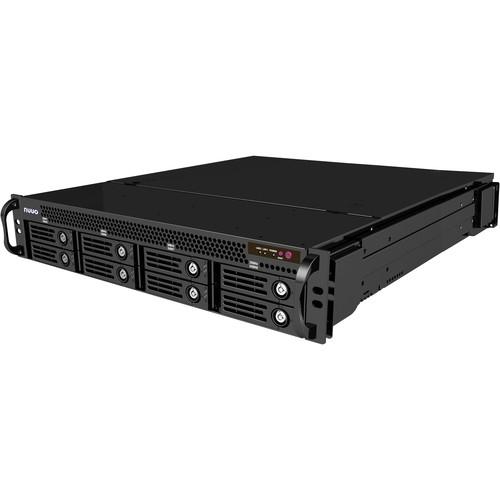 Contents of the user manual for the NUUO CT-8000R Crystal 2RU Rack-Mountable 8-Bay
- Product category: Network Video Recorders (NVRs) NUUO
- Brand: NUUO
- Description and content of package
- Technical information and basic settings
- Frequently asked questions – FAQ
- Troubleshooting (does not switch on, does not respond, error message, what do I do if...)
- Authorized service for NUUO Network Video Recorders (NVRs)
|
User manual for the NUUO CT-8000R Crystal 2RU Rack-Mountable 8-Bay contain basic instructions
that need to be followed during installation and operation.
Before starting your appliance, the user manual should be read through carefully.
Follow all the safety instructions and warnings, and be guided by the given recommendations.
User manual is an integral part of any NUUO product,
and if it is sold or transferred, they should be handed over jointly with the product.
Following the instructions for use is an essential prerequisite for protecting
health and property during use, as well as recognition of liability on the part of the manufacturer
for possible defects should you make a warranty claim. Download an official NUUO user manual in which you will find instructions on how to install, use, maintain and service your product.
And do not forget – unsuitable use of a NUUO product will considerably shorten its lifespan!
|
Product description The 16TB CT-8000R Crystal 2U Rack-Mountable 8-Bay Network Video Recorder from NUUO is a Linux-embedded recording solution that supports H.264 encoding for up to 64 channels with a throughput of 250 Mb/s. Featuring a modular system structure that is made to handle large project sizes, the NUUO Crystal NVR is a suitable choice for enterprise solutions. The benefits of a modular system design are that not only can it be managed centrally, down to a process level, but every module can also work independently. When a process fails, only that process module shuts down and the rest of the system will continue to function normally, further enhancing system stability.
This NVR features recording failover functionality to safeguard server uptime and performance consistency. The failover function can be assigned and managed as a cluster, so that N+M redundancy can be achieved. The NVR features support for unlimited numbers of cameras, 3rd-party access control systems, POS, and I/O devices. Any number of users and user groups may be assigned different levels of management rights, monitoring points, and event processing. Combined with the NuClient software to provide centralized live view and playback video stream, NUUO Crystal provides the user with total control over the entire system at their fingertips.
Utilizing a custom recording technology known as File Ring, the NUUO Crystal NVR is able to handle high megapixel recordings. The NVR is able to maintain data throughput up to 250 Mb/s for a single volume, 400 Mb/s for 2 volumes, and 500 Mb/s for 3 volumes. The NUUO Crystal NVR supports an unlimited number of video wall displays, up to 100 channels per monitor. With a built-in View Wizard, changing view configurations is as easy as dragging and dropping different view grids. The NVR also features Image Fusion to stitch multiple views into one single picture. Combined with PTZ joystick control, Fisheye Dewarp algorithm, and video tour modes, reviewing and monitoring are simplified. System, Setting, Management, and Integration - Centralized Management
- Unlimited cameras, access control, POS and I/O devices for centrally configuring the device, user authority management, integrated video and 3rd party monitoring, system status overview, event handling, and cluster-recording failover management
- Camera Integration
- Open platform support for multiple camera brands and models, RTSP stream, UPnP search, and ONVIF Profile S conformance
Centrally configure camera parameters, including video format, resolution, frame rate, and lens setting - Multiple and High Channel Streaming
- Stream up to 256 connections per server to multiple clients simultaneously for live view
Supports multiple stream profile from cameras, displaying lower bit rate but still recording with good quality - All Service in One NUUO Crystal
- Built in Management Server, Recording Server, Recording Failover Server, and Metadata Server in one NVR
Enables necessary services to meet different system specs and demands - Authorization Management
- Manage function privilege and device access permission with unlimited roles, users, and user groups
Customized login period by users
Privilege by function
Access permission by device
PTZ control priority
Priority for Video Wall control - Recording Failover Server Group (available with Ultimate Licenses, not included)
- Flexible N+M server cluster structure to maximize system reliability, uptime, and efficiency
- Third Party Integration
- Integrate third party data and video on unified management platform
The plugin structure allows the user to expand the system by plugin installation - Schedule-Based Architecture
- Unified Schedule Profile for event, user login duration, recording schedule, recording parameter, and 3rd-party streaming for complicated environments and requirements
- Multiple Video Codec Support
- Supports H.264, MJPEG, MPEG4, and MxPEG for good video quality and storage space optimization
- Event/ Action Management
- Centrally manages events from system, cameras, 3rd-party metadata devices, and I/O devices with instant alert responses
Event and boost recording reduce storage usage but ensure important period recording - Centralized System Status Overview
- Real-time monitoring of status of all servers, cameras, IO devices, and metadata channels
- Automatic NUUO Crystal Search
- Automatically search for all Titans in the network
- Automatic Camera Model Detection
- Automatically search for IP cameras in the network (cameras should support UPnP protocol)
Manual insert for cameras that do not support UPnP
Auto detection helps users find the brand and model of the camera after specifying its IP address - Dual Gigabit Ethernet Ports
- It is equipped with 2x Gigabit ports
Users can separate the recording stream from viewing stream to ensure a clean recording pipeline - I/O Event Control
- Control I/O for event detection, instant action, and digital output
- License Management
- Extend Recording Server to 64CH per server by license activation
Supports online/offline activation and transfer
Scalable upgrade from Enterprise to Ultimate by adding upgrade license (available separately) - NTP Date/Time Synchronization
- The system can interface to Internet Time Server (NTP server) for time and date synchronization at each location
Management Server can play the role of an NTP server in a LAN environment - Watchdog
- Supports software and hardware watchdog for system stability
Recording, Recycle, and Storage - High Recording Throughput (250 Mb/s for Single Volume Group)
- Process large amount of data throughput up to 250 Mb/s for single volume of sixty-four 5MP cameras (H.264, 15 fps, moderate traffic)
Volume group mechanism can further increase the throughput - Volume Group
- Volume Group mechanism distributes camera throughput loading to multiple volume groups to further enlarge the recording throughput
- Individual Recycle Condition (IRC) Per Device
- Supports individual recycle condition (IRC) for each video or metadata device
Videos within specified retention time periods will be protected from recycling deletion
Videos outside the retention time periods will be automatically deleted
When system reaches storage capacity limit, even video data within IRC retention periods will be deleted to free up additional storage space for recording; users will be notified when this occurs - RAID
- Supports RAID 0, 1, 5 and 10 for maximum capacity or data protection at the HDD level
- Multiple Recording Modes
- Supports multiple event-based and schedule-based recording modes
It also supports pre-event and post-event recording to make sure seamless protection
Supported recording modes include continuous, digital-input-triggered, motion-triggered, event-triggered, boosting, record by schedule, manually triggering recording on NuClient - External Storage
- Supports SAN (iSCSi) and DAS (eSATA)
- Edge Motion
- Supports camera edge motion detection, reducing server loading and ensuring stability
With event-action management and recording mode, the user can monitor the system easily - Audio
- Supports camera audio listening and audio recording
- Watermark
- Protect the original recording from alternation with the watermark verification tool
Remote Operation - Unified NuClient
- Simply log in to the management server on NuClient to configure, live view, or search video from all servers on the system
Supports identical, full-featured software client applications and Web client via browser - Cross Platform
- NuClient and Video Wall support both Windows and Mac OS
The Web client supports both IE and Firefox (Windows version) - Video Wall (NuMatrix)
- Supports unlimited number of Video Walls and video displays, with up to 100-channels display per monitor
Easily drag and drop views and cameras to Video Wall (available with Ultimate licenses) - Unlimited Channels Monitoring
- The system supports unlimited client connection and unlimited live viewing/ playback display
It manages up to 400-channel live view and 100-channel playback simultaneously per view - NUUO Image Fusion Technology
- Allows users to manipulate camera views by changing the viewing angle and image size, making viewing easier in both live view and playback
Moreover, users can stitch multiple cameras together to form a unified single view - Customized Layout
- Intuitive layout customization to meet the needs of panorama cameras and camera corridor mode
- Centralized I/O Management
- Manage all I/O devices on one I/O panel
Control I/O for event detection, instant action, and digital output - Centralized Event Management
- View and search all events on one event panel
Video will pop up by double-clicking the event - View Management
- Including view group, view tour and matrix profile, NUUO Crystal supports public view for all users and private view for each user
It also supports view tour to loop through different selected views - PTZ Control
- Supports physical Pan/Tilt/Zoom, camera preset point, and patrol
PTZ/Preset/Patrol control privilege and priority by device
Supports digital PTZ
Easily monitor one camera on multiple grids with different zones to enlarge the usability of megapixel cameras
Event trigger when camera goes to specific preset point
NUUO Generic Fisheye Dewarp for panorama lenses
Supports ImmerVision and VIVOTEK fisheye lenses - Instant Playback
- User can view instantly play the last few minutes of video via double-click event, e-map notification, or video tool bar
The intuitive GUI enables users to easily export instant playback video or sync to playback. - Multi-View
- Crystal NVR can duplicate the same live view video onto multiple channels and digitally zoom in to see the details of different spots on cloned channels without losing the original live view video
- Fisheye Dewarp
- Generic dewarp technology to process all types of fisheye-warp video
It supports original mode, PTZ mode, quad mode, and perimeter mode - Joystick
- Users can utilize a joystick or keyboard to control cameras' physical PTZ motion and software-enabled digital PTZ function
- Snapshot
- Easily take snapshots in BMP/JPEG during live view or playback
Users can also take a snapshot of the whole view - Centralized E-Map
- Tree structured e-map with unlimited map layers
Supports intuitive GUI indicators of cameras, I/O devices, POS, access control, and all server locations for real-time system monitoring
Supports notification on indicator when an event occurs, double click popup live video and instant playback, drag and drop of cameras from map into live view, and one click exam device property - Auto-Switch Stream Profile
- Automatically switch stream profile base on the grid layout for quality viewing and reducing client computer loading
Playback, Search, Export, & Secure Data - Intuitive Interface
- Browse video with GUI timeline and intuitive interface of playback, reverse playback, skip forward/backward, speed up/down, and play by speed shuttle
- Intelligent Search
- Intuitive post-event motion search for suspicious areas on video and post-event 3rd-party data keyword search followed by query related camera recording
The system can also search events and double clicking query associated recording to quickly figure out flagged events - Evidence Export
- Export video or 3rd-party device data in AVI snapshot and print video image in BMP/ JPEG
- Backup
- Supports automatic backup of videos to FTP and manual backup of video from any recording server
- Post-Recording Processing
- Supports intelligent search, image fusion, digital PTZ, and panorama 360˚ PTZ
Event/Action Management - System Events
- Server disconnect, Fail to write to drive, Volume operation error, Volume Group no functional volume, Recording Module error, Power failed (redundant power)
Auto backup failed, No available failover server for disconnected recording server (available with Ultimate license) - Camera Events
- Camera Motion Detection, Connection lost, Not enough space for retention days
- Digital Input Event
- Input signal on
- Third Party Metadata Events
- Transaction start, Transaction stop, Up to 10 user-definable events
- Five Automatic Alert Responses
- Video edge display on client, NuClient play alert sound, Send email, Camera go to preset point, Trigger digital output
External Device - Remote I/O Modules
- Analog devices that are connected to I/O modules are converted to Ethernet through a media converter, which enables the NVR to start recording when inputs are triggered, or trigger outputs when an event occurs
- APC UPS
- Supports external UPS (Uninterrupted Power Supply) power supplies, which provide clean uninterruptable power
In the Box NUUO CT-8000R Crystal 2RU Rack-Mountable 8-Bay Network Video Recorder (16TB) US Power Cord Limited 2-Year Warranty Table of Contents
|
Upload User Manual
Have you got an user manual for the NUUO CT-8000R Crystal 2RU Rack-Mountable 8-Bay Network Video Recorder in electronic form? Please send it to us and help us expand our library of instruction manuals.
Thank you, too, on behalf of other users.
To upload the product manual, we first need to check and make sure you are not a robot. After that, your "Submit Link" or "Upload File" will appear.
Technical parametersNUUO CT-8000R-US-16T-4 Specs | | | Operating System | Windows XP (32-bit)/Windows 7 (32/64-bit)/Windows 8(32/64-bit), Mac OSX (v10.6/10.7/10.8) It is suggested to use 64-bit system for best system performance. | | CPU | Intel Core 2 Duo, 2.6 GHz | | Display Card | nVidia or ATI with 1 GB memory (OpenGL 2.0 and later) | | RAM | 2 GB | | LAN | Transmission Speed: 10/100/1000 Mb/s (RJ45) | | User Interface | Application: NuClient, NuMatrix(available in Ultimate)
Web Browser: Internet Explorer 8, 9, 10, 11, Firefox 23 and above (Windows version)
iViewer for NUUO iPhone, iPad, Android mobile live viewer It is suggested to use a 64-bit system for best system performance. | | | | Type | Rack-mount 2RU | | CPU | Intel i5-2400 | | HDD Trays | Removable: 8x SATA II | | Storage Capacity | 16 TB, 4 x 4 TB | | Storage | 4 TB per drive (maximum 8 drives) | | RAID | 0, 1, 5, 10 | | External Storage | DAS, iSCSI | | External Ports | 2x USB 3.0
2x USB 2.0
1x eSATA (for DAS) | | Ethernet | 2x Gigabits ports, RJ45 | | LAN | Transmission Speed: 10/100/1000 Mb/s | | Voltage | 100 to 240 V | | Power Consumption | Full Loading: 150 W
Maximum: 500 W | | Operating Temperature | 32 to 104°F (0 to 40°C) | | Operating Humidity | 5 to 95% | | | | Server Operating System | Linux | | Client Operating System | Windows XP (32-bit) / Windows 7 (32 and 64-bit)/ Windows 8 (32 and 64-bit)/ Windows 8.1 (32 and 64-bit)
Mac OS X v10.6, 10.7, v10.8 | | License Type | Professional / Enterprise / Ultimate / Metadata channel Licenses are available separately | | Number of Cameras | 64 channels per recording server | | Maximum Streams | 256 per recording server | | Number of Cameras | 400 per NuClient | | ONVIF | Profile S | | Video Compression | H.264, MPEG4, MJPEG, MxPEG | | Multi-Streaming | Supported | | Recording Performance | 250 Mb/s (1 Volume Group)
400 Mb/s (2 Volume Group)
550 Mb/s (3 Volume Group) | | Third Party Software | Supports POS, access control | | Function | Live view and playback line by line with video
Metadata Search | | Export | AVI, ASF, MOV | | Live View | 16-channel per view
Supports view tour to 64 channels | | Recording type | Continuous record, trigger record by digital input, motion-triggered record, event-triggered record, boosting record, record by schedule, and manual trigger record on NuClient
Event pre- and post-recording | | NTP (Network Time Protocol) | Yes | | Control | Joystick support | | Supported IP Cameras | ACTi, ADT, Airlive, Alarm.com, Alphatech, American Dynamics, AMTK, Arecont, ARM, ATV, Asoni, AXIS, Aver, BASLER, Bolide, BOSCH, Brickcom, Bullwark, Centrix, CISCO, CNB, COP, CORUM, Dahua, Digital Watchdog, D-Link, DlinkCN, DYNACOLOR, Eneo, Ernitec, Etrovision, Everfocus, FINE, Forenix, GE, Grandstream, Grundig, Guardeon, Guardliner, HIKVISION, Histream, Honeywell, i-Mege, InscapeData, IQinvision, Jetstor, JVC, LevelOne, LG, Lilin, Linksys, Lumenera, MegaIP, Messoa, MOBOTIX, Milesight, NetworkCamera, NTIC, On Electronics, Onvif, Panasonic, Pelco, PiXORD, PLANET, Probe, Rover, Saerim, Samsung, SANTEC, SANYO, Shany, Sony, StarDot, Sunell, Techson, Telview, Tiandy, TOSHIBA, TRUEN, UDP, Videosec, Vision Hi-Tech, Vista, Vitek, VIVOTEK, Wavekrom, Yudor, Zavio, 3S vision, 3M | | Supported Languages | 15 languages
Czech, Chinese (Simplified), Chinese(Traditional), English, Finnish, French, Japanese, Korean, Polish, Portuguese (Brazil), Russian, Spanish, Swedish, Thai, Turkish | | Dimensions (H x W x D) | 3.4 x 17.5 x 22.9" (88 x 447 x 583 mm) | | Weight | 25.1 lb (11.3 kg) without HDD |
Rating90% users recommend this product to others. And what about you?

This product has already been rated by 86 owners. Add your rating and experience with the product.
Discussion
 Ask our technicians if you have a problem with your settings,
or if anything is unclear in the user manual you have downloaded.
You can make use of our moderated discussion.
The discussion is public and helps other users of our website who may be encountering similar problems.
Ask our technicians if you have a problem with your settings,
or if anything is unclear in the user manual you have downloaded.
You can make use of our moderated discussion.
The discussion is public and helps other users of our website who may be encountering similar problems.
The discussion is empty - enter the first post
Post a new topic / query / comment:
|
|


