User Manual for NUUO NS-2080 8-Channel NVRsolo Network Video Recorder Click to enlarge the picture
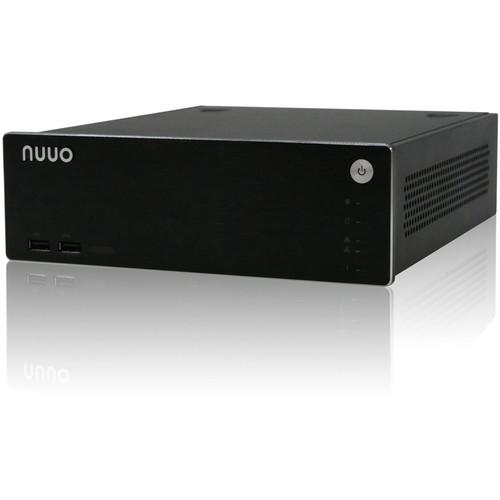 Contents of the user manual for the NUUO NS-2080 8-Channel NVRsolo Network Video
- Product category: Network Video Recorders (NVRs) NUUO
- Brand: NUUO
- Description and content of package
- Technical information and basic settings
- Frequently asked questions – FAQ
- Troubleshooting (does not switch on, does not respond, error message, what do I do if...)
- Authorized service for NUUO Network Video Recorders (NVRs)
|
User manual for the NUUO NS-2080 8-Channel NVRsolo Network Video contain basic instructions
that need to be followed during installation and operation.
Before starting your appliance, the user manual should be read through carefully.
Follow all the safety instructions and warnings, and be guided by the given recommendations.
User manual is an integral part of any NUUO product,
and if it is sold or transferred, they should be handed over jointly with the product.
Following the instructions for use is an essential prerequisite for protecting
health and property during use, as well as recognition of liability on the part of the manufacturer
for possible defects should you make a warranty claim. Download an official NUUO user manual in which you will find instructions on how to install, use, maintain and service your product.
And do not forget – unsuitable use of a NUUO product will considerably shorten its lifespan!
|
Product description The 3TB NUUO NS-2080 8-Channel NVRsolo Network Video Recorder is a Linux-embedded, stand-alone system, providing a local display through an HDMI or VGA interface. As a network-based surveillance system, the NVRsolo leverages its remote access ability to strengthen its usability.The NVRsolo is compatible with 90 brands of IP cameras, with monthly free pack updates. It features functions like one-click setup and ezNUUO. One-click setup saves time in camera configuration by searching and automatically adding cameras to the system. The ezNUUO facilitates the process of establishing Internet access to the NVRsolo system, which means that there are no more router settings necessary for remote (IE 8 and later) and mobile viewing (iOS and Android).Being compatible with all the systems in the NUUO Main Console family, this NVR is also compatible with the NUUO Central Management System. This makes it suitable for not only home or SMB recording, but also for chain stores or ATM/bank projects by virtue of POS support. - Local
-
- Linux embedded – safer solution against PC crashes and virus
- One-click setup for more than 90 brands of IP cameras
- 4-channel real time @ 1080p live display
- ezNUUO – free from router settings for web/mobile viewing
- POS (Point of Sale)
- Alarm source for NUUO Central Management System
- RAID 0, 1 for maximum capacity or data protection
- Supports megapixel cameras and H.264 compression format
- Supports camera multi-stream settings
- Supports multi-streaming on local
- Supports camera two-way audio
- Camera I/O integration
- Supports HDD SMART self-test
- Real-time digital output, email alert, and push notification on mobile
- NTP server synchronization
- Compatible with touch panel
1 Please Note: POS device configuration is only available via the Web.
Compatible with Acer T232HL and ViewSonic TD2220 touch panels (not included)
The data is updated for DP 2.19
Multi-stream and two-way audio support for DP 3.1 or above. close - Remote
-
- Supports stream profile for remote live view bandwidth control (original / 500 kb/sec / 100 kb/sec)
- Supports mobile client for iOS and Android
- Up to 128-channel remote live view with multiple monitors
2 Please Note: DP 2.16 or above; the low profile of cameras integrated before DP 2.16 is 300 kb/s close - Web
-
- Web-based configuration, live viewer, playback
- Compatible with Internet Explorer 8, 9 10, 11, Mac Safari v6.1, 7.0, and Chrome for Windows
- Online GUI recording schedule
- Panorama 360° PTZ (ImmerVision and Vivotek fisheye)
- Generic dewarp (fisheye)
- Digital PTZ and multi-view
- Supports joystick for easier camera control
- Playback with 5 types of intelligent event search
- E-map with indicator
- Digital watermark
- Recording Server
-
- Supports RAID 0, 1 for maximum capacity of data protection
- Remote Backup System
-
- NUUO CMS: Central monitoring solution for large scale projects and projects with multiple sites
- Fully compatible with all NUUO Main Console family servers
- POS: NUUO Point of Sale system works on NVRsolo by overlaying the transaction text from cash register onto the video image (local and remote live view / playback)
- All POS recordings are searchable from Web Viewer and remote playback system
In the Box NUUO NS-2080 8-Channel NVRsolo Network Video Recorder (3TB) Remote Control 4.9' (1.5m) IR Extender Cable Disk Screws Foot Pads & Screws Rackmount Kit 12V / 4A, 48W Power Adapter Power Cord 3TB Hard Drive Limited 2-Year Warranty Note: Two 1.5V, AAA, R03 batteries are required for a remote control (not included) Table of Contents
|
Upload User Manual
Have you got an user manual for the NUUO NS-2080 8-Channel NVRsolo Network Video Recorder in electronic form? Please send it to us and help us expand our library of instruction manuals.
Thank you, too, on behalf of other users.
To upload the product manual, we first need to check and make sure you are not a robot. After that, your "Submit Link" or "Upload File" will appear.
Technical parametersNUUO NS-2080-US-3T-3 Specs | Number of Licenses | Maximum: 16 for recording and playback | | Licenses | Base: 8 | | Video Output | HDMI or VGA | | Output Resolution | 1920 x 1080, 1280 x 1024, 1280 x 720, 1024 x 768 | | Decoding | 120 fps @ 1080p or 240 fps @ 720p
H.264 / MPEG4; MJPEG / MxPEG is with limited support
No resolution limitation on single channel
Up to 1920 x 1080 (MPEG4) Max total capacity with 8-ch 5 MP cameras and 2 MP cameras; 6-ch 8 MP cameras and 2 MP cameras
The local display won't work if width or length of 2 MP camera is over 1920 x 1080. | | Recording Performance | 80 Mb/sec | | Operating System | Embedded Linux | | Compression | H.264, MPEG-4, MJPEG, MxPEG (remote client only) | | Remote Operation | Remote Live Viewer (Software), Remote Live Viewer (Web), iViewer (Mobile App) | | Mobile Client OS Platform | iOS and Android | | Recording | Emergency record, continuous record, record by schedule, event triggered record, and digital input triggered record | | Live Viewing | Control: Live view, preset/go, PTZ, remote I/O, snapshot, digital PTZ
Remote Live View Control: Live view, preset/go, PTZ, remote I/O, snapshot, multi-view, digital PTZ, advanced E-Map, and bandwidth monitoring | | Audio & Video Recording | Synchronized | | POS Integration | Live view, record, playback, and search for every transaction (web only) | | Auto Backup | Automatically back up recorded video of the date before to FTP server | | Search | Intelligent Search via Web/Remote: General motion, missing object, foreign object, lose focus, and camera occlusion | | Remote | Client: Remote Live Viewer (Software), Remote Live Viewer (Web), iViewer (Mobile App)
Server: Live view maximum 64 connections per server at the same time | | Remote Client PC Requirements | OS: Windows XP (32-bit), 7, 8, 8.1 (32 and 64-bit)
CPU: Intel Core 2 Duo, 2.6 GHz
RAM: 1 GB
LAN Transmission Speed: 10/100/1000 Mb/s (RJ45)
UI: Internet Explorer 8, 9, 10 or NUUO client application program, NUUO iPhone, iPad, Android mobile live viewer Please check the supported camera spec list on website. To use mobile live viewer, you have to enable multi-stream function on setting page | | Mobile Client OS Platform | iOS and Android | | Supported IP Cameras | Brands Supported: ACTi, ADT, Airlive, Alphatech, American Dynamics, Arecont, AMTK, ARM, Asoni, AXIS, BASLER, Bolide, BOSCH, Brickcom, Bullwark, Centrix, CISCO, CNB, COP, CORUM, Dahua, Digital Watchdog, D-Link, D-LinkCN, DYNACOLOR, Eneo, Ernitec, Etrovision, Everfocus, Fine, Forenix, GE, Grandstream, Grundig, Guardeon, Guardliner, HIKVision, Histream, Honeywell, i-Mege, IQinVision, Jetstor, JVC, LevelOne, LG, Lilin, Linksys, Lumenera, MegaIP, Messoa, Mobotix, NetworkCamera, NTIC, On Electronics, Onvif, Panasonic, Pelco, PiXORD, Planet, Probe, Rover, Saerim, Samsung, SANTEC, SANYO, Shany, Sony, StarDot, Sunell, Telview, Techson, Tiandy, TOSHIBA, TRUEN, UDP, Videosec, Vision Hi-Tech, Vista, VIVOTEK, Yudor, Zavio, and 3Svision | | RAM | DDR3 2 GB | | HDD Bay | 2 x 3.5" SATA II | | Storage Capacity | Maximum per Drive: 6 TB | | External Storage | 1 x eSATA | | RAID Level | 0, 1 | | Ethernet Port | 2 x Gigabit Port, RJ45 | | LAN Port Speed | 10/100/1000 Mb/sec | | External Ports | 5 x USB 2.0 for keyboard, mouse, UPS, & USB flash drive | | Voltage | 12 VDC / 5 A | | Power Consumption | Full Loading: 25 W
Maximum: 60 W | | Operating Temperature | 32 to 104°F (0 to 40°C) with HDD inserted | | Operating Humidity | 5 to 95% | | Supported Languages | English, Croatian, Czech, Deutsch, Finnish, French, Italian, Japanese, Korean, Polish, Portuguese (Brazil), Russian, Simplified Chinese, Traditional Chinese, Spanish, Swedish, Thai, and Turkish | | Dimensions | 2.8 x 8.5 x 10.2" (7.1 x 21.5 x 26 cm) | | Weight | 4.91 lb (2.23 kg) | | | | Package Weight | 8.4 lb | | Box Dimensions (LxWxH) | 17.6 x 10.7 x 5.6" |
Rating70% users recommend this product to others. And what about you?

This product has already been rated by 91 owners. Add your rating and experience with the product.
Discussion
 Ask our technicians if you have a problem with your settings,
or if anything is unclear in the user manual you have downloaded.
You can make use of our moderated discussion.
The discussion is public and helps other users of our website who may be encountering similar problems.
Ask our technicians if you have a problem with your settings,
or if anything is unclear in the user manual you have downloaded.
You can make use of our moderated discussion.
The discussion is public and helps other users of our website who may be encountering similar problems.
The discussion is empty - enter the first post
Post a new topic / query / comment:
|
|


