User Manual for NUUO Nt-4040-US Titan NVR 250 Mbps Linux Recording Server Click to enlarge the picture
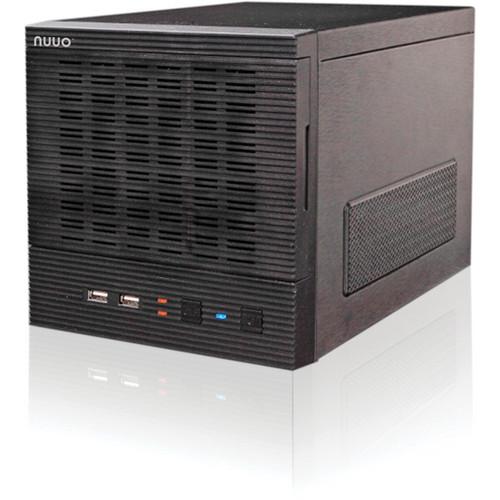 Contents of the user manual for the NUUO Nt-4040-US Titan NVR 250 Mbps
- Product category: Network Video Recorders (NVRs) NUUO
- Brand: NUUO
- Description and content of package
- Technical information and basic settings
- Frequently asked questions – FAQ
- Troubleshooting (does not switch on, does not respond, error message, what do I do if...)
- Authorized service for NUUO Network Video Recorders (NVRs)
|
User manual for the NUUO Nt-4040-US Titan NVR 250 Mbps contain basic instructions
that need to be followed during installation and operation.
Before starting your appliance, the user manual should be read through carefully.
Follow all the safety instructions and warnings, and be guided by the given recommendations.
User manual is an integral part of any NUUO product,
and if it is sold or transferred, they should be handed over jointly with the product.
Following the instructions for use is an essential prerequisite for protecting
health and property during use, as well as recognition of liability on the part of the manufacturer
for possible defects should you make a warranty claim. Download an official NUUO user manual in which you will find instructions on how to install, use, maintain and service your product.
And do not forget – unsuitable use of a NUUO product will considerably shorten its lifespan!
|
Product description With highly stable throughput for recording, the NUUO Nt-4040-US Titan NVR 250 Mbps Linux Recording Server is a Linux-embedded system that is free from virus attacks. In addition to the stable Linux platform, it also provides the RAID function for data protection. With these features, the 250 Mbps recording throughput can not only bring you good recording ability (64 channels, 1.3M, H.264, 10 fps), but also one of the most stable and safest data saving mechanisms.
Featuring dual Gigabit Ethernet ports for load balancing or separating system management and camera recording, this device provides dual NICs for the implementation.
The device supports panomorph PTZ (original, PTZ, quad, perimeter modes), which can reduce the total cost by decreasing the number of IP cameras. Besides, the device also provides the panoramic view function to let users stitch different video streams, which can make tracking object from one channel to another easier.The device supports multiple client OS platforms such as Internet Explorer, Firefox (Windows version), and Safari browsers. Its client application supports Windows and Mac platforms. Numerous platforms support allows more operating system choices. The Dual Stream feature can reduce the stream size for smoother viewing at a remote location with limited bandwidth. Also, it benefits cell phone viewing requirement. The device supports numerous mobile clients: iPhone, iPad, Android, and BlackBerry. With this device’s powerful client, users can manage 100 servers and live view up to 400 channels simultaneously. In addition to viewing, this client can also access I/O devices, POS, alarms from NUUO recording servers. With E-map, users can instantly identify the camera location and alarm status. - Spot-out for live viewing
- Dual stream for limited-bandwidth remote viewer
- 250 Mbps recording throughput (around 64channel, 1.3M, H.264, 10fps)
- Dual Gigabit Ethernet ports
- Manage 100 servers, live view up to 400 channels simultaneously
- Multiple client OS platforms: Windows and Mac
- Supports Internet Explorer, Firefox (Windows version), and Safari browsers
- E-map and GUI recording schedule
- Supports panomorph PTZ (360°)
- Up to 64 channels by adding IP licenses
- Supports iPhone, iPad, Android, and BlackBerry mobile clients
- Supports 32 brands of IP cameras and more than 870 models
In the Box NUUO Nt-4040-US Titan NVR 250 Mbps Linux Recording Server (Tower) 3-Year Warranty Table of Contents
|
Upload User Manual
Have you got an user manual for the NUUO Nt-4040-US Titan NVR 250 Mbps Linux Recording Server in electronic form? Please send it to us and help us expand our library of instruction manuals.
Thank you, too, on behalf of other users.
To upload the product manual, we first need to check and make sure you are not a robot. After that, your "Submit Link" or "Upload File" will appear.
Technical parametersNUUO NT-4040 Specs | Camera | Recording: 4 (up to 64, by adding IP licenses) | | Number of Drives | 4x SATA II | | Storage Space | 1 to 8 TB | | RAID Level | RAID 0, 1, 5, 10 | | I/O Interface | 6x USB 2.0 (for UPS or mouse)
1x eSATA (for DAS) | | LAN Port | 2x 10/100/1000 Mbps (RJ45) | | Spot Output | 1x D-sub (for live viewing, up to 16 channel) | | Temperature | Operating: 41 to 95°F (5 to 35°C) ± 41°F (± 5°C) | | Humidity | Operating: 10 to 85% | | Compression Format | MPEG4, M-JPEG, H264, MxPEG (depends on IP camera) | | Recording Performance | Camera dependent (around 64 channels, 1.3 M, H.264, 10 fps)
Total Bitrate: 250 Mbps | | Remote PC CPU | Intel Core 2 Duo, 2.6 GHz | | Remote PC RAM | 1 GB | | User Interface | HTTP Web browser: Internet Explorer 8, 9, Firefox 3.6, 4.0 (Windows version), Safari 5.0 / NUUO client application | | Remote Management | 100 servers, 400 channel live viewing | | Recording type | Continuous record, record by schedule, manual record, event trigger record, digital input trigger record | | Remote Live View Control | Live view, preset/go, PTZ, digital PTZ, panoramic, view carousel, stream profile, multi-view | | E-Map | Up to 10 photos | | Auto Backup | Automatically backup the recorded video of the previous date to FTP | | Remote Client OS | Windows XP SP3 (32-bit), 7 (32 & 64-bit), Mac OS X v10.6 | | Remote Live View Connections | Maximum 256 (simultaneous) | | Mobile Client OS Platform | iPhone, iPad, Android, BlackBerry | | Supported IP Cameras | ACTi, ArecontVision,ARM, Axis, Basler, Brickcom, Bosch, Cisco, CNB, D-Link, Dynacolor, Eneo, Fine, HIKVision, Honeywell, IQinVision, LevelOne, Lumenera, Linksys, Mobotix, Onvif, Panasonic, PiXORD, Samsung, Santec, SANYO, Sony, StarDot, Toshiba, Videosec, VIVOTEK, Zavio | | Dimensions (W x D x H) | 7.87 x 11.8 x 9.84" (200 x 300 x 250 mm) | | Weight | 12.13 lb (5.5 kg) | | | | Package Weight | 13.8 lb | | Box Dimensions (LxWxH) | 15.45 x 12.25 x 11.35" |
Rating80% users recommend this product to others. And what about you?

This product has already been rated by 02 owners. Add your rating and experience with the product.
Discussion
 Ask our technicians if you have a problem with your settings,
or if anything is unclear in the user manual you have downloaded.
You can make use of our moderated discussion.
The discussion is public and helps other users of our website who may be encountering similar problems.
Ask our technicians if you have a problem with your settings,
or if anything is unclear in the user manual you have downloaded.
You can make use of our moderated discussion.
The discussion is public and helps other users of our website who may be encountering similar problems.
The discussion is empty - enter the first post
Post a new topic / query / comment:
|
|


