|
User Manual for Optex iVision Wireless Intercom and Annunciator System Kit Click to enlarge the picture
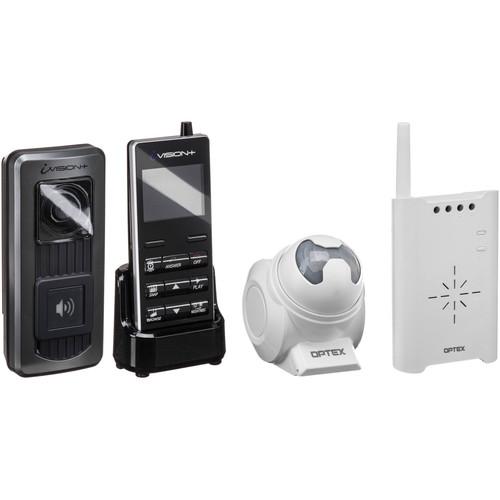 Contents of the user manual for the Optex iVision Wireless Intercom and Annunciator
- Product category: Intercoms Kits Optex
- Brand: Optex
- Description and content of package
- Technical information and basic settings
- Frequently asked questions – FAQ
- Troubleshooting (does not switch on, does not respond, error message, what do I do if...)
- Authorized service for Optex Intercoms Kits
|
User manual for the Optex iVision Wireless Intercom and Annunciator contain basic instructions
that need to be followed during installation and operation.
Before starting your appliance, the user manual should be read through carefully.
Follow all the safety instructions and warnings, and be guided by the given recommendations.
User manual is an integral part of any Optex product,
and if it is sold or transferred, they should be handed over jointly with the product.
Following the instructions for use is an essential prerequisite for protecting
health and property during use, as well as recognition of liability on the part of the manufacturer
for possible defects should you make a warranty claim. Download an official Optex user manual in which you will find instructions on how to install, use, maintain and service your product.
And do not forget – unsuitable use of a Optex product will considerably shorten its lifespan!
|
Product description This Kit includes the Optex iVision+ Wireless Intercom System and the Wireless 2000 Annunciator System and can be used to create a surveillance solution that allows you to see, hear, and speak to visitors approaching or standing at your front door. Perfect for homeowners and shop owners, this kit keeps you aware of the outside happenings at your property.
The Wireless Intercom can be installed to your front door for visual and audio footage of whoever is ringing your doorbell. Featuring a wireless handheld unit with an LCD monitor you can see who's at your door without peering through a peephole or window. The Wireless 2000 Annunciator System extends the security of your home using a motion detection triggered chime to alert you of motion along your property's perimeter. By simply entering a driveway or walkway, the visitor will be triggering an alert so you are aware of their approaching presence before the doorbell is rung. The two systems work together to keep a watchful eye out, and the Annunciator will trigger the intercom's camera to take still pictures whenever the motion sensor is tripped. The systems' collaborative relationship allows you to review footage of visitors who don't ring the doorbell, like delivery men, and also lets you review who you missed while you were out. - Optex iVision+ Wireless Intercom System The iVision+ Wireless Intercom System from Optex allows you to see who's at the door, communicate with the person or identify them, from the convenience of inside your home or office. Moreover, it supports optional door-release capability that lets you open the door without getting up. The system includes a Door Unit and Handheld Unit that form a one-way video / two-way audio communication system. Up to four Handheld Units and up to two Door Units can be incorporated into one system, suitable for both residential and commercial locations.
The Door Unit, which neatly installs at your entrance door, features a doorbell, camera, microphone, and speaker for your visitors to ring and communicate with you. IR LEDs around the camera lens allow the camera to clearly see visitors at nighttime, as long as there's at least a little light outside. The Handheld Unit is a monitoring device, featuring a 2.4" display that shows you who's at the door. It also has a microphone and speaker so you can speak with your visitor. When you're not available to answer, the Door Unit takes up to three photos of your visitor and transmits them to the Handheld Unit where they're saved to built-in memory. These photos can later be offloaded to your computer via a USB output on the Handheld Unit.
The system supports a 330 ft line-of-sight transmission range between the units. The Door Unit is battery-operated by three AA batteries and can also be wired to work off of AC/DC power, and it's splash proof against rain and similar outdoor conditions. It mounts near your door using its own back plate and screws. The Handheld Unit runs on an included rechargeable battery and comes with a wall-mountable charging cradle where it can be kept at all times, like a cordless phone in its base.
Remote door-release capability can be integrated by installing the optional iVision+ Gateway Unit or Wireless 2000 Unit and wiring your doors. - Key Features
-
- One-way video / two-way audio communication system for the home or office
- Includes doorbell and camera unit, and handheld monitoring unit, both with a mic/speaker
- Let you see who's at the door and communicate with them from anywhere inside the premises
- Night-vision capability
- Takes photos of your visitors when you're unavailable to answer
- Supports optional iVision+ Gateway or Wireless 2000 for remote door-release capability
UPC: 788924088747 - Optex Wireless 2000 Annunciator System The Wireless 2000 Annunciator System from Optex includes an outdoor-rated PIR detector and an RF receiver that chimes when the sensor detects motion. The Wireless 2000 system can be used to alert shop owners when customers enter their store, provide driveway annunciation, and offer perimeter awareness. Furthermore, the receiver can support up to 9 detectors, enabling you to set up a full perimeter around your property. The RF receiver also features a Form C relay for activation of a variety of electronic equipment. Additional accessories can be added, including the TC-20U wireless door/window contact, the TS-10U wireless push-button transmitter for notification or activation applications, and the TR-20U repeater for applications where extended range between Wireless 2000 devices is necessary. UPC: 788924040202
In the Box - iVision+ Wireless Intercom System rtcdqezyyzxyrz
- iVision+ Handheld Unit
- iVision+ Door Unit
- Wireless 2000 Annunciator System
Table of Contents
|
Upload User Manual
Have you got an user manual for the Optex iVision Wireless Intercom and Annunciator System Kit in electronic form? Please send it to us and help us expand our library of instruction manuals.
Thank you, too, on behalf of other users.
To upload the product manual, we first need to check and make sure you are not a robot. After that, your "Submit Link" or "Upload File" will appear.
Technical parameters - Optex iVision+ Wireless Intercom System
| | | Transmission Distance | 330 ft (100 m) line-of-sight | | Radiowave Frequency | 2.4 GHz | | | | Power | 3x AA batteries, not included (12 month life expectancy, based on three activations per day)
Or 10-24 V AC/DC power if optionally wired to AC current | | Operating Temperature | -4 to 122°F (-20 to 50°C) | | Storage Temperature | -22 to 158°F (-30 to 70°C) | | Operating Humidity | < 90% RH (no condensation) | | Dimensions | 2.8 x 6.4 x 1.7" (7 x 16 x 4 cm) | | | | Screen Size | 2.4" (6 cm) | | USB Output | microUSB port for PC connection | | Power | 5.5 V AC/DC power adapter included for powering the charging cradle | | Operating Temperature | 32 to 104°F (0 to 40°C) | | Operating Humidity | < 90% RH (no condensation) | | Dimensions | 2.4 x 5.7 x 1.2" (6 x 14.5 x 3 cm) | | | | Box Dimensions (LxWxH) | 13.35 x 8.7 x 3.25" | - Optex TD-20U Indoor/Outdoor Sensor Transmitter for Wireless 2000 System
| Detection Method | Passive Infrared | | Pattern | 50.0' (15.2 m) long range
17.0' (5.1 m) fan pattern | | Angle Adjustment | 45° vertically and ±5° horizontally
±5° vertically and 45° horizontally | | Radio Frequency | 418 MHz | | Transmission Range | 2000' (609.6 m) line of sight | | Power Source | 9 V alkaline battery | | Battery Life | Approximately 2 years (250 times/day at 70°F/20°C) | | Status Indicator | Red LED | | Water Resistance | IP54 | | Installation | Outdoor/Indoor | | Operating Temperature | 15 to 120°F (-10 to 50°C) | | Dimensions (W x H x D) | 3.5 x 4.2 x 4.5" (8.9 x 10.6 x 11.4 cm) | | Weight | 6.3 oz (178.6 g) | | | | Box Dimensions (LxWxH) | 4.95 x 4.85 x 4.25" | - Optex Chime Box Receiver with Relay for Wireless 2000 Annunciator
| | | Box Dimensions (LxWxH) | 8.3 x 4.3 x 2.4" |
Rating60% users recommend this product to others. And what about you?

This product has already been rated by 99 owners. Add your rating and experience with the product.
Discussion
 Ask our technicians if you have a problem with your settings,
or if anything is unclear in the user manual you have downloaded.
You can make use of our moderated discussion.
The discussion is public and helps other users of our website who may be encountering similar problems.
Ask our technicians if you have a problem with your settings,
or if anything is unclear in the user manual you have downloaded.
You can make use of our moderated discussion.
The discussion is public and helps other users of our website who may be encountering similar problems.
The discussion is empty - enter the first post
Post a new topic / query / comment:
|
|
|
| Request for user manual |
You can’t find the operation manual you are looking for? Let us know and we will try to add the missing manual:
I’m looking for a manual / Request for manual
Current requests for instruction manuals:
Call Of Duty World War Two For Xbox...
controller stratus XL...
stratus XL...
smart whatch serie S11 42mm...
Allen & Heath SQ-6 manual...
|
| Discussion |
Latest contributions to the discussion:
AEW R 4100
Name: MAURICIO ANGARITA
Audio-Technica AEW-R4100 UHF Diversity Receiver for
AEW R 4100 has the mute function blocked and does not allow audio to pass. I tried several times to turn off the mute from the transmitter but it does nothing, the mute stays on. Solution?
Thank you...
Instructions for assembling the 2015 Forecast Image Master Consoles GC3-A
Name: mike elam
Forecast Consoles GC3-A ImageMaster Editing Console
Looking for instructions for assembling this console. ...
EMPTY TONER ERROR MESSAGE AFTER REPLACING TONER
Name: LINDA BAD YELLOW EYES
Brother TN223BK Standard-Yield Toner
I HAD TO CHANGE OUT ALL THREE TONERS DUE TO LEAKS IN THE YELLOW AND CYAN. AFTER I REPLACED THEM, THE MACHINE KEEPS GIVING ME AN EMPTY TONER ERROR MESSAGE. HELP!!...
PS480D 20/24 pin Switching 480W Power Supply
Name: swkargo
Logisys 480W Power Supply
This item states in can run -5vdc .It is NOT listed on the board or I beleive is r4 is missing the resitior. Any body have thid issue. Shawn
...
Help needed
Name: Ann Carter
SanDisk 1TB Extreme Portable USB 3.1
When I click the link to download the user manual for my Sandisk Extreme external hard drive, it gives me the manual for the LG Cricket. Can you please change the link so I can download the Sandisk manual and begin using this drive? Thank you....
|
|


