User Manual for Optoma Technology HDCast Pro Multimedia Streaming Device Click to enlarge the picture
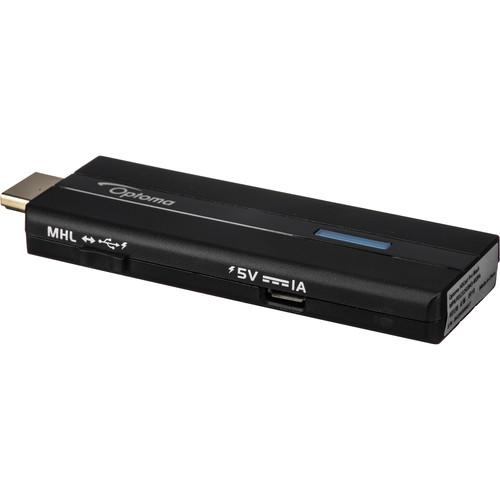 Contents of the user manual for the Optoma Technology HDCast Pro Multimedia Streaming
- Product category: Projector Accessories Optoma Technology
- Brand: Optoma Technology
- Description and content of package
- Technical information and basic settings
- Frequently asked questions – FAQ
- Troubleshooting (does not switch on, does not respond, error message, what do I do if...)
- Authorized service for Optoma Technology Projector Accessories
|
User manual for the Optoma Technology HDCast Pro Multimedia Streaming contain basic instructions
that need to be followed during installation and operation.
Before starting your appliance, the user manual should be read through carefully.
Follow all the safety instructions and warnings, and be guided by the given recommendations.
User manual is an integral part of any Optoma Technology product,
and if it is sold or transferred, they should be handed over jointly with the product.
Following the instructions for use is an essential prerequisite for protecting
health and property during use, as well as recognition of liability on the part of the manufacturer
for possible defects should you make a warranty claim. Download an official Optoma Technology user manual in which you will find instructions on how to install, use, maintain and service your product.
And do not forget – unsuitable use of a Optoma Technology product will considerably shorten its lifespan!
|
Product description Add wireless streaming capability to your projector or display with the Optoma HDCast Pro Multimedia Streaming Device. It allows you to present wirelessly from your compatible Android, iOS, Windows, or Mac device and supports a variety of video, audio, image, and document formats. The HDCast Pro connects to your display device via HDMI and is powered either via HDMI-MHL or via an optional USB power adapter. An HDMI extender and USB cable are included. - Mirror the Screen of Your Mobile Device
- You can mirror the entire screen of your Android 4.x, Android 5.x, Windows 7, Windows 8.1, Windows 10, iOS 7.0.2, iOS 8.x, iOS 9.x, and Mac OS 10.10.x devices using the HDCast Pro app.
- Digital Media Sharing
- Stream music, pictures, and videos from your compatible Android, iOS, Mac OS X, or Windows device to the HDCast Pro using the HDCast Pro app or any DLNA/UPnP & Airplay-compatible app or device. Video can be streamed from popular sites such as YouTube, Vimeo, Hulu, and more.
- Android and iOS Cloud Storage Support
- Access your digitally stored files from Amazon Cloud, Box, Google Drive, or OneDrive via your Android 4.4.x (or higher) or iOS 7.0.x (or higher) device.
- Broadcast from Your Device's Cameras
- Display a live camera stream from either of your device's built-in cameras.
- Full HD 1080p Resolution
- 1080p resolution provides detailed images from compatible content without downscaling or compression, making the HDCast Pro suitable for watching movies or viewing photos or documents.
- MHL or USB Power
- Connect the HDCast Pro directly to an MHL-enabled projector or display, or to an HDMI port and power it via the USB power port on your projector or display, or use an external USB power adapter.
- Video & Audio Streaming, Photo and Document Viewing, & Laptop Mirroring
- Stream video, audio, photos, or documents directly from your compatible mobile device, or mirror your laptop's screen, eliminating the need for long cable runs.
- HDMirror and HDAir
- Since the HDCast Pro is compatible with Miracast and AirPlay, you can wirelessly mirror your compatible Android, Mac, or iOS device directly on the screen.
- DLNA
- Display content stored on your home network on a projector or display device.
- Built-In Web Browser
- Browse the Internet on the big screen.
- Annotations
- Draw and annotate on the projected image from your mobile device. Grab your audience's attention with multiple colors, either freehand or using the tools provided to highlight key points.
- 4:1 Split Screen
- Simultaneously present from up to four devices for sharing ideas during a meeting.
UPC: 796435090784 In the Box Optoma Technology HDCast Pro Multimedia Streaming Device HDMI Extension Cable Micro-USB Cable Limited 1-Year Warranty Table of Contents
|
Upload User Manual
Have you got an user manual for the Optoma Technology HDCast Pro Multimedia Streaming Device in electronic form? Please send it to us and help us expand our library of instruction manuals.
Thank you, too, on behalf of other users.
To upload the product manual, we first need to check and make sure you are not a robot. After that, your "Submit Link" or "Upload File" will appear.
Technical parametersOptoma Technology HDCAST PRO - BLACK Specs | CPU | 500 MHz MIPS | | DRAM | DDR3 256 MB @ 1 GHz | | NAND | 128 MB | | Input | Micro-USB power (when using USB instead of MHL for power) | | Output | 1 x HDMI version 1.4, MHL-compatible (backward-compatible to version 1.2) | | Output Resolutions | Selectable: 1280 x 720 (720p), 1920 x 1080 @ 24 Hz (1080p 24), 1920 x 1080 @ 30 Hz (1080p 30) | | Wi-Fi Support | IEEE 802.11b/g/n 2T2R (single band), 300 Mbps, 2.4 GHz | | Wireless Security | WPA, WPA2 | | OS Support | Android: 4.x, 5.x
iOS: 7.x, 8.x, 9.x
Mac OS X: 10.10.x
Windows: 7, 8.1, 10 (support for Windows 10 for Phone scheduled via future firmware update) | | Supported File Formats | Documents: MS Office 97 to 2003 (doc, xls, ppt), Office 2007 to 2016 (docx, xlsx, pptx), Adobe Acrobat PDF Reader 1.0 to 4.0, iWorks '09 (Pages '09, Numbers '09, & Keynote '09)
Video: AVI, DAT, M4V, MP4, MKV, MOV, MPG, MPEG, TS, VOB, WMV
Images: BNP, JPEG Baseline Profile (YUV400, YUV420, YUV422, YUV440, YUV444 @ 8000 x 6000), JPEG Progressive Profile (YUV400, YUV420, YUV422, YUV440, YUV444 @ 10240 x 6400)
Audio: M4A, MKA, MP3, OGG, WAV, WMA, WMA2, WMA3 | | Max File Size | Word: 100 MB
Excel: 15 MB
PowerPoint: 19 MB | | Supported Video Codecs | MPG (up to 1080p, 30 fps, 80 Mbps)
MPEG-1 (Main profile, Low and Main Levels, 1080p, 30 fps, 30 Mbps)
MPEG-2 (Low and Main Levels, 1080p, 30 fps, 30 Mbps)
MPEG-4 Advanced Simple Profile (Levels 0 to 5, 1080p, 30 fps, 30 Mbps)
H.264/AVC (up to High Profile, Levels 1 to 4.1, 1080p, 30 fps, 25 Mbps)
MJPEG (up to 1080p, 30 fps, 80 Mbps)
Xvid (up to Advanced Simple profile, 1080p, 30 fps, 30 Mbps)
WMV3 (up to Main Profile, Low, Medium Level, 1080p, 30 fps, 25 Mbps)
VC-1 (Simple and Main Profile, Low, Medium, and High Levels, 1080p, 30 fps, 25 Mbps) | | Supported Audio Codecs | AC3, AAC, DTS, FLAC, FLAC HD
MPEG Layer 1, MPEG Layer 2, MPEG Layer 3 (MP3) (8 to 48 kHz sample rate, 8 to 320 kbps bit rate)
IMA-ADPCM (WAV) (16 kHz sample rate @ 32 kbps, 16 kHz sample rate @ 64 kbps, 24 kHz sample rate @ 192 kbps, 48 kHz sample rate @ 384 kbps bit rate)
ADPCM-WAV (8 to 48 kHz sample rate, 32 to 384 kbps bit rate)
PCM-WAV (8 to 48 kHz sample rate, 128 to 1536 bit rate)
LPCM, WMA, WMA2, WMA3 (22 to 48 kHz sample rate, 5 to 320 kbps bit rate) | | Supported Subtitle Formats | Standard SRT, SMI, SSA/ASS (UTF-8 / UTF-16 font) @ 8 bits up to 1280 x 800; mixed subtitles are not supported | | Operating Temperature | 73.4°F / 23°C (up to 10,000' / 3048 m) | | Power Requirements | 5 VDC, 1 A | | Dimensions (W x H x D) | 1.3 x 0.39 x 3.6" / 33 x 9.9 x 91.4 mm | | Weight | 9.1 oz / 258 g | | | | Package Weight | 0.25 lb | | Box Dimensions (LxWxH) | 5.3 x 3.2 x 1.2" |
Rating20% users recommend this product to others. And what about you?

This product has already been rated by 28 owners. Add your rating and experience with the product.
Discussion
 Ask our technicians if you have a problem with your settings,
or if anything is unclear in the user manual you have downloaded.
You can make use of our moderated discussion.
The discussion is public and helps other users of our website who may be encountering similar problems.
Ask our technicians if you have a problem with your settings,
or if anything is unclear in the user manual you have downloaded.
You can make use of our moderated discussion.
The discussion is public and helps other users of our website who may be encountering similar problems.
The discussion is empty - enter the first post
Post a new topic / query / comment:
|
|


