|
User Manual for OWI Inc. CRS101IC54 Infrared Wireless Microphone System & Speaker Package Click to enlarge the picture
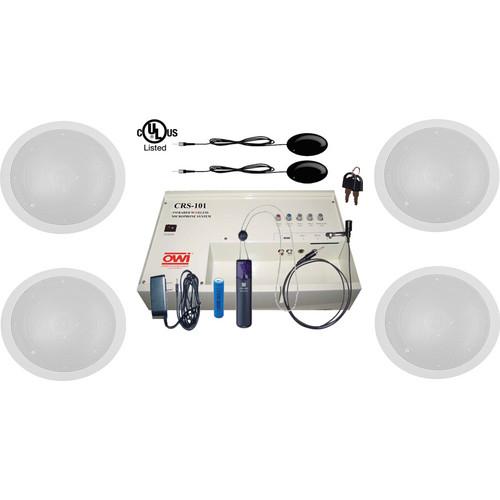 Contents of the user manual for the OWI Inc. CRS101IC54 Infrared Wireless Microphone
- Product category: Assistive Listening Systems OWI Inc.
- Brand: OWI Inc.
- Description and content of package
- Technical information and basic settings
- Frequently asked questions – FAQ
- Troubleshooting (does not switch on, does not respond, error message, what do I do if...)
- Authorized service for OWI Inc. Assistive Listening Systems
|
User manual for the OWI Inc. CRS101IC54 Infrared Wireless Microphone contain basic instructions
that need to be followed during installation and operation.
Before starting your appliance, the user manual should be read through carefully.
Follow all the safety instructions and warnings, and be guided by the given recommendations.
User manual is an integral part of any OWI Inc. product,
and if it is sold or transferred, they should be handed over jointly with the product.
Following the instructions for use is an essential prerequisite for protecting
health and property during use, as well as recognition of liability on the part of the manufacturer
for possible defects should you make a warranty claim. Download an official OWI Inc. user manual in which you will find instructions on how to install, use, maintain and service your product.
And do not forget – unsuitable use of a OWI Inc. product will considerably shorten its lifespan!
|
Product description The CRS101IC54 Infrared Wireless Microphone System & Speaker Package from OWI Inc. consists of the CRS-101 Infrared Wireless Microphone System and four IC5 In-Ceiling Speakers for use in classrooms, boardrooms, computer training rooms, and hotel meeting rooms. It also includes backcans and tile bridges required for installation of the speakers.The UL-listed CRS-101 System is a slim, fully lockable, wall-mounted infrared receiver/amplifier/mixer that accepts 3 different line level inputs. This infrared wireless microphone system can simultaneously control two infrared wireless microphones, and each microphone has independent volume control to obtain the best audio effects for each individual room layout. Since the system is wall-mounted, there are no freestanding or rack-mounted components to take up closet space or be knocked off a shelf, and no unsightly tangle of wires.The IC5 In-Ceiling Speakers are suitable for playing music, broadcast pages, or other audio with the CRS-101 System. The included Kwik Klamps provide for fast and easy installation. The IC5 speakers work indoors and in covered areas outdoors.The backcan enclosure is meant for the installation of the in-ceiling speakers and the 5TB Speaker Tile Bridge is a support truss for the speakers. The tile bridge secures backcan enclosures with only 4 screws and supports all loudspeakers and baffles that mount on a 6.7" diameter circle. Made from 24-gauge, galvanized steel, the support mounts the speaker or baffle flush. - CRS-101 Infrared Wireless Microphone System (White) The white CRS-101 Infrared Wireless Microphone System from OWI Inc. is a package that includes the CRS-CASE Amplifier Wall Case, 2 x CRS-IRS IR Sensors, the CRS-PMIC combination IR Wireless Pendant Microphone and Battery Charger, the CRS-PBAT37 Pendant Microphone Battery and the CRS-LMIC Lapel Microphone with collar clip-on.
The CRS-101 System is an Infrared Wireless system that allows the speaker the freedom to move about the room without the restriction of a microphone cable. The two included CRS-IRS IR Sensors allow use of several options of microphones. The CRS-101 System is suitable for use in classrooms, boardrooms, computer training rooms, and hotel meeting rooms. The slim, fully lockable, wall-mounted infrared receiver / amplifier / mixer accepts 3 different line level inputs. Because the CRS-101 System is wall-mounted, there are no freestanding or rack-mounted components to take up closet space or be knocked off a shelf, and no unsightly tangle of wires.
The CRS-101 Infrared Wireless Microphone System can simultaneously control the two included infrared wireless microphones, and each device can adjust its volume by independent controls to obtain desired audio effects for each individual room layout.
The CRS-CASE is an amplified audio mixer that provides inputs for infrared wireless microphones, two unbalanced mono 1/4" phono jacks and a stereo RCA line level audio source. The internal amplifier is a clean, powerful 30 watts per channel in a dual mono configuration (that is, the system outputs the same mono signal to up to two speakers). When not in use, the CRS-CASE provides a secure, locking storage space for the pendant, lapel and headset microphones, so they will never get misplaced.
The CRS-PMIC is a combination IR Wireless Pendant Microphone and Battery Charger. It gets clipped onto a coat or shirt pocket, or hung around the presenter’s neck on a lanyard and is then used as a wireless microphone allowing for a hands-free presentation.
The CRS-PMIC also features a mic input that connects to the included CRS-LMIC Lapel Microphone or CRS-HSMIC Headset Microphone (sold separately). These two ultra-sensitive mics provide additional options for hands-free presentations.
The IR Wireless Microphones are similar to normal mics in how they detect speech, but rather than directly connecting to a PA or other amplifier, they convert the audio signals into very strong IR pulses (invisible light pulses) that are seen by the IR Sensors. The Sensors receive these pulses and output electrical pulses to the CRS-CASE, where the electrical pulses are converted back to audio signals, amplified and output to the speakers.
IR is invisible light and IR systems typically require a direct line-of-sight from the transmitter (microphone) to the receiver (IR Sensors) to operate. The CRS-101 is designed with ultra-high output IR circuitry that allows the IR pulses output from the microphones to reflect off ceiling, wall, and hard floor surfaces. The IR Sensors are designed to ‘see’ IR from any direction, allowing uninterrupted presentations.
The CRS-101 System is easy to install and operate. Once set up, it will be ready for class every day. The microphone batteries need to be kept at peak performance levels, so it is important to re-charge the batteries before each use. CRS-101 System - With the CRS-101, people in the back of the room can hear just as well as those sitting up front. Audio drop-off occurs without a microphone and it increases dramatically toward the back of the room.
- The CRS-101 accepts 3 different line level inputs. It can also control 2 infrared wireless microphones at the same time.
- Each device can have its volume adjusted by independent controls to get the best audio effects for each room layout.
- Customize each room with two or four available OWI ceiling or surface mounted speakers (sold separately).
- Convenient locking storage box for microphones.
CRS-IRS IR Sensors - Mini Plug: One 3.5mm mini plug connects to one of the three IR Sensor jacks on the CRS-CASE side panel.
- Cable: The 50' cable allows the IR Sensors to be positioned away from the CRS-CASE for optimum coverage for reception of IR pulses from the CRS IR Microphones.
- ON Led: One LED illuminates green to indicate that the CRS System is ON and the IR Sensors are connected and active.
- IR Sensors: The Sensors sense the IR pulses output from the CRS IR Microphones. These must be positioned to have a clear line-of-sight to the classroom and any location that the CRS Microphones may be used. Each IR Sensor senses IR in an omnidirectional pattern (140° off-axis) and will also sense IR reflected off the ceiling, wall and hard floor surfaces. Each IR Sensor has a range of 66'.
- In-Ceiling Speaker (Pair) The OWI IC5 In-Ceiling Speaker (Paintable white) is perfect for use in commercial settings. Play music, broadcast pages or other audio with this 2-Way system. The included Kwik Klamps provide for fast and easy installation. The IC5 works indoors and in covered outdoors.
- The speaker is paintable white
UPC: 092087910129 - 5TB Speaker Tile Bridge OWI's 5TB Speaker Tile Bridge is a support truss for the IC5 speaker series. This tile bridge secures back can enclosures with only four screws and supports all loud speakers and baffles that mount on a 6 6/8" diameter circle. Made from 24 guage, galvanized steel the support mounts the speaker or baffle flush. UPC: 092087911171
- Backcan Enclosure The OWI Backcan Enclosure is meant for the installation of the IC5 and the IC6 in-ceiling speakers. The backcan has dimensions of 9.25 x 9.62 x 4.5". UPC: 092087912550
In the Box Bundle Items CRS-101 Infrared Wireless Microphone System (White) zyuzduevcdbsdsbfexavebbccx - CRS-CASE Amplifier Wall Case for CRS-101
- CRS-PMIC Pendant Microphone for CRS-101 IR Wireless System
- CRS-PBAT3.7 - Replacement Rechargeable Battery for CRS-PMIC Pendant Mic
- CRS-PENCH Charger for the CRS-PMIC Pendant Microphone
- CRS-LMIC Lapel Microphone for CRS-LMIC IR Pendant Microphone
2 x In-Ceiling Speaker (Pair) 4 x 5TB Speaker Tile Bridge 4 x Backcan Enclosure
Also Includes Table of Contents
|
Upload User Manual
Have you got an user manual for the OWI Inc. CRS101IC54 Infrared Wireless Microphone System & Speaker Package in electronic form? Please send it to us and help us expand our library of instruction manuals.
Thank you, too, on behalf of other users.
To upload the product manual, we first need to check and make sure you are not a robot. After that, your "Submit Link" or "Upload File" will appear.
Technical parameters - CRS-101 Infrared Wireless Microphone System (White)
| | | Carrier Frequency | 2.06 and 2.56 MHz | | Off-Axis Performance | 140° | | Cable Length | 50.0' (15.2 m) | | Range | 66.0' (20.0 m) | | Dimensions (W x D x H) | 3.25 x 1.25 x 2.0" (82.55 x 31.75 x 50.8 mm) | | | | Box Dimensions (LxWxH) | 25.0 x 20.0 x 14.0" | - In-Ceiling Speaker (Pair)
| System | 2-Way | | Impedance | 8 Ohms | | Sensitivity | 85.2dB | | Power Taps | N/A | | Maximum Power | 40W | | Frequency Response | 70HZ-20KHz | | Crossover | 4KHz | | Woofer | 5.25"
Paper coated polyurethane surround | | Tweeter | 0.5"
Hard dome | | Dimensions | 8 x 2 1/2" (diameter x height) (20.32 x 6.4cm) | | Weight | 2.6 lbs (1.18kg) | | | | Box Dimensions (LxWxH) | 18.0 x 8.9 x 3.7" | - 5TB Speaker Tile Bridge
| | | Box Dimensions (LxWxH) | 24.0 x 12.0 x 0.5" | - Backcan Enclosure
| Dimensions | 9.25 x 9.62 x 4.5" | | | | Box Dimensions (LxWxH) | 10.0 x 9.3 x 4.3" |
Rating70% users recommend this product to others. And what about you?

This product has already been rated by 91 owners. Add your rating and experience with the product.
Discussion
 Ask our technicians if you have a problem with your settings,
or if anything is unclear in the user manual you have downloaded.
You can make use of our moderated discussion.
The discussion is public and helps other users of our website who may be encountering similar problems.
Ask our technicians if you have a problem with your settings,
or if anything is unclear in the user manual you have downloaded.
You can make use of our moderated discussion.
The discussion is public and helps other users of our website who may be encountering similar problems.
The discussion is empty - enter the first post
Post a new topic / query / comment:
|
|
|
| Request for user manual |
You can’t find the operation manual you are looking for? Let us know and we will try to add the missing manual:
I’m looking for a manual / Request for manual
Current requests for instruction manuals:
Call Of Duty World War Two For Xbox...
controller stratus XL...
stratus XL...
smart whatch serie S11 42mm...
Allen & Heath SQ-6 manual...
|
| Discussion |
Latest contributions to the discussion:
AEW R 4100
Name: MAURICIO ANGARITA
Audio-Technica AEW-R4100 UHF Diversity Receiver for
AEW R 4100 has the mute function blocked and does not allow audio to pass. I tried several times to turn off the mute from the transmitter but it does nothing, the mute stays on. Solution?
Thank you...
Instructions for assembling the 2015 Forecast Image Master Consoles GC3-A
Name: mike elam
Forecast Consoles GC3-A ImageMaster Editing Console
Looking for instructions for assembling this console. ...
EMPTY TONER ERROR MESSAGE AFTER REPLACING TONER
Name: LINDA BAD YELLOW EYES
Brother TN223BK Standard-Yield Toner
I HAD TO CHANGE OUT ALL THREE TONERS DUE TO LEAKS IN THE YELLOW AND CYAN. AFTER I REPLACED THEM, THE MACHINE KEEPS GIVING ME AN EMPTY TONER ERROR MESSAGE. HELP!!...
PS480D 20/24 pin Switching 480W Power Supply
Name: swkargo
Logisys 480W Power Supply
This item states in can run -5vdc .It is NOT listed on the board or I beleive is r4 is missing the resitior. Any body have thid issue. Shawn
...
Help needed
Name: Ann Carter
SanDisk 1TB Extreme Portable USB 3.1
When I click the link to download the user manual for my Sandisk Extreme external hard drive, it gives me the manual for the LG Cricket. Can you please change the link so I can download the Sandisk manual and begin using this drive? Thank you....
|
|


