User Manual for PageFlip Butterfly - Wireless Bluetooth Pedal Click to enlarge the picture
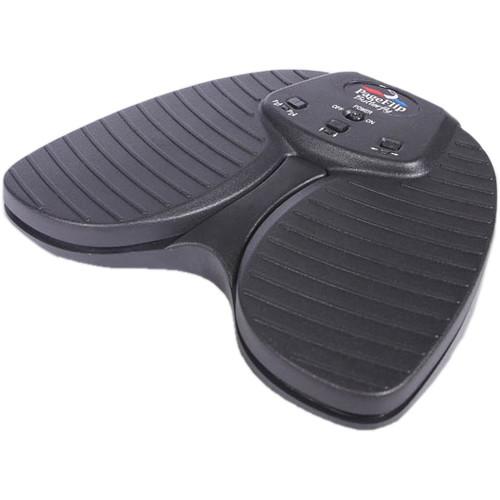 Contents of the user manual for the PageFlip Butterfly - Wireless Bluetooth Pedal
- Product category: Music Stand Accessories PageFlip
- Brand: PageFlip
- Description and content of package
- Technical information and basic settings
- Frequently asked questions – FAQ
- Troubleshooting (does not switch on, does not respond, error message, what do I do if...)
- Authorized service for PageFlip Music Stand Accessories
 |
User manual for the PageFlip Butterfly - Wireless Bluetooth Pedal contain basic instructions
that need to be followed during installation and operation.
Before starting your appliance, the user manual should be read through carefully.
Follow all the safety instructions and warnings, and be guided by the given recommendations.
User manual is an integral part of any PageFlip product,
and if it is sold or transferred, they should be handed over jointly with the product.
Following the instructions for use is an essential prerequisite for protecting
health and property during use, as well as recognition of liability on the part of the manufacturer
for possible defects should you make a warranty claim. Download an official PageFlip user manual in which you will find instructions on how to install, use, maintain and service your product.
And do not forget – unsuitable use of a PageFlip product will considerably shorten its lifespan!
|
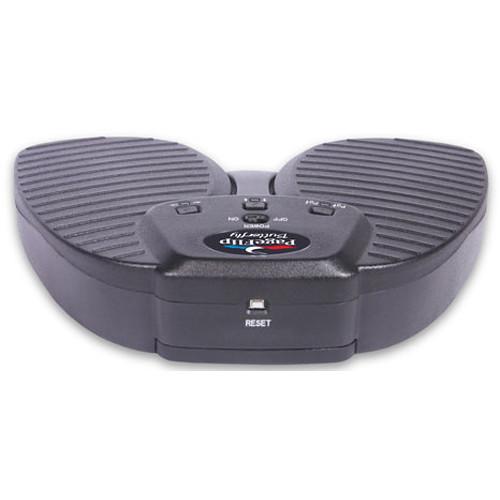
Product description The Butterfly from PageFlip is a wireless Bluetooth dual-pedal designed to turn pages within any compatible iPad or Android app and is well suited for musicians, people with disabilities, or any individual wishing for hands-free operation. Building upon the success of the Cicada dual-pedal, the Butterfly is made with a heftier, rugged construction and a silent pedal action that mimics the feel of the flagship Firefly pedal. The pedal is compatible with select apps that accept keyboard commands and will also work with Windows, Mac, and Linux computers. If your computer does not have Bluetooth, you can purchase an optional Bluetooth USB dongle that you can plug into your computer's USB port for instant wireless Bluetooth support. -
- Ease of Use: Simply open a digital file and press either pedal of the PageFlip. Butterfly to turn a page forwards or backwards
- Convenience: Permits hands-free reading of vast libraries of scanned, purchased, or freely downloaded digital content. There is no need to stop playing your musical instrument or wait for a care-giver to turn the page
- Reliability: Turns one page at a time with 100% accuracy. Navigation of digital content eliminates the risk of turning multiple pages at once, which is a problem typically associated with physical books
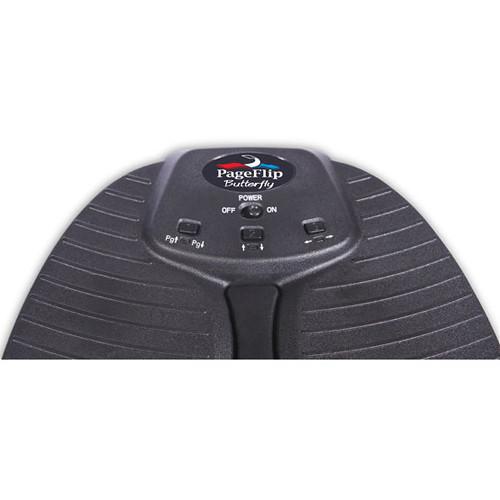
- Versatility: Press a mode button to select pedal functions for enhanced software compatibility
- Select one of three modes:
- PageUp/PageDown
- Up/Down arrow
- Left/Right arrow
- Wireless Connectivity: The PageFlip Butterfly communicates wirelessly with the computer up to a range of 33' using standard Bluetooth 3.0 technology. Even if your computer does not have Bluetooth, you can still bring it the full benefits of this wireless pedal by purchasing a Bluetooth USB dongle from www.pageflip.com and plugging it into the computer’s USB port
- Compatibility: Works with iPad and Android tablets using select apps that accept keyboard commands, such as arrow. Also works with any Windows, Mac, or Linux computer
- Compatible Apps
-
- Android: MobileSheets, SongBook, Fakebook, Lyrics Flipper+, Moon+ Reader, EBookDroid, Cool Reader, ezPDF Reader, EP45 Pro, GuitarTapp Pro, MuseBook, MuseScore, Musicnotes, and all keyboard-compatible apps
- iPad: ForScore, OnSong, unrealBook, Avid Scorch, Alto Prompter, Baritone Sax Prompter, DeepDish GigBook, DrumSetlist Manager, Finale SongBook, Flute Prompter, GoodReader, GuitarTapp Pro, Hymnals, iAutoCue, iBandManager Pro, iBooks, iClassicScores, iCue, iGigBook, iReal Pro, Loopy, Loopy HD, MuseScore, Music Binder, Musicnotes, MusicReader, MusicPodium, My Lyric Book, Newzik, NextPage, NextSong, Oboe Prompter, PiaScore HD, Planning Center Music Stand, Planning Center Projector, Play On Cue, Pocket Jamz Guitar Tabs, Pocket Jamz Piano Notes, PowerMusic, PowerPoint, PrompterPal, Recorder Prompter, SampleWiz, Scorecerer, Scorio Music Case, SeeScore, Set List Maker, Setlists, Sheet Music Direct, Scorecerer, Set List Maker, Setlists, SongBook+, SongBook ChordPro, SongSheet, Steinway Etude, Teleprompt+, Tempo - Metronome with Setlists, Tenor Sax Prompter, TheGigEasy, Trumpet Prompter, unrealBook, Video Scores, Virtual Sheet Music, and Word
UPC: 753182221489 In the Box PageFlip Butterfly - Wireless Bluetooth Pedal Limited 1-Year Warranty Table of Contents
|
Upload User Manual
Have you got an user manual for the PageFlip Butterfly - Wireless Bluetooth Pedal in electronic form? Please send it to us and help us expand our library of instruction manuals.
Thank you, too, on behalf of other users.
To upload the product manual, we first need to check and make sure you are not a robot. After that, your "Submit Link" or "Upload File" will appear.
Technical parametersPageFlip PFBUTTERFLY01 Specs | Model Name | PageFlip Butterfly | | Model Number | PFBUTTERFLY-01 | | Battery Life (approx.) | 200 hours of continuous turning or approximately 200,000 page turns | | Connectivity | Wireless operation using Bluetooth 3.0 | | Sleep Mode | Enters sleep mode after 30-minute inactivity period. Press pedal to awaken within 3 seconds | | Control Modes | Pedal Modes: PageUp/Dn, Up/Down arrows, Left/Right arrows | | Operating Distance | 32.8' / 10.0 m | | Operating Frequency | 2402-2480 MHz | | Indicator LEDs | Off: Pedal Powered Off or Asleep
All LEDs Flash: Bluetooth discovery mode (Reset)
Quick Flash (1 sec): Attempting to pair with computer
Slow Flash (4 sec): Paired with computer
Three Quick Flashes: Low-battery condition | | Power Consumption | Operating Mode 1.5 mA
Bluetooth Pairing 0.6 mA
Standby 0.5 mA
Sleep 0.02 mA | | Power | 2 x AA batteries | | Output Power | -2 dBm to 4 dBm | | Battery Life | Battery Life: 200 hours of continuous turning (approx. 200,000 page turns) | | Temperature & Humidity | Operating Temperature: 32 to 140°F / 0 to 60°C
Storage Temperature: -4 to 140°F / -20 to 60°C
Relative Humidity: 15 - 90% | | Dimensions (W x H x D) | 6.8 x 5.3 x 1.4" / 172.7 x 134.6 x 35.6 mm | | Weight | 13 oz / 368 g | | | | Package Weight | 0.85 lb | | Box Dimensions (LxWxH) | 7.45 x 7.25 x 1.8" |
Rating20% users recommend this product to others. And what about you?

This product has already been rated by 34 owners. Add your rating and experience with the product.
Discussion
 Ask our technicians if you have a problem with your settings,
or if anything is unclear in the user manual you have downloaded.
You can make use of our moderated discussion.
The discussion is public and helps other users of our website who may be encountering similar problems.
Ask our technicians if you have a problem with your settings,
or if anything is unclear in the user manual you have downloaded.
You can make use of our moderated discussion.
The discussion is public and helps other users of our website who may be encountering similar problems.
The discussion is empty - enter the first post
Post a new topic / query / comment:
|
|


