User Manual for Panasonic 21,000-Lumen SXGA DLP Projector Click to enlarge the picture
 Contents of the user manual for the Panasonic 21,000-Lumen SXGA DLP Projector
- Product category: Multimedia Projectors Panasonic
- Brand: Panasonic
- Description and content of package
- Technical information and basic settings
- Frequently asked questions – FAQ
- Troubleshooting (does not switch on, does not respond, error message, what do I do if...)
- Authorized service for Panasonic Multimedia Projectors
 |
User manual for the Panasonic 21,000-Lumen SXGA DLP Projector contain basic instructions
that need to be followed during installation and operation.
Before starting your appliance, the user manual should be read through carefully.
Follow all the safety instructions and warnings, and be guided by the given recommendations.
User manual is an integral part of any Panasonic product,
and if it is sold or transferred, they should be handed over jointly with the product.
Following the instructions for use is an essential prerequisite for protecting
health and property during use, as well as recognition of liability on the part of the manufacturer
for possible defects should you make a warranty claim. Download an official Panasonic user manual in which you will find instructions on how to install, use, maintain and service your product.
And do not forget – unsuitable use of a Panasonic product will considerably shorten its lifespan!
|
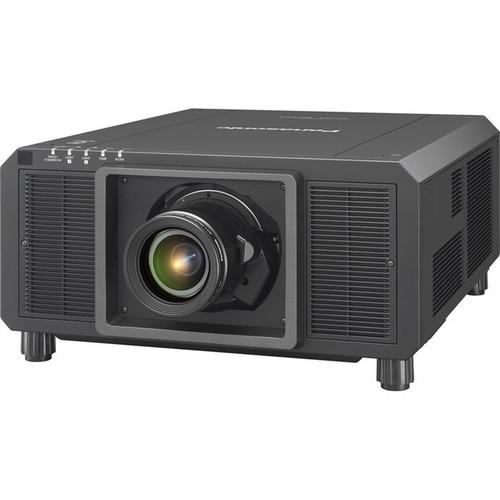
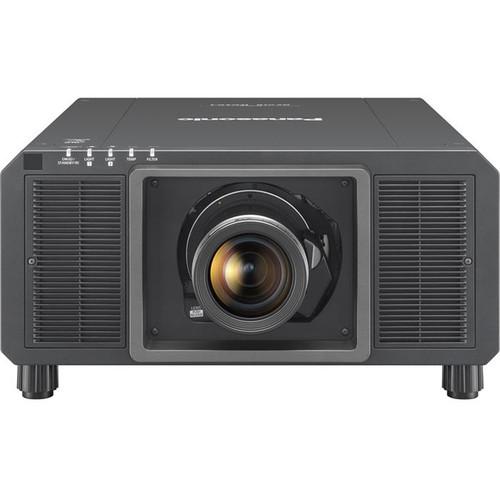
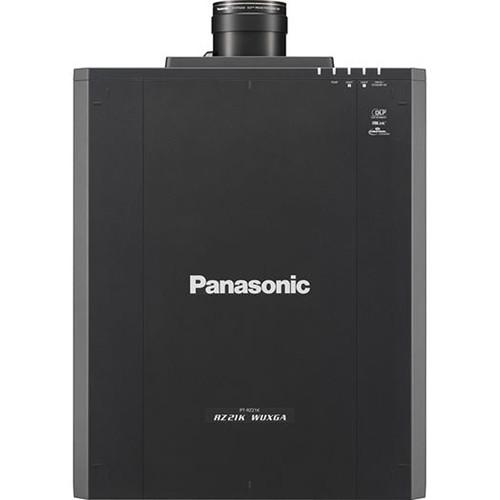
Product description The PT-RS20KU 21,000-Lumen SXGA+ DLP Projector from Panasonic features a SOLID SHINE laser phosphor technology with 3-chip DLP. With brightness of up to 21,000 lumens, the projector delivers bright and detailed picture quality. It features an efficient cooling system for stable operation and long life. Furthermore, the detail clarity processor clarifies and enhances fine details with advanced processing algorithm. Digital link supports transmission of uncompressed Full HD video, audio, and control commands through a single LAN cable. The dust-resistant design features hermetically sealed laser modules and efficient filterless design. The projector provides 20,000 hours of maintenance-free projection. - 3-chip DLP with SOLID SHINE laser phosphor technology
- Brightness of up to 21,000 lumens and 20,000:1 contrast ratio
- Efficient cooling system for stable operation and long life
- Dynamic contrast laser light-source modulation achieves high contrast
- Detail clarity processor clarifies and enhances fine details with advanced processing algorithm
- Daylight view function improves color perception in bright environments and in mapping applications
- DIGITAL LINK supports transmission of uncompressed Full HD video and control commands through single LAN cable
- Multi-screen support system merges multiple screens
- Multi-unit brightness and color control
- 4,410,000 (3 x 1400 x 1050) pixels
- Applicable Software: Logo transfer software, multi monitoring and control software, early warning software, geometry manager pro, smart projector control
- SD-SDI: SMPTE ST 259 compliant, [YCBCR 4:2:2 10-bit] 480/60i, 576/50i
HD-SDI: SMPTE ST 292 compliant, [YPBPR 4:2:2 10-bit] 720/60p, 720/50p, 1080/60i, 1080/50i, 1080/25p, 1080/24p, 1080/24sF, 1080/30p
Dual-Link HD-SDI: SMPTE ST 372 compliant, [YPBPR 4:2:2 10-bit] 1080/50p, 1080/60p [RGB 4:4:4 12-bit/10-bit] 1080/60i, 1080/50i, 1080/25p, 1080/24p, 1080/24sF, 1080/30p, 2048 x 1080/24p, [X'Y'Z' 4:4:4 12-bit] 2048 x 1080/24p
3G-SDI: SMPTE ST 424 compliant, [RGB 4:4:4 12-bit/10-bit] 1080/60i, 1080/50i, 1080/25p, 1080/24p, 1080/24sF, 1080/30p, 2048 x 1080/24p, 2048 x 1080/25p, 2048 x 1080/30p, [YPBPR 4:2:2 10-bit] 1080/60p, 1080/50p, 2048 x 1080/48p, 2048 x 1080/50p, 2048 x 1080/60p, [X'Y'Z' 4:4:4 12-bit] 2048 x 1080/24p, 2048 x 1080/25p, 2048 x 1080/30p
Dual-link 3G-SDI: SMPTE ST 425 compliant, [YPBPR 4:4:4 12-bit/10-bit] 1080/60p, 1080/50p, 2048 x 1080/60p, 2048 x 1080/50p, 2048 x 1080/48p, [RGB 4:4:4 12-bit/10-bit] 1080/60p, 1080/50p, 2048 x 1080/60p, 2048 x 1080/50p, 2048 x 1080/48p
HDMI/DVI-D/DIGITAL LINK: 480/60i, 576/50i, 480/60p, 576/50p, 720/60p, 720/50p, 1080/60i, 1080/50i, 1080/24p, 1080/24sF, 1080/25p, 1080/30p, 1080/60p, 1080/50p, 640 x 400-WUXGA (1920 x 1200) (compatible with non-interlaced signals only), dot clock: 25 to 162 MHz
RGB: fH: 15 to 100 kHz, fV: 24 to 120 Hz, dot clock: fH: 15 to 100 kHz, fV: 24 to 120 Hz, dot clock: 162 MHz or less
YPBPR (YCBCR): fH: 15.73 kHz, fV: 59.94 Hz [525i (480i)], fH: 15.63 kHz, fV: 50 Hz [625i (576i)], fH: 31.47 kHz, fV: 59.94 Hz [525p (480p)], fH: 31.25 kHz, fV: 50 Hz [625p (576p)], fH: 45.00 kHz, fV: 60 Hz [750 (720)/60p], fH: 37.50 kHz, fV: 50 Hz [750 (720)/50p], fH: 33.75 kHz, fV: 60 Hz [1125 (1080)/60i], fH: 28.13 kHz, fV: 50 Hz [1125 (1080)/50i], fH: 28.13 kHz, fV: 25 Hz [1125 (1080)/25p], fH: 27.00 kHz, fV: 24 Hz [1125 (1080)/24p], fH: 27.00 kHz, fV: 48 Hz [1125 (1080)/24sF], fH: 33.75 kHz, fV: 30 Hz [1125 (1080)/30p], fH: 67.50 kHz, fV: 60 Hz [1125 (1080)/60p], fH: 56.25 kHz, fV: 50 Hz [1125 (1080)/50p]
Video/YC: fH: 15.73 kHz, fV: 59.94 Hz (NTSC/NTSC4.43/PAL-M/PAL60), fH: 15.63 kHz, fV: 50 Hz (PAL/PAL-N/SECAM - SDI 1 Input: 1 x BNC 3G/HD/SD-SDI input, Dual-link HD-SDI (Link-A), Dual-link 3G-SDI (Link 1)
SDI 2 Input: 1 x BNC 3G/HD/SD-SDI input, Dual-link HD-SDI (Link-B), Dual-link 3G-SDI (Link 2)
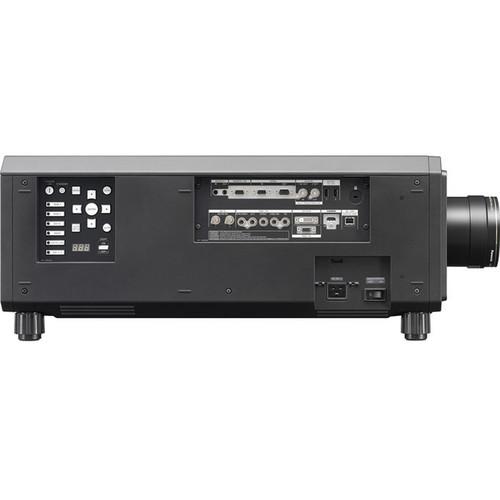
DVI-D Input: 1 x DVI-D 24-pin (DVI 1.0 compliant, compatible with HDCP) (Single-link only)
RGB 2 Input: 1 x D-sub HD 15-pin (female) RGB/YPBPR
Remote 1 Input / Output: 1 x M3 for wired remote control, link control UPC: 885170318878 In the Box Panasonic 21,000-Lumen SXGA+ DLP Projector (No Lens) Limited 3-Year Warranty Table of Contents
|
Upload User Manual
Have you got an user manual for the Panasonic 21,000-Lumen SXGA DLP Projector in electronic form? Please send it to us and help us expand our library of instruction manuals.
Thank you, too, on behalf of other users.
To upload the product manual, we first need to check and make sure you are not a robot. After that, your "Submit Link" or "Upload File" will appear.
Technical parametersPanasonic PT-RS20KU Specs | | | Display System | 0.95" DLP | | Native Chip Resolution | 1400 x 1050 (SXGA+) | | Max Brightness | 21,000 Lumens | | Uniformity | 90% | | Aspect Ratio | 4:3 | | | | Lens Shift | Vertical: ± 50%
Horizontal: ± 30% From center of screen (powered) | | Optical Zoom | None | | Projection Size | 70 - 1000" / 1.78 - 25.40 m | | | | Keystone Correction | Vertical: ± 40°
Horizontal: ± 15° | | Ceiling Mountable | Yes | | | | Inputs/Outputs | 1 x HDMI Video (Input)
1 x VGA (DE-15) Video (Input)
1 x Composite (BNC) Video (Input)
1 x Composite (BNC) Video (Output)
1 x Unspecified Signal (DE-9) Control (Input)
1 x Unspecified Signal (DE-9) Control (Output)
1 x Unspecified Signal (DE-9) Remote (Input)
1 x Ethernet (RJ45) LAN
1 x USB Type-A Male | | | | Fan Noise | Full Brightness: 46 dB | | Power Consumption | Full Brightness: 1510 W (0.3 W with Standby Mode set to Eco, 4 W with Standby Mode set to Normal) | | Temperature | Operating
32 to 122°F (0 to 50°C)
Humidity: 10 - 80% | | Dimensions (W x H x D) | 23.5 x 10.6 x 28.5" / 598.0 x 270.0 x 725.0 mm not including protruding parts | | Weight | 108.00 lb / 48.99 kg |
Rating80% users recommend this product to others. And what about you?

This product has already been rated by 97 owners. Add your rating and experience with the product.
Discussion
 Ask our technicians if you have a problem with your settings,
or if anything is unclear in the user manual you have downloaded.
You can make use of our moderated discussion.
The discussion is public and helps other users of our website who may be encountering similar problems.
Ask our technicians if you have a problem with your settings,
or if anything is unclear in the user manual you have downloaded.
You can make use of our moderated discussion.
The discussion is public and helps other users of our website who may be encountering similar problems.
The discussion is empty - enter the first post
Post a new topic / query / comment:
|
|


