User Manual for Panasonic 4K Vandal Resistant Weatherproof Network Camera Click to enlarge the picture
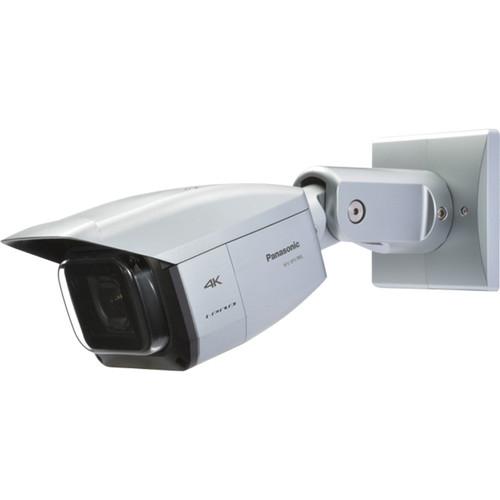 Contents of the user manual for the Panasonic 4K Vandal Resistant Weatherproof Network
- Product category: Wired IP Cameras Panasonic
- Brand: Panasonic
- Description and content of package
- Technical information and basic settings
- Frequently asked questions – FAQ
- Troubleshooting (does not switch on, does not respond, error message, what do I do if...)
- Authorized service for Panasonic Wired IP Cameras
|
User manual for the Panasonic 4K Vandal Resistant Weatherproof Network contain basic instructions
that need to be followed during installation and operation.
Before starting your appliance, the user manual should be read through carefully.
Follow all the safety instructions and warnings, and be guided by the given recommendations.
User manual is an integral part of any Panasonic product,
and if it is sold or transferred, they should be handed over jointly with the product.
Following the instructions for use is an essential prerequisite for protecting
health and property during use, as well as recognition of liability on the part of the manufacturer
for possible defects should you make a warranty claim. Download an official Panasonic user manual in which you will find instructions on how to install, use, maintain and service your product.
And do not forget – unsuitable use of a Panasonic product will considerably shorten its lifespan!
|
Product description The 4K Vandal Resistant Weatherproof Network Camera from Panasonic is a water- and dust-resistant fixed network camera. It shoots 4K (3,840 x 2,160) video at up to 30 fps and 12MP (4,000 x 3,000)images at up to 15 fps. It features an ultrawide x6 zoom lens with a 3-drive lens system, multiple H.264 (High profile) streams and JPEG streams to ensure simultaneous real time monitoring, and smart DoF (Depth of Field) to automatically optimize DoF to enhance focus for both near and far objects. Digital noise reduction and the high-sensitivity Day & Night (ICR) function allows video to be captured in various conditions.
The equipped IR LED makes it possible to take pictures at zero lux. VIQS (Variable Image Quality on Specified area) technology allows eight designated locations to retain higher image quality, while the excluded area will have decreased image quality. This feature allows for smaller files and a decreased bit rate
Alarm sources include a 3-terminal input, VMD, and Panasonic alarm command. These can trigger actions such as SDXC/SDHC/SD memory recording, FTP image transfer, email notification, indication on browser, alarm terminal output, and Panasonic alarm protocol output. - Electronic sensitivity enhancement
- Selectable light control modes
- 1x, 2x, 4x digital zoom controlled by browser
- VMD (Video Motion Detection) with 4 programmable detection areas, 15 sensitivity levels, and 10 detection sizes
- Privacy Zone can mask up to 8 private areas, such as house windows and entrances/exits
- Full duplex bi-directional audio allows interactive communication between camera site and monitoring site
- SDXC/SDHC/SD memory card slot for manual recording (H.264/JPEG), alarm recording (H.264/JPEG), and backup upon network failure (H.264/JPEG)
- Fog compensation function
- HLC (High Light Compensation) technology reduces strong light sources such as vehicle headlights to prevent camera being blinded
- SCC (Super Chroma Compensation) function for better color reproduction in low illumination
- IP66 rated water- and dust-resistant, compatible with IEC60529 measurement standard, Type 4X(UL50), NEMA 4X compliant
- Dehumidification device for use in various weather conditions
- Vandal resistant mechanism for high reliability (IK10)•
- Rain wash coating lens cover
In the Box Panasonic 4K Vandal Resistant Weatherproof Network Camera (Light Gray) 2 x Camera Mount Bracket Covers 3 x M3x6mm Screws Safety Wire and Lug 2 x M3x10mm Screws Waterproof Tape 4P Alarm Cable 2P Power Cable LAN Cable Cover Monitor Out Conversion Plug CD-ROM Code Label Protection Cover Adapter Box 5 x M5x20mm Screws M4x35mm Screws Limited 1-Year Warranty Guides & Manuals wrrryzzusyseyfrr Table of Contents
|
Upload User Manual
Have you got an user manual for the Panasonic 4K Vandal Resistant Weatherproof Network Camera in electronic form? Please send it to us and help us expand our library of instruction manuals.
Thank you, too, on behalf of other users.
To upload the product manual, we first need to check and make sure you are not a robot. After that, your "Submit Link" or "Upload File" will appear.
Download User ManualThe user manual for the Panasonic 4K Vandal Resistant Weatherproof Network Camera can be downloaded in PDF format at the link stated below.
Technical parametersPanasonic WV-SPV781L Specs | | | Image Sensor | 1/1.7 type MOS image sensor | | Effective Pixels | Approx. 12.4 MP | | Scanning Mode | Progressive scan | | Scanning Area (H x V) | .3" x .22" (7.40 mm x 5.55 mm | | Minimum Illumination | Color : 0.3 lux, BW : 0.04 lux, BW(with IR LED) : 0 lx (f/1.6, Maximum shutter : Off (1/30s), Gain : High), Color : 0.02 lx, BW 0.003 lx (f/1.6, Maximum shutter : Max. 16/30s, AGC : High) *1 | | IR LED | Off / Auto (High / Mid / Low) | | IR LED Range | Up to 98' (30 m) | | White Balance | ATW1 (2,700 - 6,000 K) /ATW2 (2,000 - 6,000 K) /AWC (2,000 - 10,000 K) | | Light Control Mode | Outdoor scene / Indoor scene (50 Hz) / Indoor scene (60 Hz)/ Fix shutter | | Shutter Speed | max. 1/1000 s, max. 1/500 s, max. 1/250 s, max. 1/120 s, max. 1/100 s, max. 2/120 s, max. 2/100 s, max. 1/30 s, max. 2/30 s, max. 4/30 s, max. 6/30 s, max. 10/30 s, max. 16/30 s
Off(1/30), 3/100, 3/120, 2/100, 2/120, 1/100, 1/120, 1/250, 1/500, 1/1000, 1/2000, 1/4000, 1/10000 | | Focal Length | 4.2 - 25.2mm | | Angular Field of View | [16 : 9 mode] Horizontal : 17 (TELE) - 97 ° (WIDE) Vertical : 9.4 (TELE) - 55 ° (WIDE) [4 : 3 mode] Horizontal : 18 (TELE) - 101 ° (WIDE) Vertical : (TELE) - 76 ° (WIDE) | | Maximum Aperture Ratio | 1 : 1.6 (WIDE) - 1 : 3.3 (TELE) | | Focusing Range | 1.0 m - ∞ | | | | Supported OS | Microsoft Windows 8.1, Microsoft Windows 8, Microsoft Windows 7, Microsoft Windows Vista | | Supported Browsers | Windows Internet Explorer 11 (32 bit), Windows Internet Explorer 10 (32 bit), Windows, Internet Explorer 9 (32 bit), Windows Internet Explorer 8 (32 bit), Windows Internet Explorer 7 (32 bit) | | | | Alarm Source | 3 terminals input, VMD, command alarm | | Alarm Actions | SDXC/SDHC/SD memory recording, E-mail notification, indication on browser, FTP image transfer, Panasonic protocol output | | Alarm Log | With SDXC/SDHC/SD memory card: 50,000 logs | | Schedule | Alarm / VMD / access permission / H.264 recording / scene file / FTP periodic image transmission | | | | Monitor Output | VBS: 1.0 V p-p / 75 Ohms, NTSC / PAL composite, RCA jack | | Microphone/Line Input | Microphone Input: Recommended applicable microphone: Plug-in power type
Supply voltage: 2.5 V ±0.5 V
Recommended sensitivity of microphone:-48 dB ±3 dB (0 dB=1 V/Pa, 1 kHz)
Line Input:
Input level: Approx. -10 dBV | | Audio Output | ø3.5 mm stereo mini jack
Output impedance: Approx. 600 Ohms (unbalanced) / Output level: -20 dBV | | External I/O Terminals | ALARM IN1 (DAY/NIGHT IN), ALARM IN2 (ALARM OUT), ALARM IN3 (AUX OUT, DAY/NIGHT OUT) | | | | Safety | UL (UL60950-1, UL60950-22), C-UL (CAN/CSA C22.2 No.60950-1), CE, IEC60950-1 | | EMC | FCC (Part15 ClassA), ICES003 ClassA, EN55023 ClassB, EN55022 ClassB, EN55024 | | Power Source and Consumption | DC12 V : 1050 mA / Approx. 12.6 W PoE (IEEE802.3af compliant) / PoE DC48 V: 265 mA / Approx. 12.95 W (Class 0 device) | | Ambient Operating Temperature | -49 F to 122° F (-45 C to +50°C | | Ambient Operating Humidity | 10 to 90 % (no condensation) | | Impact Protection | Compliant with IK10 (IEC 62262) | | Water and Dust Resistance | Main body: IP66 (IEC60529), Type 4X (UL50), NEMA 4X compliant | | Dimensions | When directly mounting the camera to a ceiling or wall 5.16 x 5.16 x 15 (131 x 130 x 380 mm) (D), with adapter box 5.16 x 5.16 x 15" (131 x 130 x 380 mm), Bracket: 5 x 5" (125 x 125 mm) | | Weight | When directly mounting the camera to a ceiling or wall : Approx. 5.73 lb (2.6 kg ), with adapter box : Approx. 6.82 lb (3.1 kg) |
Rating70% users recommend this product to others. And what about you?

This product has already been rated by 41 owners. Add your rating and experience with the product.
Discussion
 Ask our technicians if you have a problem with your settings,
or if anything is unclear in the user manual you have downloaded.
You can make use of our moderated discussion.
The discussion is public and helps other users of our website who may be encountering similar problems.
Ask our technicians if you have a problem with your settings,
or if anything is unclear in the user manual you have downloaded.
You can make use of our moderated discussion.
The discussion is public and helps other users of our website who may be encountering similar problems.
The discussion is empty - enter the first post
Post a new topic / query / comment:
|
|



