|
User Manual for Panasonic AJ-PD500 AVC-ULTRA P2 Recorder Click to enlarge the picture
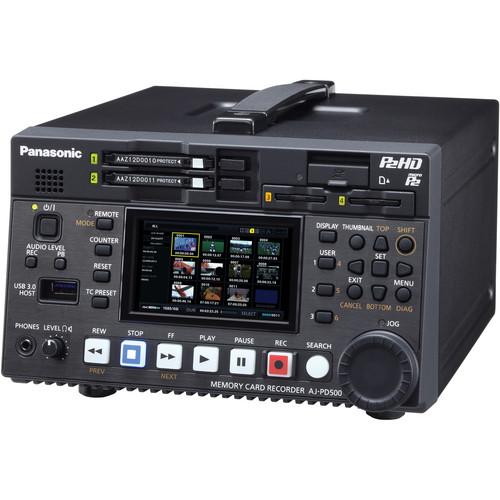 Contents of the user manual for the Panasonic AJ-PD500 AVC-ULTRA P2 Recorder
- Product category: Recorders & Duplication Panasonic
- Brand: Panasonic
- Description and content of package
- Technical information and basic settings
- Frequently asked questions – FAQ
- Troubleshooting (does not switch on, does not respond, error message, what do I do if...)
- Authorized service for Panasonic Recorders & Duplication
 |
User manual for the Panasonic AJ-PD500 AVC-ULTRA P2 Recorder contain basic instructions
that need to be followed during installation and operation.
Before starting your appliance, the user manual should be read through carefully.
Follow all the safety instructions and warnings, and be guided by the given recommendations.
User manual is an integral part of any Panasonic product,
and if it is sold or transferred, they should be handed over jointly with the product.
Following the instructions for use is an essential prerequisite for protecting
health and property during use, as well as recognition of liability on the part of the manufacturer
for possible defects should you make a warranty claim. Download an official Panasonic user manual in which you will find instructions on how to install, use, maintain and service your product.
And do not forget – unsuitable use of a Panasonic product will considerably shorten its lifespan!
|
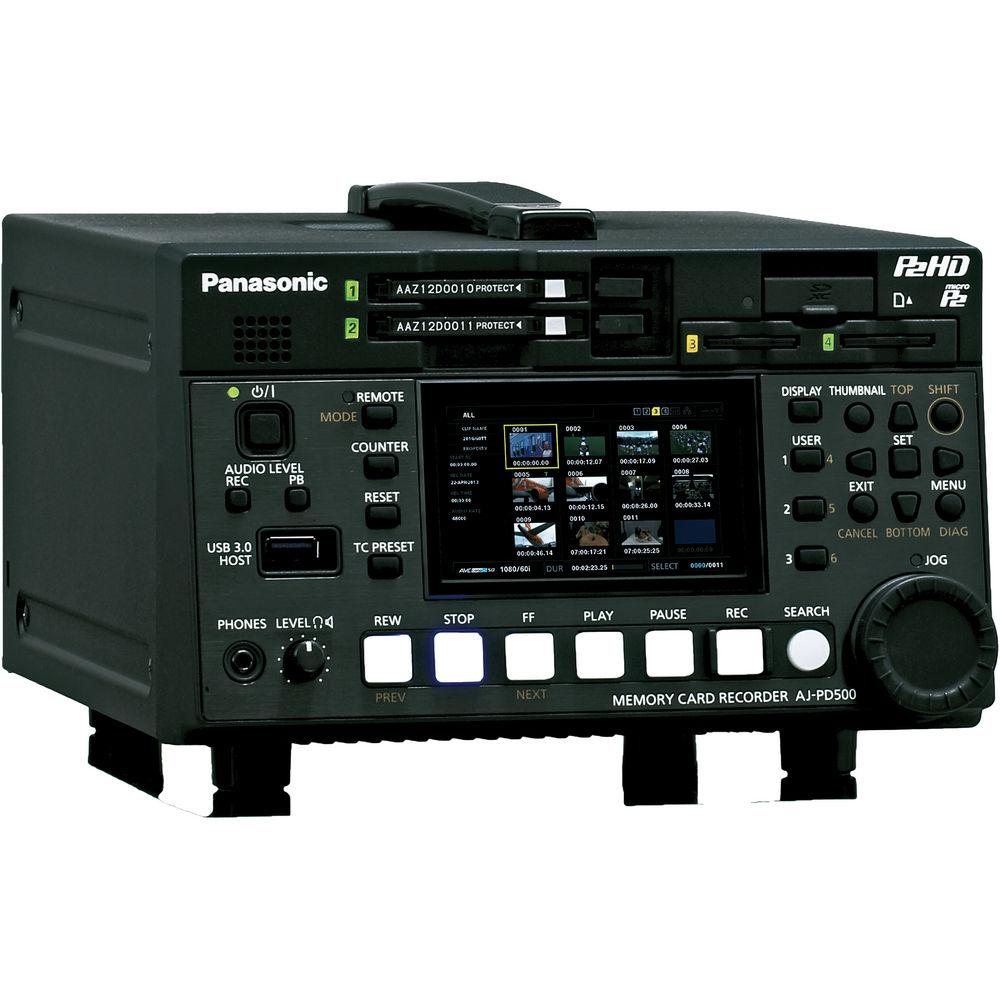
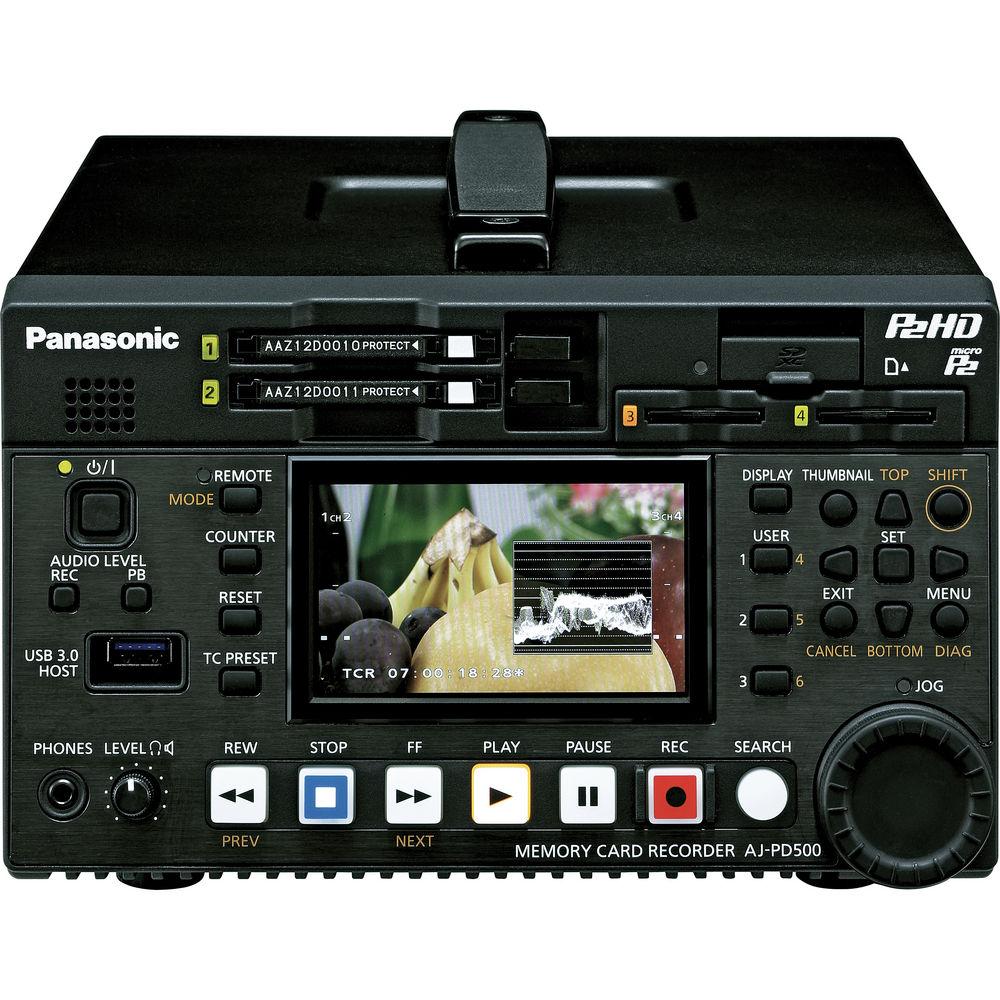
Product description The Panasonic AJ-PD500 AVC-ULTRA P2 Recorder is an HD-SDI and SD-SDI recording system with slots for two P2 and two MicroP2 memory cards. It can record in a number of AVC-ULTRA codecs at up 1080p60 resolution, with 4:2:2 chroma sub-sampling and 10-bit color. It is a flexible recorder that can be deployed in a number of production contexts These may include house of worship, production, post-production, long-form documentaries, live event systems, satellite facilities, reality television, news trucks, or to serve as a redundant playback and recording device in news facilities.
Among the AVC-ULTRA codecs the AJ-PD500 supports are AVC-Intra100 and Intra50, which are I-frame only codecs that are designed to provide "master quality" recordings with minimal quality loss due to compression and are ideal when extensive color correction or other post-production manipulations is anticipate down the road. For more efficient compression while still minimizing visible quality loss, the recorder offers AVC-LongG50 and AVC-LongG25, which use inter-frame compression similar to AVCHD but offering 4:2:2 and 10-bit color. In addition, a future upgrade from Panasonic will allow the AJ-PD500 to record in AVC-Intra200 for an ever high level of "master" quality recording as well as AVC-LongG12 and AVC-LongG6 for extended recording times where quality is less of a concern or where the footage will not be exposed to much color correction or other forms of generational quality loss.
For client applications where a reference copy of the footage is required, the AJ-PD500 can record a proxy file simultaneously with, or instead of, the master copy. The proxy is recorded in H.264 compression using either an .MP4 or .MOV wrapper with bit rates range from up to 3.5 Mb/s down to 800 Kb/s. For compatibility with older P2 and DV equipment, the recorder also supports DVCPRO HD, DVCPRO50, DVCPRO, and DV codecs.
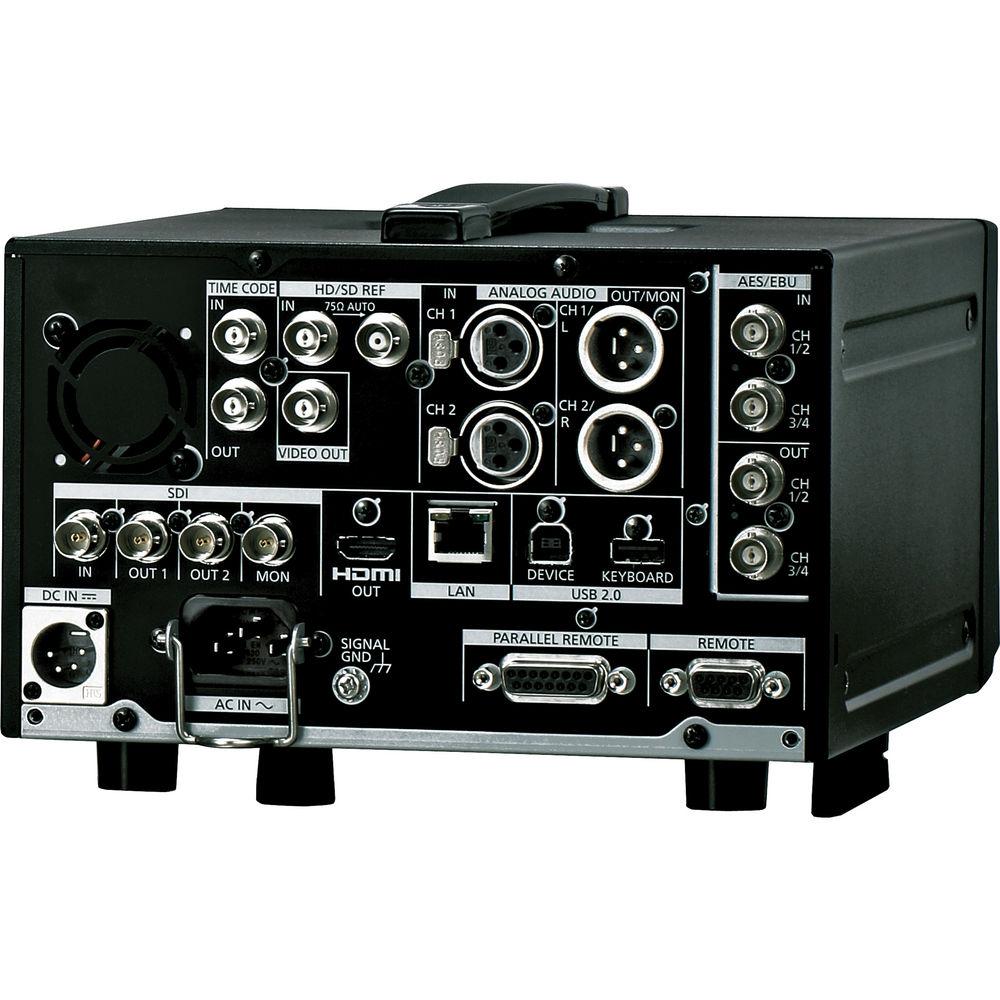
Video can come from a variety of SD and HD sources. The AJ-PD500 features an HD-SDI/SD-SDI digital video input with embedded audio, two AES/EBU digital audio inputs, two XLR analog audio inputs, timecode in and out, and reference in and through. It features a total of three HD-SDI/SD-SDI outputs with embedded audio; two are intended for the program feed, and one is for a local preview monitor. It also has an HDMI output so that a consumer grade display such as an HDTV or computer monitor can be used as a cost-effective alternative to a broadcast monitor. There is also a composite monitor out for legacy analog production monitors. Finally, it features two AES/EBU digital audio outputs and two XRL analog audio outputs.
The AJ-PD500 features a 3.5" display and front panel buttons allowing you to access the menu settings, manage files, and edit metadata. A jog/shuttle control allows you to scrub through footage on playback and also provides a means of navigate the menu system. For integration with editing systems, it features an RS-422A remote port exposing deck controls to NLE software and also an Ethernet port allowing the recorder to be operated remotely across a network.
A USB 3.0 port allows the AJ-PD500 to act as a host for an external hard drive or SSD drive. This allows you to transfer footage to and from the P2 cards without using a computer as an intermediary so that you can easily distribute copies to the clients or the production team. In addition, the USB 3.0 port can be used to connect a keyboard to make it easier to enter metadata. A USB 2.0 type B "printer port" is also provided so you can connect the recorder directly to a computer. - SDI inputs and outputs support native 1080p 24PsF signals
- Supports 3G-SDI for up to 1080p60, 10-bit video signals in or out
- HD-SDI input allows recording of 8 or 10-bit SD or HD content from a wide range of Panasonic and non-Panasonic cameras as well as the ability to back up data onto external hard disk drives
- HDMI output allows you to monitor video an array of consumer playback devices, including video projectors, digital televisions, and computer monitors
- 24-bit audio recording support in AVC-Intra and AVC-LongG
- Can powered internationally from 100 to 240V, 50 or 60 Hz mains AC power, or from 12V DC field sources such as professional video battery systems
- Autodetects HD and SD content without requiring an adjustment be made in the menu
- Gibabit Ethernet port provides device control over a network as well as FTP file transfer as well as other network-based features that can be added via a future upgrade option
- 3.5-inch, 16:9 LCD screen allowing you to manage clip files and metadata
- RS-422A port and a GPIO parallel port expose standard deck controls to nonlinear editing and color correction systems as well as remote controls
- Timecode in and out and reference sync passthrough ports for synchronization with other equipment in your production
- Equipped with a headphone jack and mono speaker
- Optional AJ-YCX500G encoder board, sold separately, provides playback of AVCHD content
UPC: 885170131224 In the Box Panasonic AJ-PD500 AVC-ULTRA P2 Recorder AC Cable Limited 1-Year Warranty Table of Contents
|
Upload User Manual
Have you got an user manual for the Panasonic AJ-PD500 AVC-ULTRA P2 Recorder in electronic form? Please send it to us and help us expand our library of instruction manuals.
Thank you, too, on behalf of other users.
To upload the product manual, we first need to check and make sure you are not a robot. After that, your "Submit Link" or "Upload File" will appear.
Technical parametersPanasonic AJ-PD500 Specs | | | Recording Media | P2 card, microP2 card | | Supported Signals | 1920 x 1080: 59.94p, 50p, 59.94i, 50i, 29.97p, 25p, 24p, 23.98p
1280 x 720: 59.94p, 50p
720 x 480: 59.94i
720 x 576: 50i | | Compression | AVCULTRA:
AVC-Intra100 / AVC-Intra50
AVC-LongG50 / AVC-LongG25
DVCPRO HD
DVCPRO50 / DVCPRO
DV Compression
AVC-Intra200, AVC-LongG12, and AVC-LongG6 via future upgrade option
Proxy:
Using MP4 and MOV wrappers:
MPEG4 Simple Profile
H.264/AVC Baseline Profile
H.264/AVC High Profile | | Supported Resolutions | AVC-Intra100 / AVC-LongG50 / AVC-LongG25:
1920 x 1080: 59.94i, 1080/50i
1280 x 720: 59.94p, 50p
AVC-Intra100 / AVC-LongG25:
1920 x 1080: 59.94p, 50p
AVC-Intra50:
1440 x 1080: 59.94i, 50i
960 x 720: 59.94p, 50p
Proxy:
STD 2CH MP4: 320 x 240 (QVGA)
LOW 2CH MOV: 1080i mode: 480 x 270, 480-59.94i mode: 352 x 240, 576-50i mode: 352 x 288, 1080 60/50p mode: 320 x 180, 1080 30/25/24p mode: 480 x 270, 720 60/50p mode: 320 x 180, 720 30/25/24p mode: 480 x 270
HQ 2CH MOV: 640 x 360
HQ 4CH MOV: 640 x 360
SHQ 2CH MOV: 960 x 540 | | Recording Time | Per 64 GB Card:
AVC-Intra100/DVCPRO HD: Approximately 64 minutes
AVC-Intra50/AVC-LongG/DVCPRO 50: Approximately 128 minutes
AVC-LongG25/DVCPRO DV: Approximately 256 minutes | | | | Compression | AVC-Intra100/AVC-Intra50:
48 kHz: 24-bit, 8 channels or 16-bit, 8 channels
AVC-LongG50/AVC-LongG25:
48 kHz: 24-bit, 8 channels
DVCPRO HD:
48 kHz: 16-bit, 8 channels
DVCPRO 50/DVCPRO:
48 kHz: 16-bit, 4 channels
Proxy:
AAC-LC, Linear PCM | | Headroom | 12 dB / 18 dB / 20 dB - selectable | | De-Emphasis | T1=50 µs, T2=15 µs - auto, on, off selectable | | | | Inputs | 1 x HD-SDI/SD-SDI on BNC connector
2 x AES/EBU audio on BNC connector
2 x XLR audio connector
1 x Timecode on BNC connector 1 x Reference on BNC connector | | Outputs | 2 x HD-SDI/SD-SDI on BNC connector
1 x HD-SDI/SD-SDI monitor output on BNC connector
1 x Composite monitor output on BNC connector
1 x HDMI
2 x AES/EBU audio on BNC connector
2 x XLR audio connector
1 x Stereo headphone out on 3.5 mm mini-jack connector
1 x Reference through on BNC connector 1 x Timecode on BNC connector | | Remote | 1 x RS-422A on 9-pin D-sub connector
1 x GPIO on 15-pin D-sub connector
1 x Ethernet on RJ-45 connector | | USB | 1 x USB 3.0 on type A connector to host SSD/hard drive
1 x USB 2.0 on type B connector for device/computer interface | | | | Internal Speakers | Yes, monaural | | Power Consumption | 45 W | | Power Requirements | DC: 12 VDC / 3.6 A
AC: 100 - 240 VAC / 50 or 60 Hz | | Operating Temperature | 32 - 104 °F / 0 - 40 °C | | Rack Size | 3 RU, half-rack | | Dimensions (W x H x D) | 8.2 x 5 x 10" / 21 x 12.6 x 25.3 cm | | Weight | 8.1 lb / 3.7 kg | | | | Package Weight | 11.6 lb | | Box Dimensions (LxWxH) | 14.7 x 11.6 x 11.6" |
Rating70% users recommend this product to others. And what about you?

This product has already been rated by 91 owners. Add your rating and experience with the product.
Discussion
 Ask our technicians if you have a problem with your settings,
or if anything is unclear in the user manual you have downloaded.
You can make use of our moderated discussion.
The discussion is public and helps other users of our website who may be encountering similar problems.
Ask our technicians if you have a problem with your settings,
or if anything is unclear in the user manual you have downloaded.
You can make use of our moderated discussion.
The discussion is public and helps other users of our website who may be encountering similar problems.
The discussion is empty - enter the first post
Post a new topic / query / comment:
|
|
|
| Request for user manual |
You can’t find the operation manual you are looking for? Let us know and we will try to add the missing manual:
I’m looking for a manual / Request for manual
Current requests for instruction manuals:
Call Of Duty World War Two For Xbox...
controller stratus XL...
stratus XL...
smart whatch serie S11 42mm...
Allen & Heath SQ-6 manual...
|
| Discussion |
Latest contributions to the discussion:
AEW R 4100
Name: MAURICIO ANGARITA
Audio-Technica AEW-R4100 UHF Diversity Receiver for
AEW R 4100 has the mute function blocked and does not allow audio to pass. I tried several times to turn off the mute from the transmitter but it does nothing, the mute stays on. Solution?
Thank you...
Instructions for assembling the 2015 Forecast Image Master Consoles GC3-A
Name: mike elam
Forecast Consoles GC3-A ImageMaster Editing Console
Looking for instructions for assembling this console. ...
EMPTY TONER ERROR MESSAGE AFTER REPLACING TONER
Name: LINDA BAD YELLOW EYES
Brother TN223BK Standard-Yield Toner
I HAD TO CHANGE OUT ALL THREE TONERS DUE TO LEAKS IN THE YELLOW AND CYAN. AFTER I REPLACED THEM, THE MACHINE KEEPS GIVING ME AN EMPTY TONER ERROR MESSAGE. HELP!!...
PS480D 20/24 pin Switching 480W Power Supply
Name: swkargo
Logisys 480W Power Supply
This item states in can run -5vdc .It is NOT listed on the board or I beleive is r4 is missing the resitior. Any body have thid issue. Shawn
...
Help needed
Name: Ann Carter
SanDisk 1TB Extreme Portable USB 3.1
When I click the link to download the user manual for my Sandisk Extreme external hard drive, it gives me the manual for the LG Cricket. Can you please change the link so I can download the Sandisk manual and begin using this drive? Thank you....
|
|


