|
User Manual for Panasonic AJ-PG50 Portable P2 Memory Card Recorder Click to enlarge the picture
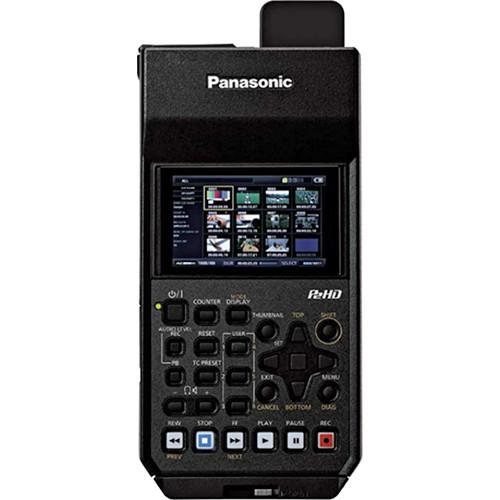 Contents of the user manual for the Panasonic AJ-PG50 Portable P2 Memory Card
- Product category: Recorders & Duplication Panasonic
- Brand: Panasonic
- Description and content of package
- Technical information and basic settings
- Frequently asked questions – FAQ
- Troubleshooting (does not switch on, does not respond, error message, what do I do if...)
- Authorized service for Panasonic Recorders & Duplication
 |
User manual for the Panasonic AJ-PG50 Portable P2 Memory Card contain basic instructions
that need to be followed during installation and operation.
Before starting your appliance, the user manual should be read through carefully.
Follow all the safety instructions and warnings, and be guided by the given recommendations.
User manual is an integral part of any Panasonic product,
and if it is sold or transferred, they should be handed over jointly with the product.
Following the instructions for use is an essential prerequisite for protecting
health and property during use, as well as recognition of liability on the part of the manufacturer
for possible defects should you make a warranty claim. Download an official Panasonic user manual in which you will find instructions on how to install, use, maintain and service your product.
And do not forget – unsuitable use of a Panasonic product will considerably shorten its lifespan!
|
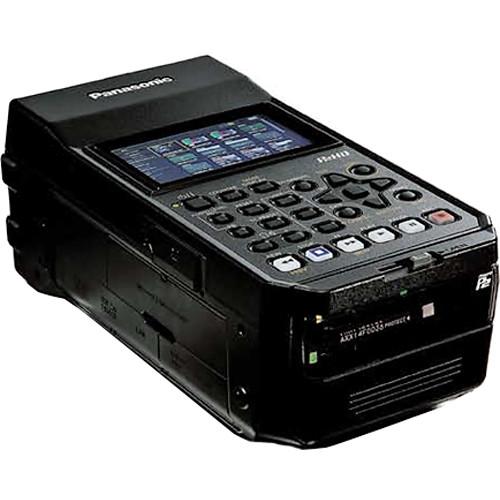
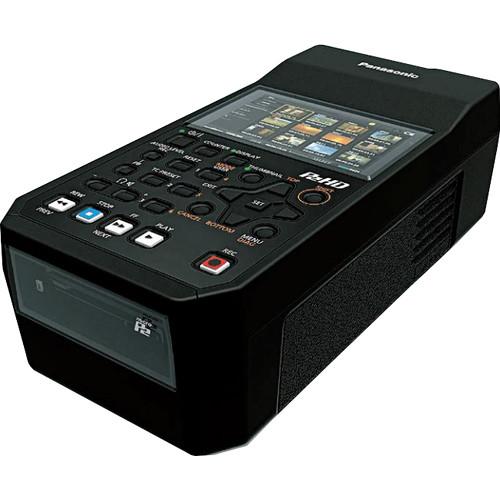
Product description The Panasonic AJ-PG50 Portable P2 Memory Card Recorder is a compact, lightweight field recorder and deck that supports the AVC-ULTRA family of codecs. It records up to 1080p 59.94/50 video to microP2 and P2 memory cards, and features HDMI, 3G-SDI, and analog inputs/outputs for connecting to a wide range of video and audio devices. This makes the AJ-PG50 an ideal solution for backup recording, monitoring, previewing, file copying, and many other critical field uses. Video can be monitored and played back on a built-in 3.5" LCD screen, which is equipped with waveform and vectorscope display functions. For use in the field, the recorder can be powered using an included 5800mAh battery pack, which provides approximately 180 minutes of continuous playback time.
With the AVC-Ultra codec family, you can select the image quality and bit-rate to match the application at hand. Select AVC-Intra for optimum quality, AVC-LongG for high-quality at lower bit-rates, or even DVCPRO codecs for fitting into existing workflows. You can also simultaneously record AVC-Proxy files along with your higher quality files, for low bit-rate proxies and easier web upload, or efficient offline editing.
The AJ-PG50 has a high-speed USB 3.0 (Host) interface for transferring and backing up files to an external storage device and previewing externally stored files. The recorder also provides a standard RJ-45 Ethernet port for wired connection to a LAN for remote control and transferring files to a network. An optional Wi-Fi module is available for wirelessly connecting to a computer, tablet, or smartphone. - AVC-ULTRA Codec Support
- The AJ-PG50 supports the AVC-ULTRA family of codecs, letting you select the image quality and bit-rate to match your needs.
AVC-Intra: Intra-frame compression at either 100 or 50 Mbps.
AVC-LongG: Uses inter-frame compression to achieve high-quality HD recording at a low bit rate. Three bit rates are available: 50, 25, and 12 Mbps.
AVC-Proxy: Low bit-rate, high-sound quality proxy video (QuickTime/H.264) can be recorded simultaneously with main video. Ideal for data transfer over a network and efficient offline editing.
In addition to AVC-ULTRA, the AJ-PG50 also supports DVCPRO HD, DVCPRO50, DVCPRO, and DV recording formats. - microP2 Card Slots
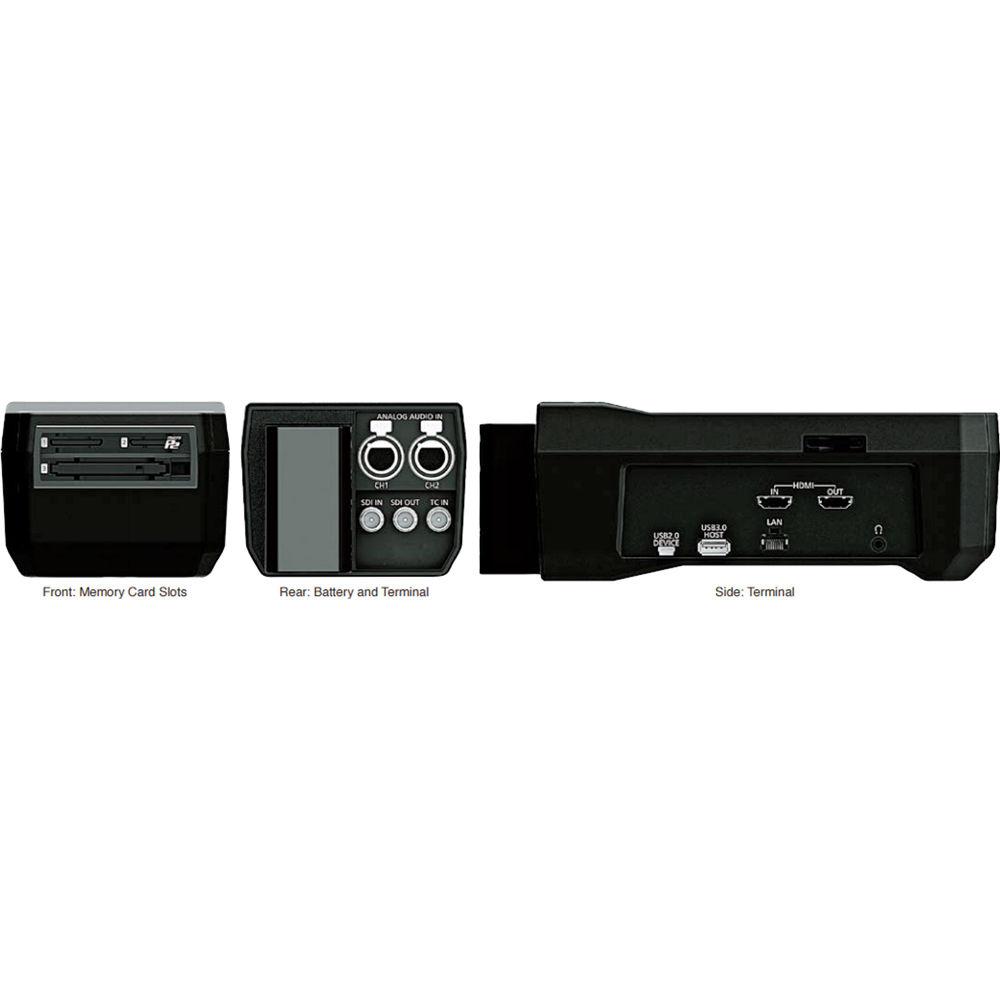
- The recorder has three memory card slots; two for microP2 cards, and one for full-sized P2 cards. While inheriting the high reliability of P2 cards, microP2 cards are scaled-down to match the size of SD memory cards. Files can be copied between a microP2 card and a P2 card, but you cannot simultaneously record to both types of cards.
- Multi-Functional Recording
- Simultaneous Rec: Records simultaneously onto two microP2 cards for redundant files.
Dual Codec Rec: Records the main video data with an AVC-Intra or AVC-LongG codec, while simultaneously recording proxy video data at a low bit-rate.
Hot-Swap Rec: The two microP2 card slots enable uninterrupted recording, and also allows switching of the active card slot and changing of card while recording.
Auto Rec: Automatically starts recording according to the SDI/HDMI video signal input.
Loop Rec: Maintains a recording of a certain time period through repeated loop recording; records over older images once memory card becomes full.
Text Memo: Up to 100 memos can be posted onto a clip as bookmarks.
Shot Marker: Used to mark clips as OK, Not Good, etc.
CC Rec:Records the closed caption signal via the SD-SDI input.
Metadata: Data with information such as operator's name, shooting location, and text memos can be added via an SD memory card. - Inputs/Outputs
- The recorder features 3G-SDI and HDMI inputs/outputs for connecting to a wide range of professional and consumer devices. Both connection types support time code input and Rec Start/Stop trigger with compatible cameras. For audio, the AJ-PG50 has two XLR inputs (CH1 and CH2), an analog audio out, and headphone output jack. Audio can also be monitored from the built-in front speaker.
- 3.5" LCD with Waveform and Vectorscope
- Thumbnail Display: Thumbnail images can be freely arranged for display, allowing instant playback, deletion, or copying of selected clips.
Image Full-Screen Display: Allows use as a recording or preview monitor/
Waveform/Vectorscope: Waveform and vectorscope can be displayed for the playback or input video signal on the LCD monitor. It can also display on HDMI output and SDI output.
4:3 Marker: A 4:3 marker can be displayed on the 16:9 LCD screen. - Playback Functions
- PB Position Selection: Allows selection of the playback start position when playing back from a thumbnail. The start position can be selected from three options: the end of the previous playback, the time code of the thumbnail position, and the beginning of the clip.
Repeat Playback: Plays back selected clip or clips repeatedly.
Down-conversion: Down-converts HD to SD and outputs SD signal. There are three aspect ratio conversion modes (FIT-V, FIT-H, FIT-HV) to choose from. - USB 3.0 Transfer Interface
- USB 3.0 (Host): For transferring files from the microP2/P2 cards to external storage drives up to 2TB. It can also connect an ordinary USB keyboard for easy metadata text input.
USB 2.0 (Device): Device mode allows you to use the recorder as a P2 card drive for a computer.
Playback: P2 .mxf files on an external storage can be displayed as thumbnails and played back. The audio playback is uninterrupted by slow hard disk performance, or when vibration temporarily delays data reading. - Wired/Wireless LAN Functions
- A standard LAN (Ethernet) port allows network connection for proxy preview, remote control, and file transfer. By adding the optional AJ-WM30 Wireless Module, the AJ-PG50 gains wireless LAN connectivity to computers, tablets, and smartphones.
Proxy Preview: Plays back proxy AVC-Proxy files, downloads file/clip information, displays and allows editing of metadata, and enables addition/deletion of shot marks and text memos.
Remote: Allows remote control of recording start/stop, time code setting, and bit-rate setting.
File Transfer: The FTP client function lets you transfer clips from the recorder to a network.
Playlist Editing: Playlists can be created using proxy video with a computer or tablet. The workflow can be streamlined and faster by rough editing location, and then transferring the content files. Editing, saving, playback, and SDI output of a playlist as well as EditCopy can be performed using the web app. (Note: EditCopy does not support AVC-LongG) - Video Streaming
- The AJ-PG50 is capable of proxy streaming via a wired/wireless LAN connection. There are four streaming modes (LOW, HQ, SHQ, and AVC-G6), so the most suitable mode can be selected according to the line condition and application.
- Battery Powered
- The AJ-PG50 is powered by a 5800mAh battery pack, which mounts to the back of the unit and provides approximately 170 minutes of continuous playback time. It can also be plugged into a wall outlet using the included AC adapter.
- Additional Features
-
- AVC-Intra and AVC-LongG codecs support 24-bit/48 kHz 4-channel digital audio recording
- 6 user-assignable function buttons; user file containing the settings can be saved onto an SD/SDHC/SDXC card
- Compact and lightweight design
- Weighs only 2.4 lb
UPC: 885170226920 In the Box Panasonic AJ-PG50 Portable P2 Memory Card Recorder VW-VBD58 Battery Pack (7.2V, 5800mAh) ydadxwswwycbecfztvty Battery Charger/Cable AC Adapter/Cable Limited 1-Year Warranty Table of Contents
|
Upload User Manual
Have you got an user manual for the Panasonic AJ-PG50 Portable P2 Memory Card Recorder in electronic form? Please send it to us and help us expand our library of instruction manuals.
Thank you, too, on behalf of other users.
To upload the product manual, we first need to check and make sure you are not a robot. After that, your "Submit Link" or "Upload File" will appear.
Technical parametersPanasonic AJ-PG50 Specs | | | Media | 2 x microP2 memory card slots
1 x P2 memory card slot | | Recording Formats | AVC-Intra100 (4:2:2, 10-bit):
1920 x 1080p 59.94/50 (3G-SDI)
1920 x 1080i 59.94/50
1280 x 720p 59.94/50
AVC-Intra50 (4:2:0, 10-bit):
1440 x 1080i 59.94/50
960 x 720p 59.94/50
AVC-LongG50 (4:2:2, 10-bit):
1920 x 1080i 59.94/50
1280 x 720p 59.94/50
AVC-LongG25 (4:2:2, 10-bit):
1920 x 1080p 59.94/50 (3G-SDI)
1920 x 1080i 59.94/50
1280 x 720p 59.94/50
AVC-LongG12 (4:2:0, 8-bit):
1920 x 1080p 59.94/50 (3G-SDI)
1920 x 1080i 59.94/50
1280 x 720p 59.94/50
DVCPRO HD (4:2:2 8-bit):
1920 x 1080i 59.94/50
1280 x 720p 59.94/50
DVCPRO 50 (4:2:2, 8-bit):
480/59.94i
576/50i
DVCPRO/DV (4:1:1, 8-bit):
480/59.94i
576/50i
| | Video Compression | AVC-Intra100/50: MPEG-4 AVC/H.264 Intra Profile
AVCLongG50/25/12: MPEG-4 AVC/H.264 High Profile
DVCPRO HD: DV-Based Compression (SMPTE ST 370) | | Proxy Video Format | LOW 2CH MOV:
Resolution: 480 x 270 (1080i mode), 320 x 180 (1080p mode)
Codec: H.264 Baseline Profile
Bit Rate: 800 kbps
Audio: AAC-LC, 2 CH, 64 kbps
HQ 2CH MOV:
Resolution: 640 x 360
Codec: H.264 High Profile
Bit Rate: 1500 kbps
Audio: AAC-LC, 2 CH, 64 kbps
SHQ 2CH MOV:
Resolution: 960 x 540
Codec: H.264 High Profile
Bit Rate: 3500 kbps
Audio: Linear PCM, 2 CH, 768 kbps
AVC-G6 2CH MOV:
Resolution: 1920 x 1080
Codec: H.264 High Profile
Bit Rate: 6 Mbps
Audio: AAC-LC, 2 CH, 64 kbps
| | Record Time | AVC-Intra100/DVCPRO HD: Approx. 64 min. on 64 GB card
AVC-LongG50/AVC-Intra50/DVCPRO 50: Approx. 128 min. on 64 GB card
DVCPRO: Approx. 256 min. on 64 GB card
AVC-LongG25: Approx. 220 min. on 64 GB card
AVC-LongG12: Approx. 440 min. on 64 GB card | | | | Video Input | 1 x 3G/HD/SD-SDI, BNC
1 x HDMI, (Type A HDCP supported; VIERA Link not supported) | | Video Output | 1 x 3G/HD/SD-SDI, BNC
1 x HDMI, (Type A HDCP supported; VIERA Link not supported) | | Digital Audio | Sampling Frequency: 48 kHz (synchronized with video)
Quantization: 16-bit (AVC-LongG12/DVCPRO HD/DVCPRO50/DVCPRO/DV), 16/24-bit selectable (AVC-Intra 100/AVC-Intra 50), 24-bit (AVC-LongG50/AVC-LongG25)
Headroom: 12/18/20 dB (selectable)
De-emphasis: T1=50 μs, T2=15 μs (ON/OFF auto select) | | Audio Input | 2 x XLR (CH 1 and CH 2)
1 x SDI, BNC
1 x HDMI, Type A, 2-channels (Linear PCM), 16-bit | | Audio Output | 1 x SDI, BNC
1 x HDMI, Type A, 2-channels (Linear PCM), 16-bit
1 x Analog output (L/R), 3.5 mm Stereo mini jack
1 x headphone output, 3.5 mm Stereo mini jack
1 x Internal speaker, monaural | | Time Code | 1 x BNC, 0.5 V[p-p] to 8.0 V[p-p], 10 kΩ | | LAN | 1 x RJ-45, 100BASE-TX/10BASE-T | | USB Interface | 1 x USB 3.0 (Host), Type A
1 x USB 2.0 (Device), Type B | | | | Power Supply | 7.2 VDC (during battery use)
12 VDC (during AC adapter use) | | Power Consumption | 21.4 W | | Operating Temperature | 32 to 104°F (0 to 40°C) | | Operating Humidity | 10% to 80% (non-condensing) | | Storage Temperature | -4 to 122°F (-20 to 50°C) | | Dimensions | 4.3 x 3.3 x 8.5" (10.8 x 8.5 x 21.7 cm) (excluding the foot parts and protrusions such as the cap) | | Weight | 2.4 lb (1.1 kg) | | | | Package Weight | 5.65 lb | | Box Dimensions (LxWxH) | 14.0 x 10.7 x 7.8" |
Rating90% users recommend this product to others. And what about you?

This product has already been rated by 76 owners. Add your rating and experience with the product.
Discussion
 Ask our technicians if you have a problem with your settings,
or if anything is unclear in the user manual you have downloaded.
You can make use of our moderated discussion.
The discussion is public and helps other users of our website who may be encountering similar problems.
Ask our technicians if you have a problem with your settings,
or if anything is unclear in the user manual you have downloaded.
You can make use of our moderated discussion.
The discussion is public and helps other users of our website who may be encountering similar problems.
The discussion is empty - enter the first post
Post a new topic / query / comment:
|
|
|
| Request for user manual |
You can’t find the operation manual you are looking for? Let us know and we will try to add the missing manual:
I’m looking for a manual / Request for manual
Current requests for instruction manuals:
Call Of Duty World War Two For Xbox...
controller stratus XL...
stratus XL...
smart whatch serie S11 42mm...
Allen & Heath SQ-6 manual...
|
| Discussion |
Latest contributions to the discussion:
AEW R 4100
Name: MAURICIO ANGARITA
Audio-Technica AEW-R4100 UHF Diversity Receiver for
AEW R 4100 has the mute function blocked and does not allow audio to pass. I tried several times to turn off the mute from the transmitter but it does nothing, the mute stays on. Solution?
Thank you...
Instructions for assembling the 2015 Forecast Image Master Consoles GC3-A
Name: mike elam
Forecast Consoles GC3-A ImageMaster Editing Console
Looking for instructions for assembling this console. ...
EMPTY TONER ERROR MESSAGE AFTER REPLACING TONER
Name: LINDA BAD YELLOW EYES
Brother TN223BK Standard-Yield Toner
I HAD TO CHANGE OUT ALL THREE TONERS DUE TO LEAKS IN THE YELLOW AND CYAN. AFTER I REPLACED THEM, THE MACHINE KEEPS GIVING ME AN EMPTY TONER ERROR MESSAGE. HELP!!...
PS480D 20/24 pin Switching 480W Power Supply
Name: swkargo
Logisys 480W Power Supply
This item states in can run -5vdc .It is NOT listed on the board or I beleive is r4 is missing the resitior. Any body have thid issue. Shawn
...
Help needed
Name: Ann Carter
SanDisk 1TB Extreme Portable USB 3.1
When I click the link to download the user manual for my Sandisk Extreme external hard drive, it gives me the manual for the LG Cricket. Can you please change the link so I can download the Sandisk manual and begin using this drive? Thank you....
|
|


