User Manual for Panasonic AV-HS410 HD SD Multi-Format Live Switcher Click to enlarge the picture
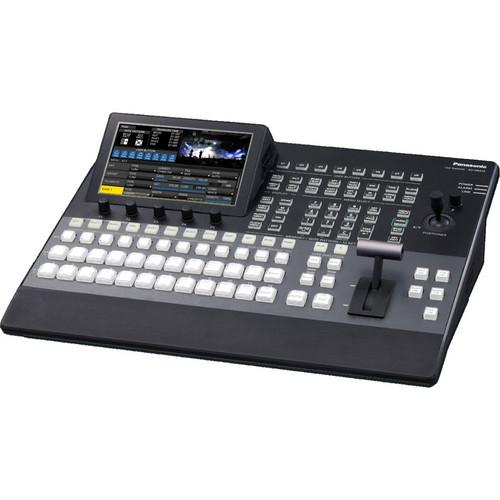 Contents of the user manual for the Panasonic AV-HS410 HD SD Multi-Format Live
- Product category: Production Switchers Panasonic
- Brand: Panasonic
- Description and content of package
- Technical information and basic settings
- Frequently asked questions – FAQ
- Troubleshooting (does not switch on, does not respond, error message, what do I do if...)
- Authorized service for Panasonic Production Switchers
|
User manual for the Panasonic AV-HS410 HD SD Multi-Format Live contain basic instructions
that need to be followed during installation and operation.
Before starting your appliance, the user manual should be read through carefully.
Follow all the safety instructions and warnings, and be guided by the given recommendations.
User manual is an integral part of any Panasonic product,
and if it is sold or transferred, they should be handed over jointly with the product.
Following the instructions for use is an essential prerequisite for protecting
health and property during use, as well as recognition of liability on the part of the manufacturer
for possible defects should you make a warranty claim. Download an official Panasonic user manual in which you will find instructions on how to install, use, maintain and service your product.
And do not forget – unsuitable use of a Panasonic product will considerably shorten its lifespan!
|
Product description The Panasonic AV-HS410 HD / SD Multi-Format Live Switcher is a video production switcher boasting high performance and functionality in a compact form factor. Its intuitive user interface is designed for live production, while its plug-in compatibility makes for simple expansion. Nine standard inputs, including eight SDI and one DVI, and six standard outputs, including five SDI and one DVI, are present on the unit. You can add an additional four inputs and four outputs (not included). The integrated 7.0" (17.8 cm) multi-mode color LCD monitor shows versatile menus, an image monitor, waveform / vectorscope and more.
High-quality Primatte chroma keying and versatile transitions, including DVE functions, are available to you, as well. An enhanced MultiViewer Display with as many as 16 splits allows for 9 screen variations, a clock, a level meter and 4:3 marker display. The switcher's Video Memory function allows playback of 2 channels of still images or video, while the Memory Preview function offers previews of shot memory and event memory image effects. The AV-HS410 supports Plug-in API functionality for external control, external camera control, output of status data, and more. You'll also find a control panel with extra direct button control, a numeric keypad and more, letting you enjoy even greater ease of use. HD/SD Multi-Format Support - Supports standard HD / SD multi-format, including 1080 / 24PsF
- System frequency is 59.94 / 50 / 24 Hz switchable, making the AV-HS410 perfect for digital cinema production and worldwide operation
- A broad array of optional boards (not included) permits the input and output of analog component and various other signals
Various Switching Functions, High Image Quality, Intuitive User Interface - Built-In Frame Synchronizer For All Input Channels
- Each input channel boasts an integrated frame synchronizer for use in switching unsynchronized video signals. A gen-lock function also provides support for the synchronization of systems based on external sync signals (black burst or tri-level)
- Up-Converter, Dot By Dot And Video Processing
- The AV-HS410 comes with an SD / HD up-converter function for 4 inputs, as well as a dot by dot function for 8 inputs. The dot by dot input may be utilized for P-in-P display of high-definition images from standard definition footage with no degradation. There's also a video processing function with color correction for 8 inputs
- 4 Aux Buses And 2 P-In-P
- Four Aux and two P-in-P buses are provided. Borders and software effects are applicable to the P-in-P buses. The bus transition function (P-in-P bus and Aux bus switching effect) allows for a Cut transition as well as a Mix transition (Aux 1 only). Versatile operation is achieved via the combination of Aux buses and M/E sections
- Versatile Transitions And Effects
- Standard wipe, mix and cut effects are included, as are DVE transition patterns using 2 channels, like reduce, slide, squeeze and 3D wipe. You can also elect circle wipe and page turn
- New Video Memory Function For 2 Inputs
- You can save dual inputs for still (STILL) or moving (CLIP) images in Video Memory, and can also select them as bus footage. Videos may be recorded and played with key signals for a maximum of roughly 20 sec / 600 frames with 59.94i. Video and still image files are also transferrable over a LAN network from an SDHC / SD Memory Card or PC.
Please note: Uploading of video and still images from an Ethernet LAN will be supported in the future - SDHC / SD Memory Card Slot
- Video memory, shot memory, event memory and set-up data may all be saved to SDHC / SD memory cards (not included)
- Primatte High-Quality Chroma Key
- Enjoy linear, luminance and chroma keying, the last of which uses the Primatte algorithm, widely employed as a plug-in for nonlinear editors. The same excellent Primatte image quality utilized globally for films, TV programs, music videos and commercials is achieved via the AV-HS410's real-time processing. Exceptional blue-spill processing naturally combines translucent objects like thin cloth and glass with background colors. Very fine objects like individual strands of hair are reproduced with high fidelity. A single DSK channel is also present for adding borders, shadows and other edge effects.
- Shot Memory
- As many as 100 image effects, including background transition patterns, P-in-P sizes and border widths, may be registered in shot memory for immediate retrieval. The AV-HS410's Effect Dissolve function allows for smooth switching between a current image and one of the images or operations stored in shot memory
- Event Memory
- 64 of the image effects registered in shot memory may be sequentially registered in the event memory for immediate recall. This enables highly expressive consecutive effects to be simply and smoothly executed. As many as 100 event memories can be registered
- New Memory Preview
- A new function, New Memory Preview enables you to preview shot memory and event memory content. It permits image effects to be confirmed with ease while on-air. This feature is especially convenient during live operation.
Please note: The resolution of images output from memory is slightly lower than the normal resolution. - Integrated 7" Color LCD Monitor with Multi-Mode Display
- LCD with WVGA (800 x 480) resolution is integrated into the control panel. You can switch among a broad array of various display modes, including setting menus, image monitoring, and waveform / vectorscope. There is also MultiViewer and Memory Preview function support. The AV-HS410 offers comfortable operation that eliminates the need for viewing numerous displays in various locations.
- Enhanced MultiViewer Display
- Allows you to divide the screen to show PVW, PGM and all source images on one screen. Permits 4 / 5 / 6 / 9 / 10 / 16 split screens. The input signal name, audio level meter and 4:3 marker may also be overlaid onto each screen. A clock is capable of being displayed. This enhanced MultiViewer Display enables the efficient operation of a multi-channel system with just one monitor
- Easy-to-Use Panel Layout
- A total of 12 crosspoint buttons in each A and B bus, meaning a maximum of 22 with the Shift function, enable direct control with this intuitive panel design. Function settings and registrations can be done quickly and easily via the LCD monitor's matrix menu and rotary switches. Different functions are assignable to 8 user buttons for one-touch operation. This level of simple operation supports fast, precise live-relay operation
Expanded Functions With Plug-in Software And Optional Boards - Plug-In Software Created With A Software Development Kit
- Plug-ins permit versatile expansion of software-based functions. A Software Development Kit (SDK) is included to allow third parties or SI enterprises to freely develop the software required to add new functions to the switcher. This enables the system to satisfy an even broader spectrum of needs, including operating the switcher with an external controller or computer, operating cameras and other devices from the switcher, and outputting status data pertaining to the switcher or image sources
UPC: 885170065796 In the Box Panasonic AV-HS410 HD / SD Multi-Format Live Switcher Limited 1-Year Warranty User Manual PDF 8.4mbaraytucyvdeexcrefcfsxdzrvryawa Table of Contents
|
Upload User Manual
Have you got an user manual for the Panasonic AV-HS410 HD SD Multi-Format Live Switcher in electronic form? Please send it to us and help us expand our library of instruction manuals.
Thank you, too, on behalf of other users.
To upload the product manual, we first need to check and make sure you are not a robot. After that, your "Submit Link" or "Upload File" will appear.
Technical parametersPanasonic AV-HS410 Specs | Video Inputs | Standard SDI: 8 signal lines, BNC x 8 (SDI INPUT 1 to SDI INPUT 8)
Up-converter function for SDI INPUT 5 to SDI INPUT 8 connectors
Standard DVI-D: 1 signal line, DVI-D x 1
Optional: Up to 4x additional signal lines (IN A1, IN A2, IN B1, IN B2)
Up to 2 option boards can be installed in the 2 input / output slots 13 signal lines maximum | | Video Outputs | Standard SDI: 5 signal lines, BNC x 6 (SDI OUTPUT 1 to SDI OUTPUT 5 x 1 line each, 2x distributed outputs for SDI OUTPUT 1 only)
Standard DVI-D: 1 signal line, DVI-D x 1
Optional: Up to 4x additional lines (OUT A1, OUT A2, OUT B1, OUT B2):
PGM, PVW, AUX1 to AUX4, MV (MULTI_VIEW), CLN, KEYOUT and MEM PVW can be assigned to SDI OUTPUT 1 to SDI OUTPUT 5, DVI-D OUT, OUT A1, OUT A2, OUT B1 and OUT B2
CLN can be pre-selected from KEY or DSK using menu
Up to 2x option boards can be installed in the 2 input / output slots 10 signal lines maximum | | Signal Format | SD: 480 / 59.94i, 576 / 50i
HD: 1080 / 59.94i, 1080 / 50i, 720 / 59.94p, 720 / 50p, 1080 / 24PsF, 1080 / 23.98PsF Option boards not supported: AV-HS04M1, AV-HS04M2, AV-HS04M3, AV-HS04M4, AV-HS04M5, AV-HS04M6, AV-HS04M7 | | Signal Processing | Y: PB: PR 4: 2: 2, 10 bit (8 bit for video memory), RGB 4:4:4, 8 bit | | ME Number | 1 ME | | SDI Input | HD-SDI: HD Serial digital (SMPTE 292M)
SD-SDI: SD Serial digital (SMPTE 259M)
8 signal lines, standard: IN1 to IN8
12 signal lines, maximum: IN A1, IN A2, IN B1, IN B2 (when 2 boards used, with active through)
HD: SMPTE 292M (BTA S-004B) standard compliant:
0.8 V [p-p] ±10 % (75 Ω)
Automatic equalizer More than 328' (100 m) ((when 1.5 Gbps / 5C-FB cable is used)
SD: SMPTE 259M standard compliant:
0.8 V [p-p] ±10 % (75 Ω)
Automatic equalizer 656' (200 m) (when 5C-2V cable is used) | | SDI Output | HD-SDI: HD Serial digital (SMPTE 292M)
SD-SDI: SD Serial digital (SMPTE 259M)
5 signal lines, standard: OUT1 x 2; OUT2 to OUT5 x 1 each
9 signal lines, maximum: OUT A1, OUT A2, OUT B1, OUT B2 (when 2x AV-HS04M7 boards are used)
HD: SMPTE 292M (BTA S-004B) standard compliant:
Output level 0.8 V [p-p] ± 10 %
Rise time HD: Less than 270 ps
Fall time HD: Less than 270 ps
Difference between rise time and fall time: HD - less than 100 ps
Alignment jitter HD: Less than 0.2 UI (130 ps)
Timing jitter HD: Less than 1.0 UI
Eye aperture ratio More than 90 %
DC offset 0 ±0.5 V
SD: SMPTE 259M standard compliant:
Output level 0.8 V [p-p] ±10 %
Rise time Less than 1.5 ns
Fall time Less than 1.5 ns
Difference between rise time and fall time: Less than 0.5 ns
Jitter: Less than 0.2 UI | | Analog Composite Input | Option board:
Analog composite signal (NTSC/PAL) (1.0 V [p-p], 75 Ω)
4 signal lines, maximum: IN A1, IN A2, IN B1, IN B2 (when 2x AV-HS04M6 boards are used; with loop-through) | | Analog Input | Option board:
SD / HD analog component Y/PB/PR (1.0 V [p-p], 75 Ω)
4 signal lines, maximum: IN A1, IN A2, IN B1, IN B2 (when 2x AV-HS04M2 boards are used) | | Analog Output | Option board:
SD / HD analog component Y/PB/PR (1.0 V [p-p], 75 Ω)
4 signal lines, maximum: OUT A1, OUT A2, OUT B1, OUT B2 (when 2x AV-HS04M4 boards are used): 2 signal lines (OUT A1, OUT B1) when 2x AV-HS04M5 boards are used | | DVI-I Input | Option board:
Analog / digital RGB:
XGA (1024 x 768), WXGA (1280 x 768), SXGA (1280 x 1024)
Vertical frequency: 60 Hz
Connector does not support HDCP technologies
4 signal lines, maximum: IN A1, IN A2, IN B1, IN B2 (when 2x AV-HS04M3 boards are used) | | DVI-I Output | Option board:
Analog / digital RGB:
XGA (1024 x 768), WXGA (1280 x 768), SXGA (1280 x 1024)
WSXGA+ (1680 x 1050), UXGA (1600 x 1200), WUXGA (1920 x 1200)
Vertical frequency: 60 Hz
Connector does not support HDCP technologies
2 signal lines, maximum: OUT A2, OUT B2 (When 2x AV-HS04M5 boards are used) Selectable only when digital signals are output | | DVI-D Input | Digital RGB:
XGA (1024 x 768), WXGA (1280 x 768), SXGA (1280 x 1024)
WSXGA+ (1680 x 1050), UXGA (1600 x 1200), WUXGA (1920 x 1200)
Vertical frequency: 60 Hz
Video format inputs:
Digital RGB: 1080 / 50p, 1080 / 59.94p
Vertical frequency: Same as system formats
Input of analog signals not supported
Standard input: 1 line DVI-D IN
Option board:
Digital RGB:
XGA (1024 x 768), WXGA (1280 x 768), SXGA (1280 x 1024)
WSXGA+ (1680 x 1050), UXGA (1600 x 1200), WUXGA (1920 x 1200)
Vertical frequency: 60 Hz
Digital RGB: 1080 / 50p, 1080 / 59.94p
Analog input signals not supported
Connector does not support HDCP technologies
4 signal lines, maximum: IN A1, IN A2, IN B1, IN B2 (When 2x AV-HS04M8 boards are used)
DVI-I connector cable cannot be used
For DVI-D connector cable, use a cable with length of up to 16.4' (5.0 m) | | DVI-D Output | Digital RGB: 1080 / 50p, 1080 / 59.94p, 1080 / 50i, 1080 / 59.94i, 720 / 50p, 720 / 59.94p
Output of analog signals not supported
Output supports high-resolution multi view mode:
Signals output at high resolution even when SD is set as system mode
When high-resolution multi view mode enabled, MV selected as DVI-D output, and it is not possible to select MV with SDI OUT
Connector does not support HDCP technologies
Standard output: 1 line DVI-D OUT
DVI-I connector cable cannot be used
For DVI-D connector cable, use a cable with length of up to 16.4' (5.0 m) | | Reference | Input / Output:
In GENLOCK mode: Black burst or Tri-level Sync input signals (with loop-through)
In internal sync mode: Black burst output signals x 2
Same field frequencies as those of system formats supported
With 1080 / 24PsF format, only GENLOCK mode supported
With the 1080 / 23.98PsF format, black burst with 10F-ID (SMPTE318M standard met) or TRI signals supported | | Video Delay | 1 line (H) when frame synchronizer setting is "Off" and up-converter setting is "Off"
1 frame (F) when frame synchronizer setting is "On" or up-converter setting is "On"
When signals have passed through PinP, DVE, multi view, down-converter, DVI-IN or DVI-OUT, max delay of 1 frame is applied in each case | | Control I/O | LAN:
RJ-45
LAN 10BASE-T/100BASE-TX (For IP control)
Connecting cable: LAN cable (category 5 or above), max. 328' (100 m), STP (Shielded Twisted Pair) cable recommended
When connecting to switching hub, use straight cable
Use crossover cable when connecting unit and PC on 1:1 basis without going through hub
Use with same segment recommended for equipment connected to unit
If unit connected to equipment with different segments, events dependent upon settings inherent to network equipment may occur
EDITOR:
D-sub, 9-pin, female
EDITOR Used to control an editor
RS-422 control connector
Communication format:
Baud rate: 38400 bps, Character length: 8 bit, Parity: Odd
Stop bit: 1 bit, Flow control: None
COM:
D-sub, 9-pin, female
COM Used to control an external device RS-422 control connector
Communication format (selected using a menu):
Mode: 1 (default setting), Baud rate: 9600 bps, Character length: 8 bit
Parity: None, Stop bit: 1 bit, Flow control: None
Mode: 2, Baud rate: 38400 bps, Character length: 8 bit, Parity: Odd
Stop bit: 1 bit, Flow control: None
Mode: 3, Baud rate: 38400 bps, Character length: 8 bit, Parity: None
Stop bit: 1 bit, Flow control: None
TALLY / GPI 1, TALLY / GPI 2: 2x D-sub, 15-pin, female
Input: 8x inputs, general-purpose, photocoupler sensing
Output: 19x outputs; selected from R / G tally, general-purpose
Alarm: 1x output, open collector output (negative logic) LAN: Check connections with equipment to which unit will be connected prior to start of operation | | Booting | BOOT switch [SV / NM (service / normal) ] for maintenance purposes
Normally, switch is used as "NM" position | | # Of Buses and Type | 2x P-in-P
4x Aux | | Memory Card Slot | 1x SDHC / SD slot | | Frequency | 59.94 /50 /24 Hz switchable | | LCD | 7.0" (17.8 cm) color monitor with WVGA (800 x 480) resolution | | Power Requirement | AC 100 - 240 V, 50 / 60 Hz, 88 W | | Operating Temperature | 32 - 104° F (0 - 40° C) | | Operating Humidity | 10 - 90% (no condensation) | | Dimensions (WxHxD) | 17.3 x 6.2 x 14.2" (44 x 15.8 x 36.1 cm) excluding protrusions | | Weight | Approx. 13.7 lb (6.2 kg) excluding accessory parts when no options installed
Approx 14.6 lb (6.6 kg) excluding accessory parts when all possible options installed | | | | Package Weight | 20.2 lb | | Box Dimensions (LxWxH) | 21.6 x 20.3 x 11.0" |
Rating100% users recommend this product to others. And what about you?

This product has already been rated by 82 owners. Add your rating and experience with the product.
Discussion
 Ask our technicians if you have a problem with your settings,
or if anything is unclear in the user manual you have downloaded.
You can make use of our moderated discussion.
The discussion is public and helps other users of our website who may be encountering similar problems.
Ask our technicians if you have a problem with your settings,
or if anything is unclear in the user manual you have downloaded.
You can make use of our moderated discussion.
The discussion is public and helps other users of our website who may be encountering similar problems.
The discussion is empty - enter the first post
Post a new topic / query / comment:
|
|


